
ORICO 8858RC3
ORICO All-Flash 5-Bay USB-C Docking Station User Manual
Model: 8858RC3
1. Introduction
Thank you for choosing the ORICO All-Flash 5-Bay USB-C Docking Station. This device is designed to provide high-speed, high-capacity storage solutions for your 2.5-inch SATA HDDs and SSDs, featuring a built-in cooling fan and flexible RAID mode management. This manual will guide you through the setup, operation, and maintenance of your docking station.

The ORICO All-Flash 5-Bay USB-C Docking Station, a versatile storage solution.
Package Contents
Please verify that all items are present in your package:
- 1 x 5-Bay 2.5 Hard Drive Enclosure
- 1 x 10Gbps USB A/C Transfer Cable
- 1 x Power Adapter
- 1 x Instruction Manual
- Thimbles
- Screw Accessories
- Screwdriver

All components included in the ORICO 5-Bay Docking Station package.
2. Product Features and Overview
The ORICO 5-Bay Docking Station offers advanced features for data management and storage:
- High-Speed Data Transfer: USB 3.2 Gen2 interface provides up to 10Gbps when connected to PSSD, and 5Gbps with SATA interface.
- Flexible RAID Modes: Supports RAID 0, 1, 3, 5, 10, JBOD, and CLEAR for various data protection and performance needs.
- Multi-Interface Expansion: Includes two USB 3.2 10Gbps ports and SD & TF 3.0 card slots.
- High Capacity: Supports up to 8TB per drive, totaling 40TB across five bays, with daisy-chaining for up to 120TB.
- Compact and Portable: 55% smaller than traditional 3.5-inch 5-bay enclosures, with excellent shock resistance.
- Efficient Cooling: Built-in cooling fan and aluminum alloy design ensure optimal heat dissipation.

Supports up to 40TB of storage using 2.5-inch SSDs or HDDs.
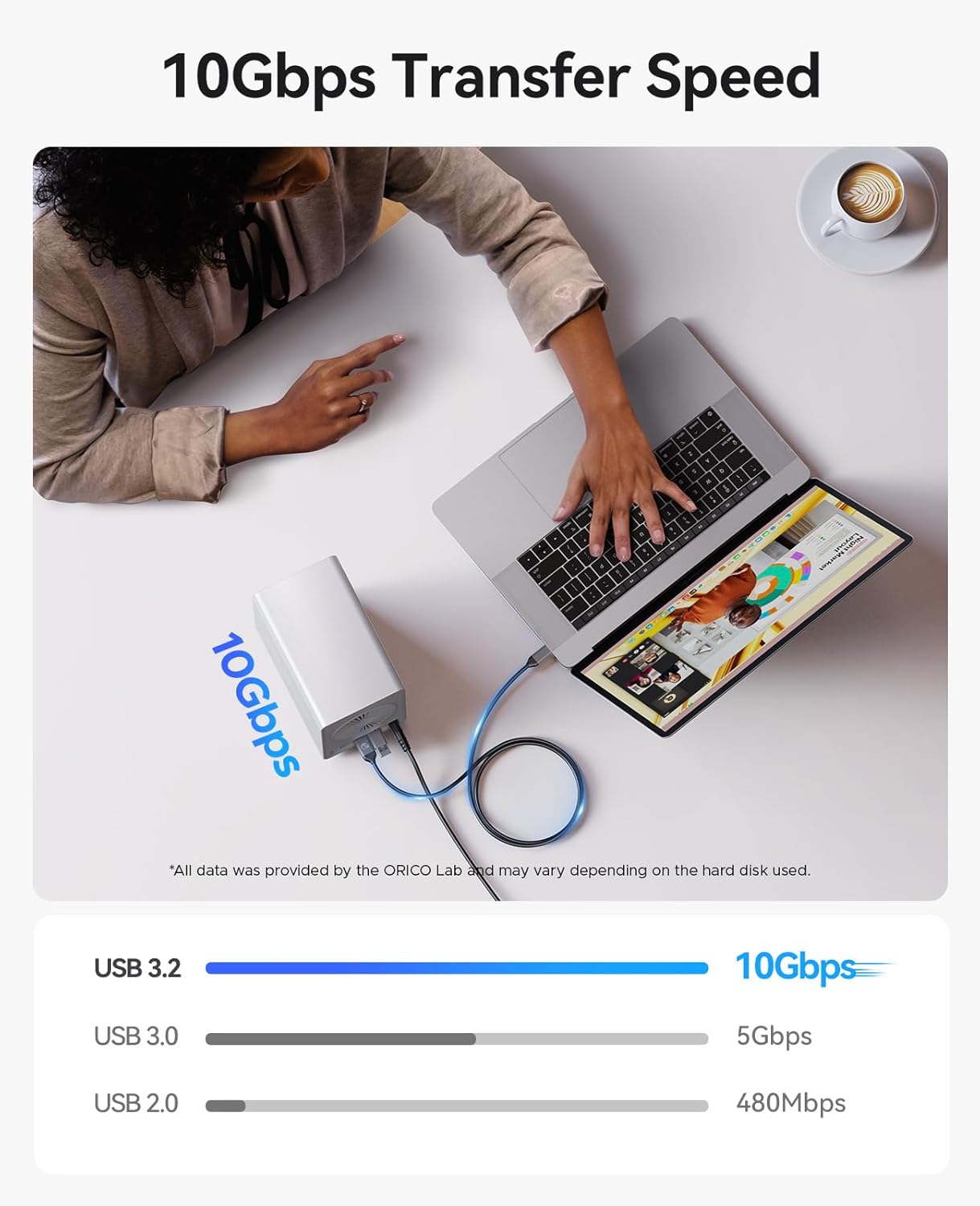
Experience rapid data transfer speeds of up to 10Gbps.
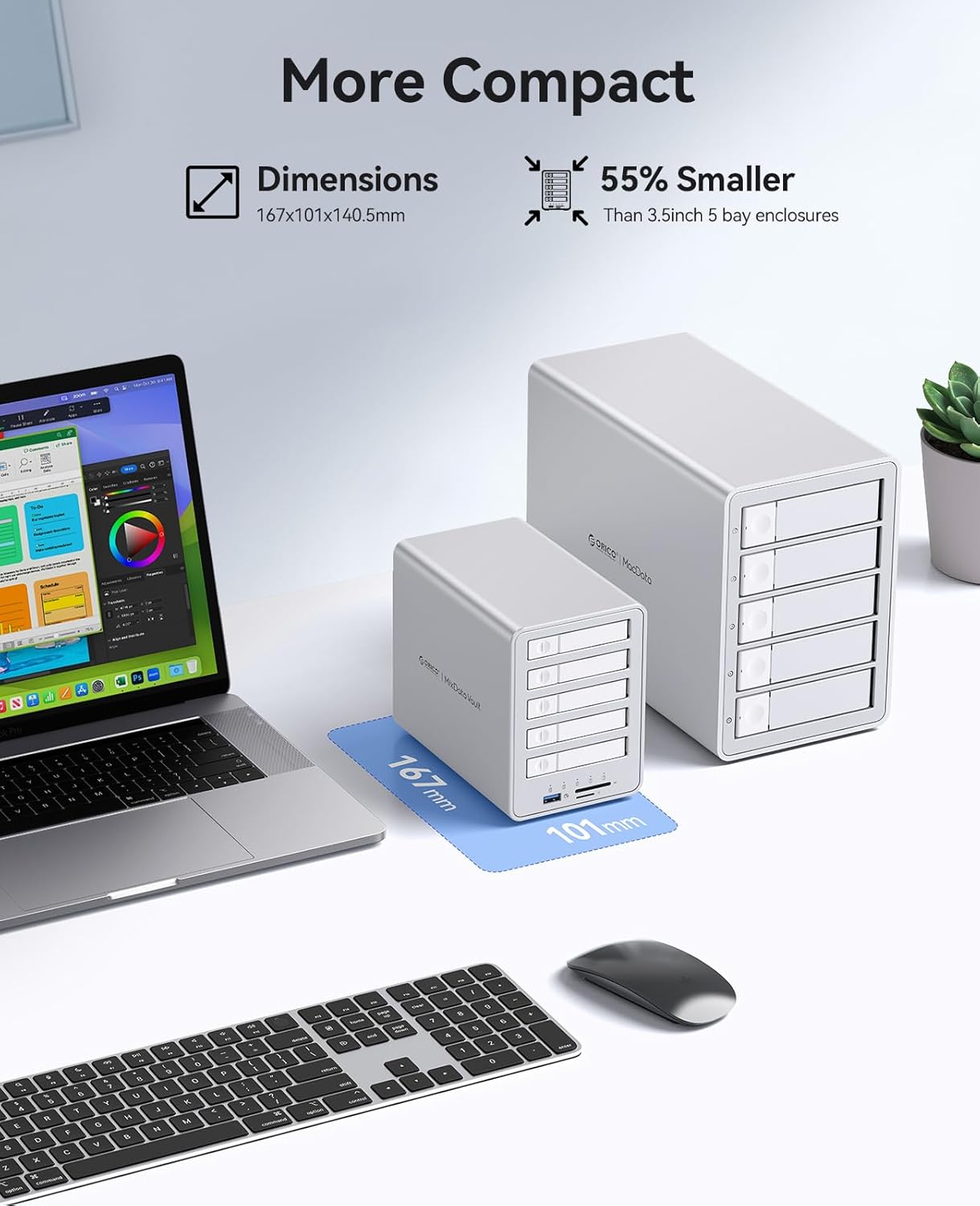
The compact design makes it highly portable and space-efficient.
3. Setup and Installation
Installing Hard Drives
Follow these steps to install your 2.5-inch SATA HDDs or SSDs into the docking station:
- Step 1: Push the slide buckle on the left side of the drive bay to automatically eject the hard drive tray.
- Step 2: Pull out the hard drive tray. Align the screw holes at the bottom of your 2.5-inch hard drive with the 4 fixing holes on the tray and secure it with screws.
- Step 3: Carefully install the tray with the mounted drive back into the hard disk cabinet until it clicks into place. Repeat for all desired drives.

Visual guide for installing 2.5-inch hard drives into the ORICO docking station.
4. Operating Instructions
Connecting the Docking Station
Connect the ORICO docking station to your computer using the provided USB A/C transfer cable. Ensure the power adapter is connected to the docking station and a power outlet. The device supports various interfaces for connectivity:
- 1 x USB-A (10Gbps)
- 1 x USB-C (10Gbps)
- SD & TF 3.0 Card Slots (104MB/s)

Front and rear panel interfaces for connectivity and expansion.
RAID Mode Configuration
The ORICO docking station supports multiple RAID modes. Always back up your data before changing the RAID mode. The RAID management software is not supported for Mac OS and Linux systems; you need to manually group RAID.

Overview of the seven supported RAID modes.
| RAID Mode | How to set up | Minimum Number of Disks | Utilization | RAID Usage Scenarios |
|---|---|---|---|---|
| RAID 0 |  | 2-5 | 100% | HD Movies/Photoshop/Video Editing |
| RAID 1 | | 2 | 50% | Enterprise Files/Database Storage/Servers |
| RAID 3 | | 3-5 | 2/3≈66% | Video Editing/Streaming Services |
| RAID 5 | | 3-5 | 2/3≈66% | Finance/Data Centers/Database Storage |
| RAID Mode | How to set up | Minimum Number of Disks | RAID Feature | Available Capacity | RAID Usage Scenarios |
|---|---|---|---|---|---|
| RAID 10 |  | 4 | Striping & Mirroring | 20TB*2 | Banks/Finance/Business Supermarkets/Document Management |
| Span (JBOD) | | 2-5 | Concatenation | 40TB | Server/Database Storage |
| Normal/Clear | | 1-5 | Independent Disks | 20TB | Audio-Visual Collection, Security Monitoring |
* You are advised to use hard disks of the same capacity to form a RAID array to maximize capacity utilization. The above total usable capacity calculations are based on a 20TB hard drive as an example.
Data Transfer and Expansion
The docking station supports daisy-chaining via USB 3.2, allowing you to connect multiple devices for expanded storage. This is ideal for managing large volumes of data, such as in video production environments.

Flexible capacity expansion through daisy-chaining multiple units.
5. Compatibility
The ORICO All-Flash 5-Bay Docking Station is widely compatible with various operating systems and devices:
- Operating Systems: Windows, macOS, Linux, Android, Chrome OS.
- Compatible Devices: Laptops, Desktops, Mac mini, Mac Studio, Mac Pro, iPads, OTG Phones, NAS, Projectors, Routers.
- Supported Drives: 2.5-inch SSDs and HDDs (7-9.5mm thickness).

Broad compatibility with major operating systems and a wide range of devices.
6. Maintenance
Cooling System
The docking station features an upgraded built-in cooling fan and an aluminum alloy design to ensure efficient heat dissipation. This helps maintain optimal operating temperatures for your drives, prolonging their lifespan and ensuring stable performance.

The integrated cooling fan and aluminum construction provide superior heat dissipation.
Stability and Placement
The device is equipped with silicone anti-skid pads at the bottom. These pads help keep the docking station stable on various surfaces, protecting it from accidental movement and potential damage.

Silicone anti-slip pads ensure stability and protect the unit.
7. Specifications
| Feature | Detail |
|---|---|
| Model Number | 8858RC3 |
| Memory Storage Capacity | 40 TB (Max) |
| Compatible Devices | Desktop, Laptop, Tablet |
| Hard Disk Form Factor | 2.5 Inches (7-9.5mm) |
| Data Transfer Rate | 10 Gbps (USB 3.2 Gen 2) |
| Manufacturer | SHENZHEN ORICO TECHNOLOGIES CO.,LTD |
| Product Dimensions | 6.54 x 4.02 x 5.51 inches |
| Item Weight | 4.82 pounds |
| Hardware Interface | USB 3.2 Gen 2 |
| Color | Silver |
| Hardware Platform | PC |
| Material | Aluminum |
8. Troubleshooting
If you encounter issues with your ORICO All-Flash 5-Bay USB-C Docking Station, please refer to the following common troubleshooting steps:
- No Power: Ensure the power adapter is securely connected to both the docking station and a working power outlet. Check if the power indicator light is on.
- Drive Not Detected: Verify that the hard drives are properly seated in their trays and the trays are fully inserted into the bays. Check the USB cable connection to your computer. Try connecting to a different USB port.
- Slow Transfer Speed: Ensure you are using a USB 3.2 Gen2 compatible port on your computer. The actual speed may vary depending on the hard disk used and system configuration.
- RAID Configuration Issues: Remember to back up all data before changing RAID modes. RAID management software is not supported for Mac OS and Linux; manual configuration is required. Ensure DIP switches are set correctly according to the desired RAID mode.
- Overheating: Ensure the docking station is placed in a well-ventilated area and the cooling fan is not obstructed.
For further assistance, please contact ORICO customer support.
9. Warranty and Support
ORICO products come with a standard manufacturer's warranty. Please refer to the warranty card included in your package or visit the official ORICO website for detailed warranty terms and conditions.
For technical support, product inquiries, or warranty claims, please contact ORICO customer service through their official channels. Keep your purchase receipt and product model number (8858RC3) handy for faster service.
ORICO Official Website: www.oricotech.com
Ask a question about this manual
Ask about setup, troubleshooting, compatibility, parts, safety, or missing instructions. Manuals+ will review the question and use this page’s manual context to help answer it.