Introduction
Thank you for choosing the Hodozzy Android 15 Single Din Flip Out Car Stereo. This manual provides comprehensive instructions for the installation, operation, and maintenance of your new car multimedia player. Please read this manual thoroughly before using the product to ensure proper functionality and to maximize your user experience. Keep this manual for future reference.
Safety Information
To ensure safe operation and prevent damage, please observe the following safety guidelines:
- Do not operate the device while driving. Always pull over to a safe location before making adjustments or interacting with the system.
- Ensure all wiring connections are secure and properly insulated to prevent short circuits and electrical hazards.
- Consult a professional for installation if you are unsure about any wiring or mounting procedures.
- Avoid exposing the unit to extreme temperatures, direct sunlight for prolonged periods, or excessive moisture.
- Do not attempt to disassemble or modify the unit. This may void the warranty and pose a safety risk.
Package Contents
Verify that all items listed below are included in your package:
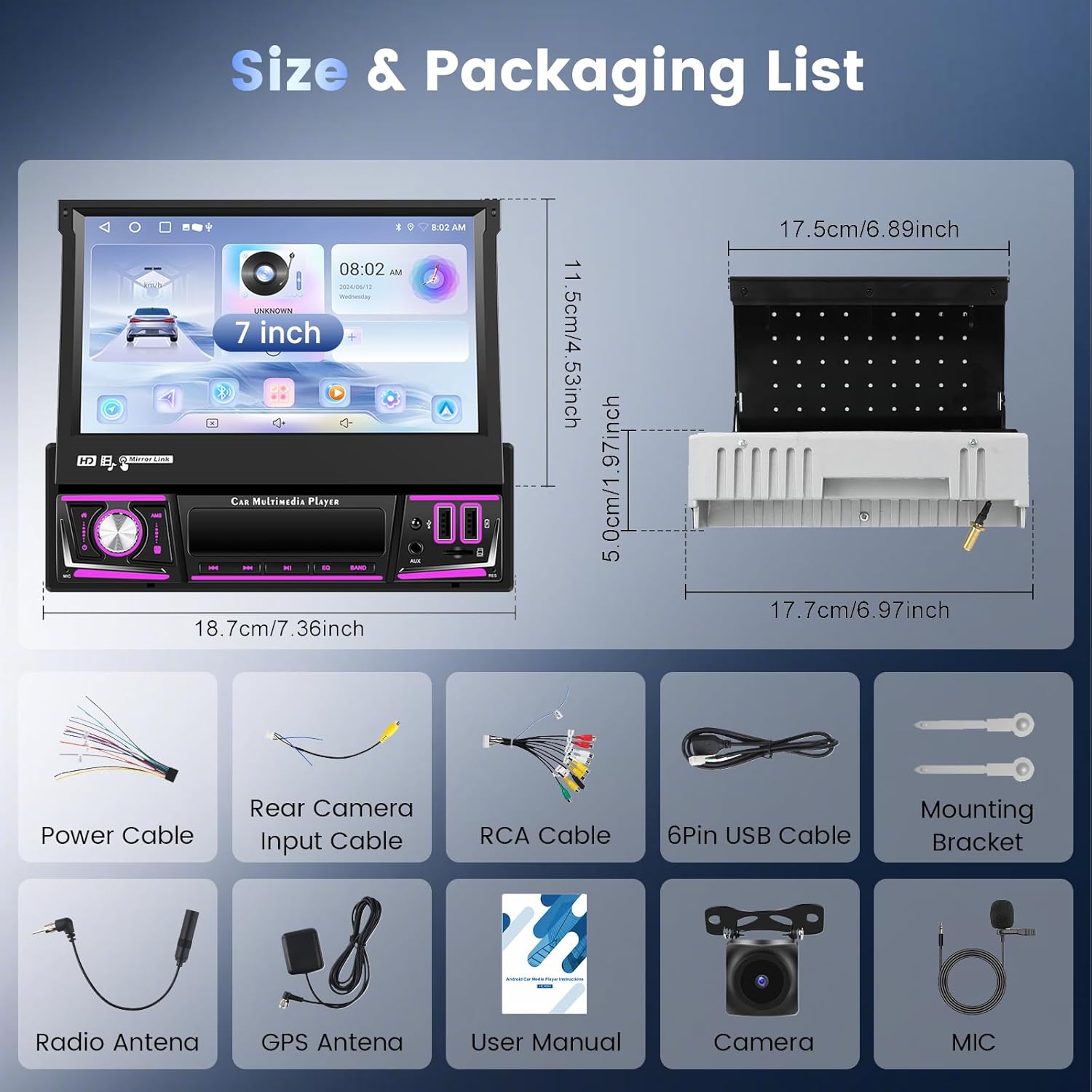
Image showing the car stereo unit, its dimensions, and all included accessories such as cables, camera, and manual.
- Hodozzy Single Din Flip Out Car Stereo Unit
- Backup Camera
- Power Cable
- Rear Camera Input Cable
- RCA Cable
- 6Pin USB Cable
- Mounting Bracket
- Radio Antenna
- GPS Antenna
- User Manual
- Microphone (MIC)
Product Overview
The Hodozzy Android 15 Single Din Flip Out Car Stereo features a 7-inch retractable touchscreen display, offering a versatile multimedia experience in your vehicle. It runs on Android 15 with 2GB RAM and 64GB ROM for smooth performance and ample storage.

Front view of the Hodozzy car stereo with its 7-inch screen fully extended, showing the main interface and physical buttons.
Front Panel and Ports
The front panel provides easy access to essential controls and connectivity options. The screen can be manually retracted or extended.

Detailed view of the car stereo's front panel, highlighting the power button, microphone input, screen off button, AMS, media controls, EQ, BAND, AUX input, SD card slot, USB port, and USB charging port. Also shows the three steps for manual screen retraction.
- POWER: Power On/Off button.
- HOME: Returns to the main interface.
- MIC: External microphone input.
- Off Screen: Turns off the display while audio continues.
- AMS / Media Controls: Auto-scan for radio, play/pause, skip tracks.
- EQ: Equalizer settings.
- BAND: Switches radio bands.
- AUX: Auxiliary audio input.
- SD Slot: MicroSD card slot for media playback.
- USB Port: USB input for media and data.
- USB Charging Port: Dedicated USB port for device charging.
- RES: Reset button (small hole, requires a pin).
Installation Guide
Before Installation
- Disconnect the vehicle's negative battery terminal before starting any electrical work.
- Ensure the mounting location is suitable for a single DIN unit and allows for screen retraction/extension.
- Test all connections before fully reassembling the dashboard.
Wiring Diagram
Refer to the included wiring harness for specific connections. The main connections typically include:
- Power: Yellow (Constant 12V), Red (Accessory 12V), Black (Ground).
- Speakers: Typically 8 wires for 4 channels (Front Left/Right, Rear Left/Right).
- Reverse Camera Input: RCA video input and a trigger wire.
- USB Cables: For data and charging.
- GPS Antenna: Connect to the dedicated GPS port.
- Radio Antenna: Connect to the standard car antenna port.
- SWC (Steering Wheel Control): Connect to vehicle's SWC wires (may require an adapter for some vehicles).
- External Microphone: Connect to the MIC input.
Physical Installation
- Remove the existing car stereo and dashboard trim.
- Connect all necessary wiring harnesses to the new Hodozzy unit.
- Mount the unit into the single DIN slot using the provided mounting bracket.
- Secure the unit firmly.
- Reconnect the vehicle's negative battery terminal.
- Test all functions before reassembling the dashboard trim.
Operating Instructions
Basic Operation
- Power On/Off: Press the POWER button to turn the unit on. Press and hold to turn off.
- Volume Control: Use the rotary knob on the front panel to adjust volume.
- Screen Retraction: The screen can be manually pushed back into the unit. To extend, gently pull it out until it locks into position. Adjust the angle as needed.
- Touchscreen Navigation: Tap icons to open applications, swipe to navigate menus.
Wireless CarPlay & Android Auto
Connect your iPhone or Android smartphone wirelessly for seamless integration of navigation, music, calls, and more.

The car stereo display showing both Wireless CarPlay and Android Auto interfaces, along with icons for WiFi, USB, Bluetooth, GPS Navigation, Online Music, Hands-free Calling, and Voice Control.
- Ensure Bluetooth and Wi-Fi are enabled on your smartphone.
- On the car stereo, select the 'CarPlay' or 'Android Auto' application.
- Follow the on-screen prompts to pair your device via Bluetooth. Once paired, the system will automatically connect via Wi-Fi for CarPlay/Android Auto functionality.
Bluetooth Connectivity
Pair your phone for hands-free calling and audio streaming.
- Go to the Bluetooth settings on the car stereo.
- Enable Bluetooth on your smartphone and search for available devices.
- Select the car stereo's Bluetooth name (e.g., "Hodozzy CarBT") from your phone's list and confirm pairing.
- You can now make/receive calls and stream music wirelessly.
GPS Navigation & Wi-Fi
Utilize built-in GPS for navigation and Wi-Fi for online services and app downloads.

The car stereo display showing a map for GPS navigation and various app icons, indicating online map capabilities, video playback, and app downloads via WiFi.
- GPS: The unit comes with a pre-installed GPS antenna. Access navigation apps (e.g., Google Maps, Waze) from the main menu.
- Wi-Fi: Connect to a Wi-Fi hotspot (e.g., from your phone or a portable hotspot) via the system's Wi-Fi settings to access online maps, stream content, and download apps from the Google Play Store.
Radio (FM/RDS & DAB)
Enjoy a wide range of radio stations with clear sound quality.
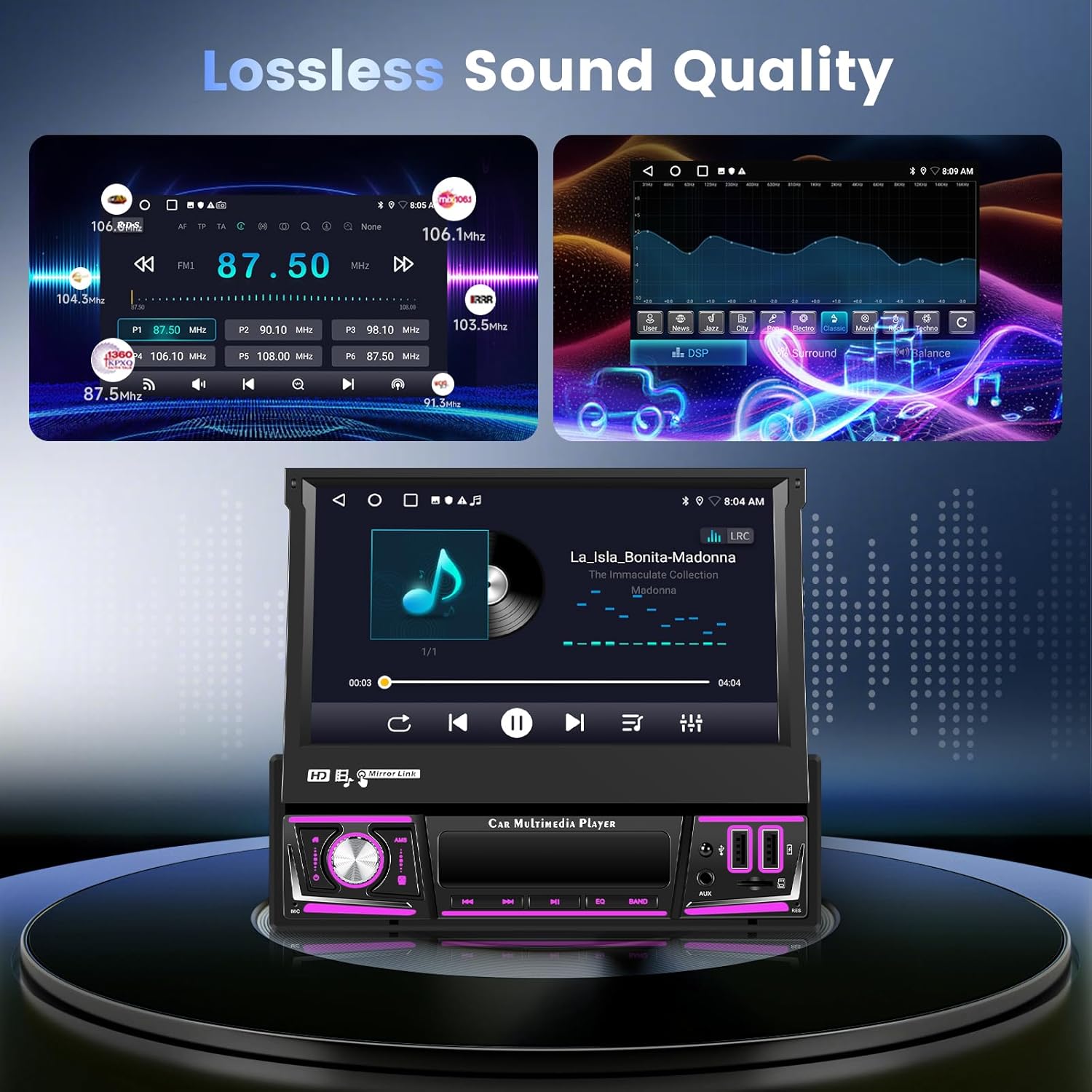
The car stereo display showing the FM radio interface with station frequencies and the DSP equalizer settings, emphasizing lossless sound quality.
- FM/RDS: Select the 'Radio' app. Use the scan function to find stations or manually tune. RDS provides station information.
- DAB: If a DAB antenna is connected (sold separately), select the 'DAB' app for digital radio broadcasts with CD-quality sound.
DSP & Audio Settings
Customize your audio experience with the built-in Digital Sound Processor (DSP).
- Access the 'DSP' or 'Equalizer' app from the main menu.
- Adjust sound parameters such as bass, treble, balance, fader, and preset EQ modes.
- The DSP enhances audio quality for a superior listening experience.
Mirror Link
Mirror your smartphone's screen directly onto the car stereo display.
- Open the 'Mirror Link' app on the stereo.
- Follow the instructions to connect your Android or iOS device via USB or Wi-Fi.
USB Media Playback
Play audio and video files from a USB drive.
- Insert a USB drive into one of the USB ports.
- Select the 'Music' or 'Video' app to browse and play media files.
Steering Wheel Control (SWC)
Control the stereo directly from your vehicle's steering wheel buttons.
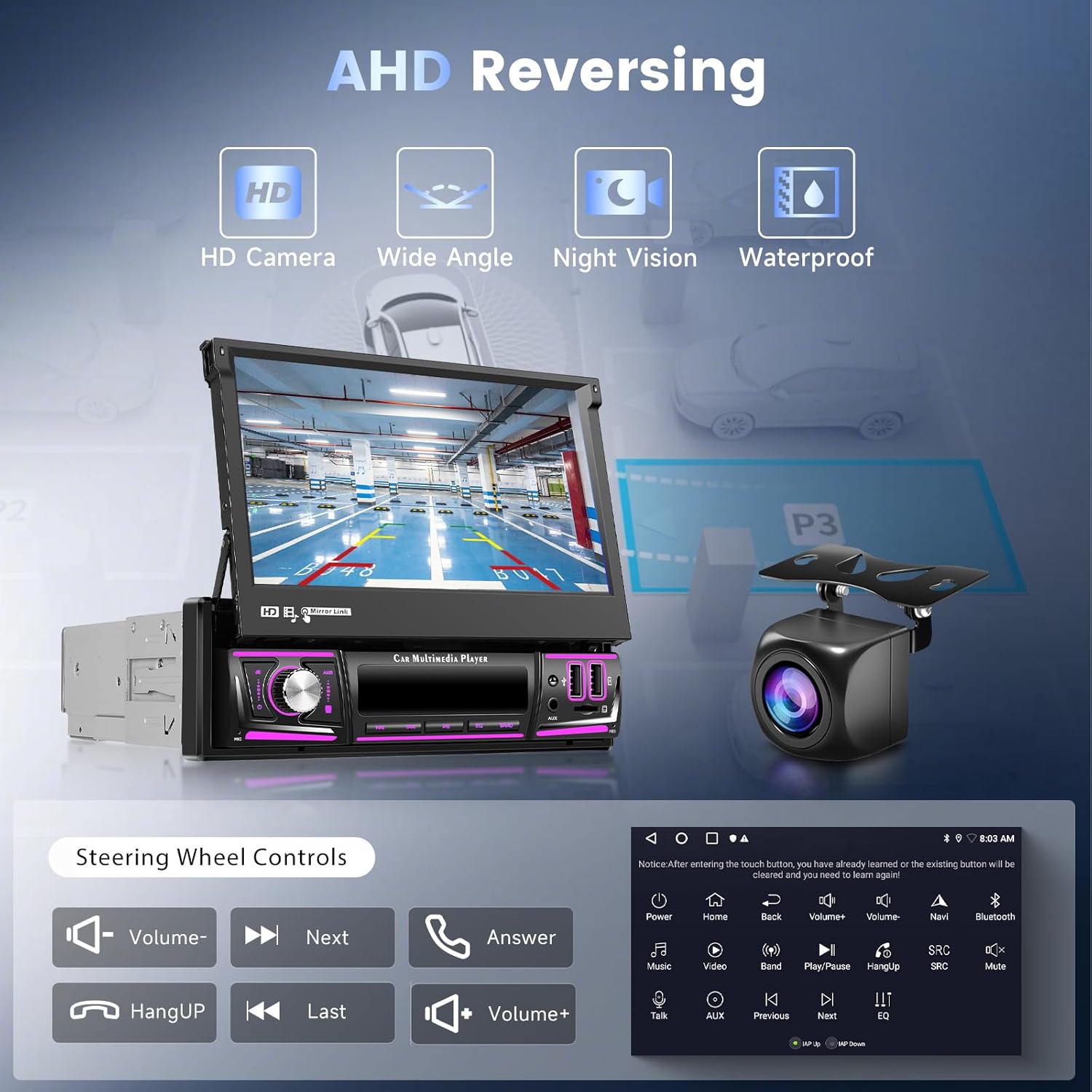
The car stereo displaying the AHD reversing camera view, with icons indicating HD camera, wide angle, night vision, and waterproof features. Below, a diagram shows common steering wheel control functions like volume, track skip, and call handling.
- Access the 'SWC' or 'Steering Wheel Learning' settings in the system menu.
- Follow the on-screen instructions to program your steering wheel buttons to control various functions of the stereo.
AHD Reversing Camera
The included AHD reversing camera provides a clear view of your vehicle's rear when backing up.
- Ensure the backup camera is properly installed and connected to the 'Rear Camera Input' on the stereo.
- When the vehicle is shifted into reverse gear, the stereo will automatically display the camera feed.
Maintenance
Proper maintenance ensures the longevity and optimal performance of your car stereo.
- Cleaning: Use a soft, dry cloth to wipe the screen and unit. For stubborn marks, slightly dampen the cloth with water. Avoid harsh chemicals or abrasive materials.
- Screen Care: Do not press the screen with sharp objects. When retracting the screen, ensure no obstructions are present.
- Temperature: Avoid leaving the unit in direct sunlight for extended periods, especially in hot weather, as this can affect performance and lifespan.
Troubleshooting
If you encounter issues, refer to the table below for common problems and solutions.
| Problem | Possible Cause | Solution |
|---|---|---|
| Unit does not power on. | No power connection; Blown fuse. | Check power wiring (Yellow, Red, Black). Check vehicle's fuse box and the unit's fuse. |
| No sound. | Speaker wires disconnected; Volume too low; Mute enabled. | Check speaker connections. Increase volume. Disable mute function. |
| Touchscreen unresponsive. | System crash; Software issue. | Press the RES (Reset) button with a thin object. If issue persists, contact support. |
| CarPlay/Android Auto not connecting. | Bluetooth/Wi-Fi off; Incorrect pairing. | Ensure Bluetooth and Wi-Fi are on for both devices. Delete previous pairings and re-pair. |
| GPS signal weak or lost. | GPS antenna obstructed or disconnected. | Ensure GPS antenna is properly connected and placed in an unobstructed location (e.g., dashboard). |
Specifications
| Feature | Specification |
|---|---|
| Operating System | Android 15 |
| RAM | 2GB |
| ROM | 64GB |
| Display Size | 7 Inches (Retractable Touchscreen) |
| Connectivity | Wireless CarPlay, Wireless Android Auto, Wi-Fi, Bluetooth |
| Radio Tuner | FM/RDS, DAB (DAB antenna sold separately) |
| Audio Features | DSP, Lossless Music Playback |
| USB Ports | Dual USB (Data/Media, Charging) |
| Video Encoding Support | MKV, RMVB, AVI, MP4, MDV |
| Compatible Devices | Smartphone, Tablet, Laptop |
| Item Weight | 4.2 pounds |
| Package Dimensions | 14.8 x 9.65 x 3.62 inches |
| Country of Origin | China |
Warranty and Support
Hodozzy is committed to providing quality products and excellent after-sales service. This product typically comes with a 2-year warranty for replacement and lifetime support.

Image displaying Hodozzy's customer support commitments: 18 hours reply, 60 days return, 2-years replacement, and lifetime support, along with the customer support email address.
For any technical assistance, troubleshooting, or warranty claims, please contact Hodozzy customer support:
Email: hodozzyofficial@163.com
Please provide your product model number (Hodozzy-2G64G-Android15) and a detailed description of your issue when contacting support for faster assistance.


