1. Product Overview
This ANKEWAY car radio is specifically designed for the Fiat Panda 169 model years 2006-2012, offering enhanced compatibility and stability compared to universal car radios. It integrates advanced features such as wireless Android Auto and CarPlay, a robust Android operating system, and various multimedia capabilities to improve your driving experience.
The system includes a 7-inch display, 2GB RAM, and 32GB internal storage, providing a smooth and responsive user interface. Key functionalities include Bluetooth 5.0, FM/RDS radio, GPS navigation, and support for a rear camera.

Figure 1: ANKEWAY Car Radio unit with included accessories like the rear camera, external microphone, and visual representation of CarPlay/Android Auto/MirrorLink functionality.
2. Package Contents
Please verify that all items listed below are included in your package:
- 1x ANKEWAY Autoradio for Fiat Panda
- 1x Rear Camera
- 1x External Microphone
- 1x CANbus Decoder Box
- 1x Radio Antenna Adapter
- 1x GPS Antenna
- 1x Power Cable
- 1x Camera Cable 1
- 1x Camera Cable 2
- 1x Camera Cable 3
- 1x RAC Cable
- 1x 4-Pin & 6-Pin USB Cable
- 4x Panel Removal Tools
- 1x User Manual (this document)

Figure 2: Visual representation of the car radio unit with its dimensions (13.2cm height, 23.2cm width, 3cm depth) and a comprehensive list of all included accessories.
3. Setup and Installation
This car radio is designed for easy installation with pre-grouped cables and connectors. It is recommended to consult a professional for installation if you are unfamiliar with car electronics.
3.1 Vehicle Compatibility
This unit is compatible with Fiat Panda models manufactured between 2006 and 2012. It is designed to fit perfectly into the original vehicle dashboard.

Figure 3: Comparison of the Fiat Panda dashboard before and after the ANKEWAY car radio installation, demonstrating perfect fitment for models from 2003-2012.
3.2 Wiring and Connections
The included CANbus adapter resolves protocol incompatibility issues and maintains original steering wheel control functions. Connect the provided cables to the corresponding ports in your vehicle. Ensure all connections are secure.
- Power Cable: Connects the unit to the vehicle's power supply.
- CANbus Decoder: Integrates with the vehicle's CANbus system for features like steering wheel controls.
- GPS Antenna: For navigation functionality. Position in a location with clear sky view.
- USB Cables: For connecting USB devices and enabling wired CarPlay/Android Auto.
- Camera Cables: For connecting the included rear camera.
- Radio Antenna Adapter: For connecting the vehicle's radio antenna.
4. Operating Instructions
This section details the primary functions and how to operate your ANKEWAY car radio.
4.1 Initial Setup and Android System
Upon first power-on, the system will boot into the Android interface. You can connect to the internet via Wi-Fi to install applications from the App Store. The system supports multiple languages, which can be selected in the settings menu.

Figure 4: Overview of the car multimedia radio's Android interface, displaying various functions and applications available on the system.
4.2 Wireless CarPlay and Android Auto
The unit supports both wireless and wired CarPlay and Android Auto. This allows seamless integration with your iOS or Android smartphone, enabling access to navigation, music, messages, and voice control.
- Connection: Connect your smartphone via Bluetooth and Wi-Fi for wireless connection, or use a USB cable for wired connection.
- Features: Access apps like Spotify, YouTube, Waze, and more directly from the car radio display.
- Voice Control: Utilize voice commands for hands-free operation.
- Mirror-Link: The Mirror-Link function is also supported, allowing you to mirror your phone's screen onto the car radio.

Figure 5: Illustration of the wireless CarPlay, Android Auto, and MirrorLink capabilities, highlighting both USB and Wi-Fi connection options.
4.3 Bluetooth 5.0
Connect your smartphone via Bluetooth for hands-free calling and audio streaming. The system displays caller information and allows you to manage calls directly from the unit.
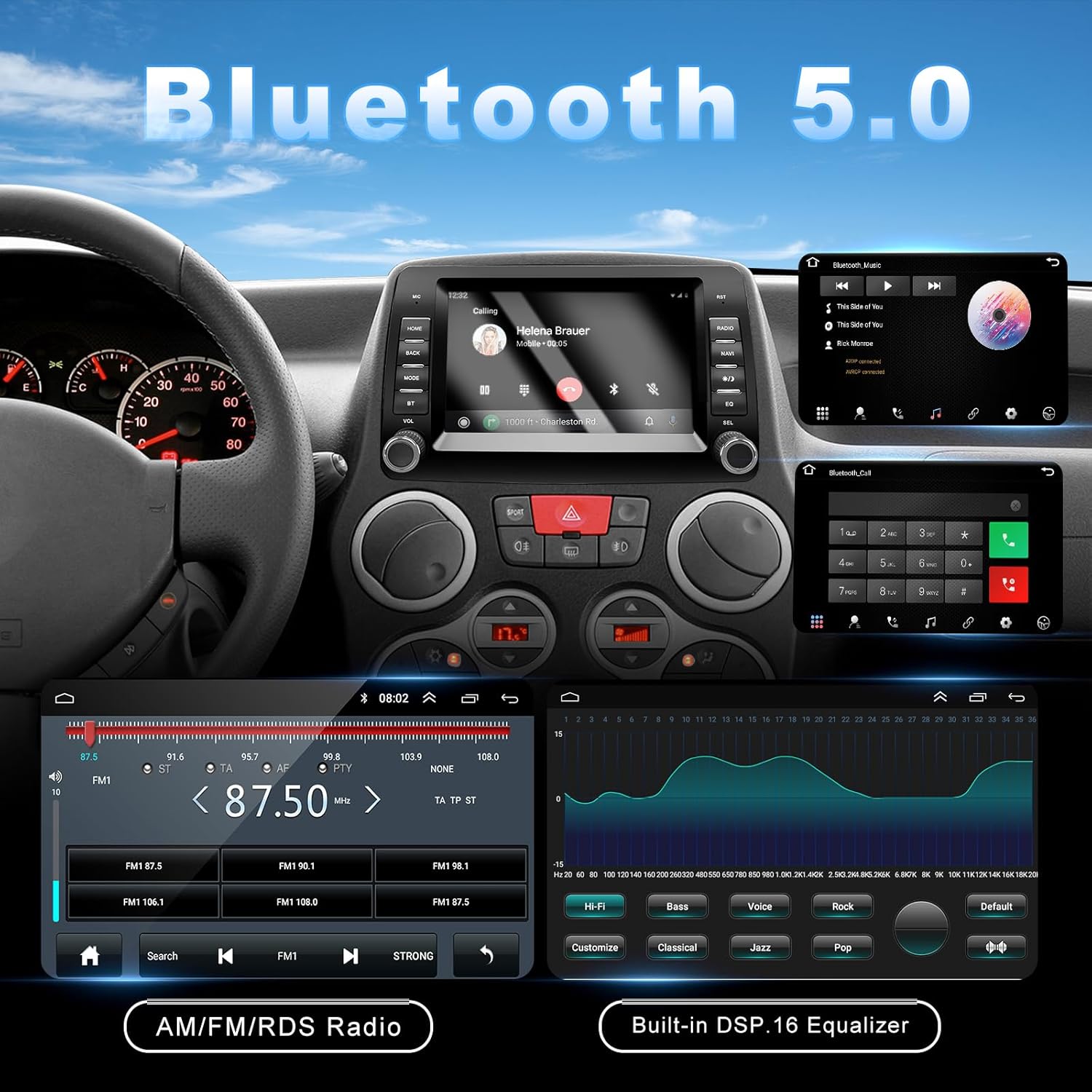
Figure 6: Demonstrates Bluetooth 5.0 features for calls and music, and the FM/RDS radio interface with DSP equalizer settings.
4.4 FM/RDS Radio
The radio supports FM with RDS (Radio Data System) functionality. You can view station frequencies and adjust audio settings using the built-in DSP function and equalizer for optimal sound quality.
4.5 Navigation (GPS)
The unit supports GPS navigation. With an internet connection, you can use various navigation applications available on the Android system.

Figure 7: The car radio displaying a navigation application with map and route details.
4.6 Rear Camera Functionality
The included high-quality rear camera supports high-resolution image input, night vision, and automatic display when reversing. This significantly enhances driving safety and convenience.

Figure 8: The car radio screen showing the rear camera feed with parking assistance lines, highlighting the camera's features including wide-angle, waterproof design, and night vision.
4.7 USB Ports
The unit features 1 USB-A and 1 USB-C port, allowing for convenient charging of electronic devices and easy file reading from USB drives.
4.8 Steering Wheel Control
The included CANbus adapter ensures that the original steering wheel control functions are fully maintained, eliminating the need for an additional external controller.

Figure 9: The interface for configuring and learning steering wheel controls, allowing customization of button functions.
4.9 Split Screen Functionality
The Android system supports split-screen mode, enabling you to view content from two applications simultaneously, such as navigation and music playback.

Figure 10: The car radio demonstrating split-screen mode, showing simultaneous use of the radio and a video application.
5. Maintenance
5.1 System Updates
Our development team regularly releases firmware updates to optimize the system experience. If you require a system update, please contact customer support to receive the firmware update package.
6. Troubleshooting
6.1 Common Issues
- Unit does not power on:
- Ensure the yellow wire labeled 'battery port' is correctly connected.
- Try using an alternative power harness if available.
- No sound: Check speaker connections and audio settings (volume, equalizer).
- GPS signal weak: Ensure the GPS antenna is placed in an open area with a clear view of the sky.
- CarPlay/Android Auto not connecting: Verify Bluetooth and Wi-Fi connections on your smartphone and the car radio. Try a different USB cable for wired connection.

Figure 11: Visual troubleshooting steps for when the autoradio does not power on, illustrating correct wiring for the battery port and suggesting an alternative power harness.
7. Specifications
| Feature | Detail |
|---|---|
| Brand | ANKEWAY |
| Model | XBH-7702 |
| Compatibility | Fiat Panda 169 (2006-2012) |
| Operating System | Android |
| Memory (RAM) | 2GB |
| Storage (ROM) | 32GB |
| Display Size | 7-inch |
| Connectivity | Wireless CarPlay, Wireless Android Auto, Bluetooth 5.0, Wi-Fi, USB |
| Radio | FM/RDS |
| Navigation | GPS Support |
| Included Accessories | Rear Camera, External Microphone, CANbus Decoder, GPS Antenna, Wiring Harnesses, Panel Removal Tools |
| Product Dimensions | 29.5 x 21 x 13 cm (Package); 1.56 kg (Weight) |
8. Warranty and Support
For warranty information, technical support, or system updates, please contact ANKEWAY customer service. Refer to your purchase documentation for specific warranty terms and contact details.
You can often find support information on the ANKEWAY brand store on Amazon: ANKEWAY Store


