1. Introduction
This manual provides instructions for the KRPTQJoo replacement remote control for Samsung Smart Televisions. This remote is designed as a direct replacement and does not require any pairing or programming. Simply insert batteries and begin use.
Important Note: This remote is not universal. It is specifically designed to be compatible with the Samsung TV models listed in this manual. Some buttons may not function if your specific TV model does not support the corresponding feature. Always refer to your television's original manual for feature compatibility.
2. Compatible TV Models
This replacement remote control is compatible with various Samsung Smart Television models, including but not limited to:
- UE60JU6850U, UE60JU6870U, UE60JU6872U
- UE65JU6400K, UE65JU6400U, UE65JU6400W, UE65JU6450U, UE65JU6470U, UE65JU6475U
- UE75JU6400K, UE75JU6400U, UE75JU6400W
- UE32J6300AK, UE32J6300AW, UE32J6302AK, UE32J6350SU, UE32J6370SU
- UE40J6200AU, UE40J6200AW, UE40J6202AK, UE40J6250SU, UE40J6270SU, UE40J6272SU, UE40J6275SU, UE40J6300AK
If your model number is not listed, please contact customer support for assistance.
3. Specifications
| Product Name | Replacement TV Remote Control |
| Brand | KRPTQJoo |
| Model (ASIN) | B0F19F7PDM |
| Power Source | 2 x AAA Batteries (not included) |
| Compatible Devices | Samsung Smart Televisions |
| Color | Black |
4. Setup
4.1 Installing Batteries
- Locate the battery compartment on the back of the remote control.
- Slide the battery cover downwards or press the latch and lift to open.
- Insert two (2) AAA batteries, ensuring the positive (+) and negative (-) terminals align correctly with the markings inside the compartment.
- Replace the battery cover by sliding it back into place until it clicks securely.
Note: Batteries are not included and must be purchased separately. Always use new batteries for optimal performance. Do not mix old and new batteries, or different types of batteries.
4.2 Initial Use
This remote control is designed to work immediately with compatible Samsung Smart Televisions without any programming or pairing. After installing the batteries, point the remote control towards your television and press the Power button to turn on your TV.
5. Operating the Remote Control
5.1 Remote Control Layout
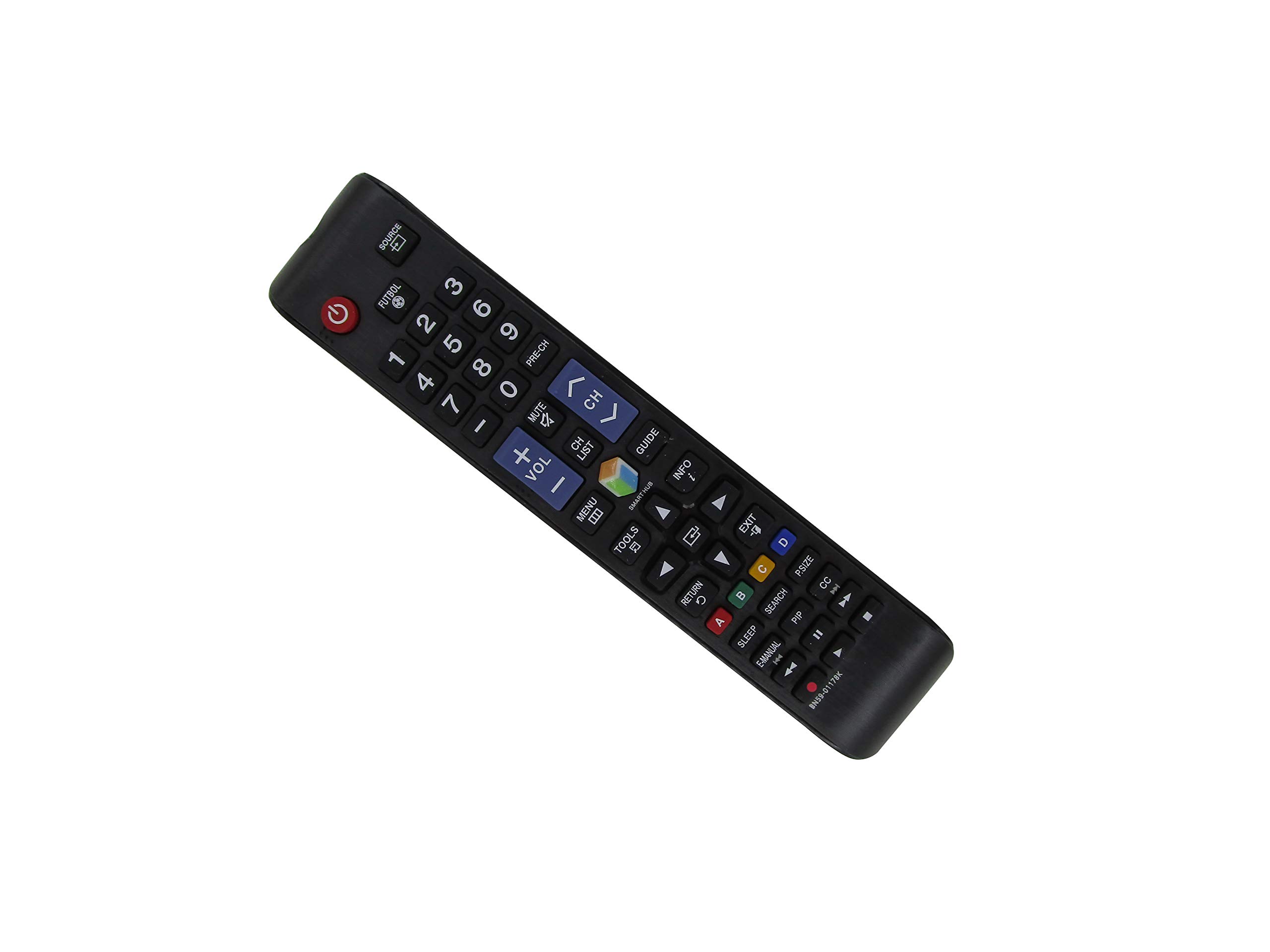
Figure 1: Front view of the remote control. This image displays the full button layout including power, source, number pad, volume, channel controls, navigation buttons, and special function keys like Smart Hub, Menu, Tools, and colored buttons (A, B, C, D).

Figure 2: Back view of the remote control. This image shows the smooth, ergonomic design and the location of the battery compartment cover.
5.2 Basic Functions
- Power Button: Turns the TV on or off.
- Source Button: Selects input sources (HDMI, AV, etc.).
- Number Pad (0-9): Directly enters channel numbers.
- VOL +/- Buttons: Adjusts the volume level.
- CH +/- Buttons: Changes channels sequentially.
- Mute Button: Mutes or unmutes the TV sound.
- Menu Button: Accesses the TV's main menu.
- Smart Hub Button: Opens the Smart Hub interface for apps and streaming services.
- Navigation Buttons (Up, Down, Left, Right, Enter): Used to navigate menus and select options.
- Return Button: Goes back to the previous screen or menu.
- Exit Button: Exits the current menu or application.
- Colored Buttons (A, B, C, D): These buttons perform specific functions depending on the TV model or current application. Refer to your TV's on-screen prompts.
6. Maintenance
6.1 Cleaning
To clean the remote control, gently wipe it with a soft, dry cloth. Do not use liquid cleaners, sprays, or abrasive materials, as these can damage the remote's surface or internal components.
6.2 Battery Replacement
Replace batteries when the remote control's response becomes sluggish or stops working. Always replace both AAA batteries at the same time. Dispose of used batteries according to local regulations.
6.3 Storage
Store the remote control in a cool, dry place away from direct sunlight and extreme temperatures. If the remote will not be used for an extended period, it is recommended to remove the batteries to prevent leakage.
7. Troubleshooting
| Problem | Possible Solution |
|---|---|
| Remote control is not working. |
|
| Some buttons do not function. |
|
| Remote response is slow or intermittent. |
|
8. Warranty and Support
KRPTQJoo provides customer support for this product. If you encounter any issues or have questions regarding the compatibility or functionality of your remote control, please contact us directly.
We aim to respond to inquiries within 12 hours to ensure your satisfaction. When contacting support, please provide your product's ASIN (B0F19F7PDM) and your specific Samsung TV model number for quicker assistance.