
Introduction
This user manual provides detailed instructions for the operation and maintenance of your new Loakdsa Replacement AC Air Conditioner Remote Control. This remote is designed to be a direct replacement for various Midea TGM series air conditioner models, ensuring seamless compatibility and ease of use. Please read this manual thoroughly before first use to ensure proper functionality and to extend the lifespan of your remote control.
Setup
1. Battery Installation
The remote control requires AAA batteries for operation. Ensure you use new, high-quality batteries for optimal performance.
- Locate the battery compartment on the back of the remote control.
- Slide open the battery compartment cover.
- Insert two (2) AAA batteries, ensuring the positive (+) and negative (-) terminals align correctly with the markings inside the compartment.
- Close the battery compartment cover securely.

Image: Rear view of the remote control, highlighting the battery compartment cover at the bottom.
2. Initial Use
This replacement remote control is pre-programmed and does not require any setup or programming. Once batteries are installed, it is ready for immediate use with compatible Midea TGM series air conditioners.
Important: Point the remote control directly towards the air conditioner's signal receiving window for proper operation.
Operating Instructions
The remote control features various buttons for controlling your air conditioner's functions. Below is a general guide to the common buttons and their uses.
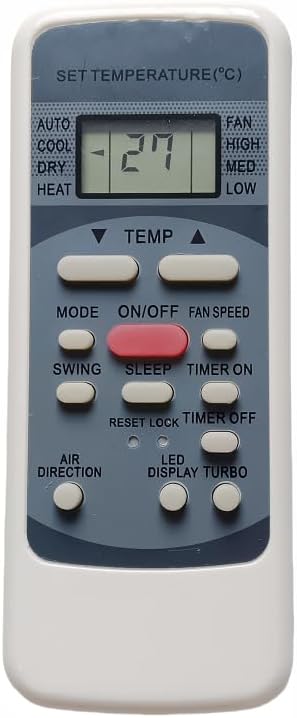
Image: Front view of the remote control, displaying the LCD screen and various control buttons.
Button Functions:
- ON/OFF: Powers the air conditioner on or off.
- MODE: Cycles through operating modes (e.g., Auto, Cool, Dry, Heat, Fan). The current mode is typically displayed on the remote's LCD screen.
- TEMP ▲ / ▼: Adjusts the desired temperature setting.
- FAN SPEED: Adjusts the fan speed (e.g., High, Med, Low, Auto).
- SWING: Controls the air conditioner's louver swing function for air direction.
- SLEEP: Activates or deactivates the sleep mode, which often adjusts temperature and fan speed for comfortable sleep.
- TIMER ON / TIMER OFF: Sets a timer for the air conditioner to turn on or off automatically. Refer to your air conditioner's main manual for specific timer programming details.
- RESET/LOCK: May be used to reset settings or lock the remote to prevent accidental changes. Consult your air conditioner's manual for specific functionality.
- AIR DIRECTION: Manually adjusts the direction of the airflow.
- LED DISPLAY: Toggles the display light on the air conditioner unit.
- TURBO: Activates a rapid cooling or heating function for quick temperature changes.
For detailed information on specific functions and advanced settings, please refer to the original user manual of your Midea TGM series air conditioner unit.
Maintenance
Proper maintenance ensures the longevity and reliable operation of your remote control.
- Cleaning: Wipe the remote control with a soft, dry cloth. Do not use liquid cleaners, abrasive materials, or chemical solvents, as these can damage the surface or internal components.
- Battery Replacement: Replace batteries when the remote's response becomes sluggish or the display dims. Always replace both batteries at the same time with new ones.
- Storage: If the remote control will not be used for an extended period (e.g., several weeks or months), remove the batteries to prevent leakage and potential damage to the remote. Store in a cool, dry place away from direct sunlight.
- Avoid Drops: Protect the remote from physical impact. Dropping the remote can damage internal circuitry or the LCD screen.
Troubleshooting
If you experience issues with your remote control, please try the following steps before seeking further assistance:
| Problem | Possible Cause | Solution |
|---|---|---|
| Remote control not responding. | Dead or low batteries. Incorrect battery orientation. Obstruction between remote and AC unit. Remote out of range. | Replace batteries with new ones, ensuring correct polarity. Remove any obstructions. Move closer to the AC unit. |
| Functions not working correctly. | Remote control not pointed directly at AC unit. Interference. | Ensure direct line of sight to the AC unit's receiver. Minimize sources of infrared interference (e.g., strong sunlight, other IR devices). |
| LCD display is dim or blank. | Low batteries. | Replace batteries. |
If the problem persists after trying these solutions, please contact customer support for further assistance.
Specifications
- Product Type: Replacement AC Air Conditioner Remote Control
- Brand: Loakdsa
- Compatible Models: Midea TGM MWPOT12S, MWPOT18S, RG51A(2)/EU1, MWPOT24S, MWPOT12SA (and similar models)
- Connectivity Technology: Infrared (IR)
- Power Source: 2 x AAA Batteries (not included)
- Special Feature: Universal (for specified Midea models)
- Max Number of Supported Devices: 1 (Air Conditioner)
- Manufacturer: Loakdsa
- Country of Origin: China
Warranty and Support
This product is designed for reliable performance. For any questions or concerns regarding your Loakdsa Replacement AC Air Conditioner Remote Control, please contact our customer support team.
We strive for customer satisfaction. If you have any questions or concerns about your order, please feel free to contact us. We aim to respond to inquiries within 24 hours.
Please note: Specific warranty details may vary. Refer to your purchase documentation or contact the seller for precise warranty information.