
1. Introduction
The NGDOLAOV KWE-PMB05 Digital Power Meter is a versatile device designed to measure and monitor various electrical parameters of connected appliances. It provides real-time data for voltage, current, power, energy consumption, and accumulated usage time. This manual provides essential information for the safe and efficient operation of your power meter.
2. Product Overview
Familiarize yourself with the components and display elements of your NGDOLAOV KWE-PMB05 Digital Power Meter.
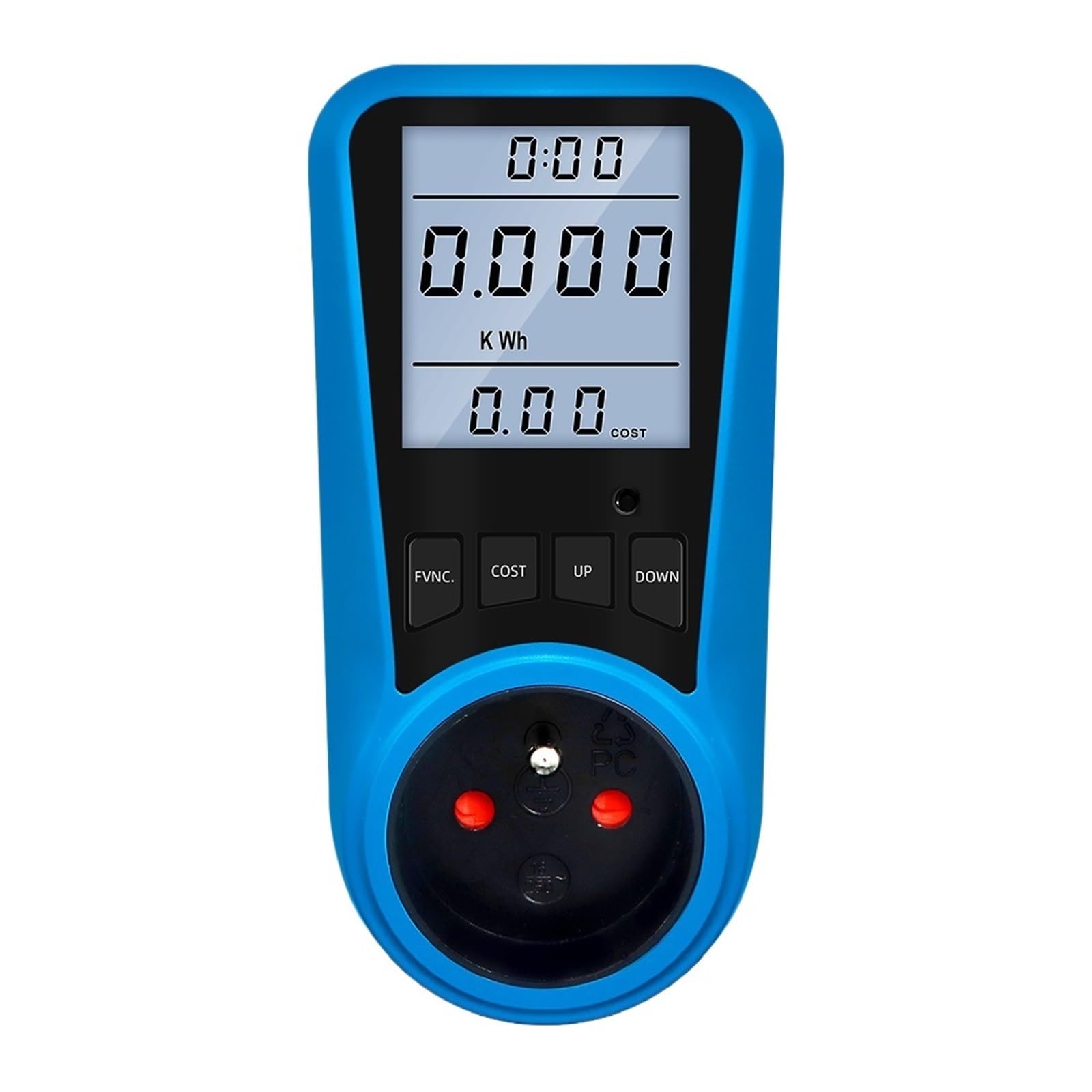
Figure 1: Front view of the NGDOLAOV KWE-PMB05 Digital Power Meter. The device measures approximately 6.5 cm in width and 13 cm in height. The display shows sections for accumulated usage time, power/electricity/voltage/current, and electricity charge. Control buttons are labeled 'FVNC.', 'COST', 'UP', and 'DOWN'.

Figure 2: Close-up view of the power meter's digital display, illustrating the readouts for accumulated usage time (0:00), power/electricity/voltage/current (0.000 KWh), and electricity charge (0.00 COST).
Display Elements:
- Accumulated Usage Time: Displays the total duration the device has been actively monitoring.
- Power, Electricity, Voltage, Current Display: Shows real-time measurements for these electrical parameters. The specific parameter displayed depends on the selected function.
- Electricity Charge Display: Indicates the calculated cost based on the accumulated energy consumption and the configured cost per kilowatt-hour (KWh).
Control Buttons:
- FVNC. (Function): Cycles through different measurement displays.
- COST: Used to view or set the electricity cost per KWh.
- UP: Navigates menus or increases values during settings.
- DOWN: Navigates menus or decreases values during settings.
3. Setup Instructions
- Plug In: Insert the NGDOLAOV KWE-PMB05 Digital Power Meter into a standard wall socket. Ensure the socket type (FR plug for this model) and voltage (230V 50Hz) are compatible with the device.
- Connect Appliance: Plug the appliance you wish to monitor into the socket located on the front of the power meter.
- Power On: The device will automatically power on and begin displaying real-time electrical data.
4. Operating Instructions
4.1. Viewing Measurements
- Press the FVNC. button repeatedly to cycle through various display modes, including:
- Voltage (V)
- Current (A)
- Wattage (W)
- Frequency (Hz)
- Accumulated Energy (KWh)
- Accumulated Usage Time (Hours:Minutes)
- Minimum Wattage (Min W)
- Maximum Wattage (Max W)
4.2. Setting Electricity Cost
- Press the COST button to view the current cost per KWh.
- To set or adjust the cost, press and hold the COST button until the cost value starts flashing.
- Use the UP and DOWN buttons to adjust the cost per KWh.
- Press the COST button again to confirm and save the setting.
4.3. Resetting Data
To clear all accumulated data (usage time, energy consumption, and cost), refer to the device's specific reset procedure, which typically involves pressing and holding a combination of buttons or a dedicated reset button (if available). Consult the full product manual for detailed instructions if this feature is required.
5. Maintenance
- Keep the device clean and dry. Use a soft, dry cloth for cleaning.
- Avoid exposing the power meter to extreme temperatures, direct sunlight, or high humidity.
- Do not attempt to open or repair the device yourself. Refer to qualified service personnel for any repairs.
- Unplug the device from the wall socket when not in use for extended periods.
6. Troubleshooting
- No Display:
- Ensure the device is securely plugged into a live wall socket.
- Test the wall socket with another appliance to confirm it is supplying power.
- Incorrect Readings:
- Verify that the connected appliance is within the meter's specified operating ranges (e.g., maximum current 16A, maximum wattage 3680W).
- If readings appear consistently inaccurate, the device may require service.
- Buttons Unresponsive:
- Unplug the device from the wall socket, wait approximately 10 seconds, and then plug it back in to perform a soft reset.
7. Specifications
| Model | KWE-PMB05 |
| Working Voltage | 230V 50Hz (for FR, EU, UK, AU plugs) |
| Maximum Working Current | 16A |
| Wide Voltage Range | 230V - 250V |
| Timing Display Range | 0 seconds - 9999 days |
| Wattage Display (W) | 0W - 3680W |
| Voltage Display Range | 0V - 9999V |
| Current Display (A) | 0.0A - 16.0A |
| Frequency Display | 0Hz - 9999Hz |
| Total Electricity & Cost Display | 0.000KWh - 9999KWh |
| Product Dimensions | 62mm x 76mm x 129mm (approx. 130mm x 65mm x 82mm) |
| Working Temperature | -10°C to 60°C |
| Accuracy Level | +/-2% |
| Phase | Single phase |
| Power Supply | AC |
| Display Type | Numbers only |
8. Warranty and Support
For warranty information, technical assistance, or customer support regarding your NGDOLAOV KWE-PMB05 Digital Power Meter, please refer to the contact details provided with your purchase documentation or visit the official NGDOLAOV website.
- Model: KWE-PMB05
- Manufacturer: NGDOLAOV