
Spider Farmer GGS AC10 & 6-inch Grow Tent Fan Kit
Contents
Spider Farmer Grow Tent Fan & GGS AC10 Power Strip Kit User Manual
Model: GGS AC10 & 6-inch Grow Tent Fan Kit
Brand: Spider Farmer
1. Introduction
Thank you for choosing the Spider Farmer Grow Tent Fan and GGS AC10 Power Strip Kit. This comprehensive system is designed to optimize your indoor grow environment by providing precise control over airflow, temperature, humidity, and light cycles. This manual will guide you through the setup, operation, and maintenance of your new equipment to ensure successful plant cultivation.
2. Package Contents
- Spider Farmer 6-inch Grow Tent Clip Fan
- Spider Farmer GGS AC10 Smart Power Strip
- 3-in-1 Soil Sensor (if included in your specific kit)
- Temperature, Humidity, and Light Sensor
- Power Adapter for AC10 Power Strip
- User Manual (this document)
3. Safety Information
Please read all safety warnings and instructions carefully before using this product. Failure to follow these instructions may result in electric shock, fire, or serious injury.
- Always disconnect power before cleaning or performing maintenance.
- Do not expose the power strip or sensors to water or excessive humidity.
- Ensure all connections are secure and properly insulated.
- Do not operate the fan with a damaged cord or plug.
- Keep children and pets away from the operating equipment.
- Use only the provided power adapter for the AC10 Power Strip.
- The fan is designed for indoor use only.
4. Product Overview
4.1 Spider Farmer 6-inch Grow Tent Fan
This fan features a professional EC motor for powerful and efficient airflow, essential for circulating air within your grow tent. It offers customizable speeds and flexible oscillation for optimal air distribution.

Image: The Spider Farmer 6-inch Grow Tent Fan shown mounted on a vertical pole, highlighting its clip mechanism and compact design.

Image: The grow tent fan operating inside a grow tent, with blue arrows indicating the powerful airflow it generates to circulate air and promote plant growth.
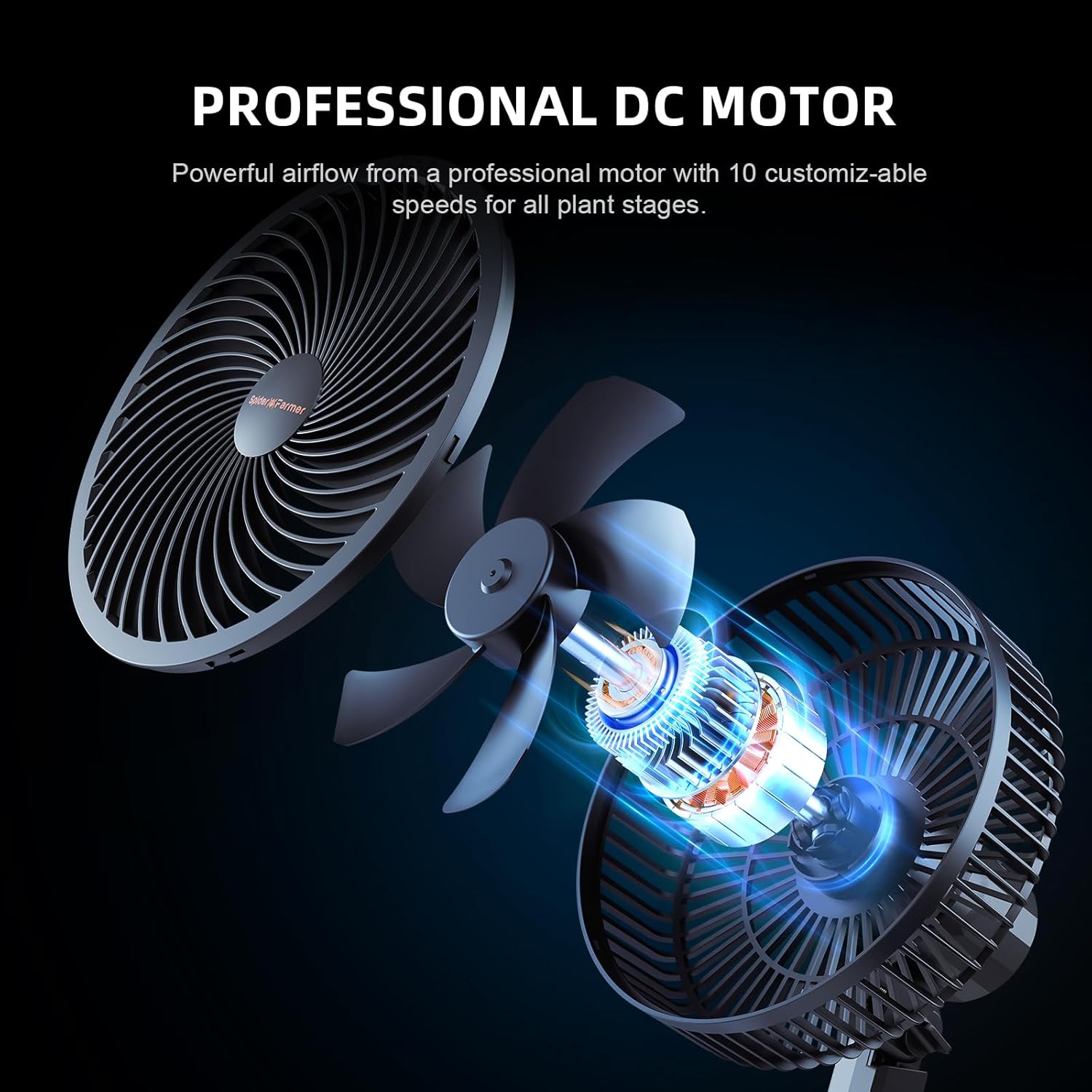
Image: An exploded view of the Spider Farmer fan, showcasing its professional DC motor and internal components responsible for its powerful and customizable airflow with 10 speeds.

Image: A diagram illustrating the 90-degree adjustable oscillation feature of the fan, showing how airflow can be directed across a wide area or focused on specific points within the grow tent.
4.2 Spider Farmer GGS AC10 Smart Power Strip
The AC10 Power Strip is a central control unit for your grow tent, featuring 10 independent outlets that can be managed remotely via the Spider Farmer app. It supports both manual and automated control modes.

Image: The Spider Farmer GGS AC10 Power Strip displayed with connected sensors (soil, temp/humid/light) and a smartphone showing the Spider Farmer app interface, demonstrating the integrated control system.

Image: A close-up view of the Spider Farmer AC10 Power Strip, highlighting its device ports, SYNC port, and the overcurrent protection button for safety and connectivity.

Image: A smartphone screen displaying various interfaces of the Spider Farmer app, including individual outlet settings, a list of controlled outlets, and environmental sensor data like air temperature, humidity, and VPD.
4.3 Sensors
The kit includes essential sensors for monitoring your grow environment, providing data for precise control and automation.

Image: A close-up of the Spider Farmer Temperature, Humidity, and Light Sensor positioned above plant foliage, emphasizing its role in providing crucial environmental data for stable and automatic grow tent operation.
5. Setup
5.1 Fan Installation
- Identify a suitable vertical pole within your grow tent (16mm to 25mm diameter).
- Open the adjustable grip clip on the fan and securely attach it to the pole. Ensure the thick rubber pad prevents scratching.
- Adjust the fan's vertical angle manually to direct airflow as needed.
- Connect the fan's power cable to an available outlet on the AC10 Power Strip or a standard power source.
5.2 AC10 Power Strip Connection
- Place the AC10 Power Strip in a dry, accessible location within or near your grow tent.
- Connect the provided power adapter to the AC10 Power Strip and then plug it into a wall outlet.
- Plug your grow tent devices (lights, pumps, other fans, etc.) into the 10 independent AC outlets on the power strip.
5.3 Sensor Connection
- Connect the Temperature, Humidity, and Light Sensor to one of the designated sensor ports on the AC10 Power Strip. Position it appropriately within your grow tent to get accurate readings.
- If your kit includes the 3-in-1 Soil Sensor, connect it to its designated port on the AC10 Power Strip and insert the probes into the soil of your plant.
5.4 App Installation & Pairing
- Download the "Spider Farmer" app from your smartphone's app store (iOS or Android).
- Open the app and follow the on-screen instructions to create an account or log in.
- Add your AC10 Power Strip device by following the in-app pairing process. This typically involves ensuring the power strip is powered on and in pairing mode (refer to app instructions for specific steps).
- Once paired, your fan and connected sensors will be accessible and controllable through the app.
6. Operating Instructions
6.1 Fan Operation
- Speed Control: Use the Spider Farmer app to adjust the fan speed from 0 to 10 levels (0-2500 RPM). Select the appropriate speed for your plants' current growth stage.
- Oscillation: The fan supports 90° horizontal automatic oscillation. Activate this feature via the app to ensure wide-angle air distribution. The fan will automatically rebound if it contacts an object, preventing damage.
- Natural Wind Mode: The app may offer a 'Natural Wind' mode, which simulates natural breezes by varying fan speed, reducing plant stress.
6.2 AC10 Power Strip App Control
The Spider Farmer app provides comprehensive control over your AC10 Power Strip and connected devices.
- Manual Mode: In the app, you can manually turn each of the 10 outlets ON or OFF in real-time. This gives you instant control over individual devices.
- Auto Mode (Programming): This is the core of the smart control. You can set up automated controls for each outlet based on various parameters:
- Time Periods: Schedule devices to turn on/off at specific times of day.
- Time Cycles: Set devices to operate in repeating cycles (e.g., 15 minutes ON, 45 minutes OFF).
- Temperature Control: Automate devices (e.g., heaters, exhaust fans) to respond to temperature thresholds detected by the sensor.
- Humidity Control: Automate devices (e.g., humidifiers, dehumidifiers) based on humidity levels.
- CO2 Control: If you have a CO2 system connected, automate its operation based on CO2 levels (requires compatible CO2 sensor, if not included).
- Monitoring: The app displays real-time data from your connected sensors, including temperature, humidity, light intensity, and VPD (Vapor Pressure Deficit).
7. Maintenance
7.1 Fan Cleaning
- Periodically disconnect the fan from power.
- Use a soft, dry cloth to wipe down the fan blades and housing.
- For stubborn dust, a slightly damp cloth can be used, ensuring no moisture enters the motor housing.
- Do not use harsh chemicals or abrasive cleaners.
7.2 Power Strip and Sensor Care
- Keep the power strip and sensors clean and free of dust. Use a dry cloth for cleaning.
- Ensure sensors are not submerged in water or exposed to extreme conditions beyond their operating range.
- Regularly check all cable connections for wear or damage.
7.3 Storage
When not in use, store the kit in a cool, dry place, away from direct sunlight and extreme temperatures.
8. Troubleshooting
| Problem | Possible Cause | Solution |
|---|---|---|
| Fan not turning on. | No power; loose connection; fan motor issue. | Check power outlet and connections. Ensure AC10 Power Strip is powered on and the specific outlet is activated in the app. |
| AC10 Power Strip not responding to app. | No internet connection; app not paired; power strip offline. | Check Wi-Fi connection. Restart app and power strip. Re-pair device if necessary. |
| Sensors not providing data. | Sensor not connected; faulty sensor; app issue. | Ensure sensors are securely plugged into the AC10. Restart app. Contact support if issue persists. |
| Fan oscillation not working. | Oscillation feature not activated; obstruction. | Activate oscillation in the app. Check for any physical obstructions around the fan. |
| Automated programs not running. | Incorrect program settings; sensor malfunction; power strip offline. | Review program settings in the app. Check sensor readings. Ensure power strip is online. |
9. Specifications
9.1 Spider Farmer 6-inch Grow Tent Fan
- Motor Type: EC Motor
- Airflow: Up to 2500 RPM (approx. 315 CFM)
- Speed Settings: 10 customizable speeds
- Oscillation: 90° horizontal automatic oscillation, 90° vertical manual adjustment
- Clip Compatibility: Poles 16mm to 25mm diameter
9.2 Spider Farmer GGS AC10 Smart Power Strip
- Outlets: 10 independent AC outlets
- Control: Smart APP-based control (Spider Farmer App)
- Modes: Manual Mode, Auto Mode (Time Periods, Time Cycles, Temperature, Humidity, CO2 Control)
- Sensor Ports: Multiple ports for various sensors (Temp/Humid/Light, Soil)
- Input Voltage: [Specify Voltage, e.g., 100-240V AC]
- Max Load: [Specify Max Amperage/Wattage]
9.3 Sensors
- Temp/Humid/Light Sensor: Measures air temperature, relative humidity, and light intensity. Supports VPD sensing.
- Soil Sensor (if included): Measures soil moisture, EC (electrical conductivity), and temperature.
10. Warranty and Support
Spider Farmer products come with a limited warranty. Please refer to the warranty card included with your purchase or visit the official Spider Farmer website for detailed warranty terms and conditions.
For technical support, troubleshooting assistance, or warranty claims, please contact Spider Farmer customer service through their official website or the contact information provided in your product packaging. When contacting support, please have your product model and purchase date ready.
Ask a question about this manual
Ask about setup, troubleshooting, compatibility, parts, safety, or missing instructions. Manuals+ will review the question and use this page’s manual context to help answer it.