Introduction
This manual provides comprehensive instructions for the installation, operation, and maintenance of your AINAVITO FT-UNIVERSAL Car Stereo. Please read this manual thoroughly before using the product to ensure proper function and to maximize your user experience. Keep this manual for future reference.

Image: AINAVITO FT-UNIVERSAL Car Stereo with CarPlay interface.
Compatibility
The AINAVITO FT-UNIVERSAL Car Stereo is designed for specific Ford vehicle models. Verify your vehicle's compatibility before installation.
- Ford F150 (2004-2008)
- Ford F250/F350/450/550 (2008-2016)
- Ford E150/250/350 Cargo (2009-2016)
- Ford Expedition (2007-2014)
- Ford Transit Connect (2012-2013)
- Ford Focus/Fusion (2005-2007)
- Ford Econoline Van (2009-2016)

Image: Visual representation of compatible Ford vehicle dashboards before and after stereo installation.
Key Features
The AINAVITO FT-UNIVERSAL Car Stereo offers a range of features designed to enhance your driving experience.
Wireless CarPlay & Android Auto
This unit supports both wireless and wired CarPlay and Android Auto. Connect your smartphone via Bluetooth or USB to access navigation, make calls, send messages, and stream music directly from your device. It also supports iPhone Airplay and wireless/wired mirroring for seamless phone interaction.

Image: Wireless CarPlay and Android Auto functionality demonstrated on the car stereo screen.
QLED Touch Screen & Knob Design
The stereo features a 10-inch QLED display with a 1280x720 HD resolution, providing vibrant visuals. The customizable knob and keybutton design allows for easy control of navigation, music, Bluetooth, and other functions.
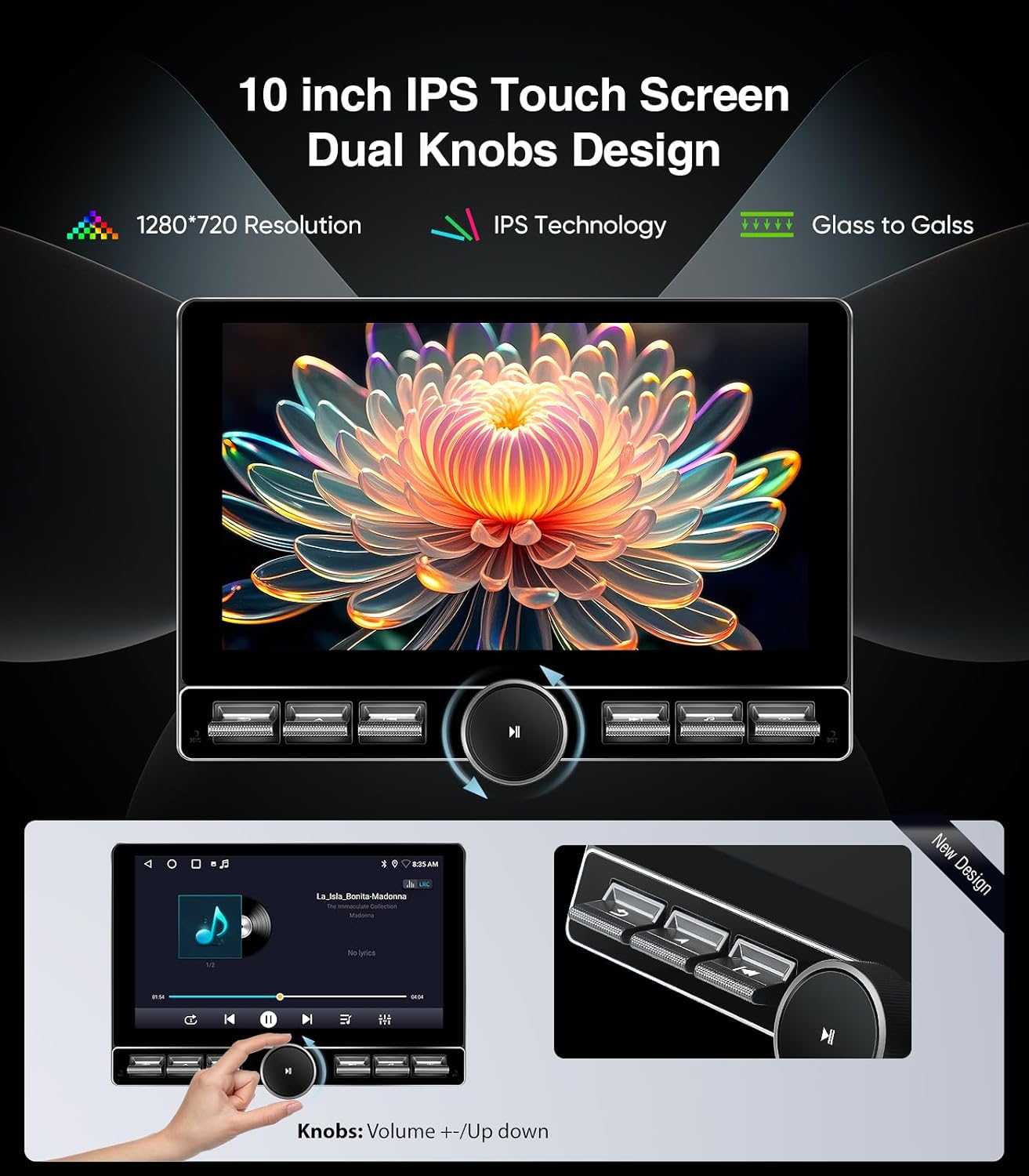
Image: Detailed view of the 10-inch QLED touch screen and physical control knob.
Performance and Memory
Powered by the Android 13.0 operating system, the unit is equipped with 64GB ROM for smooth performance and ample storage. It supports various applications such as Google, Facebook, TikTok, and YouTube, and offers multiple UI themes for personalization.

Image: Internal components highlighting the 2GB RAM and 64GB ROM for enhanced performance.
Advanced Connectivity
The stereo supports 5G Wi-Fi, Bluetooth 5.0, AUX input, AM/FM radio, GPS, and navigation. Enjoy hands-free calling, phonebook synchronization, and music streaming. Wi-Fi connectivity enables access to online maps and various applications.
- 5G Wi-Fi: Faster data transmission for online services.
- Bluetooth 5.0: Stable connection for calls and audio streaming.
- AM/FM RDS Radio: Automatic and manual station search with RDS information.
- GPS & Navigation: Integrated for reliable route guidance.

Image: FM/AM RDS Radio interface on the car stereo.
1080P AHD Backup Camera Support
The system supports a 1080P AHD backup camera, featuring a 170° wide-angle lens for enhanced visibility when reversing. The camera offers high definition, night vision, and is waterproof.
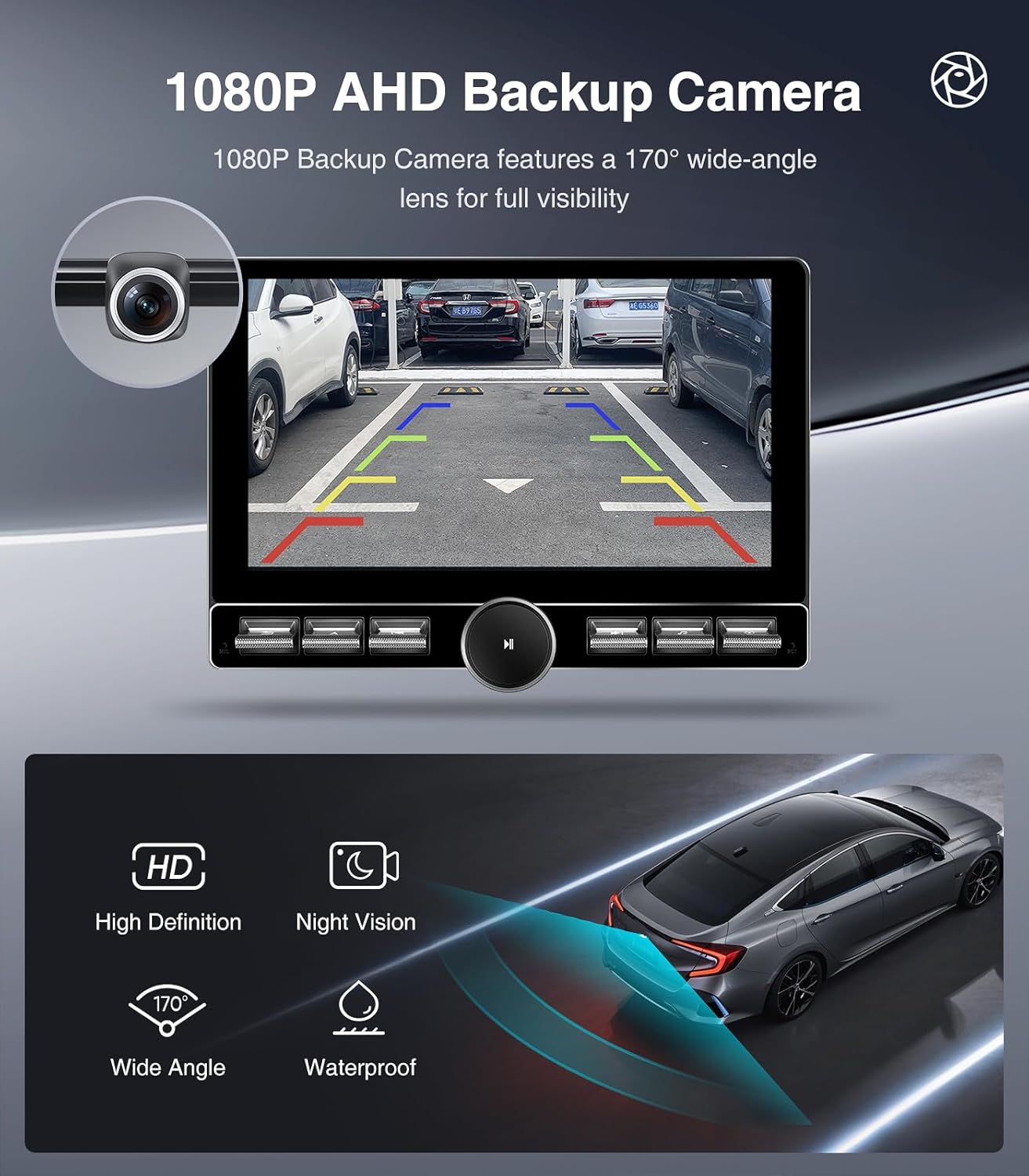
Image: Backup camera view displayed on the car stereo screen.
Split Screen Display
The unit supports split-screen functionality, allowing you to run two applications simultaneously, such as navigation and music playback.

Image: Split-screen display showing multiple applications running concurrently.
Setup and Installation
Installation of the AINAVITO FT-UNIVERSAL Car Stereo is designed to be plug-and-play for compatible vehicles. Professional engineer guidance is available for any installation questions.
Included Components
The package typically includes the following items:
- 1x Car Stereo radio with Frame
- 1x RCA Cable
- 1x Power Cable
- 1x Car Microphone
- 1x GPS Antenna
- 1x Frame Removal Tool
- 1x Rear View 1080P Camera
- 2x USB Cables
- 1x Reversing Control Extension Cable
- 1x Detailed Installation Picture
- 1x Product User Manual (this document)

Image: All components included in the product package.
General Installation Steps (Consult Detailed Installation Picture)
- Preparation: Ensure the vehicle's battery is disconnected before starting.
- Remove Old Unit: Carefully remove the existing car stereo and trim using the provided frame removal tool.
- Connect Wiring: Connect the power cable, RCA cables, USB cables, GPS antenna, and microphone to the new stereo. Ensure all connections are secure.
- Backup Camera Installation: Install the rear view camera and connect its cable to the stereo. The reversing control extension cable may be needed for proper activation.
- Mount New Unit: Secure the AINAVITO FT-UNIVERSAL stereo into the dashboard opening.
- Test Functionality: Reconnect the battery and test all functions (power, audio, CarPlay/Android Auto, camera, radio) before fully reassembling the dashboard.
Operating Instructions
Power On/Off
Press and hold the power button (usually integrated into the knob) to turn the unit on or off. A short press typically mutes or pauses audio.
Volume Control
Rotate the main knob to adjust the volume. Volume can also be adjusted via the touch screen interface.
CarPlay / Android Auto Connection
- Wireless: Enable Bluetooth and Wi-Fi on your smartphone. Pair your phone with the car stereo via Bluetooth. Follow the on-screen prompts to initiate wireless CarPlay or Android Auto.
- Wired: Connect your smartphone to one of the USB ports using a compatible USB cable. The system should automatically detect and launch CarPlay or Android Auto.
Radio Operation (AM/FM RDS)
Select the 'Radio' application from the main menu. Use the touch screen to scan for stations, save presets, or manually tune. The RDS (Radio Data System) feature will display station information where available.
Navigation
Access the pre-installed navigation application or use navigation through CarPlay/Android Auto. Ensure the GPS antenna is properly installed for optimal signal reception.
Bluetooth Functions
Pair your phone via Bluetooth to enable hands-free calling, access your phonebook, and stream audio. Navigate to the 'Bluetooth' menu on the stereo to manage devices.
Rear View Camera Display
When the vehicle is shifted into reverse, the display will automatically switch to the rear view camera feed, showing parking guidelines.
Maintenance
To ensure the longevity and optimal performance of your AINAVITO FT-UNIVERSAL Car Stereo, follow these maintenance guidelines:
- Cleaning the Screen: Use a soft, lint-free cloth to gently wipe the screen. For stubborn smudges, slightly dampen the cloth with water or a screen-safe cleaner. Avoid harsh chemicals or abrasive materials.
- Software Updates: Periodically check for software updates through the system settings or the manufacturer's website to ensure you have the latest features and bug fixes.
- Environmental Conditions: Avoid exposing the unit to extreme temperatures, direct sunlight for prolonged periods, or excessive moisture.
- Cable Connections: Ensure all cables are securely connected and free from damage. Avoid pulling on cables forcefully.
Troubleshooting
If you encounter issues with your car stereo, refer to the following common troubleshooting steps. For persistent problems, contact customer support.
| Problem | Possible Cause | Solution |
|---|---|---|
| No Power | Loose power connection, blown fuse. | Check power cable connections. Inspect vehicle's fuse box and stereo's inline fuse. |
| No Audio | Volume too low, incorrect source, loose speaker wires. | Increase volume. Select correct audio source. Check speaker wiring. |
| CarPlay/Android Auto Not Connecting | Bluetooth/Wi-Fi off, faulty USB cable, phone compatibility. | Ensure phone's Bluetooth/Wi-Fi is on. Try a different USB cable. Restart phone and stereo. |
| Backup Camera Not Displaying | Incorrect wiring, camera malfunction. | Verify camera and reversing control cable connections. Ensure camera is powered. |
| Touch Screen Unresponsive | Software glitch, screen damage. | Restart the stereo. If issue persists, contact support. |
Specifications
Below are the technical specifications for the AINAVITO FT-UNIVERSAL Car Stereo (Model: FT-UNIVERSAL).
- Brand: AINAVITO
- Model Number: FT-UNIVERSAL
- ASIN: B0F18V96KP
- Operating System: Android 13.0
- Display: 10-inch QLED Touch Screen
- Resolution: 1280x720
- Memory (ROM): 64GB
- Connectivity: Auxiliary, Bluetooth 5.0, USB, Wi-Fi (5G), Wireless/Wired CarPlay, Wireless/Wired Android Auto
- Controller Type: Android 13.0, Mechanical Knob
- Special Features: AM/FM Tuner, Apple CarPlay, Android Auto, Rear View Camera Input, Knob and Keybutton Design
- Compatible Devices: Amplifier, Smartphone, Speaker, iPhone
- Connector Type: RCA, USB Type-C
- Audio Output Mode: Surround
- Surround Sound Channel Configuration: 2.0
- Video Encoding: H.264, H.265/HEVC
- Color: Black
- Item Weight: 5 pounds
- Package Dimensions: 15.51 x 13.3 x 5.55 inches
- Visible Screen Diagonal: 10 inches / 26 cm
Support and Warranty
AINAVITO is committed to providing customer support for product use, settings, and installation.
Customer Support
For any questions or assistance, you can contact our professional engineer guidance team. They are available to help solve your problems.
- Contact Method: Via your order center on Amazon (Click our Store --- "Sold By ----Speedroad" ---- find a Button "ASK a Question").
- Response Time: We aim to reply within 24 hours.

Image: Customer support representative.
Return Policy
The product is subject to a 30-day return policy for refund or replacement, as per Amazon's standard terms.


