1. Introduction
Welcome to the world of smart audio with your new XO Simple is Beauty Smart Audio Sunglasses Model E6. These innovative sunglasses combine stylish UV400 protection with advanced Bluetooth 5.2 technology, allowing for seamless wireless music streaming, hands-free calls, and voice assistant access. Designed for comfort and convenience, they are perfect for various activities while keeping you connected and aware of your surroundings.
2. What's in the Box
- 1x Smart Audio Sunglasses (Model E6)
- 1x Charging Cable (Type-C)
- 1x Cleaning Cloth
- 1x User Manual (this document)

Image: The XO Simple is Beauty Smart Audio Sunglasses Model E6, showcasing their sleek design.
3. Product Overview
Familiarize yourself with the key components of your Smart Audio Sunglasses:
- UV400 Lenses: Provide 100% protection against harmful UVA/UVB rays.
- Built-in Speakers: Located in the temples for open-ear audio experience.
- Microphone: Integrated for clear hands-free calls with noise-canceling capabilities.
- MFB (Multi-Function Button): Controls power, play/pause, and call management.
- Touch Area: Located on the temple for volume adjustment and voice assistant activation.
- Type-C Charging Port: For recharging the sunglasses.
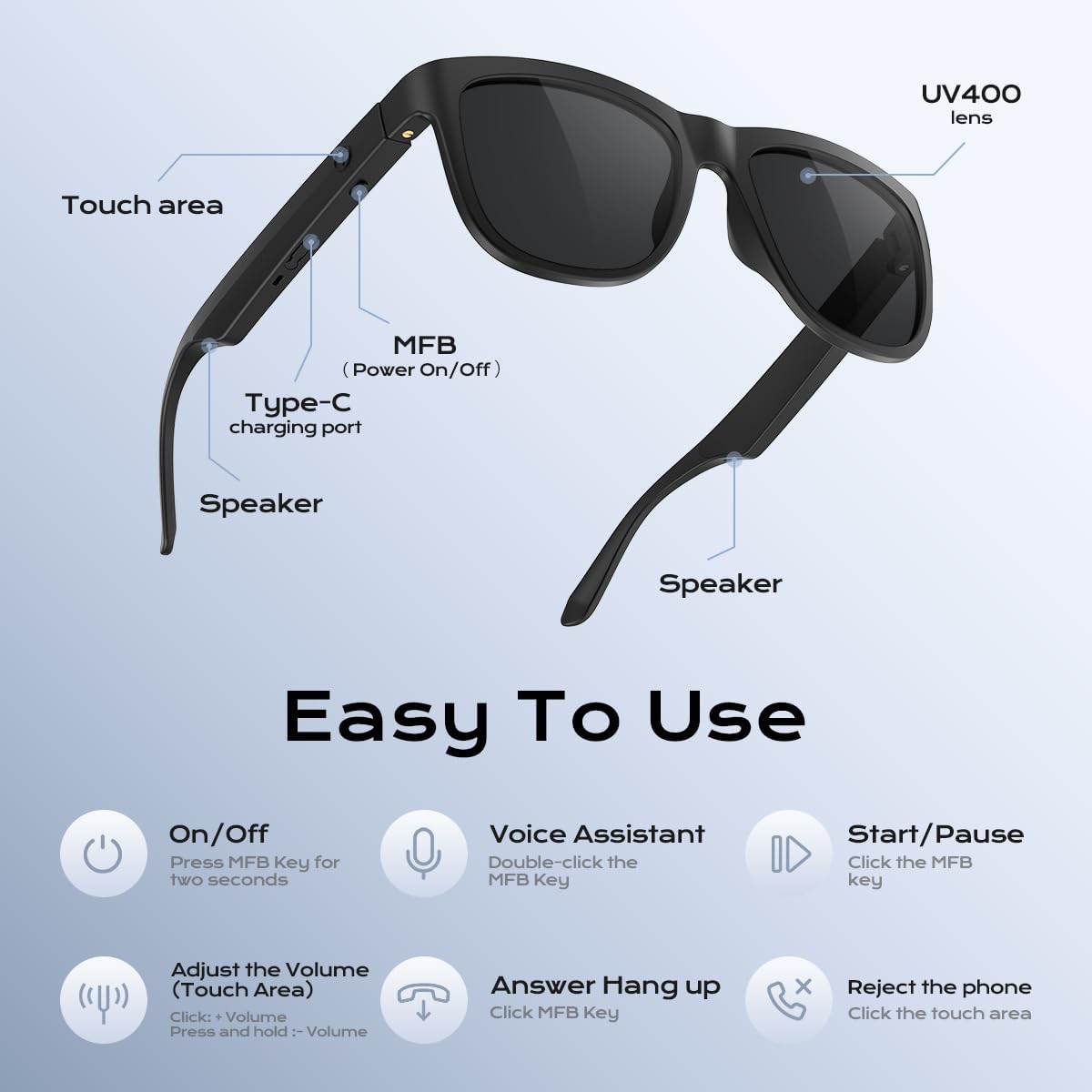
Image: A detailed diagram highlighting the touch area, MFB button, Type-C charging port, and speakers on the sunglasses.
4. Setup
4.1 Charging the Sunglasses
Before first use, ensure your sunglasses are fully charged. The charging port is discreetly located on the temple.
- Locate the Type-C charging port on the right temple of the sunglasses.
- Gently open the protective flap covering the port.
- Connect the provided Type-C charging cable to the port and the other end to a USB power source.
- A charging indicator light will illuminate. Charging typically takes approximately 2 hours for a full charge.
- Once fully charged, disconnect the cable and securely close the protective flap.
Important Note:
- Do not use the sunglasses while they are charging.
- If the sunglasses do not power on, ensure they are fully charged first.

Image: A woman wearing the Smart Audio Sunglasses, demonstrating their stylish appearance and integrated technology.
4.2 Bluetooth Pairing
Your sunglasses use Bluetooth 5.2 for a stable and efficient connection.
- Ensure the sunglasses are charged and powered off.
- Press and hold the MFB (Multi-Function Button) on the right temple for approximately 2 seconds until you hear a "Power On" voice prompt and the indicator light flashes blue.
- Continue holding the MFB button until the indicator light alternates between red and blue, indicating pairing mode.
- On your smartphone or Bluetooth-enabled device, go to Bluetooth settings and search for available devices.
- Select "XO-E6" from the list to connect. You will hear a "Connected" voice prompt upon successful pairing.
- The indicator light will then slowly flash blue.
Video: An official product video demonstrating the power on/off, Bluetooth pairing process, and basic controls for the Smart Audio Sunglasses Model E6.
5. Operating Instructions
5.1 Power On/Off
- Power On: Press and hold the MFB button for 2 seconds until you hear "Power On".
- Power Off: Press and hold the MFB button for 3 seconds until you hear "Power Off".
5.2 Music Playback
- Play/Pause: Short press the MFB button once.
- Volume Up: Tap the touch area on the right temple once.
- Volume Down: Press and hold the touch area on the right temple.
- Next Track: Double-tap the MFB button.
- Previous Track: Triple-tap the MFB button.

Image: A man wearing the Smart Audio Sunglasses, illustrating the open-ear audio experience with sound waves emanating from the temples.
5.3 Call Management
- Answer Call: Short press the MFB button once.
- End Call: Short press the MFB button once during a call.
- Reject Call: Press and hold the touch area for 2 seconds.
5.4 Voice Assistant
- Activate Voice Assistant (Siri/Google Assistant): Double-tap the MFB button.
6. Features
- UV400 Protection: Lenses block 100% of harmful UVA and UVB rays, protecting your eyes.
- Open-Ear Audio: Dual stereo speakers deliver high-quality sound without blocking ambient noise, ensuring situational awareness.
- Noise-Canceling Microphone: Provides clear voice quality during calls by reducing background noise.
- Lightweight Design: Comfortable for extended wear, making them suitable for various activities.
- Long Battery Life: Up to 8 hours of continuous use on a single charge, with a standby time of 200 hours.
- Wide Compatibility: Compatible with both iOS and Android devices via Bluetooth 5.2.

Image: A woman enjoying the sun while wearing the Smart Audio Sunglasses, highlighting the UV400 protection feature.

Image: The Smart Audio Sunglasses displayed with an emphasis on their impressive 200-hour standby time.
7. Maintenance
- Cleaning: Use the provided cleaning cloth to gently wipe the lenses and frame. Avoid using harsh chemicals or abrasive materials.
- Storage: When not in use, store the sunglasses in their protective case to prevent scratches and damage.
- Water Exposure: While designed for outdoor use, avoid submerging the sunglasses in water. Wipe off any moisture immediately.
- Temperature: Do not expose the sunglasses to extreme temperatures (hot or cold) for prolonged periods.
8. Troubleshooting
| Problem | Possible Solution |
|---|---|
| Sunglasses won't power on. | Ensure the battery is fully charged. Connect to the charging cable for at least 2 hours. |
| Cannot pair with device. |
|
| No sound or low volume. |
|
| Call quality is poor. |
|
9. Specifications
- Model: E6
- Bluetooth Version: 5.2
- Battery Life (Continuous Use): Up to 8 hours
- Standby Time: 200 hours
- Charging Time: Approximately 2 hours
- Lens Type: UV400 Protection
- Weight: 4.3 ounces
- Package Dimensions: 6.5 x 4.25 x 2.04 inches
- Manufacturer: Sanqi Youpin (Shenzhen) Co, Ltd.
10. Warranty and Support
For warranty information and customer support, please refer to the product packaging or contact XO Simple is Beauty customer service directly. Keep your purchase receipt for any warranty claims.