
Introduction
Thank you for choosing the VCJ Portable Washing Machine Model VCJ-75. This full-automatic portable washer is designed for convenience and efficiency, making laundry easier in small living spaces such as apartments, RVs, and dorms. With its 20 lbs capacity, 7 wash cycles, and user-friendly LED display, it offers a comprehensive solution for your laundry needs. Please read this manual carefully before use to ensure proper operation and maintenance.
Safety Information
Always follow basic safety precautions when using electrical appliances to reduce the risk of fire, electric shock, or injury to persons.
- Ensure the washing machine is placed on a stable, level surface.
- Do not operate the machine with a damaged power cord or plug.
- Keep children and pets away from the machine during operation.
- Do not immerse the electrical parts in water.
- Unplug the machine from the power outlet when not in use or before cleaning.
- Only use powdered high-efficiency (HE) laundry detergent as specified in the manual.
- Do not wash items that are soiled with gasoline, dry-cleaning solvents, or other flammable or explosive substances.
- Utilize the Child Lock feature to prevent accidental operation.
What's in the Box
Your VCJ Portable Washing Machine package includes:
- VCJ Portable Washing Machine (Model VCJ-75)
- User Manual
- Fill Hose
- Faucet Adapter
Setup
1. Placement
Place the washing machine on a firm, level surface. The compact dimensions (20"D x 20"W x 34"H) allow it to fit snugly into various small spaces. Ensure there is enough clearance around the machine for proper ventilation and operation.

Image: Front view of the VCJ Portable Washing Machine, highlighting its compact dimensions of 20 inches depth, 20 inches width, and 34 inches height. The control panel is visible at the top.
2. Leveling
The machine is equipped with adjustable leveling legs. Rotate the caster wheels at the bottom of the machine to ensure it is perfectly level and stable, which is crucial for reducing vibration and noise during operation.

Video: A demonstration of how to adjust the leveling legs on the VCJ Portable Washing Machine to ensure stability and reduce vibration during use.
3. Water Connection
Connect the provided fill hose to the water inlet on the back of the washing machine. Use the included adapter to connect the other end of the fill hose to a compatible faucet. The adapter supports quick connection, female thread (15/16"-17T/24mm), and male thread (55/64"-27T/22mm) faucet types.

Image: Visual guide illustrating the different types of faucets (quick connection, female thread, male thread) that can be adapted for the water inlet hose, along with a diagram of the portable handle, stainless steel tub, drain hose, and adjustable leveling legs.
4. Drainage
The portable washer is equipped with a drainage pump. Position the drain hose into a suitable drainage area such as a sink, standpipe, or laundry tub. Ensure the drain hose is securely fastened to prevent dislodging during the drainage cycle.
5. Power Connection
Plug the power cord into a grounded 120 Volt electrical outlet.
6. Initial Test Run
Before washing clothes, it is recommended to perform an empty rinse and spin cycle to ensure all connections are secure and the machine operates correctly.
Operation
1. Control Panel Overview
The intuitive LED control panel allows for easy selection of wash cycles, water levels, and other functions.
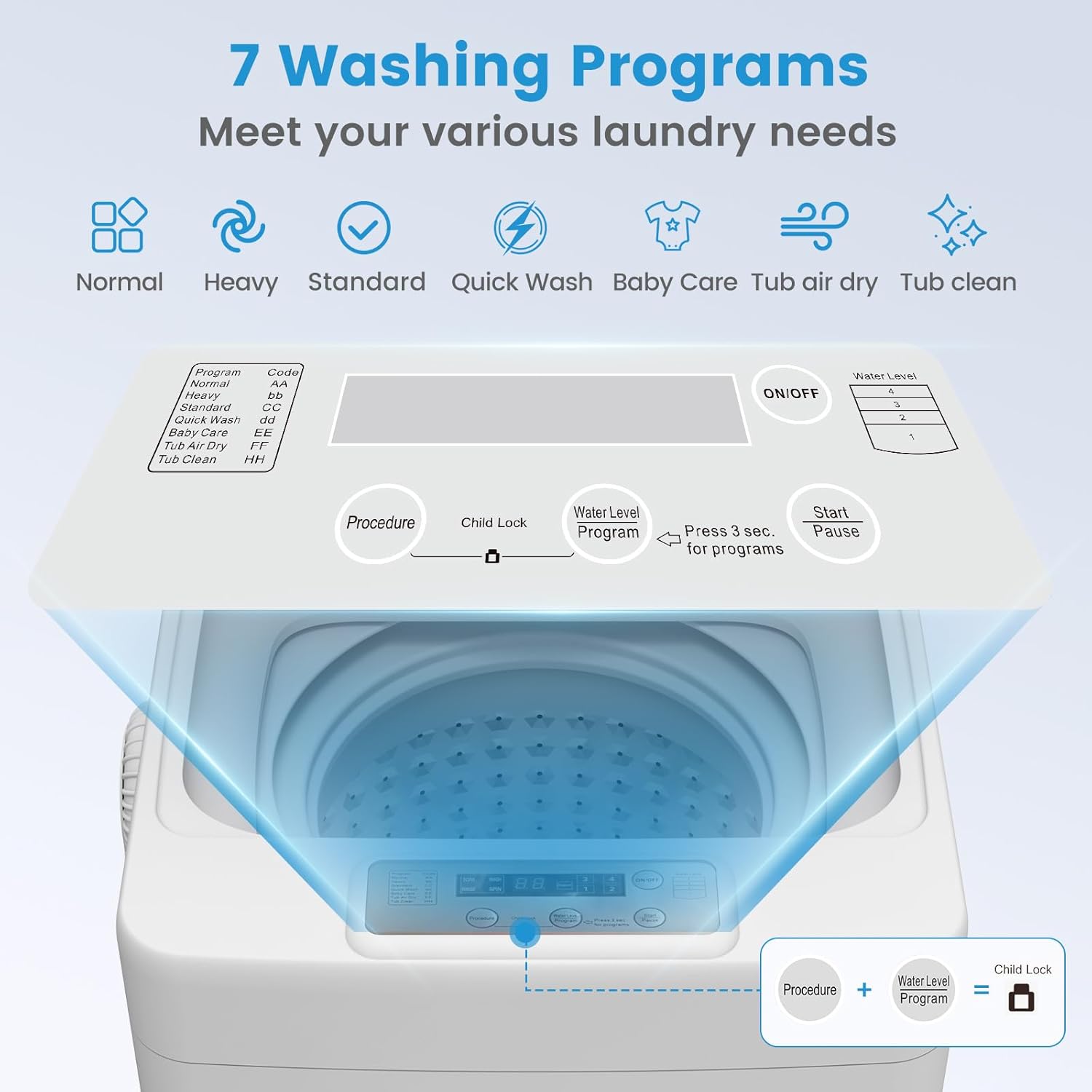
Image: A detailed view of the washing machine's control panel, illustrating the 7 washing programs (Normal, Heavy, Standard, Quick Wash, Baby Care, Tub Air Dry, Tub Clean) and the child lock activation method.
2. Loading Laundry
Open the top lid and load your laundry into the stainless steel tub. For optimal cleaning and to prevent imbalance, distribute clothes evenly. The 20 lbs capacity is suitable for various items, including clothes, bedding, and towels. For larger items like queen-size sheets, consider splitting them into two loads (e.g., flat sheet and one pillowcase in the first load, fitted sheet and second pillowcase in the second).
3. Adding Detergent and Softener
This model does not feature a built-in detergent or softener dispenser. Add your preferred powdered high-efficiency (HE) laundry detergent directly into the tub as it fills with water. If using fabric softener, add it manually just before the final rinse cycle.
4. Selecting Wash Cycles
The machine offers 7 customized wash programs:
- Normal: For everyday laundry.
- Heavy: For heavily soiled items.
- Standard: A balanced cycle for mixed loads.
- Quick Wash: For lightly soiled items or when time is limited (e.g., 26 minutes).
- Baby Care: Gentle cycle for delicate baby clothes.
- Tub Air Dry: Helps to air dry the tub after use.
- Tub Clean: For cleaning the washing machine tub.
Select the desired program using the 'Program' button on the control panel.
5. Water Level Selection
Choose from 4 water levels (1, 2, 3, 4) based on your laundry load size. Use the 'Water Level/Program' button to adjust. Filling closer to capacity often yields the best washing results.
6. Delay Start Function
The delay start function allows you to set a delayed start time for your wash cycle, providing flexibility for your schedule.
7. Pause/Reload Function
If you forget to add an item, press and hold the 'Start/Pause' button to pause the cycle, add the item, and then press and hold again to resume.

Image: A visual guide to using the Reload Function, showing how to press ON/OFF, add clothes, and then press Start/Pause to continue the wash cycle.
8. Child Lock
To activate the Child Lock, press and hold the 'Procedure' and 'Water level/Program' buttons simultaneously. This will freeze the control panel, preventing accidental changes during operation. Repeat the action to deactivate.

Video: An installation and feature demonstration for the VCJ Portable Washing Machine, showcasing the water level settings, child lock activation, and the overall washing process.
Maintenance
1. Lint Filter
Regularly clean the lint filter box located inside the tub to effectively capture hair and dirt, ensuring optimal machine performance and preventing drainage issues.
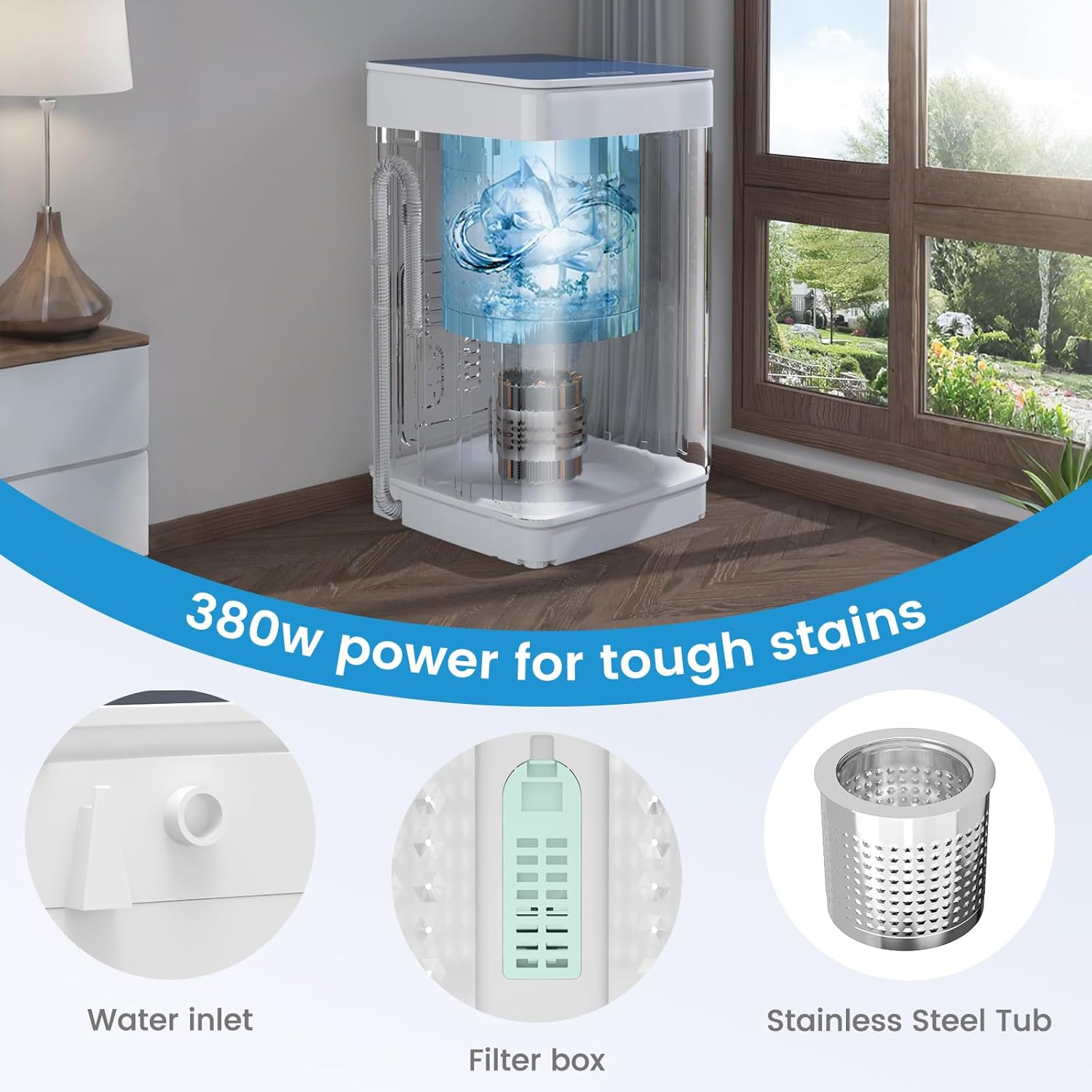
Image: An internal view of the VCJ Portable Washing Machine, showing the 380W motor, water inlet, the removable lint filter box, and the durable stainless steel tub.
2. Tub Clean Mode
Use the 'Tub Clean' program periodically to clean the washing machine tub and prevent odor buildup.
3. General Cleaning
Wipe down the exterior of the machine with a soft, damp cloth. Do not use abrasive cleaners or solvents.
Specifications
| Feature | Detail |
|---|---|
| Brand | VCJ |
| Model Name | VCJ-75 |
| Product Dimensions | 20"D x 20"W x 34"H |
| Capacity | 20 Pounds |
| Item Weight | 46 Pounds |
| Material | Polypropylene (Body), Stainless Steel (Drum) |
| Access Location | Top Load |
| Operation Mode | Fully Automatic |
| Number of Standard Cycles | 7 |
| Special Features | Adjustable Leveling Legs, Child Lock, Drum Clean, End Of Cycle Signal, Reload Function |
| Display | LED |
| Voltage | 120 Volts |
| Max Rotational Speed | 1600 RPM |
Warranty & Support
The VCJ Portable Washing Machine Model VCJ-75 comes with a 6-month warranty from the date of purchase. For warranty claims, technical support, or any inquiries, please contact VCJ Direct customer service.
Visit the official VCJ Store on Amazon for more information and support.