
1. Product Introduction
The xDuoo DM-01 is a compact DAC headphone amplifier featuring a distinctive robot design. It offers versatile input options including USB and Bluetooth. The USB input supports high-resolution audio formats such as PCM up to 32Bit/384kHz, DSD256, and MQA 8x. For wireless connectivity, Bluetooth supports HD formats like aptX, aptX HD, and LDAC.
The device incorporates a CS43131 DAC chip for superior decoding performance. Its amplifier circuit utilizes tube amplification for a warm, sweet sound, complemented by a transistor-based Class-A buffer. This hybrid design ensures sufficient power to drive a wide range of headphones with impedances from 16 to 600 ohms, providing an enjoyable music listening experience in various settings.
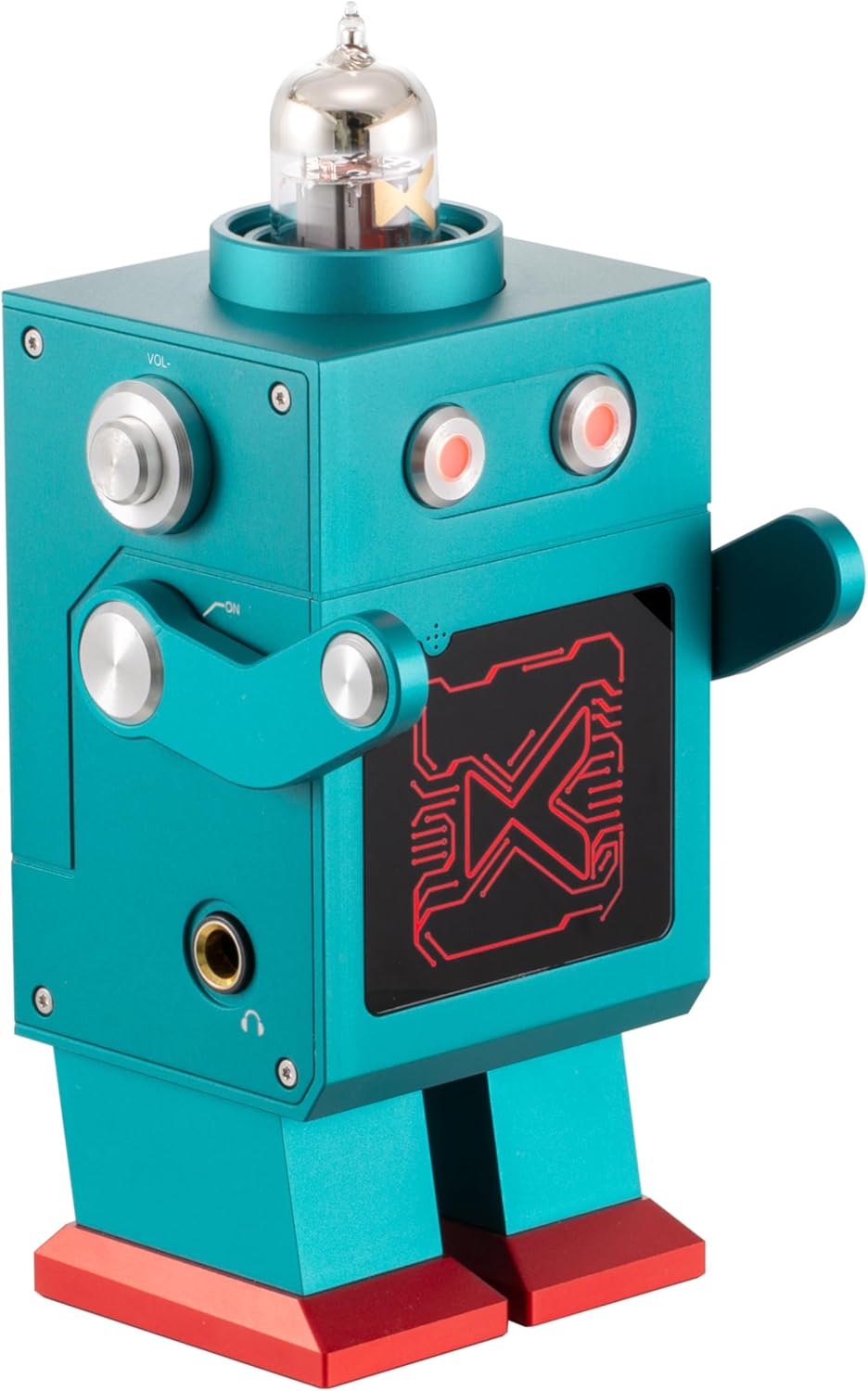
Image: Front view of the xDuoo DM-01 DAC Headphone Amplifier, showcasing its unique robot shape and tube.
2. Key Features
- USB Receiving Chip: Utilizes XMOS's XU316, supporting PCM 32Bit/384kHz, DSD256, and MQA 8x formats.
- Mobile Device Compatibility: Supports iOS and Android mobile phones or players via USB OTG cable.
- Bluetooth Connectivity: Features Qualcomm's QCC3084 chip with Bluetooth 5.4, supporting aptX, aptX HD, and LDAC for high-quality wireless audio.
- DAC Chip: Equipped with CS43131 for enhanced decoding, low noise, and high resolution.
- Clock Structure: Employs a 3X Clock structure for dedicated USB asynchronous transmission, minimizing Jitter.
- Pre-Amplification: Tube-based pre-amp circuit delivers a sweet and exquisite vocal tone.
- Buffer Stage: Transistor-based Class A buffer provides strong load capacity for various earphones.
- Audio Capacitors: Uses ELNA capacitors specifically designed for audio coupling.
- Chassis: Aluminum-shielded case effectively prevents external interference noise.
- Cyberpunk Exterior: Unique robot design with multicolor indicator lights that correspond to audio format/sampling rate.

Image: Diagram highlighting key features such as Cyberpunk Exterior, 1500mW Output Power, CS43131 DAC, MQA 8X, 12AU7 tube, Transistor Buffer, Bluetooth 5.4, USB DAC, and Metal Body.
3. Package Contents
The xDuoo DM-01 package includes the following items:
- DM-01 DAC Headphone Amplifier
- Type-C USB Cable
- 6.35mm to 3.5mm Converter
- User Manual
- Warranty Card
Video: An unboxing video demonstrating the contents of the xDuoo DM-01 package.
4. Parts and Controls

Image: Detailed views of the DM-01, labeling its various ports and controls.
- Indicator: Displays current status and audio format/sampling rate via color.
- Tube: Visible vacuum tube for pre-amplification.
- Volume + / Volume -: Rotary knobs for adjusting output volume.
- Selection Input (USB/BT In): Button to cycle through available input sources.
- Power On/Off: Main power switch.
- Headphone Output: 6.35mm headphone jack for connecting headphones.
- USB In: Type-C port for USB audio input and power.
- DC In (12V): Power input jack.
- Line Out: RCA outputs for connecting to external amplifiers or powered speakers.
- MIC (Bluetooth): Microphone input for Bluetooth calls or gaming headsets.
Indicator Light Meanings:

Image: Chart detailing the color codes for indicator lights based on sampling rate and Bluetooth format.
| Sampling Rate | Color |
|---|---|
| 44.1k-48kHz | Red |
| 88.2k-96kHz | Cyan |
| 176.4-384kHz | Yellow |
| DSD64-256 | White |
| MQA. | Green |
| MQA. | Blue |
| OFS | Purple |
| Bluetooth Format | Color |
|---|---|
| AAC/SBC | Blue |
| aptX/aptX-HD/aptX-AD | Purple |
| LDAC | White |
| LC3 | Cyan |
| Aptx_Lite | Yellow |
5. Setup
5.1 Power Connection
Connect the provided DC 12V/2A power adapter to the DC In port on the rear of the DM-01. Plug the adapter into a suitable power outlet.
5.2 USB Audio Input
Use the supplied Type-C USB cable to connect the DM-01's USB In port to your computer (Windows, Linux, Mac OS X) or mobile device (iOS, Android) via an OTG cable. Ensure the DM-01 is selected as the audio output device in your operating system settings.
5.3 Bluetooth Audio Input
To connect via Bluetooth, select the Bluetooth input mode on the DM-01. On your source device (phone, tablet, computer), search for and pair with