
1. Introduction
The 1Mii NightPair Bluetooth 5.3 Transmitter is designed to wirelessly transmit audio from your television or other audio sources to Bluetooth headphones or speakers. It supports simultaneous connection to two devices, offering a private listening experience without disturbing others. Featuring advanced audio codecs like aptX Low Latency, aptX Adaptive, and aptX HD, it ensures high-quality sound with minimal delay.
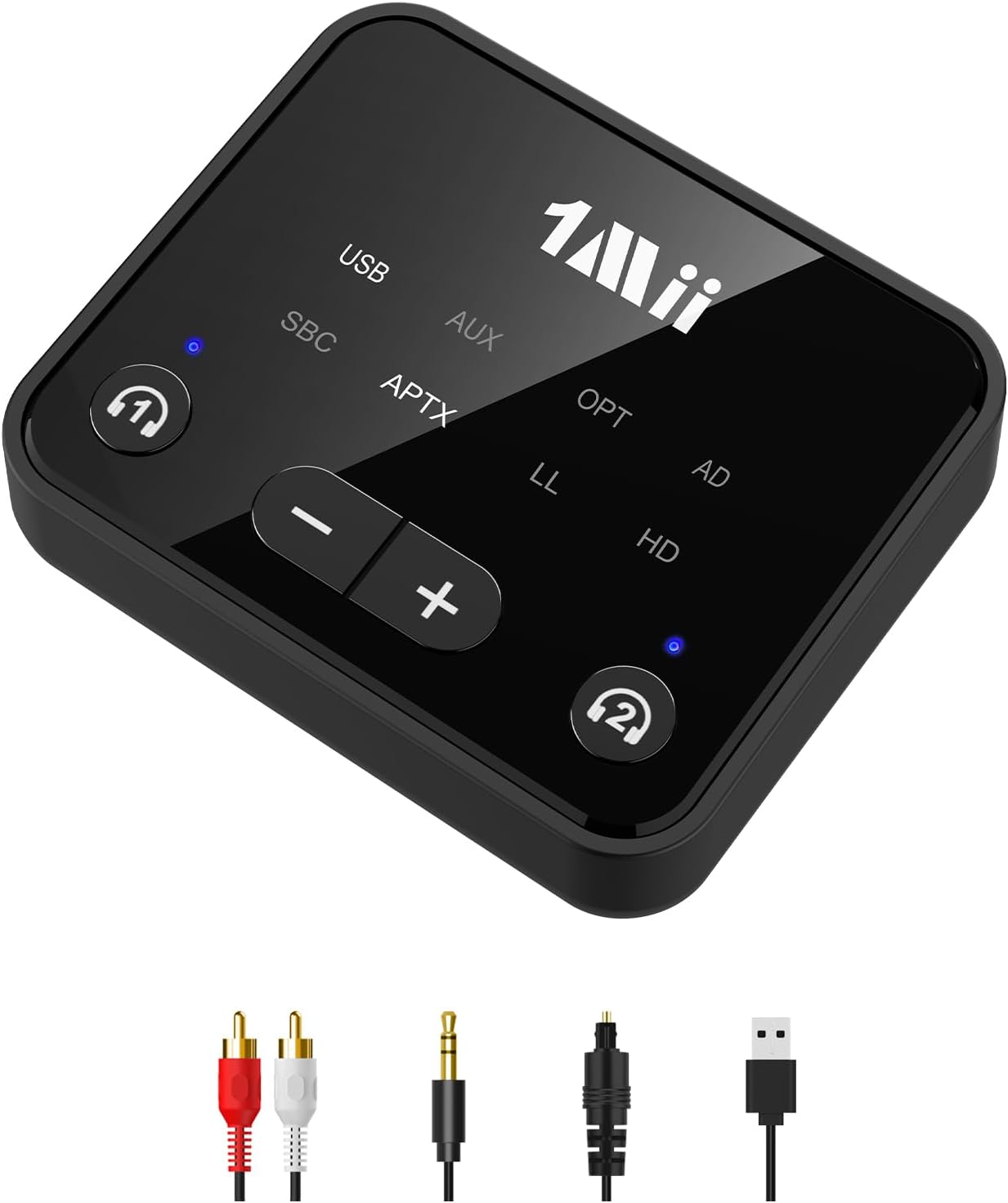
The 1Mii NightPair allows for private TV listening with Bluetooth headphones.
This device is ideal for late-night viewing, gaming, or for individuals with hearing impairments who require higher volume levels without affecting others in the room. It offers broad compatibility with 99% of televisions and various audio input options.
2. Package Contents
Please verify that all items are present in the package:
- 1Mii NightPair Bluetooth Transmitter
- USB Charging Cable
- 3.5mm to RCA Audio Cable
- 3.5mm Audio Cable
- Optical Cable
- User Manual

Included components of the 1Mii NightPair package.
3. Setup Instructions
3.1 Power Connection
Connect the supplied USB charging cable to the DC IN port on the transmitter and plug the other end into a USB power source (e.g., TV USB port, USB wall adapter). The device is powered via a corded electric connection.
3.2 Audio Input Connection
The NightPair transmitter supports AUX, Optical, and RCA audio inputs. Choose the appropriate cable based on your TV or audio source's output ports:
- Optical (OPT): For digital audio output. Connect the optical cable from your TV's optical output to the OPTICAL input on the transmitter.
- AUX (3.5mm): For analog audio output. Connect the 3.5mm audio cable from your TV's headphone jack or AUX output to the AUX input on the transmitter.
- RCA: For analog audio output. Use the 3.5mm to RCA cable to connect your TV's RCA (red and white) audio outputs to the AUX input on the transmitter.

Connect the transmitter to your TV using the appropriate audio cable.
Important Note for Optical Connection: If using the optical output from your TV, ensure your TV's audio output format is set to PCM. Otherwise, there will be no sound output.
3.3 Pairing with Bluetooth Headphones/Speakers
- Turn on the 1Mii NightPair transmitter using the ON/OFF switch.
- Put your Bluetooth headphones or speaker into pairing mode. Refer to your audio device's manual for specific instructions.
- On the NightPair transmitter, press and hold the '1' or '2' pairing button (indicated by headphone icons) for approximately 3-5 seconds until the corresponding LED indicator flashes rapidly, signifying pairing mode.
- Place your Bluetooth audio device close to the transmitter. They should automatically connect. Once connected, the LED indicator on the transmitter will turn solid blue.
4. Operating Instructions
4.1 Single Device Connection
After successful pairing, audio from your connected TV or source will be transmitted to your Bluetooth headphones or speaker. For optimal low latency performance (aptX LL), ensure your receiving device also supports aptX LL. This codec is most effective when only one device is connected.
4.2 Dual Device Connection
The NightPair transmitter can connect to two Bluetooth headphones or speakers simultaneously:
- First, pair your primary Bluetooth device using the '1' pairing button as described in Section 3.3.
- Once the first device is connected, put your second Bluetooth device into pairing mode.
- Press and hold the '2' pairing button on the transmitter until its LED flashes rapidly.
- The second device will connect, and its LED will turn solid blue.

Enjoy shared listening with two Bluetooth devices connected simultaneously.
Note: When two devices are connected simultaneously, the aptX LL codec is not supported, and the audio will downgrade to aptX or SBC, which may introduce a slight audio delay.
4.3 Volume Control
The NightPair transmitter features dedicated volume control buttons (- and +) to adjust the audio output level. This is particularly useful for Bluetooth headsets that lack their own volume controls.

Adjust volume directly on the transmitter using the dedicated buttons.
5. Maintenance
To ensure the longevity and optimal performance of your 1Mii NightPair Bluetooth Transmitter, follow these maintenance guidelines:
- Keep the device clean by wiping it with a soft, dry cloth. Avoid using harsh chemicals or abrasive cleaners.
- Store the transmitter in a cool, dry place away from direct sunlight, extreme temperatures, and high humidity.
- Avoid dropping the device or subjecting it to strong impacts.
- Do not attempt to disassemble or repair the device yourself, as this will void the warranty.
6. Troubleshooting
If you encounter issues with your 1Mii NightPair transmitter, please refer to the following common problems and solutions:
| Problem | Possible Cause / Solution |
|---|---|
| No sound output. |
|
| Audio delay (latency). |
|
| Cannot connect two devices simultaneously. |
|
| White noise or static in audio. |
|
| Transmitter does not remember preferred codec. |
|

Ensure your devices are compatible with the 1Mii NightPair transmitter.
7. Specifications
| Brand | 1Mii |
| Model | NightPair |
| Connectivity Technology | Bluetooth 5.3 |
| Supported Audio Codecs | aptX Low Latency, aptX Adaptive, aptX HD, aptX, SBC |
| Input Interfaces | AUX (3.5mm), Optical, RCA |
| Power Source | Corded Electric (USB) |
| Compatible Devices | Bluetooth Headphones, PC, Speakers, TV |
| Control Method | Buttons, Touch |
| Item Dimensions (L x W x H) | 6.5 cm x 5.5 cm x 2 cm |
| Material | Acrylonitrile Butadiene Styrene (ABS) |
| Color | Black |
8. Warranty and Support
The 1Mii NightPair Bluetooth 5.3 Transmitter comes with a 24-month warranty service from the date of purchase. If you encounter any issues or require assistance, please contact our professional customer service team. We are committed to providing support and resolving any concerns you may have.
For warranty claims or technical support, please refer to the contact information provided on the 1Mii official website or your purchase documentation.


