
1. Introduction
The RENPHO MorphoScan Base Smart Scale is an advanced body composition analyzer designed to provide comprehensive insights into your body's health. Utilizing eight-electrode dual-frequency and segmental Bioelectrical Impedance Analysis (BIA) technology, this scale offers precise measurements of various body metrics. This manual provides essential information for safe and effective use of your device.
Important Safety Information:
- This device is intended for athletic fitness and health monitoring purposes only. It is not a substitute for medical equipment.
- Consult a qualified medical professional for any decisions regarding diagnosis and treatment.
- Individuals with pacemakers or other implanted medical devices should not use this scale.
- Pregnant women should consult their doctor before using this device.
2. Product Overview
The RENPHO MorphoScan Base Smart Scale offers innovative technology for detailed body composition analysis. Its design includes a large platform and a retractable handle for full-body measurements.
Key Features:
- 8-Electrode Dual-Frequency BIA Technology: Provides accurate and detailed body composition data.
- Comprehensive LED Display: Shows BMI, body fat percentage, skeletal muscle percentage, visceral fat index, and a seven-day weight trend directly on the scale.
- Detailed Health Report: Generates a comprehensive report in the RENPHO Health App, including segmental body fat analysis.
- User-Friendly App: The RENPHO Health App supports unlimited user profiles and syncs with Apple Health, MyFitnessPal, and Samsung Health.
- Durable Design: Features a 60-inch elastic cable, durable handle, and a large weighing platform supporting up to 180 kg (400 lbs).
- Long Battery Life: Up to 130 days of battery life with 4 AAA batteries (included).
What's in the Box:
- RENPHO MorphoScan Base Smart Scale
- 4 AAA Batteries
- Instruction Manual
3. Setup
3.1 Battery Installation
- Open the battery compartment on the underside of the scale.
- Insert the 4 AAA batteries, ensuring correct polarity (+/-).
- Close the battery compartment securely.
3.2 App Download and Pairing
- Download the RENPHO Health App from the Apple App Store or Google Play Store.
- Register an account and log in.
- Ensure Bluetooth is enabled on your smartphone.
- Open the RENPHO Health App and follow the on-screen instructions to add the 'Body Composition Scale (R-MSC02)' device.
- The app will automatically connect to the scale via Bluetooth.
3.3 Initial Calibration
For accurate readings, place the scale on a hard, flat surface. Avoid soft surfaces like carpets, which can affect accuracy.

Image: RENPHO MorphoScan Base Smart Scale displaying various metrics on its LED screen.
3.4 Setup Video Guide
Video: A step-by-step guide on how to set up and use the RENPHO MorphoScan Base Smart Scale, including app connection and measurement process.
4. Operating Instructions
Follow these steps to take an accurate body composition measurement:
- Place the scale on a hard, flat surface.
- Step onto the scale with bare, dry feet, ensuring your feet are positioned on the four electrode pads.
- Grasp the retractable handle and pull it up. Place your thumbs on the thumb electrodes and other fingers on the four-finger electrodes.
- Keep your arms straight and held 30-45 degrees away from your body.
- Ensure continuous contact with all 8 electrode pads (4 on the scale, 4 on the handle).
- Hold this position until the measurement is complete and the report is generated on the scale's display and in the app.
- Return the handle to its retracted position and step off the scale.
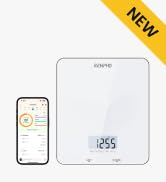
Image: Visual guide for correct foot and hand placement on the scale and handle.

Image: Proper posture and arm extension while using the scale with the handle.
5. Understanding Your Data
The RENPHO Health App provides a detailed breakdown of your body composition metrics. These metrics help you track your health and fitness progress over time.
5.1 Key Metrics Displayed:
- Weight: Your current body weight.
- BMI (Body Mass Index): A measure of body fat based on height and weight.
- Body Fat Percentage: The proportion of fat in your body.
- Skeletal Muscle Percentage: The percentage of muscle attached to bones.
- Visceral Fat Index: Level of fat surrounding your organs.
- 7-Day Weight Trend: Visual representation of your weight changes over the last week.
- Additional metrics available in the app include Fat-Free Body Weight, Subcutaneous Fat, Body Water, Bone Mass, Protein, BMR (Basal Metabolic Rate), and Metabolic Age.

Image: The RENPHO Health App interface displaying a comprehensive body composition analysis report.
5.2 Multi-User Support
The RENPHO Health App allows you to create unlimited user profiles, making it suitable for tracking the body data of multiple family members. The scale can display data for up to eight users directly on its screen.
5.3 Data Synchronization
The RENPHO Health App can sync your data with other popular fitness applications such as Apple Health, MyFitnessPal, and Samsung Health, providing a centralized view of your health information.

Image: The RENPHO Health App's compatibility with various third-party health and fitness applications.
5.4 Data Analysis Video
Video: An overview of the RENPHO Smart Body Fat Scale MorphoScan Base, highlighting its features and data analysis capabilities.
6. Maintenance
6.1 Cleaning
- Wipe the scale surface with a soft, damp cloth.
- Do not use abrasive cleaners or immerse the scale in water.
6.2 Storage
- Store the scale in a cool, dry place.
- Avoid placing heavy objects on the scale when not in use.
- If the scale will not be used for an extended period, remove the batteries to prevent leakage.
7. Troubleshooting
7.1 Inaccurate Readings
- Ensure the scale is placed on a hard, flat surface.
- Make sure your feet are bare and dry, and in full contact with all electrode pads.
- Verify the handle is held correctly with continuous contact on all handle electrodes.
- Check battery levels and replace if necessary.
7.2 Connectivity Issues
- Ensure Bluetooth is enabled on your smartphone.
- Restart the RENPHO Health App and try pairing again.
- Move your smartphone closer to the scale.
- If issues persist, try restarting your smartphone and the scale (by removing and reinserting batteries).
7.3 Display Not Working
- Check if the batteries are correctly installed and have sufficient charge. Replace batteries if needed.
- Ensure the scale is not exposed to extreme temperatures or moisture.
8. Specifications
| Feature | Detail |
|---|---|
| Brand | RENPHO |
| Model Number | R-MSC02 |
| Color | Black |
| Weight Limit | 180 Kilograms / 400 lbs |
| Display Type | LED |
| Special Features | Auto Shut Off, Body Fat, Eight electrodes, Large Display, Smart |
| Power Source | 4 AAA batteries (included) |
| Item Weight | 4.4 pounds / 2 Kilograms |
| Package Dimensions | 15.35 x 14.25 x 2.28 inches |
| Connectivity | Bluetooth |
9. Warranty & Support
RENPHO products are manufactured to the highest quality standards. For specific warranty information and to access customer support, please refer to the warranty card included with your product or visit the official RENPHO website. If you encounter any issues or have questions regarding your RENPHO MorphoScan Base Smart Scale, please contact RENPHO customer service for assistance.


