
Introduction
The CAMBOFOTO 84" Phone Tripod (Model S202) is a versatile and portable support system designed for various devices including smartphones, cameras, monitors, and projectors. It features an adjustable height up to 84 inches, a flexible gooseneck for multi-angle adjustments, and a wireless remote control for convenient operation. This manual provides detailed instructions for assembly, operation, maintenance, and troubleshooting to ensure optimal performance and longevity of your tripod.
What's in the Box
Please verify that all components are present before proceeding with assembly.
- 1x Tripod Stand
- 1x Gooseneck
- 1x Phone Holder
- 1x Wireless Remote
- 1x Carrying Bag

Setup Instructions
Follow these steps to set up your CAMBOFOTO tripod.
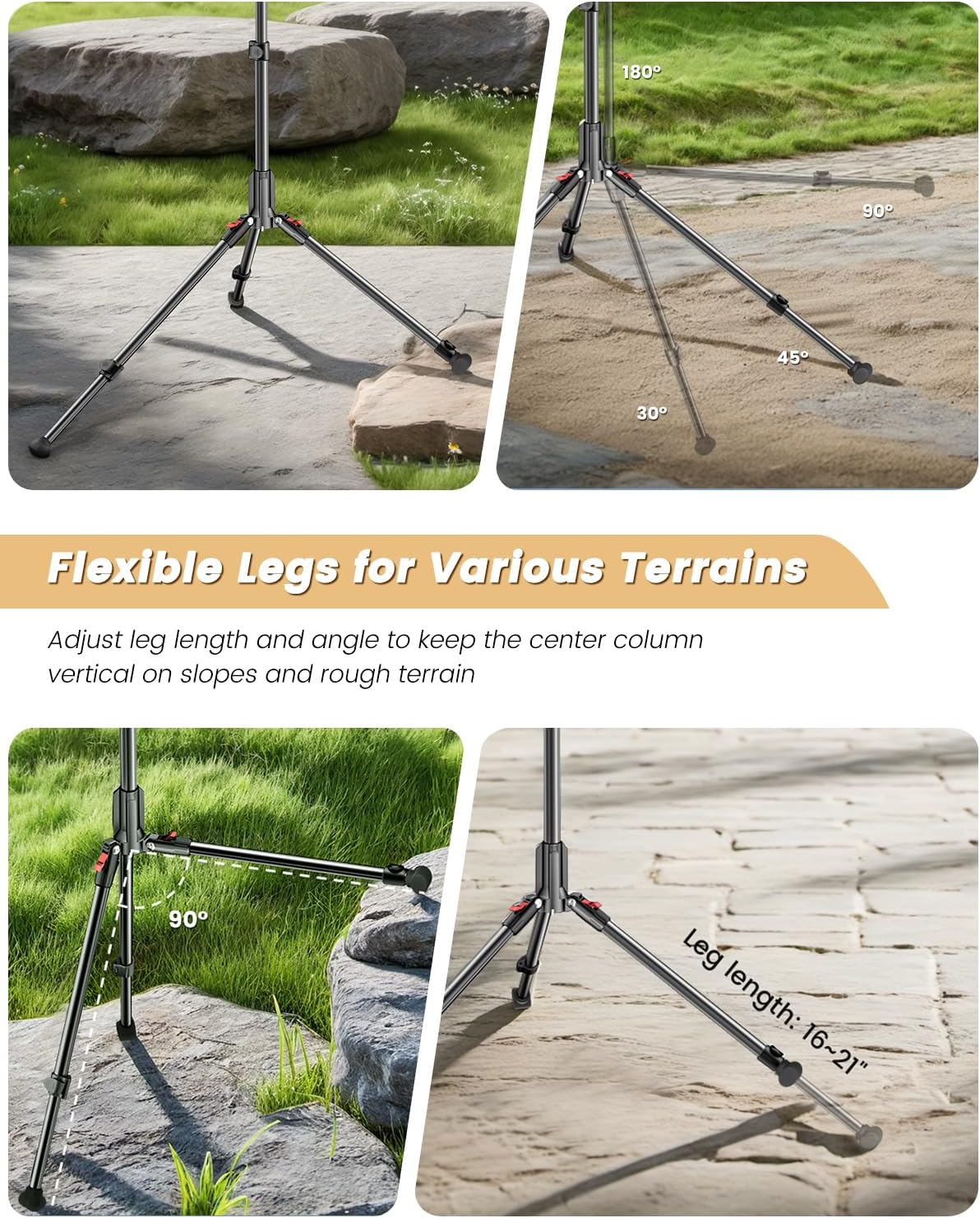
- Unfold the Tripod Legs: Gently spread the tripod legs outwards until they are fully extended and stable. The legs can be adjusted to different angles and lengths for stability on various terrains.
- Extend the Center Column: Loosen the locking knobs on the center column and extend it to your desired height. Securely tighten the locking knobs to prevent slippage.
- Attach the Gooseneck: Screw the flexible gooseneck onto the 1/4" standard screw thread at the top of the tripod's center column. Ensure it is tightened securely.
- Attach the Phone Holder: Mount the phone holder onto the ball head at the end of the gooseneck. Adjust the angle of the phone holder as needed and tighten the locking mechanism. The phone holder accommodates devices 2.8-3.6 inches wide.
- Pair the Wireless Remote:
- Turn on the wireless remote.
- Enable Bluetooth on your smartphone (iPhone or Android).
- Search for available devices and select the remote control to pair.
- Once paired, you can use the remote to trigger your phone's camera shutter from up to 30 feet away.

Video: A demonstration of the CAMBOFOTO 84" Phone Tripod Stand, showcasing its assembly and features, including the gooseneck and remote control.
Operating Instructions
Maximize the functionality of your tripod with these operating guidelines.
- Adjusting Height: Loosen the quick-release levers on the telescopic legs and center column to extend or retract the tripod to your desired height (from 17.3 inches to 84 inches). Ensure all levers are securely locked after adjustment.
- Adjusting Leg Angles: The tripod legs feature adjustable angles. Press the leg angle adjustment tabs near the top of each leg to set them at different spreads for enhanced stability or to adapt to sloped surfaces.
- Using the Flexible Gooseneck: The 9.8-inch steel gooseneck can be bent and positioned at any angle (360° multi-angle adjustments) to achieve precise camera framing. Its robust construction maintains positional memory.
- Securing Your Device: Open the phone holder clamp, insert your smartphone, and ensure it is held firmly. The 360° swivel ball head allows for easy rotation between portrait and landscape orientations.
- Enhancing Stability with Counterweight: For added stability, especially in windy conditions or when using heavier devices, utilize the integrated counterweight hook. Attach a weight (e.g., a bag, sandbag) to the hook located at the bottom of the center column. The tripod supports up to 11 lbs, and the counterweight hook can support up to 33 lbs.
- Using as a Selfie Stick: When fully collapsed and with the gooseneck and phone holder attached, the tripod can function as a tall selfie stick for self-portraits and group photos.


Maintenance
Proper care ensures the longevity and performance of your tripod.
- Cleaning: Wipe the tripod with a soft, dry cloth after each use to remove dust and dirt. For stubborn grime, use a slightly damp cloth and mild soap, then dry thoroughly. Avoid harsh chemicals or abrasive cleaners.
- Lubrication: Periodically check the moving parts and locking mechanisms. If they become stiff, apply a small amount of silicone-based lubricant.
- Storage: Store the tripod in its carrying bag in a cool, dry place away from direct sunlight and extreme temperatures. Ensure all parts are clean and dry before storage.
- Inspection: Regularly inspect the tripod for any signs of wear, damage, or loose parts. Tighten any loose screws or connections.
Troubleshooting
Refer to this section for solutions to common issues.
- Tripod is unstable:
- Ensure all leg sections and the center column are fully extended and their locking mechanisms are securely tightened.
- Adjust the leg angles to create a wider base, especially on uneven surfaces.
- Utilize the counterweight hook by attaching a weight to it for increased stability.
- Wireless remote not connecting:
- Ensure the remote control is turned on and has sufficient battery power.
- Verify Bluetooth is enabled on your smartphone.
- Unpair and re-pair the remote control in your phone's Bluetooth settings.
- Ensure you are within the 30-foot operating range of the remote.
- Gooseneck does not hold position:
- Ensure the gooseneck is securely screwed into the tripod.
- Check if the device attached to the gooseneck exceeds the recommended weight capacity (11 lbs).
Specifications
| Feature | Detail |
|---|---|
| Brand | CAMBOFOTO |
| Model Name | S202 |
| Material | Aluminum, Plastic |
| Item Weight | 1.5 Pounds |
| Weight Limit | 11 Pounds |
| Maximum Height | 84 Inches |
| Minimum Height | 17.3 Inches |
| Folded Size | 17.3 Inches |
| Leg Diameter (Base Spread) | Up to 3.7 feet |
| Gooseneck Length | 9.8 Inches |
| Phone Holder Grip Width | 2.8 - 3.6 Inches |
| Remote Control Range | Up to 30 feet |
| Compatible Devices | Camera, Monitor, Projectors, Telescope, Compact Camcorder, Smartphones |
Warranty and Support
Warranty: The CAMBOFOTO 84" Phone Tripod (Model S202) comes with a 1-year after-sales warranty from the date of purchase. This warranty covers manufacturing defects and material flaws under normal use.
Support: For any questions, technical assistance, or warranty claims, please contact CAMBOFOTO customer service. Refer to the contact information provided with your product packaging or visit the official CAMBOFOTO website for support details.