
anwickjeff headboard-ad-001
Contents
anwickjeff Queen Headboard with Storage, Outlets, USB, and LED Light
Model: headboard-ad-001
1. Safety Information
Please read all instructions carefully before assembly and use. Keep this manual for future reference. Ensure all components are securely fastened before use. Do not exceed the maximum weight capacity of 66 lbs per storage tier. Use only as intended for a queen-size bed frame. Disconnect power before cleaning or making adjustments to electrical components.
2. Package Contents
Verify that all parts are present before beginning assembly. If any parts are missing or damaged, contact customer support.
- Headboard Frame (Metal)
- Upholstered Backrest Panel (Linen Fabric)
- 2-Tier Storage Shelves
- Power Outlet and USB Port Module
- LED Light Strip with Velcro backing
- Remote Control for LED Lights
- Power Cord (4.9-foot)
- 2 Bed Frame Adapters
- Assembly Hardware (screws, bolts, etc.)
- Instruction Manual
3. Setup and Assembly
Follow these steps to assemble your anwickjeff headboard. It is recommended to have two people for assembly.
- Unpack Components: Carefully remove all parts from the packaging and lay them out on a clean, soft surface to prevent scratches.
- Assemble Headboard Frame: Connect the metal frame components according to the diagrams provided in the separate assembly guide. Ensure all screws are tightened securely.
- Install Upholstered Panel: Attach the upholstered backrest panel to the designated section of the headboard frame.
- Attach Storage Shelves: Secure the 2-tier storage shelves to the top of the headboard frame. The height of the first level storage space can be adjusted up to 9.5 inches to accommodate various items.
- Install Power Module: Integrate the power outlet and USB port module into its designated slot on the headboard. Connect the power cord.
- Apply LED Light Strip: Attach the LED light strip to the underside of the top shelf using its Velcro backing. Ensure it is positioned correctly for optimal lighting.
- Connect to Bed Frame: Position the assembled headboard against your queen-size bed frame. Use the provided bed frame adapters if your bed frame has leg holes or requires additional width adjustment. Secure the headboard to the bed frame using appropriate hardware.
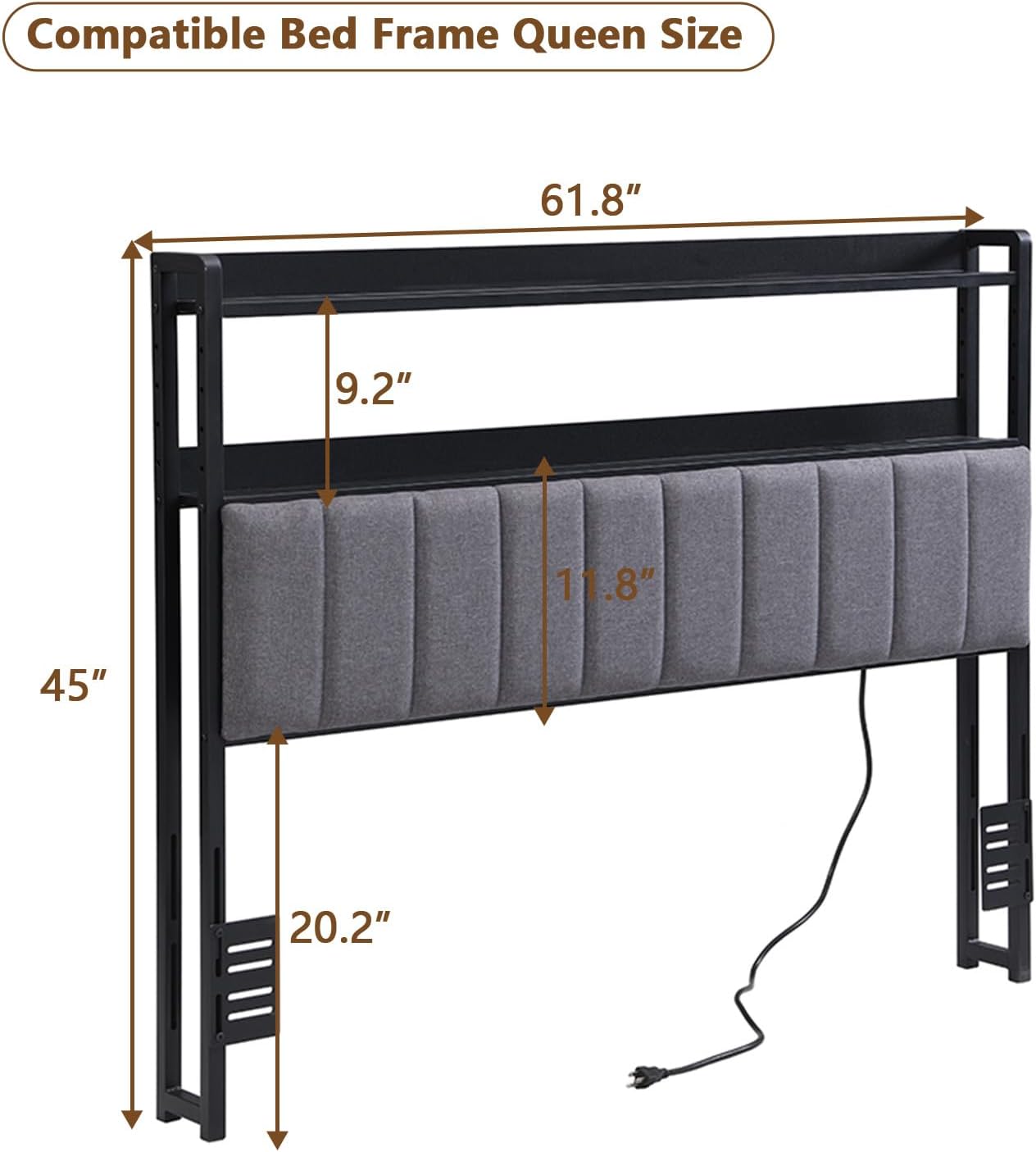
Image: Headboard dimensions for Queen size compatibility. Overall width 61.8 inches, height 45 inches. Storage shelf depth 9.2 inches, upholstered section height 11.8 inches, and adjustable leg height 20.2 inches.

Image: Detail of bed frame adapters with round holes and vertical slots for versatile mounting to various bed frames.
4. Operating Instructions
4.1. Charging Station (Outlets & USB Ports)
The headboard is equipped with 2 standard AC outlets (125V/12A) and 2 USB ports (5V/2A) for convenient charging of electronic devices.
- Plug the headboard's main power cord into a wall outlet.
- Insert your device's power adapter into an AC outlet or connect a USB cable directly to a USB port.
- Ensure devices are compatible with the provided voltage and current.

Image: Detail of the integrated power module featuring two AC outlets and two USB ports, with a 4.9-foot power cord.
4.2. RGB LED Light System
The integrated RGB LED light system can be controlled via a dedicated remote control or a smartphone application.
- Remote Control: Use the provided remote to turn the lights on/off, change colors, adjust brightness, and select lighting modes. Ensure the remote has a working battery.
- Smartphone App: Download the compatible app (refer to the QR code or instructions on the LED light packaging) to control the lights from your smartphone. This allows for advanced customization of colors and effects.

Image: The RGB LED light strip installed on the headboard, along with its remote control for color and mode adjustments.
4.3. 2-Tier Storage Space
Utilize the two levels of storage space for organizing bedside items.
- The height of the first level storage space is adjustable up to 9.5 inches. Adjust it to suit your needs by repositioning the shelf supports during assembly.
- Place items such as mobile phones, books, tablets, watches, and headphones on the shelves.
- Do not exceed the maximum load-bearing capacity of 66 lbs per layer.

Image: The headboard featuring two tiers of storage space, suitable for organizing various bedside items.
5. Maintenance
Proper care will extend the life of your headboard.
- Fabric Care: The upholstered linen fabric should be dry cleaned only. Do not machine wash or tumble dry. For minor spills, gently blot with a clean, dry cloth.
- Frame Care: Wipe the metal frame with a soft, damp cloth. Avoid abrasive cleaners.
- Electrical Components: Ensure the power cord is unplugged before cleaning near the outlets or USB ports. Use a dry cloth to wipe dust.
- Regular Checks: Periodically check all screws and connections to ensure they remain tight.
6. Troubleshooting
| Problem | Possible Cause | Solution |
|---|---|---|
| Outlets/USB ports not working | Power cord not plugged in; loose connection; faulty wall outlet. | Ensure the headboard's power cord is securely plugged into a functional wall outlet. Check the connection of the power module to the headboard. Test the wall outlet with another device. |
| LED lights not turning on/changing color | Remote battery dead; LED strip not connected; app not paired. | Replace the remote control battery. Check that the LED light strip is properly connected to its power source. Ensure the smartphone app is correctly paired with the LED system. |
| Headboard feels unstable | Loose assembly screws; improper attachment to bed frame. | Retighten all assembly screws. Ensure the headboard is securely attached to your bed frame using the provided adapters and hardware. |
| Items falling off storage shelves | Headboard not flush with wall; excessive weight. | Ensure the headboard is stable and as close to the wall as possible. Do not exceed the 66 lbs weight capacity per shelf. |
7. Specifications
| Feature | Detail |
|---|---|
| Brand | anwickjeff |
| Model Number | headboard-ad-001 |
| Size | Queen |
| Material | Linen Fabric (Upholstery), Metal (Frame) |
| Color | Black |
| Dimensions (L x W x H) | 61.8" x 5.51" x 45" |
| Item Weight | 29.8 pounds |
| Storage Capacity (each tier) | Max. 66 lbs |
| Power Outlets | 2 x AC Outlets (125V/12A) |
| USB Ports | 2 x USB Ports (5V/2A) |
| Special Features | Adjustable Height, 2-Tier Storage, LED Lights, Power Outlet, USB Ports |
| Mounting Type | Bed Frame Mount |
| Product Care | Dry Clean Only (Fabric) |
8. Warranty and Support
For warranty information or technical support, please refer to the documentation included with your purchase or contact anwickjeff customer service directly. Keep your purchase receipt for warranty claims.
Customer Service: Please visit the anwickjeff store on Amazon or refer to the contact information provided in your product packaging.
Documents and downloads
Ask a question about this manual
Ask about setup, troubleshooting, compatibility, parts, safety, or missing instructions. Manuals+ will review the question and use this page’s manual context to help answer it.