Introduction
This manual provides detailed instructions for the safe and efficient use of your Honeywell HWT-HJ3 Wide Desk Lamp. This 22W full-spectrum LED light bar is designed for home office environments, offering eye-caring illumination for large desks and dual monitor setups. It features a 3-section adjustable design with stepless dimming and adjustable color temperature.
What's in the Box
- Architect Desk Lamp
- Adapter
- User Manual
Setup and Assembly
Follow these steps to set up your Honeywell HWT-HJ3 Wide Desk Lamp:
- Attach the Clamp: Secure the anti-slip clamp to your desk. Ensure the desk surface is clean and the clamp is tightened firmly for stability. The clamp is designed to save valuable desk space.
- Assemble the Lamp Arm: Insert the lamp arm into the clamp base. Ensure it is securely seated.
- Attach the Lamp Head: Connect the lamp head to the top of the arm. The design allows for quick and easy attachment.
- Connect Power: Plug the adapter into the lamp's power input and then into a suitable power outlet.

Image: Detailed view of the clamp mechanism securing the lamp to a desk.
Video: Official Honeywell Smart Lighting video demonstrating the assembly and features of the HJ3 Clamp Desk Lamp.
Operating Instructions
Controls
The lamp features intuitive touch controls located on the top of the light bar:
- Power Button: Touch to turn the lamp on or off.
- Brightness Adjustment: Use the up (^) and down (v) arrows to adjust brightness from 10% to 100%.
- Color Temperature Cycle: Touch the sun/gear icon to cycle through four color temperature modes (3000K, 4000K, 5000K, 5700K).

Image: Touch control panel for power, brightness, and color temperature selection.
Adjusting the Lamp
The lamp's 3-section design allows for extensive adjustability:
- Arm Pivots: The main arm can pivot 360 degrees at its base and 175 degrees at its mid-joint, allowing you to position the light precisely over your workspace.
- Light Bar Rotation: The individual light bars can rotate 270 degrees, enabling focused or wide-area illumination.
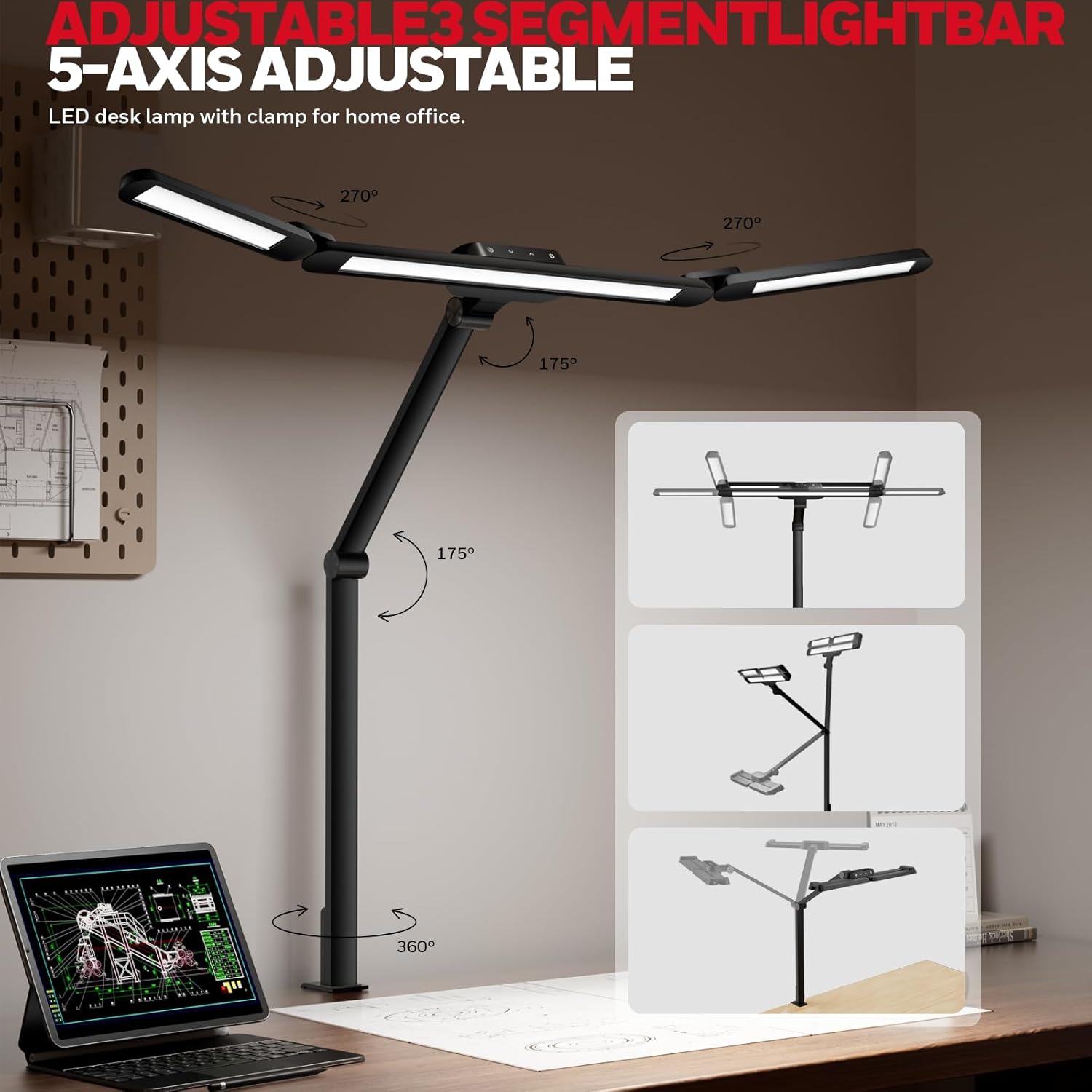
Image: Illustration of the lamp's multi-directional adjustability.
Video: Demonstration of the lamp's flexible adjustments and various lighting modes.
Eye-Caring Technology
The Honeywell HWT-HJ3 lamp is equipped with advanced eye-caring features:
- RG0 Low Blue Light: Minimizes harmful blue light emissions to reduce eye strain during prolonged use.
- Flicker-Free Performance: Ensures stable illumination without flickering, which can cause eye fatigue.
- High CRI (Ra≥92): Provides accurate color rendering, making colors appear natural and vibrant.

Image: Visual representation of the lamp's eye-caring features and high Color Rendering Index (CRI).
Maintenance
To ensure the longevity and optimal performance of your desk lamp, follow these maintenance guidelines:
- Cleaning: Use a soft, dry cloth to wipe the lamp. Avoid abrasive cleaners or solvents that may damage the finish or LED components.
- Power Disconnection: Always unplug the lamp from the power outlet before cleaning or performing any maintenance.
- LED Lifespan: The LED components are rated for over 30,000 hours of use and do not require replacement.
Troubleshooting
If you encounter any issues with your Honeywell HWT-HJ3 Wide Desk Lamp, refer to the following common troubleshooting steps:
- Lamp Not Turning On: Ensure the power adapter is securely plugged into both the lamp and a working electrical outlet. Test the outlet with another device.
- Flickering Light: Verify that the power connection is stable. If flickering persists, try plugging the lamp into a different outlet.
- Controls Unresponsive: Ensure your fingers are clean and dry when using the touch controls. If unresponsive, unplug the lamp for 30 seconds and then plug it back in to reset.
For further assistance, please contact Honeywell customer support.
Specifications
| Feature | Specification |
|---|---|
| Model Name | HWT-HJ3 |
| Wattage | 22 watts |
| Brightness | 800 Lumen (Max) |
| Color Temperature | 3000K–5700K (Adjustable) |
| Control Method | Touch |
| Material | Aluminum |
| Mounting Type | Clamp |
| Product Dimensions | 23.62"D x 37.4"W x 6.89"H |
| Item Weight | 2.79 pounds |
| Special Feature | Corded, Eye-friendly natural light simulation |
Warranty and Support
For warranty information or technical support, please refer to the contact details provided in the packaging or visit the official Honeywell Smart Lighting website. Keep your purchase receipt for warranty claims.


