
1. Introduction
Thank you for choosing the GLOBAL-PTT 5288 Plus Two-Way Radio. This device offers a unique hybrid communication solution, combining nationwide 4G LTE Push-to-Talk over Cellular (PoC) with traditional analog UHF/VHF radio capabilities. Designed for professionals requiring reliable and versatile communication, the 5288 Plus ensures connectivity in diverse environments.
Please read this manual thoroughly before operating your radio to ensure proper use, optimal performance, and safety.
2. What's in the Box
Upon opening your GLOBAL-PTT 5288 Plus package, please verify that all items listed below are present and in good condition:
- 2 x GLOBAL-PTT 5288 Plus Radios
- 2 x Pre-installed SIM Cards (with 1-year data plan included)
- 2 x Chargers
- 1 x User Manual (this document)
- 2 x Antennas
If any items are missing or damaged, please contact your vendor or GLOBAL-PTT customer support immediately.
3. Product Overview
3.1. Radio Components and Function Key Analysis
Familiarize yourself with the various parts and controls of your 5288 Plus radio:
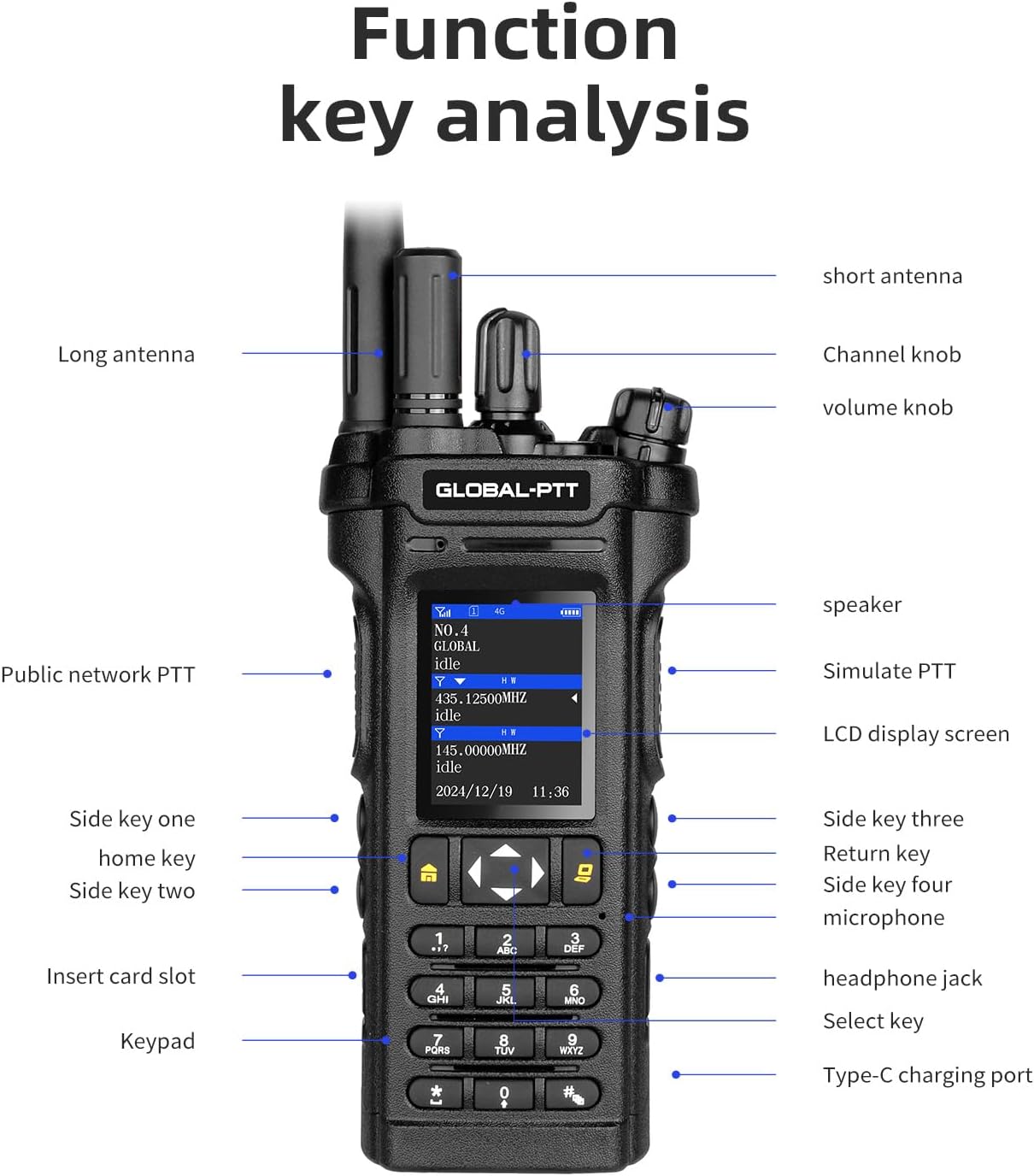
Image Description: A detailed diagram of the GLOBAL-PTT 5288 Plus radio, labeling its various components. Key labels include: Long antenna, Short antenna, Channel knob, Volume knob, Speaker, Simulate PTT, LCD display screen, Side key one (home key), Side key two, Side key three, Side key four (microphone), Insert card slot, Headphone jack, Keypad, Select key, and Type-C charging port.
- Antennas (Long/Short): Used for signal transmission and reception. Choose the appropriate antenna based on your operational needs.
- Channel Knob: Rotates to select different channels in analog mode.
- Volume Knob: Adjusts the audio output level.
- Public Network PTT (Push-to-Talk) Button: Activates transmission in 4G LTE PoC mode.
- Simulate PTT Button: Activates transmission in analog radio mode.
- LCD Display Screen: Shows operational status, channel information, battery level, and network status.
- Side Keys (1, 2, 3, 4): Programmable keys for quick access to various functions (e.g., Home, Return, Microphone).
- Insert Card Slot: For SIM card access (pre-installed).
- Headphone Jack: For connecting external audio accessories.
- Keypad: For manual frequency input, menu navigation, and dialing.
- Select Key: Used for menu selection and confirmation.
- Type-C Charging Port: For charging the radio's battery.
3.2. Multiple Core Functions
The 5288 Plus is engineered with a range of features to enhance communication efficiency and durability:

Image Description: An infographic highlighting the key features of the GLOBAL-PTT 5288 Plus radio. Icons and text indicate: Global-PTT + Analog Signal, 10W Power, UV Double Band, High Definition Sound Quality, Type-C Charging, Durable and Drop Resistant, and Dual Screen Display.
- Hybrid Communication: Seamlessly switches between 4G LTE PoC for nationwide coverage and traditional analog UHF/VHF for local communication.
- High Power Output: 10W power for extended range and strong signal penetration.
- Dual Band (UHF/VHF): Supports both Ultra High Frequency (UHF: 400-490MHz) and Very High Frequency (VHF: 136-174MHz) for versatile use.
- High Definition Sound: Ensures clear and crisp audio transmission and reception.
- Type-C Charging: Modern and convenient charging interface.
- Durable and Drop Resistant: Built to withstand demanding environments.
- Dual Screen Display: Provides comprehensive information at a glance, supporting duplex transmission and reception.
3.3. Dual Mode Intercom: Public Network (4G LTE) vs. Simulation (Analog)
The 5288 Plus offers unparalleled flexibility by integrating two distinct communication modes:

Image Description: Two GLOBAL-PTT 5288 Plus radios are shown in an outdoor setting. One is labeled "Public network" (referring to 4G LTE PoC) and the other "simulation" (referring to analog radio), illustrating the dual-mode intercom capability.
- Public Network (4G LTE PoC): Utilizes cellular networks for unlimited nationwide coverage. Ideal for long-distance communication where cellular service is available.
- Simulation (Analog Radio): Operates on traditional UHF/VHF frequencies. Best for local, direct radio-to-radio communication, especially in areas without cellular coverage.
3.4. Dual Screen Display
The radio features a dual screen display for enhanced usability and information access:
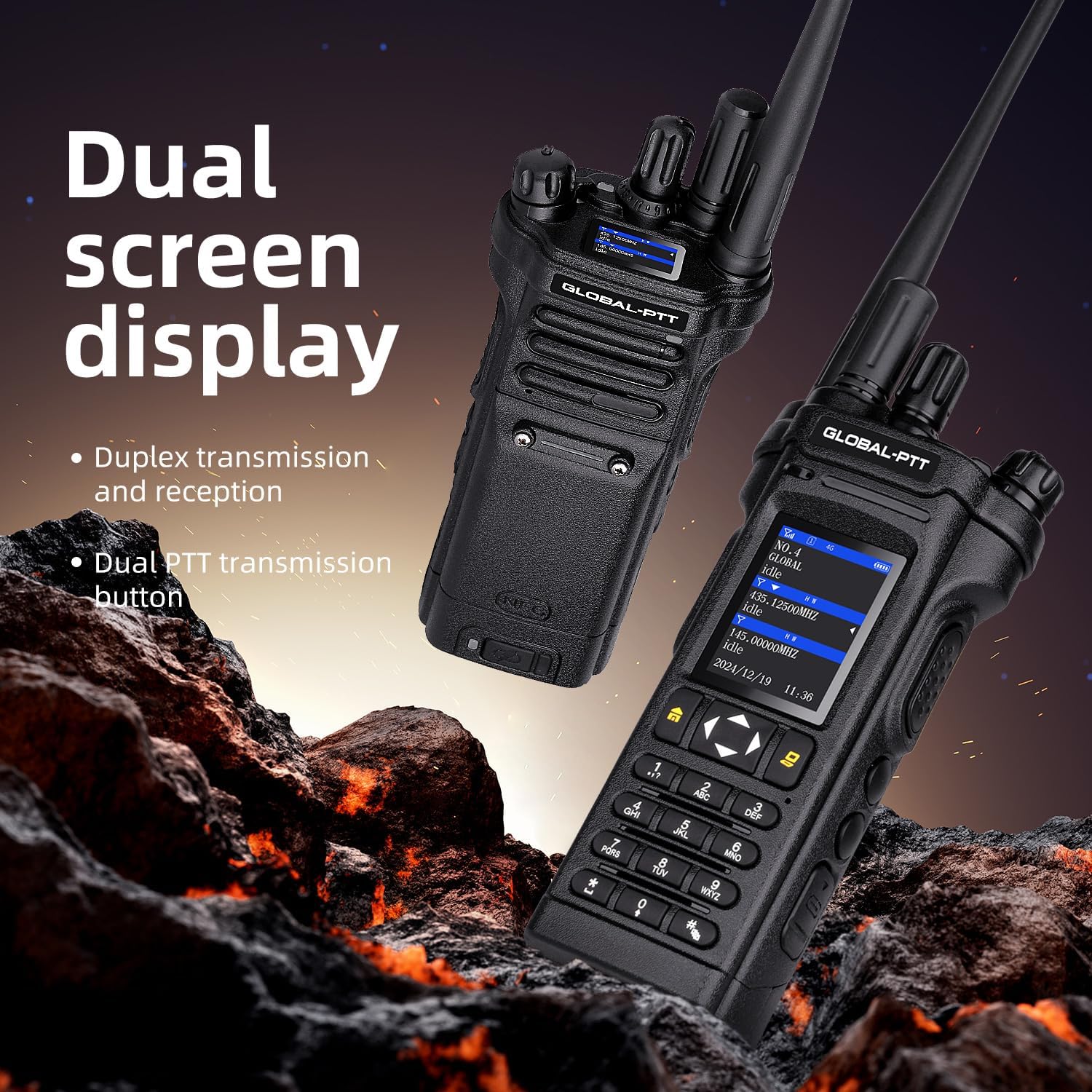
Image Description: Two GLOBAL-PTT 5288 Plus radios are depicted, highlighting their dual screen display. The text emphasizes "Duplex transmission and reception" and "Dual PTT transmission button," indicating the radio's ability to manage two communication paths simultaneously.
- Duplex Transmission and Reception: Allows for simultaneous transmission and reception, similar to a phone call, in certain modes.
- Dual PTT Transmission Button: Enables easy switching or management of two separate communication channels.
4. Setup
4.1. Charging the Battery
Before initial use, fully charge the radio's battery. The 5288 Plus is equipped with an 8800mAh large capacity lithium battery and a convenient Type-C charging port.

Image Description: A close-up image of the GLOBAL-PTT 5288 Plus radio showing the Type-C charging port with a cable inserted. Text highlights "Type-C intelligent charging" and "8800mAh Large capacity lithium battery."
- Connect the provided Type-C charger cable to the radio's charging port.
- Plug the charger into a standard AC power outlet.
- The charging indicator on the radio's display will show charging status. Charge until the battery icon indicates a full charge.
- Unplug the charger once charging is complete.
Note: Use only the charger provided or approved by GLOBAL-PTT to prevent damage to the radio and battery.
4.2. Attaching the Antenna
Screw the appropriate antenna (long or short) clockwise onto the antenna connector at the top of the radio until it is finger-tight. Do not overtighten.
4.3. Initial Power On
- Ensure the battery is charged and the antenna is attached.
- Rotate the Volume Knob clockwise to power on the radio.
- The display will light up, and the radio will perform a self-check.
- Adjust the Volume Knob to a comfortable listening level.
5. Operating the Radio
5.1. 4G LTE PoC Mode (Public Network)
This mode provides unlimited nationwide range using the pre-installed SIM card and data plan.

Image Description: A close-up of the GLOBAL-PTT 5288 Plus radio held by a gloved hand, with a vehicle in the background. Text highlights "Global LTE frequency band," "High speed network without delay," "4G global-ptt," and "5000 kilometer signal," emphasizing its wide-area communication capabilities.
- Network Connection: The radio will automatically connect to the 4G LTE network upon power-on if within coverage. The display will show network signal strength.
- Selecting a Group/Contact: Use the keypad and navigation keys to select the desired communication group or individual contact from your pre-programmed list.
- Transmitting: Press and hold the Public Network PTT button (typically on the left side of the radio) to transmit your voice. Speak clearly into the microphone.
- Receiving: Release the Public Network PTT button to listen. The radio will automatically receive incoming transmissions from your selected group/contact.
5.2. Analog Mode (UHF/VHF)
This mode allows for traditional direct radio-to-radio communication within range, independent of cellular networks.
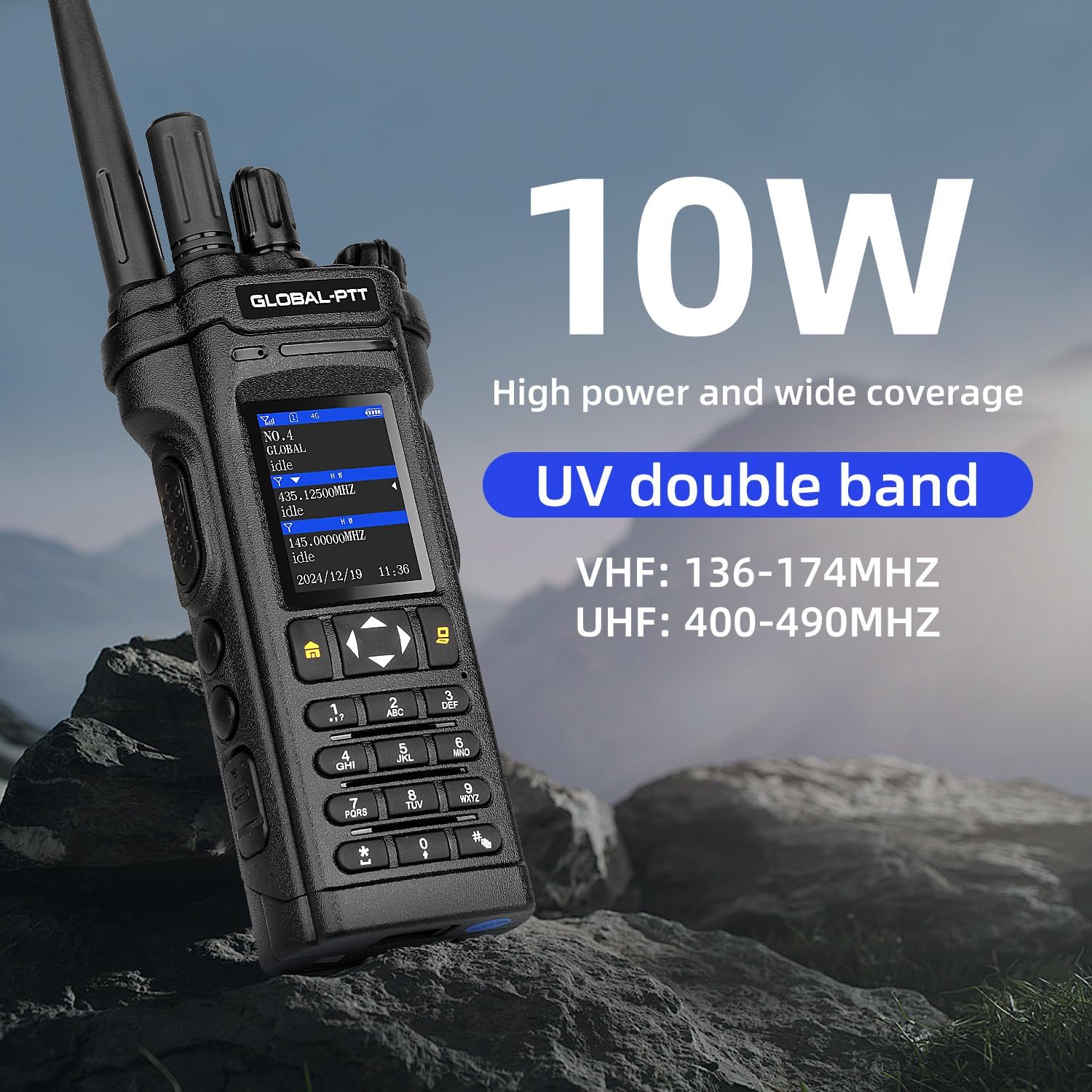
Image Description: The GLOBAL-PTT 5288 Plus radio is shown in an outdoor setting, emphasizing its 10W high power output and UV double band capabilities. Text specifies VHF: 136-174MHz and UHF: 400-490MHz frequency ranges.
- Switching to Analog Mode: Refer to your radio's menu or programmable side keys for the function to switch between PoC and Analog modes.
- Selecting a Channel/Frequency:
- Using Channel Knob: Rotate the Channel Knob to select a pre-programmed analog channel.
- Manual Frequency Input: Use the keypad to directly input a desired UHF or VHF frequency (e.g., 145.000MHz for VHF, 435.125MHz for UHF).
- Transmitting: Press and hold the Simulate PTT button (typically on the right side or a designated side key) to transmit. Speak clearly into the microphone.
- Receiving: Release the Simulate PTT button to listen for incoming transmissions on the selected channel/frequency.
5.3. Basic Communication Etiquette
- Always listen before transmitting to avoid interrupting ongoing conversations.
- Keep transmissions brief and clear.
- Identify yourself when initiating a call.
- Use standard radio procedures (e.g., "Over" to indicate end of transmission, "Clear" to indicate end of conversation).
6. Maintenance
6.1. Cleaning the Radio
- Wipe the radio's surface with a soft, damp cloth. Do not use harsh chemicals or abrasive cleaners.
- Ensure the charging port and headphone jack are free of dust and debris.
- The radio is water-resistant, but avoid submerging it in water.
6.2. Battery Care
- Avoid fully discharging the battery frequently.
- Store the radio in a cool, dry place when not in use for extended periods.
- If storing for a long time, charge the battery to about 50% capacity.
7. Troubleshooting
This section addresses common issues you might encounter with your GLOBAL-PTT 5288 Plus radio.
| Problem | Possible Cause | Solution |
|---|---|---|
| Radio does not power on. | Battery is depleted or not properly installed. | Charge the battery. Ensure the battery is securely installed. |
| No signal in 4G LTE PoC mode. | Out of cellular coverage area; SIM card issue. | Move to an area with better cellular reception. Check if the SIM card is properly inserted. Contact customer support if the issue persists. |
| Cannot transmit in Analog mode. | Incorrect frequency/channel selected; radio in PoC mode. | Verify the selected frequency/channel. Ensure the radio is switched to Analog mode. |
| Poor audio quality. | Low signal strength; volume too low/high; microphone/speaker obstructed. | Move closer to the other radio (Analog) or to a better network area (PoC). Adjust volume. Clear any obstructions from microphone/speaker. |
| Battery drains quickly. | Frequent transmission; high backlight setting; aging battery. | Reduce transmission time. Lower backlight brightness. Consider replacing the battery if it's old. |
If the problem persists after attempting these solutions, please contact GLOBAL-PTT customer support for further assistance.
8. Specifications
| Feature | Detail |
|---|---|
| Model Number | 5288 Plus |
| Communication Modes | 4G LTE PoC (Push-to-Talk over Cellular), Analog UHF/VHF |
| Power Output | 10W |
| Frequency Range (VHF) | 136-174MHz |
| Frequency Range (UHF) | 400-490MHz |
| Battery Capacity | 8800mAh Lithium Battery |
| Charging Port | Type-C |
| Display | Dual Screen LCD |
| Dimensions (L x W x H) | 8.5 x 2.5 x 1.5 inches (approx.) |
| Weight | 15.2 ounces (approx.) |
| Water Resistance Level | Water Resistant |
| Number of Channels | 256 |
| Talking Range Maximum (PoC) | 5000 Kilometer (Nationwide Coverage) |
9. Warranty and Support
Your GLOBAL-PTT 5288 Plus radio comes with a 1-year manufacturer's warranty from the date of purchase, covering defects in materials and workmanship.
For warranty claims, technical support, or any inquiries not covered in this manual, please contact GLOBAL-PTT customer service through the following channels:
- Website: Visit the official GLOBAL-PTT website for support resources and contact information.
- Email: Refer to your purchase documentation for direct email support.
- Phone: Contact numbers may be available on the GLOBAL-PTT website or your product packaging.
Please have your product model number (5288 Plus) and purchase date ready when contacting support.

