
1. Introduction
This manual provides detailed instructions for the assembly, operation, maintenance, and troubleshooting of your new chartustriable 95-inch Fireplace TV Stand. Please read all instructions carefully before assembly and use to ensure safe and proper operation.
The Fireplace TV Stand is designed to accommodate televisions up to 100 inches and features a 60-inch electric fireplace, integrated LED lighting, and a convenient charging station.
2. Safety Information
- Ensure all electrical connections comply with local codes and regulations.
- Do not overload the power outlets on the charging station.
- Keep flammable materials at least 3 feet (0.9 meters) away from the front of the electric fireplace.
- The electric fireplace includes an overheat cut-off function for safety. If the unit overheats, it will automatically shut off.
- Always unplug the unit from the power outlet before cleaning or performing any maintenance.
- This product is heavy and requires two people for safe assembly and relocation.
- Utilize the included anti-tipping device to secure the TV stand to the wall, preventing accidental tipping.
3. Package Contents
Your chartustriable Fireplace TV Stand will arrive in two separate packages. Please ensure both packages are received before beginning assembly.
- All necessary engineered wood panels for the TV stand structure.
- 60-inch Electric Fireplace insert.
- LED light strips and associated power supply.
- Charging station with 2 power outlets and 2 USB ports.
- Hardware kit (screws, dowels, cam locks, hinges, handles, anti-tipping device, etc.).
- Remote control for electric fireplace and LED lights.
- Instruction Manual.
4. Assembly Instructions
It is recommended that two people complete the assembly process. Lay out all components on a soft, clean surface (such as a carpet or the opened cardboard packaging) to prevent scratches. Identify all parts and hardware using the provided labels and diagrams.

Figure 4.1: Overall dimensions of the 95.3"W x 15.8"D x 33.1"H Fireplace TV Stand. Note the 60.2" wide electric fireplace opening and the 17.1" height for the fireplace insert.
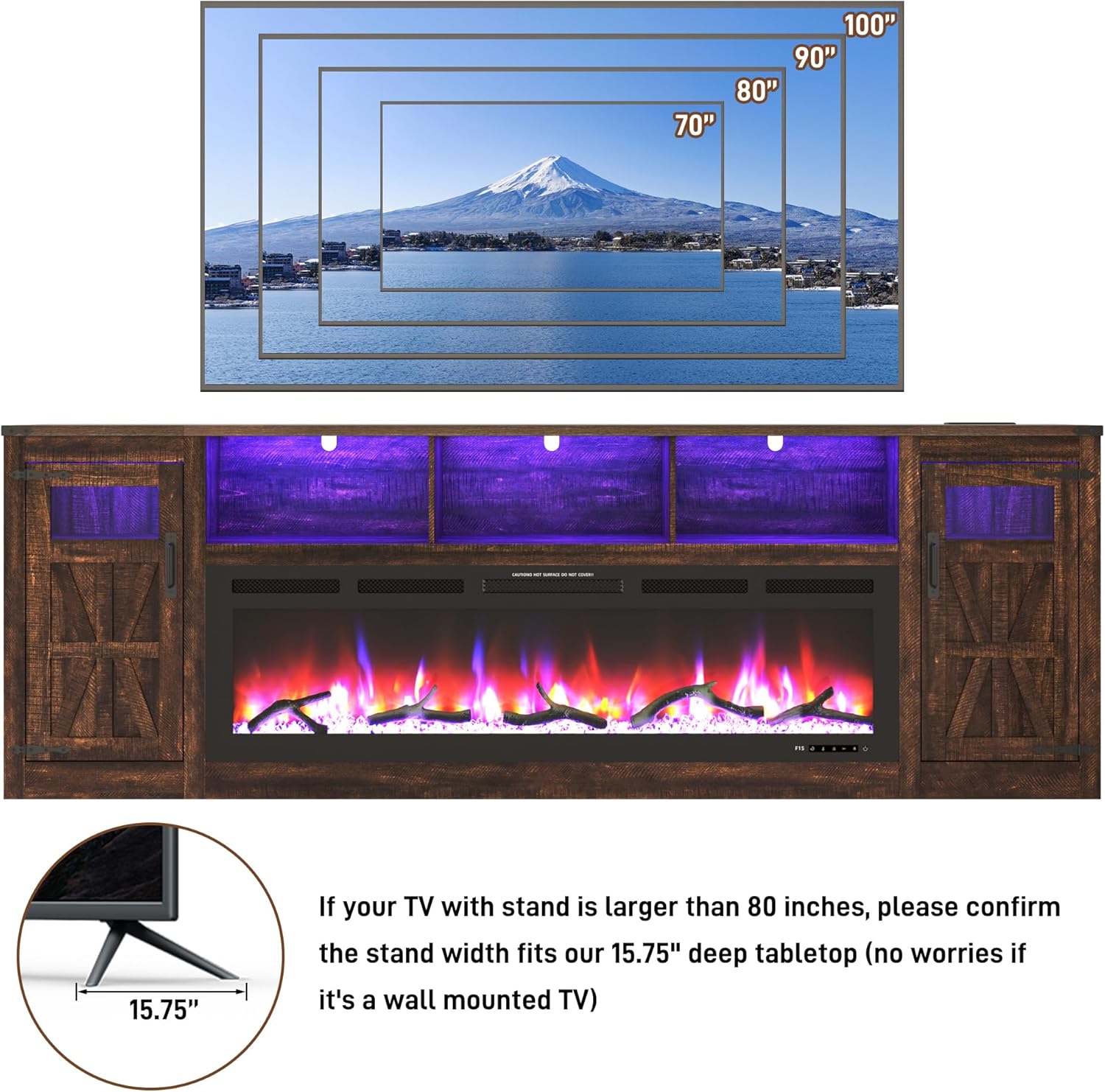
Figure 4.2: The TV stand can accommodate TVs up to 100 inches. For TVs larger than 80 inches, confirm the stand's 15.75" deep tabletop is suitable. Wall-mounted TVs do not require tabletop depth consideration.
Assembly Video Guide
Video 4.1: A detailed assembly video for the 95-inch Fireplace TV Stand. This video guides you through each step of the construction process, from unpacking to final setup.
Key Assembly Steps:
- Unpacking: Carefully open the packaging. Place furniture panels on protective layers to avoid scratches. Organize hardware by number for easy access.
- Base Construction: Assemble the base frame using the designated panels and hardware.
- Side and Center Supports: Attach the vertical side and center support panels.
- Shelving: Install the adjustable shelves within the storage compartments.
- Top Panel: Secure the top panel to the assembled structure.
- Door Installation: Attach the rustic barn doors using the provided hinges and handles.
- Electric Fireplace Insert: Carefully slide the 60-inch electric fireplace into its designated opening. Secure it according to the fireplace's specific instructions.
- LED Lights & Charging Station: Install the LED light strips in the semi-open compartments and secure the charging station into the tabletop cutout. Connect all electrical components.
- Anti-Tipping Device: Securely attach the anti-tipping device to the back of the TV stand and to a wall stud.
5. Operating Instructions
5.1 Electric Fireplace
The 60-inch electric fireplace provides realistic 3D flame effects and supplemental heating. It can be controlled via the unit's panel or the included remote control.

Figure 5.1: The electric fireplace remote control allows for easy adjustment of settings. Multiple flame colors and ember bed colors are available.
- Power (ON/OFF): Press the power button to turn the fireplace on or off.
- Flame Color: Cycle through various flame colors (e.g., red, blue, green, purple, white, and combinations) to match your ambiance.
- Ember Bed Color: Select from multiple ember bed colors (e.g., clear crystal, charcoal) to enhance the visual effect.
- Brightness (Dimmer): Adjust the flame brightness through 5 levels.
- Heat Output: The 5000 BTU heater can effectively warm areas up to 400 square feet. Adjust the temperature setting from 60°F to 99°F.
- Timer: Set the automatic shut-off timer for 0.5 to 8 hours.
- Child Lock: Activate the child lock feature for added safety.
5.2 LED Lights
The integrated LED light strips enhance the visual appeal of the TV stand and can be synchronized with the fireplace flames.

Figure 5.2: The LED light strips offer over 6000 colors, adjustable brightness, timer function, music mode, and microphone mode, controllable via app or remote.
- Control the LED lights using the dedicated remote control or a compatible smartphone application.
- Choose from over 6000 colors and adjust brightness levels.
- Utilize music mode or microphone mode for dynamic lighting effects.
5.3 Charging Station
The built-in charging station provides convenient power access for your electronic devices.
- The charging station includes two standard power outlets and two USB ports.
- Connect mobile phones, tablets, and other electronic devices for charging.
6. Maintenance
- Cleaning: Wipe surfaces with a soft, damp cloth. Avoid harsh chemicals or abrasive cleaners that may damage the engineered wood finish.
- Dusting: Regularly dust the unit to prevent buildup.
- Fireplace Care: Ensure the electric fireplace vents are clear of obstructions for proper operation and to prevent overheating.
- Hardware Check: Periodically check all screws and connections to ensure they remain tight.
7. Troubleshooting
- Fireplace Not Turning On: Check if the power cord is securely plugged into a working outlet. Verify the power button on the unit or remote is pressed. Check the circuit breaker.
- No Heat Output: Ensure the heat function is activated and the temperature setting is above the ambient room temperature. Check for any obstructions around the heater vents.
- LED Lights Not Working: Check the power connection for the LED strips. Ensure the remote control batteries are functional.
- Charging Station Not Working: Verify the main power cord for the TV stand is plugged in. Test the outlets with another device.
- Wobbly Stand: Ensure all assembly screws are tightened. Adjust leveling feet if applicable. Confirm the anti-tipping device is properly installed.
8. Specifications
| Feature | Specification |
|---|---|
| Brand | chartustriable |
| Model Name | Fireplace TV Stand |
| Model Number | 4LKFKQU03814 |
| Product Dimensions | 95.3"W x 15.8"D x 33.1"H |
| Material | Engineered Wood |
| Color | Rustic Brown |
| Style | Farmhouse |
| Installation Type | Freestanding |
| Power Source | Corded Electric |
| Heat Output | 5000 British Thermal Units (BTU) |
| Heating Coverage | 400 sq ft |
| Special Features | Multicolor Flame, TV Stand, LED Lights, Charging Station |
| Item Weight | 206 Pounds |
9. Warranty and Support
This chartustriable product comes with a limited warranty. For specific warranty details, please refer to the documentation included in your product packaging or contact customer support.
Customer Support
For any questions regarding assembly, operation, or troubleshooting, please contact our 24-hour customer service team. Contact information can be found on the product packaging or our official website.

Figure 9.1: Our dedicated customer service team is available to assist you.