
Introduction
Thank you for choosing the Gaiatop Small Handheld Personal Fan, Model HF-16. This compact and powerful fan is designed to provide instant cooling with its high-speed turbo airflow, making it ideal for travel, outdoor activities, and everyday use. This manual provides essential information for the safe and efficient operation, maintenance, and troubleshooting of your device.
Product Overview
The Gaiatop HF-16 features a high-speed brushless motor, an LED display for speed and battery life, and a durable design for portability.

Image: Front view of the Gaiatop handheld fan, highlighting the LED display and control button. The display shows '100%' indicating full power or charge. Text on the image indicates 'Double Tap to Power On/Off', 'Hold for Fine-Tuned Airflow', and 'Tap for 5-Speed Settings'.
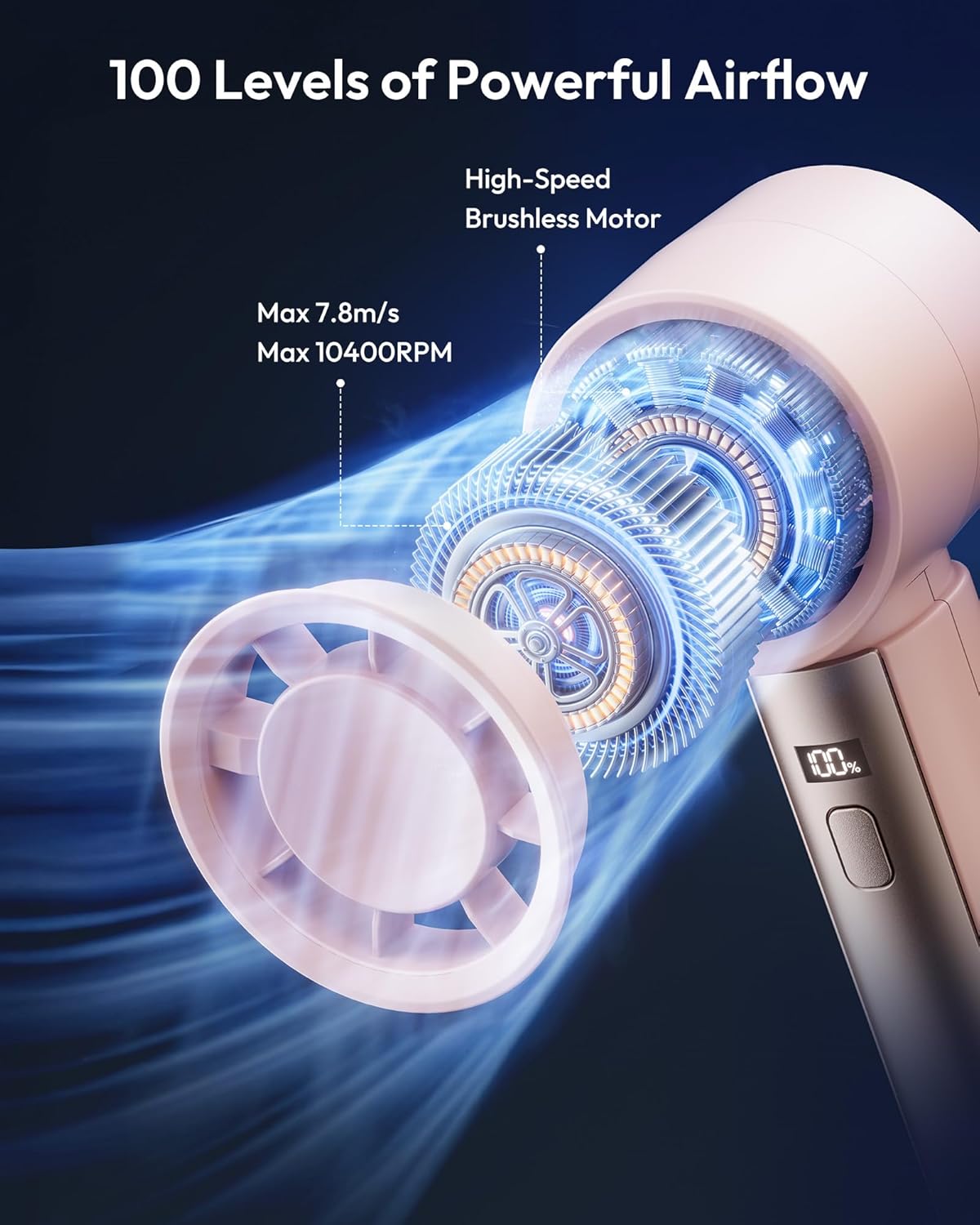
Image: Internal diagram of the fan, illustrating the high-speed brushless motor and the powerful airflow it generates. Specifications like Max 7.8m/s wind speed and Max 10400 RPM are visible.
Setup
Initial Charging
Before first use, fully charge the fan using the provided USB Type-C charging cable. Connect the cable to the fan's charging port and a compatible USB power source (e.g., wall adapter, computer USB port, power bank). The LED display will indicate charging status.
Attaching the Lanyard
To attach the anti-loss wrist strap (lanyard), fold the tip of the lanyard into a small hook. This will allow it to slide through the designated hole on the fan more easily. Once through, gently pull to secure it.
Operating Instructions
Power On/Off
- To power on the fan, double-click the control button.
- To power off the fan, double-click the control button again.
Adjusting Fan Speed
- To adjust the fan speed in 5-speed increments, tap the control button. The fan offers 5 distinct speed levels.
- For precise airflow control, hold the control button. This allows you to fine-tune the speed from level 1 to 100. Release the button when the desired speed is reached.
LED Display
The integrated LED screen displays the current speed level and the remaining battery runtime. The display will automatically turn off after 10 seconds to conserve energy. Press the control button once to illuminate the display again when needed.

Image: A woman using the Gaiatop handheld fan while hiking, showcasing its portability and effectiveness during outdoor activities. The fan is attached to her wrist with a lanyard.
Charging
The Gaiatop HF-16 fan is equipped with a rechargeable battery, providing up to 7.5 hours of runtime depending on the speed setting. To charge, use the included USB Type-C cable. The LED display will show the charging progress and battery level.

Image: The Gaiatop handheld fan being charged via a USB-C cable, with a snowy background suggesting its cooling capabilities.
Maintenance
To ensure optimal performance and longevity of your fan, follow these maintenance guidelines:
- Cleaning: Use a soft, dry cloth to wipe the exterior of the fan. Do not use abrasive cleaners or immerse the fan in water.
- Storage: When not in use for extended periods, store the fan in a cool, dry place away from direct sunlight and extreme temperatures. Ensure the battery is partially charged (around 50%) before storage to prolong battery life.
- Avoid Obstructions: Keep the fan's air inlet and outlet clear of dust, lint, and other obstructions to maintain efficient airflow.
Troubleshooting
If you encounter any issues with your Gaiatop fan, please refer to the following common problems and solutions:
| Problem | Possible Cause | Solution |
|---|---|---|
| Fan does not turn on | Low battery; Incorrect power-on sequence | Charge the fan fully. Double-click the power button to turn on. |
| Weak airflow | Low battery; Obstruction in air inlet/outlet; Low speed setting | Charge the fan. Clear any obstructions. Increase fan speed. |
| Fan is noisy or makes a high-pitched whine | Possible manufacturing defect; Internal component issue | While some noise is normal at higher speeds, an unusual whine may indicate an issue. Contact customer support if the noise is excessive or persistent. |
| Slow charging or fan gets warm during charging | Using an incompatible charger; Normal heat dissipation | Ensure you are using a standard 5V USB charger. Slight warmth during charging is normal. If it becomes excessively hot, discontinue charging and contact support. |
| LED display not working | Display timed out; Malfunction | Press the control button once to reactivate the display. If it remains off, contact customer support. |
Specifications
| Feature | Detail |
|---|---|
| Brand | Gaiatop |
| Model Name | HF-16 |
| Product Dimensions (D x W x H) | 2.3" x 2.2" x 6.3" |
| Item Weight | 0.21 Kilograms (approx. 7.4 oz) |
| Power Source | Battery Powered |
| Connector Type | USB Type C |
| Number of Speeds | 5 (with 100 fine-tune levels) |
| Max Wind Speed | 7.8 m/s |
| Max Motor Speed | 10400 RPM |
| Noise Level | 58 Decibels |
| Runtime | Up to 7.5 hours (depending on speed) |
| Material | Acrylonitrile Butadiene Styrene (ABS) |
| Included Components | Charging Cable, Hand Strap |
Safety Information
Please read and follow these safety precautions to prevent injury or damage:
- Do not insert fingers or any objects into the fan blades.
- Keep the fan away from water and other liquids.
- Do not disassemble, modify, or attempt to repair the fan yourself. Contact qualified personnel for service.
- Keep out of reach of children and pets.
- Do not expose the fan to extreme temperatures or direct sunlight for prolonged periods.
- Use only the provided charging cable or a certified USB Type-C cable for charging.
Official Product Videos
Small Handheld Personal Fan, High Speed Turbo Cooling
Video: An official product video from Gaiatop demonstrating the features and powerful cooling capabilities of the Small Handheld Personal Fan. Duration: 0:37.
Portable Handheld Fan Mini High Speed Turbo Cooling Fans
Video: A short official product video from Gaiatop showcasing the portable design and high-speed turbo cooling of the mini handheld fan. Duration: 0:16.
Warranty and Support
Gaiatop products are designed for quality and reliability. For warranty information, product support, or any inquiries, please refer to the official Gaiatop website or contact their customer service directly. Please retain your proof of purchase for any warranty claims.
You can visit the Gaiatop brand store for more information: Gaiatop Store on Amazon
Additional Product Images

Enjoying the turbo breeze outdoors.

Compact and pocket-sized design.