
1. Introduction
Thank you for choosing the G-TiDE Hibeat Bluetooth Headphones. This manual provides essential information for the safe and efficient use of your new headphones. Please read it thoroughly before using the product and retain it for future reference.
The G-TiDE Hibeat headphones offer a superior audio experience with advanced features such as Bluetooth 5.3 connectivity, NFC pairing, long-lasting battery, quick charging, and a triple microphone system with noise cancellation for clear calls. Their ergonomic design ensures comfort during extended use.
2. Important Safety Information
- Do not expose the headphones to extreme temperatures, humidity, or corrosive substances.
- Avoid dropping or subjecting the headphones to strong impacts.
- Do not disassemble or attempt to repair the headphones yourself. This may void the warranty and cause damage.
- Clean the headphones with a soft, dry cloth. Do not use liquid cleaners.
- Listen at moderate volume levels to prevent hearing damage. Prolonged exposure to loud sounds can cause irreversible hearing loss.
- Keep out of reach of children.
3. Package Contents
Please check that all the following items are included in your package:
- G-TiDE Hibeat Headphones
- User Manual (this document)
- 3.5mm Audio Cable
- Charging Cable
- Protective Case
4. Product Overview
The G-TiDE Hibeat headphones are designed for comfort and high-quality audio. Below is an illustration of the product and its key components.
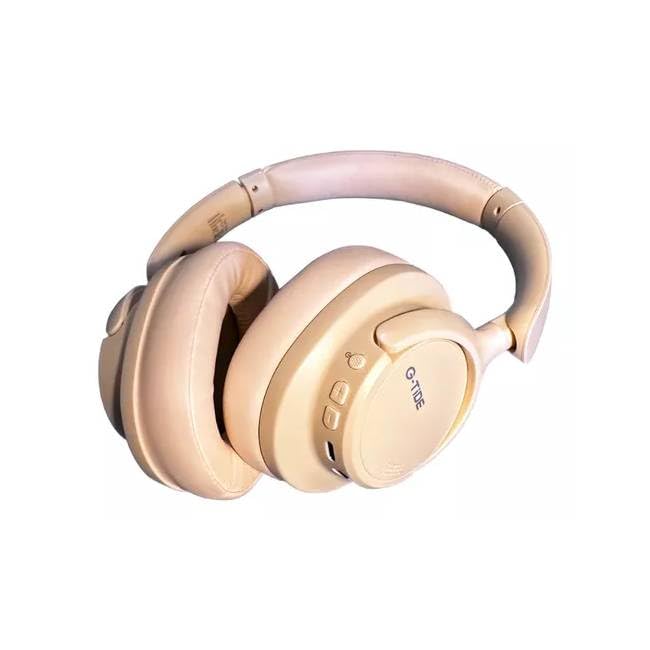
Image 1: G-TiDE Hibeat Bluetooth Headphones. This image shows the overall design of the headphones, highlighting the earcups and headband.
Key Features:
- Bluetooth 5.3: Ensures a fast and stable wireless connection up to 10 meters.
- NFC Connectivity: Quick pairing for compatible Android devices.
- Long Battery Life: Up to 12 hours of continuous music or calls on a single charge (600mAh battery).
- Quick Charge: Minimizes downtime for recharging.
- Triple Microphone System: Provides clear calls with noise cancellation technology.
- Physical Noise Cancellation Switch: Easily activate or deactivate noise cancellation.
- Adjustable and Comfortable Design: Ultra-comfortable ear cushions and a flexible structure for a perfect fit.
- Universal Compatibility: Works with smartphones, tablets, and other Bluetooth-enabled devices.
5. Setup
5.1 Charging the Headphones
- Connect the provided charging cable to the charging port on the headphones.
- Connect the other end of the charging cable to a USB power adapter (not included) or a computer's USB port.
- The LED indicator on the headphones will illuminate to show charging status. It typically takes approximately 3 hours for a full charge.
- Once fully charged, the LED indicator will change color or turn off, depending on the model. Disconnect the charging cable.
Note: For optimal battery life, fully charge the headphones before first use.
5.2 Bluetooth Pairing
- Power On: Press and hold the Power button on the headphones until the LED indicator flashes, usually blue and red, indicating pairing mode.
- Activate Bluetooth: On your device (smartphone, tablet, etc.), go to the Bluetooth settings and ensure Bluetooth is enabled.
- Select Device: In the list of available Bluetooth devices, select "G-TiDE Hibeat".
- Confirm Connection: Once paired, the LED indicator on the headphones will typically show a steady blue light or flash slowly. A voice prompt may also confirm the connection.
5.3 NFC Pairing (for compatible Android devices)
- Ensure NFC is enabled on your Android device.
- Turn on the G-TiDE Hibeat headphones.
- Gently tap your Android device against the NFC area on the left earcup of the headphones.
- Follow the on-screen prompts on your device to confirm the pairing.
6. Operating Instructions
6.1 Power On/Off
- Power On: Press and hold the Power button for approximately 3 seconds until the LED indicator lights up and you hear a power-on prompt.
- Power Off: Press and hold the Power button for approximately 5 seconds until the LED indicator turns off and you hear a power-off prompt.
6.2 Music Playback
- Play/Pause: Press the Multi-function button (often the Power button) once.
- Volume Up: Press the Volume + button.
- Volume Down: Press the Volume - button.
- Next Track: Press and hold the Volume + button for 2 seconds.
- Previous Track: Press and hold the Volume - button for 2 seconds.
6.3 Call Management
- Answer/End Call: Press the Multi-function button once.
- Reject Call: Press and hold the Multi-function button for 2 seconds.
- Redial Last Number: Double-press the Multi-function button.
6.4 Active Noise Cancellation (ANC)
The G-TiDE Hibeat headphones feature a physical switch for Active Noise Cancellation.
- Activate ANC: Slide the ANC switch to the "ON" position. An indicator light may illuminate.
- Deactivate ANC: Slide the ANC switch to the "OFF" position.
6.5 Wired Connection (3.5mm Audio Cable)
You can use the headphones with the included 3.5mm audio cable when the battery is low or with non-Bluetooth devices.
- Plug one end of the 3.5mm audio cable into the audio input jack on the headphones.
- Plug the other end into the 3.5mm audio output jack of your device.
- In wired mode, Bluetooth functions and ANC may be disabled or operate differently.
7. Maintenance and Care
- Cleaning: Use a soft, dry, lint-free cloth to clean the headphones. Do not use abrasive cleaners, alcohol, or chemical solvents.
- Storage: When not in use, store the headphones in the provided protective case to prevent dust and scratches. Keep them in a cool, dry place away from direct sunlight.
- Battery Care: To prolong battery life, avoid fully discharging the headphones frequently. Charge them regularly, even if not used for extended periods.
8. Troubleshooting
| Problem | Possible Cause | Solution |
|---|---|---|
| Headphones do not power on. | Low battery. | Charge the headphones for at least 30 minutes. |
| Cannot pair with device. | Bluetooth not enabled on device; headphones not in pairing mode; too far from device. | Ensure Bluetooth is on. Put headphones in pairing mode. Move device closer (within 10m). Forget device and re-pair. |
| No sound or low volume. | Volume too low on headphones or device; headphones not connected; incorrect audio output selected. | Increase volume on both headphones and device. Reconnect headphones. Check device's audio output settings. |
| Noise Cancellation not working. | ANC switch is off; environmental noise is too high for full cancellation. | Ensure the ANC switch is in the "ON" position. ANC reduces ambient noise but may not eliminate all sounds. |
| Poor call quality. | Weak Bluetooth connection; environmental noise; microphone obstruction. | Move closer to your device. Ensure the microphone area is clear. Try moving to a quieter environment. |
9. Specifications
| Model Name | HIBEAT |
| Model Number | BT |
| Connectivity Technology | Wireless (Bluetooth), Wired (3.5mm Jack) |
| Wireless Communication Technology | Bluetooth 5.3 |
| Battery Capacity | 600mAh (approx. 12 hours playback) |
| Charging Time | Approximately 3 hours |
| Material | Plastic |
| Form Factor | Over-Ear (Circumaural) |
| Compatible Devices | Smartphones, Tablets |
| Special Features | NFC, Triple Microphone, Noise Cancellation Switch |
10. Warranty and Support
G-TiDE products are manufactured to the highest quality standards. For warranty information, technical support, or customer service inquiries, please refer to the warranty card included in your product packaging or visit the official G-TiDE website.
You can also contact G-TiDE customer support through the retailer where you purchased the product.