
PANDAAR T1880
PANDAAR T1880 Two-Way Wireless Intercom System User Manual
Model: T1880 | Brand: PANDAAR
1. Introduction
This manual provides comprehensive instructions for the PANDAAR T1880 Two-Way Wireless Intercom System. Designed for reliable room-to-room communication, this system offers a long range of up to 4900ft in open areas, anti-interference technology, and a durable IP44 waterproof rating. Please read this manual thoroughly before using the product to ensure proper operation and longevity.

Figure 1: PANDAAR T1880 Intercom System Key Features
2. Package Contents
Verify that all items are present in your package:
- Indoor Intercom Unit (x2)
- Charging Base (x2)
- USB Charging Cable (x2)
- User Manual (this document)
3. Product Overview
Familiarize yourself with the components and controls of your PANDAAR T1880 Indoor Intercom Unit.

Figure 2: Indoor Intercom Unit Diagram
Key Components:
- Power Button: Press and hold to turn on/off. Short press to initiate a call.
- Talk Button: Press and hold to speak, release to listen.
- Volume Up/Down Buttons: Adjust the speaker volume.
- Channel Up/Down Buttons: Change the communication channel.
- SET Button: Used for pairing and channel locking/unlocking.
- Charging Base: For recharging the intercom unit.
- Micro-USB Port: Alternative charging port.
- Emission Status Light: Indicates transmission activity.
- Low Power/Pairing Pilot Lamp: Indicates battery status and pairing mode.
4. Setup Instructions
4.1 Charging the Units
Before first use, fully charge both intercom units. Place each indoor unit onto its respective charging base. The Low Power/Pairing Pilot Lamp will indicate charging status. Ensure the units are always placed back on the charging base after use to prevent automatic shutdown due to low battery.

Figure 3: Charging the Intercom Unit
4.2 Powering On
Press and hold the Power Button (red button) on each unit until you hear a "beep" sound. The device will then announce its current channel number. Both units should be powered on.
4.3 Setting and Locking Channels
For two indoor units to communicate, they must be set to the same channel. The system supports 1-16 channels to avoid interference.
- Enter Pairing Mode: Press and hold the SET Button on the side of the unit until you hear a "beep" sound and the red light continues to flash. This indicates pairing mode.
- Unlock Channel: Long press the Bell Icon Button (below the volume buttons) until you hear a "beep". This unlocks the channel for adjustment.
- Change Channel: Use the Channel Up/Down Buttons (arrow icons) to select the desired channel number. The unit will announce the channel number as you change it.
- Lock Channel: Once the desired channel is selected, long press the Bell Icon Button again. A "beep" will sound, indicating the channel is locked.
- Repeat these steps for the second unit, ensuring both are set to the same channel.
Video 1: Demonstrates powering on, setting, and locking channels on the PANDAAR T1880 intercom units.
5. Operating Instructions
5.1 Two-Way Communication
Once both indoor units are powered on and set to the same channel, they can communicate instantly without an internet connection.
- Initiate a Call: Short press the Power Button (red button). The other unit will ring, and your unit will also ring, indicating an ongoing call.
- Speak: Press and hold the Talk Button (large circular button with "TALK" label) while speaking. Release the button to stop transmitting your voice and listen for a response.

Figure 4: Internal Unit Communication
Note: The product supports one-on-one calls only. Group calls are not possible.
5.2 Adjusting Volume
Press the Volume Up/Down Buttons (speaker icon with arrows) on the side of the unit to adjust the listening volume to your preference. There are 3 volume levels available.
5.3 Doorbell Functionality (with optional outdoor unit)
If you have a compatible outdoor unit (sold separately) and it is paired with your indoor units on the same channel, the indoor unit can function as a doorbell intercom. When the outdoor unit initiates a call, all indoor units will ring. The indoor unit cannot actively call the outdoor unit; the outdoor unit must initiate the communication.
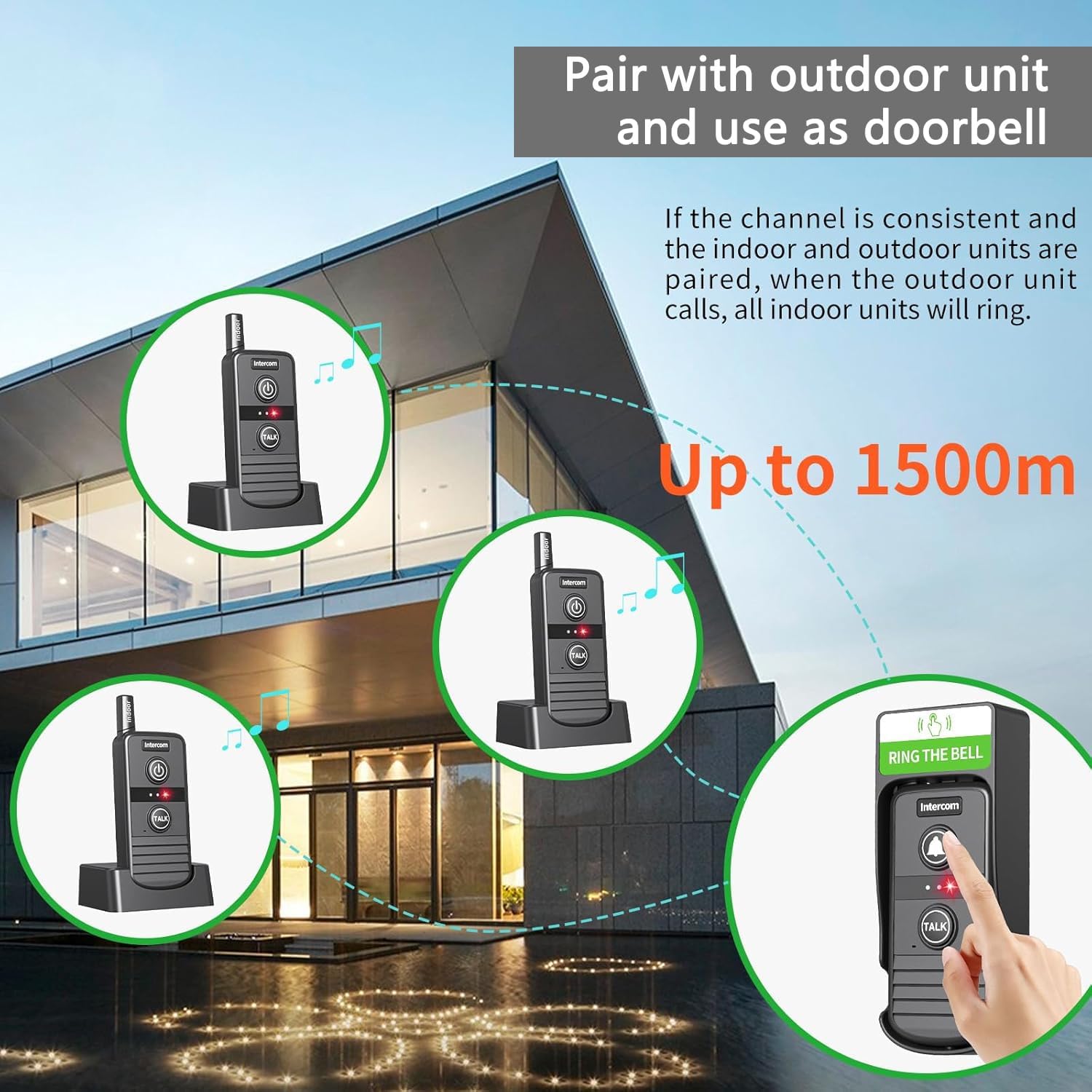
Figure 5: Doorbell Functionality with Outdoor Unit
6. Maintenance
6.1 Cleaning
Wipe the intercom units with a soft, dry cloth. Do not use abrasive cleaners or solvents, as these can damage the surface. Ensure no liquid enters the unit's openings.
6.2 Water Resistance
The PANDAAR T1880 intercom units are IP44 waterproof, meaning they are protected against solid objects larger than 1mm and against splashing water from any direction. While they can withstand rain, they are not designed for submersion. Avoid exposing them to heavy downpours or direct water jets.

Figure 6: IP44 Waterproof Feature
7. Troubleshooting
| Problem | Possible Cause | Solution |
|---|---|---|
| No power/Unit does not turn on | Low or depleted battery | Place the unit on the charging base or connect via Micro-USB to charge. Ensure the charging base is powered. |
| Cannot communicate between units | Units are on different channels | Ensure both units are set to the same channel following the instructions in Section 4.3. |
| Microphone feedback (squealing sound) | Units are too close to each other | Move the indoor units farther apart to prevent audio feedback. |
| Limited communication range | Obstructions or environmental interference | The actual range depends on the environment. Reduce obstructions between units. Switch to a different channel if interference is suspected. |
| Outdoor unit not ringing indoor unit | Outdoor unit not paired or on wrong channel | Ensure the outdoor unit (if applicable) is correctly paired and on the same channel as the indoor units. |
8. Specifications
- Model Number: T1880
- Brand: PANDAAR
- Communication Type: Two-Way Wireless Intercom
- Range: Up to 4900ft / 1500m (in open areas)
- Channels: 1-16 selectable channels
- Waterproof Rating: IP44
- Volume Levels: 3 levels
- Battery Type: Lithium Ion (included)
- Product Dimensions: 3.54 x 2.48 x 6.3 inches
- Item Weight: 1.08 pounds
- Included Components: 2 Indoor Intercom Units, 2 Charging Bases

Figure 7: Ultra-long Distance Communication
9. Warranty and Support
9.1 Warranty Information
PANDAAR products are manufactured to high-quality standards. For specific warranty details, please refer to the warranty card included with your purchase or contact customer support. Keep your proof of purchase for warranty claims.
9.2 Customer Support
If you have any questions, require assistance with setup, operation, or troubleshooting, please do not hesitate to contact PANDAAR customer service. We are committed to providing timely and thoughtful service to ensure your satisfaction.
Contact information can typically be found on the product packaging, our official website, or through your retailer.
Ask a question about this manual
Ask about setup, troubleshooting, compatibility, parts, safety, or missing instructions. Manuals+ will review the question and use this page’s manual context to help answer it.