
MYATOTO CB6A-BK
MYATOTO CB6A AI Box User Manual
Model: CB6A-BK
Introduction
The MYATOTO CB6A AI Box is a versatile device designed to enhance your in-car infotainment system. It converts your existing wired CarPlay or Android Auto into a wireless connection and integrates a full Android 13.0 operating system directly onto your car's head unit. This allows for a wide range of applications, advanced connectivity options, and smart features to improve your driving experience.
Key features include 4G LTE SIM card support, dual-band Wi-Fi, Bluetooth tethering, built-in GPS with TrackHU, and the innovative DriveChat AI assistant powered by ChatGPT. The device is equipped with an octa-core processor (SD662/SM6115) and 4GB RAM + 64GB storage, expandable up to 256GB.
Package Contents
Please verify that all items are present in your package:
- MYATOTO CB6A AI Box Carplay Adapter
- USB A to A Y-Cable
- USB A-to-C Cable
- USB C-to-C Cable
Compatibility
The MYATOTO CB6A AI Box is designed for broad compatibility with vehicles equipped with wired CarPlay. It supports:
- Car Stereos: Compatible with car stereos that come with only wired CarPlay, only wired Android Auto, both wired CarPlay and wired Android Auto, both wired CarPlay and wireless Android Auto, or both wireless CarPlay and wired Android Auto (requires pressing and holding the 'Reset' button to switch to Android Auto).
- Phones:
- iPhone 5 or newer (iOS 9.0+) for wireless CarPlay.
- Android 11.0+ for wireless Android Auto.
- Google/Samsung phones with Android 10.0, and Samsung Galaxy S8/S8+/Note 8 with Android 9.0 are also supported.
Note: Not compatible with car stereos that only have wireless CarPlay or only wireless Android Auto. A USB power cable may be needed for some car models to ensure stable operation. This device is compatible with approximately 98% of car models that have car stereos, but is not compatible with BMW series. Some 2016-2020 Nissan, Isuzu, Camry, 2023 TOYOTA Crown, 2023 Lexus NX, and some Volkswagen models may require the included USB A to A Y-Cable for sufficient power.

Image: Compatibility overview for the CB6A AI Box, detailing supported wired and wireless CarPlay/Android Auto configurations and phone OS requirements.
Setup
Follow these steps for initial setup of your MYATOTO CB6A AI Box:
- Connect the CB6A to Your Car: Plug the CB6A AI Box into your car's USB port using the appropriate cable (USB A-to-C or USB C-to-C). For some car models, if you experience instability, use the included USB A to A Y-Cable to boost power from two USB ports or a USB charger.
- Insert SIM Card (Optional): If you plan to use 4G LTE connectivity, insert a micro SIM card into the designated slot on the device. Ensure the chip faces up and the card is inserted in the correct direction to avoid damage.
- Enable Bluetooth and Wi-Fi on Your Phone: On your smartphone, enable both Bluetooth and Wi-Fi. Connect to the CB6A's Bluetooth network. The Wi-Fi connection will typically establish automatically after the Bluetooth pairing.

Image: Visual guide for connecting the CB6A to your car, inserting a SIM card, and pairing with your phone via Bluetooth and Wi-Fi.

Image: Detailed illustrations of the different USB cable connections for the CB6A AI Box, including the Y-cable for enhanced power stability.
Operating Instructions
Internet Access
The CB6A AI Box offers multiple ways to access the internet:
- 4G LTE SIM Card: Insert a micro SIM card for direct cellular data connectivity.
- 2.4GHz & 5GHz Dual-band Wi-Fi: Connect to a Wi-Fi hotspot (e.g., from your phone or a portable hotspot).
- Bluetooth Tethering: Use your phone's Bluetooth connection for internet access.
Note: When using wireless CarPlay or Android Auto, the CB6A's direct Wi-Fi internet access is not supported. Please use the built-in 4G LTE or Bluetooth tethering for internet connectivity during these sessions.

Image: Overview of the stable internet connection options for the CB6A AI Box, including SIM card insertion, Bluetooth tethering, and Wi-Fi.
Wireless CarPlay and Android Auto
The device converts your car's wired CarPlay or Android Auto system into a wireless one, providing seamless integration with your smartphone.
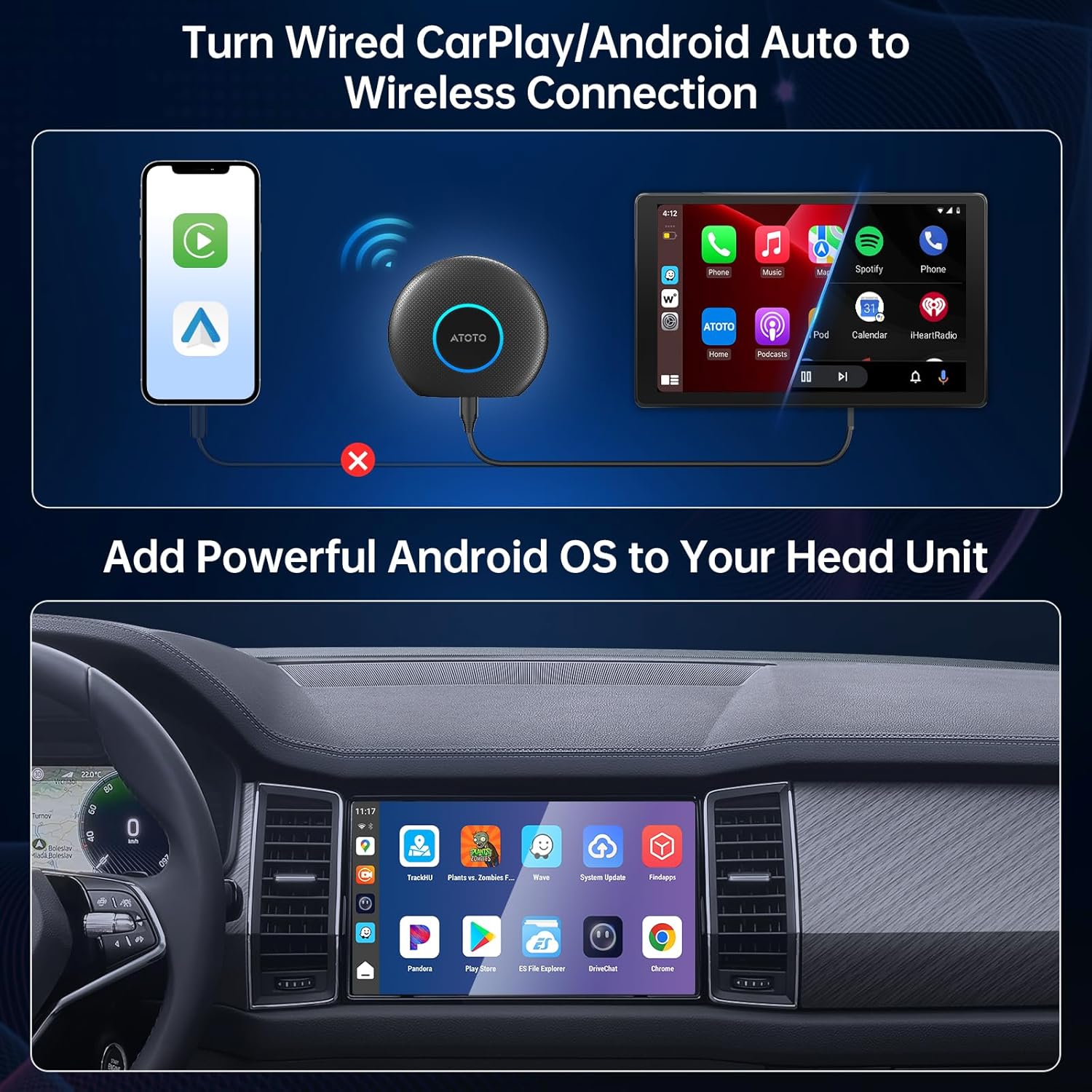
Image: Visual representation of the CB6A AI Box enabling wireless CarPlay and Android Auto from a wired connection.
Android 13.0 System and Apps
With the integrated Android 13.0 system, you can download and use various applications directly on your car's head unit via the Google Play Store or FindApps. This includes navigation, streaming, and utility apps.

Image: The car's display showing the Google Play Store, indicating the availability of various applications.
DriveChat AI Voice Assistant
The DriveChat feature, powered by ChatGPT, acts as an AI Voice Assistant. It supports AI conversations, chatbots, and other AI functionalities via voice commands, allowing for hands-free interaction while driving.
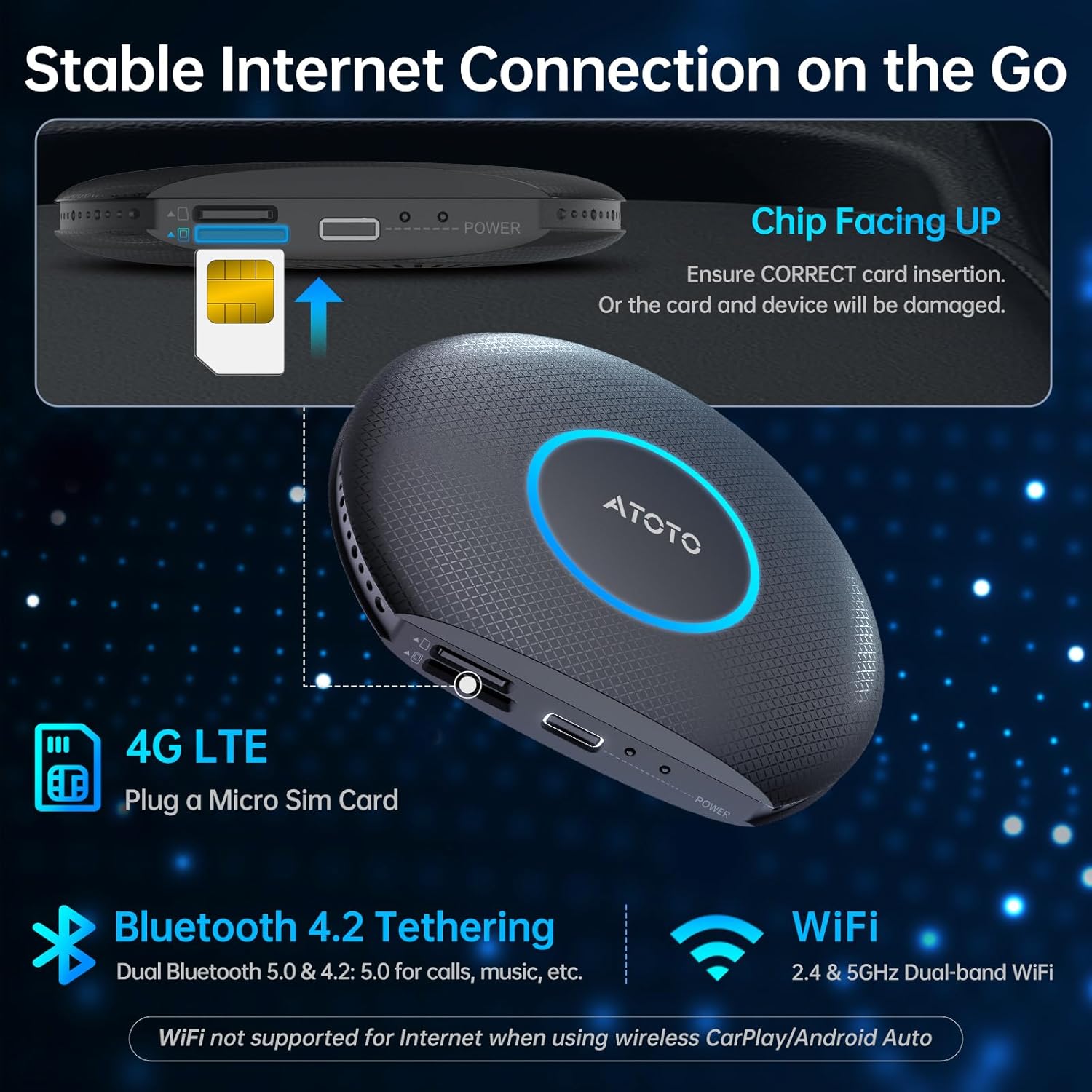
Image: The DriveChat AI assistant in action, demonstrating voice command capabilities for information retrieval.
TrackHU - Built-in GPS Tracker
TrackHU is ATOTO's featured app for real-time GPS tracking. It provides functionalities such as geofencing, instant alerts, real-time tracking, and route playback.

Image: The TrackHU app displaying its GPS tracking features and interface on a car's head unit and a smartphone.
Split Screen Functionality
The CB6A supports dual-app operation through its split-screen feature, allowing you to run two applications simultaneously on your car's display.

Image: The split-screen feature on the car's display, demonstrating simultaneous operation of two applications.
On-Board Diagnostics (OBD II)
You can view car diagnostics directly on the head unit when connected to a compatible OBD II diagnostic scanner (AC-4450 On-Board OBD II Diagnostic Scanner not included).

Image: The car's display showing diagnostic information, indicating the capability to view OBD II data.
Maintenance
OTA Updates
The CB6A AI Box supports FOTA (Firmware Over-The-Air) online upgrades. System updates can be performed directly from the device with a few taps on the screen, eliminating the need for a computer or SD card.

Image: The device interface highlighting the 'Online Upgrade' option for convenient over-the-air system updates.
General Care
To ensure the longevity and optimal performance of your device, keep it in a clean, dry environment. Avoid exposing it to extreme temperatures, direct sunlight for prolonged periods, or excessive moisture. Clean the exterior with a soft, dry cloth.
Troubleshooting
If you encounter issues with your MYATOTO CB6A AI Box, consider the following common solutions:
- Device Restarts or Instability: If the device restarts unexpectedly, especially in areas with poor cellular signal, it may be due to insufficient power. Ensure you are using the included USB A to A Y-Cable to provide adequate power from your car's USB ports or a cigarette lighter adapter.
- No Internet During Wireless CarPlay/Android Auto: As noted in the operating instructions, direct Wi-Fi internet access is not supported when wireless CarPlay or Android Auto is active. Switch to using the built-in 4G LTE SIM card or Bluetooth tethering from your phone for internet connectivity.
- SIM Card Not Recognized: Before installing the SIM card into the CB6A, some operators' SIM cards may need to be activated using another device, such as a mobile phone. Ensure the SIM card is inserted correctly with the chip facing up.
- Connection Issues: Verify that your car's wired CarPlay or Android Auto is functioning correctly before connecting the AI Box. Ensure Bluetooth and Wi-Fi are enabled on your phone and correctly paired with the CB6A.
For further assistance, refer to the product pamphlet or contact customer support.
Specifications
| Feature | Detail |
|---|---|
| Brand | MYATOTO |
| Model | CB6A-BK |
| Operating System | Android 13 |
| Processor | SD662 (SM6115), Octa-core (Max 2.0GHz) |
| Memory & Storage | 4GB RAM + 64GB ROM (Expandable up to 256GB via TF card) |
| Connectivity | 4G LTE (SIM Card), Dual Wi-Fi (2.4G/5G), Dual Bluetooth (5.0/4.2), USB |
| Special Features | Split-Screen, GPS, OTA Updates, DriveChat (powered by ChatGPT) |
| Color | Black |
| Item Weight | 4 ounces |
| Product Dimensions | 3.7 x 0.65 x 3.3 inches |
Warranty and Support
Your MYATOTO CB6A AI Box comes with a standard 12-month warranty from the date of purchase. You can extend this warranty by an additional 6 months by reaching out to us, totaling an 18-month warranty period.
For any product care inquiries, technical assistance, or support, please refer to the supplier profile on the Amazon product page, the product pamphlet included in your package, or the order details page if you have purchased the item. Our expert support team is available to assist you.

Image: Visual representation of the 18-month warranty and available expert support for the product.
Related Documents - CB6A-BK
 |
BK Box User Manual: Wireless CarPlay & Android Auto for Becker Systems Comprehensive user manual for the BK Box, enabling wireless CarPlay and Android Auto for Mercedes-Benz NTG 4.5 Becker systems. Includes installation, connection diagrams, specifications, and troubleshooting. |
 |
Porodo Wireless CarPlay Instant Plug & Play - User Manual This document provides instructions on how to convert any wired CarPlay to wireless using the Porodo PD-CPAAB-BK device. It covers connection steps for both CarPlay and Android Auto, as well as hardware specifications and media playback. |
 |
Bix CB01 Wireless CarPlay & Android Auto Adapter User Manual This user manual provides detailed instructions for setting up and using the Bix CB01 adapter to enable wireless Apple CarPlay and Android Auto connectivity in your vehicle. It covers product overview, technical specifications, package contents, connection guides, software updates, and warranty information. |
 |
Multipure Product Commissions and Policies Detailed information on Multipure's commission structure for Drinking Water Systems (DWS) and replacement filters, including payment policies, fees, and procedures for builders. |
 |
Multipure Compensation Plan Explained Understand the Multipure Compensation Plan, detailing how to earn income through personal sales, team building, and various bonuses like Rank Advancement, Rollup, and CASH. Learn about Builder types and commission calculations. |
 |
MST RMX EX S PRO RC Drift Car Upgrade Guide Official upgrade guide for the MST RMX EX S PRO 1/10 scale RC RWD high-performance drift car, detailing recommended parts and comparisons for enhanced performance. |