
Introduction
This manual provides essential information for the safe and efficient operation, installation, and maintenance of your new SHARP 11 kg Fully Automatic Top Load Washing Machine, Model ES-T110N-BK. Please read these instructions thoroughly before using the appliance and retain them for future reference.
Safety Information
Always follow basic safety precautions when using electrical appliances to reduce the risk of fire, electric shock, and injury to persons. This appliance is designed for residential use only.
- Ensure the washing machine is properly grounded.
- Do not operate the machine with a damaged power cord or plug.
- Keep children and pets away from the appliance during operation.
- Do not wash items that are soiled with flammable substances.
- Unplug the appliance before cleaning or performing any maintenance.
- Ensure water inlet and drain hoses are securely connected to prevent leaks.

The washing machine incorporates "Japan 7 Shields" for enhanced durability and safety, including protection against heavy weight, high temperature & humidity, instability, lightning, vibration, drops, and voltage fluctuations.
Product Overview
Components
Your SHARP ES-T110N-BK washing machine is a fully automatic top-load model with a toughened glass lid and a stainless steel drum.

Front view of the washing machine, highlighting its compact design and energy efficiency rating.

Rear view of the washing machine, illustrating the water inlet connections for hot and cold water, and the drain hose outlet.
Control Panel
The control panel features a touch interface and digital display for easy program selection and monitoring.

Detailed view of the touch control panel, including the power button, program selection, water level indicators, and digital timer.
Installation
Unpacking and Placement
- Remove all packaging materials, including the base packaging.
- Place the washing machine on a firm, level surface. Use the adjustable leveling legs to ensure stability and prevent vibration during operation.
- Ensure adequate space around the machine for ventilation and maintenance.
Water Connection
- Connect the provided fill hoses to the hot and cold water inlets at the back of the machine and to your household water supply.
- Ensure connections are tight to prevent leaks.
- Position the drain hose into a suitable drain or sink, ensuring it is securely fastened to prevent dislodgement during draining.
Power Connection
- Plug the power cord into a grounded electrical outlet.
- Do not use extension cords or adapters.
Operating Instructions
Loading Laundry
- Open the soft-closing lid.
- Load clothes loosely into the drum, ensuring not to overload. The 11 kg capacity is suitable for large families.
- Close the lid gently.
Adding Detergent
Add the appropriate amount of detergent and fabric softener to their designated compartments.
Selecting Wash Programs
Your washing machine offers 10 intelligent wash programs:
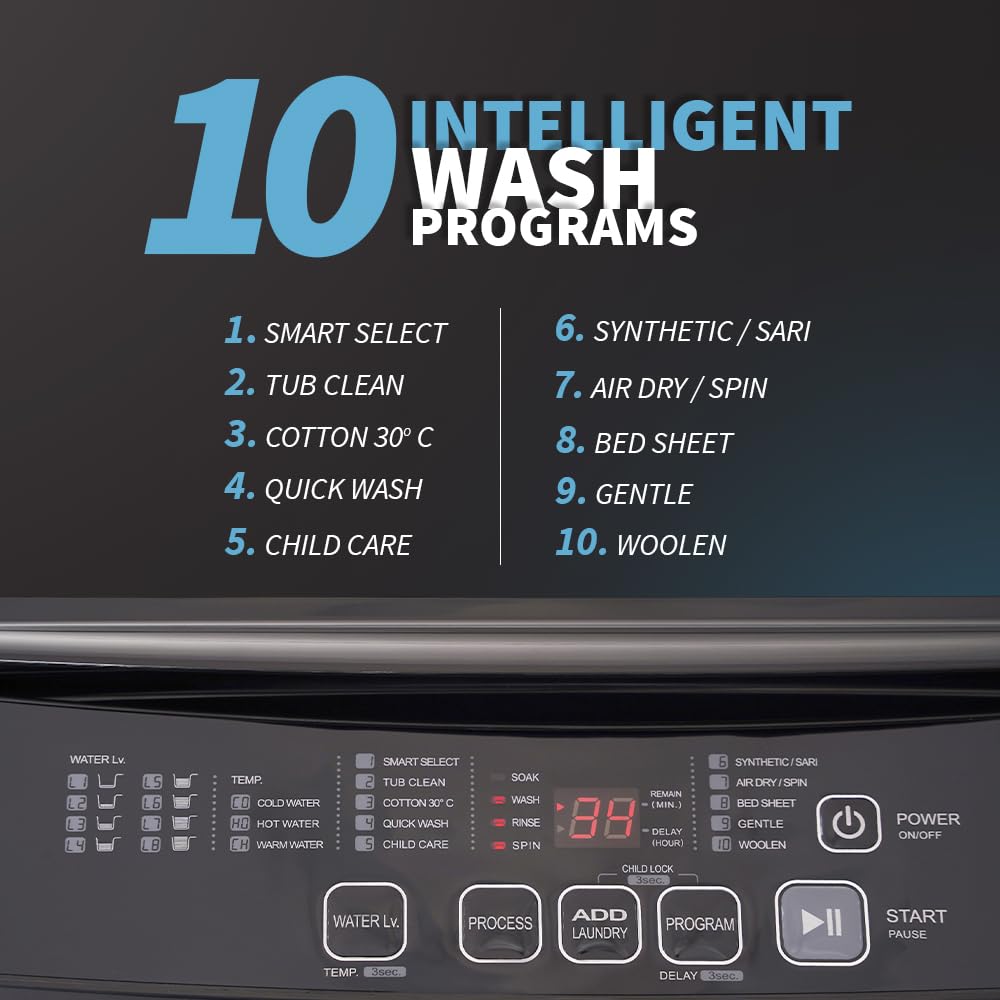
Overview of the 10 intelligent wash programs available on the control panel.
- Smart Select: Automatically detects load and optimizes wash settings.
- Tub Clean: For cleaning the washing machine drum.
- Cotton 30°C: Standard wash for cotton items at 30 degrees Celsius.
- Quick Wash: For lightly soiled clothes requiring a fast cycle.
- Child Care: Gentle wash suitable for baby clothes.
- Synthetic/Saree: Program for synthetic fabrics and sarees.
- Air Dry/Spin: For drying clothes using air and high-speed spinning.
- Bed Sheet: Optimized for washing bed sheets and larger items.
- Gentle: For delicate garments.
- Woollen: Specific program for wool items.
Use the touch panel to select the desired program. The digital display will show the remaining time.
Special Features
- Add Laundry: Allows you to pause the cycle and add forgotten items.
- Hot & Cold Water Dual Inlet: Connect both hot and cold water lines to enable washing with either temperature.
- Waterfall Wash: Provides an even water spray from the side during the wash cycle for thorough cleaning.
- One-Touch Start: Initiates a standard wash program with a single press.
- Delay Start: Set a timer for the wash cycle to begin at a later time.
- Child Lock: Locks the control panel to prevent accidental changes during operation.

The washing machine features dual inlets for hot and cold water, and a soft-closing lid for convenience and safety.

The stainless steel pulsator and side waterfall feature ensure powerful and even washing.
Maintenance
Cleaning the Drum (Tub Clean)
Regularly use the Tub Clean program to remove detergent residue and prevent mold growth, ensuring hygienic washing conditions.

The Tub Clean feature helps maintain the washing machine's drum hygiene.
Cleaning Filters
Check and clean the lint filter (if present) and water inlet filters periodically to maintain optimal performance.
Exterior Cleaning
Wipe the exterior of the machine with a soft, damp cloth. Avoid abrasive cleaners.
Troubleshooting
If you encounter issues with your washing machine, refer to the following common problems and solutions:
| Problem | Possible Cause | Solution |
|---|---|---|
| Machine does not start | Power cord unplugged, lid not closed properly, power outage. | Check power connection, ensure lid is fully closed, check household power supply. |
| Water not filling | Water tap closed, water inlet hose kinked, water supply pressure too low. | Open water taps, straighten hoses, check water supply. |
| Excessive vibration/noise | Machine not level, load unbalanced, transit bolts not removed. | Adjust leveling legs, redistribute laundry, ensure all transit bolts are removed during installation. |
| Water not draining | Drain hose kinked or blocked, drain pump filter clogged. | Straighten drain hose, clean drain pump filter. |
If the problem persists, please contact customer support.
Specifications
| Feature | Detail |
|---|---|
| Model Number | ES-T110N-BK |
| Type | Fully Automatic Top Load |
| Capacity | 11 kg |
| Product Dimensions (D x W x H) | 62D x 60.5W x 100H Centimeters |
| Item Weight | 41.5 Kilograms |
| Energy Rating | 5 Star |
| Spin Speed | 700 RPM |
| Wash Programs | 10 (Smart Select, Tub Clean, Cotton 30°C, Quick Wash, Child Care, Synthetic/Saree, Air Dry, Bed Sheet, Gentle, Woollen) |
| Drum Material | Stainless Steel |
| Pulsator Type | Stainless-Steel Insert Pulsator |
| Control Type | Touch Panel & Digital Display |
| Special Features | Add Laundry, Hot & Cold Water Dual Inlet, Waterfall Wash, Soft Lid Closing, One-Touch Start, Tub Clean, Protective Rat Mesh, Child Lock, High Efficiency, Time Remaining Display, Adjustable Leveling Legs, Delay Start, Japan 7 Shields. |
Warranty Information
Your SHARP washing machine comes with a 2 Years Comprehensive Warranty and a Total 10 Years Warranty on Motor from the date of purchase.
Please retain your purchase receipt for warranty claims. The warranty covers manufacturing defects under normal use conditions.
Warranty details: 2 years comprehensive product warranty and 10 years motor warranty.
Customer Support
For service, support, or inquiries, please contact SHARP customer service:
- Toll-Free: 1800-419-4322
- E-Mail: support@sharp-oa.com
- Manufacturer Address: Sharp Business Systems (India) Private Limited, Plot No. 51, First Floor, Okhla Industrial Estate, Phase-III, New Delhi- 110020, India.


