1. Safety Instructions
Please read all instructions carefully before use and retain for future reference. This device is designed for indoor use only. Ensure the power adapter is kept dry and away from water. Do not operate if any part of the light or cable is damaged. Keep out of reach of children.
The LED light bar is IP68 waterproof and can be fully submerged. However, the controller and power adapter are NOT waterproof and must be kept dry at all times to prevent electric shock or damage.
2. Package Contents
- Pawfly 14W Pro Aquarium LED Light Bar
- Inline Controller with Timer
- Power Adapter (ETL-certified)
- Suction Cups (2x)
- Velcro Fasteners (2x)
3. Setup
The Pawfly 14W Pro Aquarium LED Light offers flexible installation options to suit various tank setups.

Figure 3.1: Easy installation options using Velcro or suction cups.
3.1 Attaching the Light Bar
Choose one of the following methods to secure the light bar:
- Using Suction Cups: Attach the provided suction cups to the ends of the light bar. Press the suction cups firmly onto a clean, smooth surface inside or outside your aquarium.
- Using Velcro Fasteners: Separate the two pieces of Velcro. Remove the white adhesive backing from one piece and stick it to the desired location on your aquarium. Remove the adhesive backing from the other piece and stick it to the light bar. Align and press the Velcro pieces together to secure the light.

Figure 3.2: Detailed steps for Velcro installation.
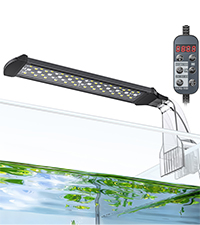
Figure 3.3: Detailed steps for suction cup installation.
3.2 Connecting Power
Connect the light bar to the inline controller, and then connect the controller to the ETL-certified power adapter. Plug the power adapter into a suitable electrical outlet. Ensure all connections are secure.

Figure 3.4: Connect the power adapter to the controller.
4. Operating Instructions
The inline controller allows for various lighting modes and adjustments.
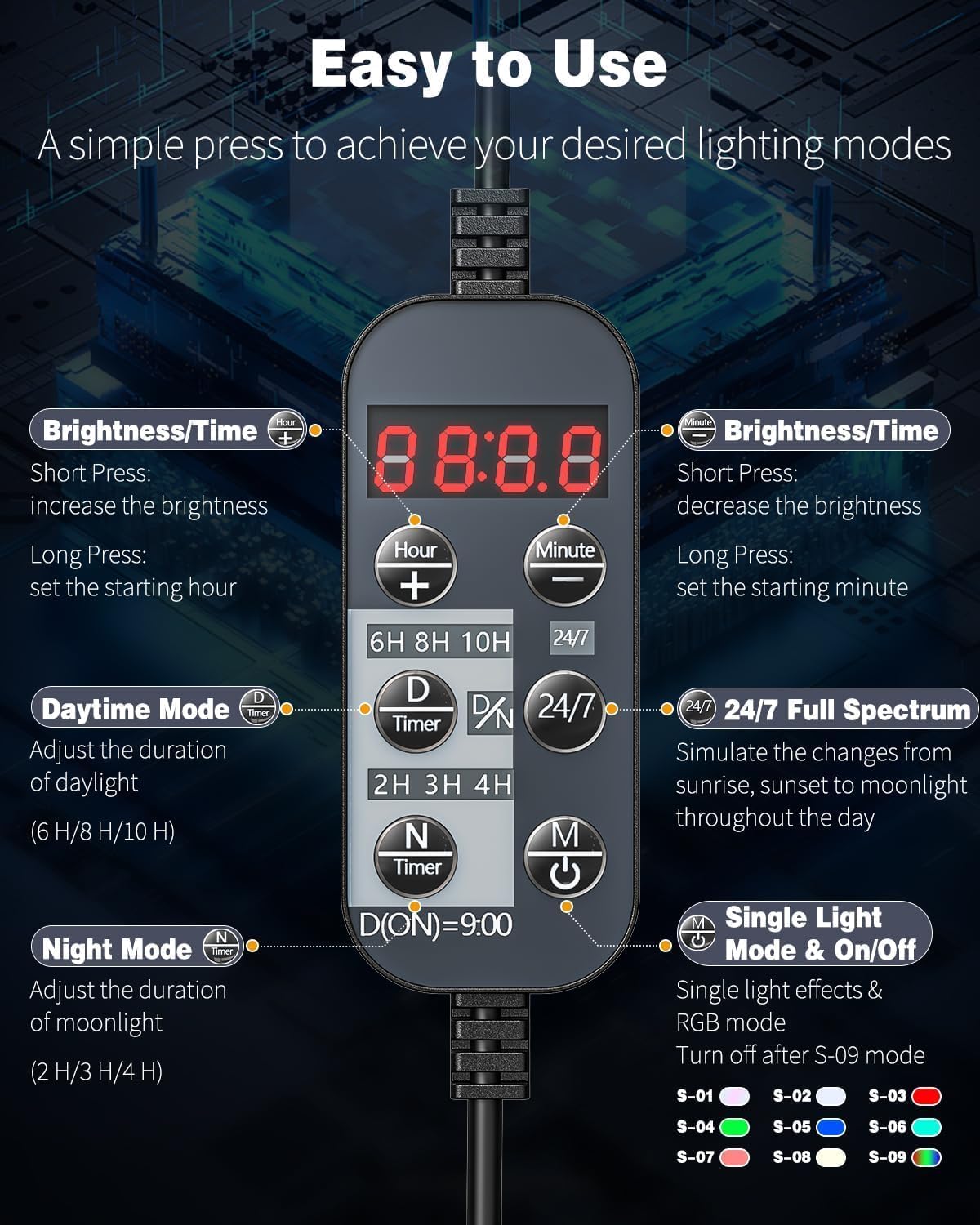
Figure 4.1: Inline controller with buttons for various functions.
4.1 Controller Buttons Overview
- Hour (+): Short press to increase hour, long press to set starting hour.
- Minute (-): Short press to decrease minute, long press to set starting minute.
- Brightness/Time (Up Arrow): Short press to increase brightness, long press to adjust daytime duration (6h, 8h, 10h).
- Brightness/Time (Down Arrow): Short press to decrease brightness, long press to adjust nighttime duration (2h, 3h, 4h).
- M (Mode/On/Off): Short press to cycle through single color effects, long press to turn the light on/off.
- 24/7: Activates the 24/7 Natural Mode.
4.2 24/7 Natural Mode
This mode simulates a natural day-night cycle, automatically adjusting light intensity and color throughout the day. The light activates at 6:00 AM and deactivates at 10:00 PM, mimicking dawn, daylight, dusk, and nocturnal glow.
Video 4.1: Demonstration of the Pawfly Aquarium LED Light's 24/7 Natural Mode cycle.

Figure 4.2: The 24/7 mode transitions through various light stages from 6:00 AM to 10:00 PM.
4.3 DIY Mode (Customizable Multi-Color LEDs)
In DIY mode, you can manually set the start time and adjust brightness levels. This mode offers 10 levels of brightness adjustment to fine-tune the lighting intensity.
- Setting Time: Long press the "Hour" or "Minute" buttons to set the current time.
- Adjusting Brightness: Short press the Up or Down arrow buttons to adjust the brightness in 10 levels.

Figure 4.3: Manual time and brightness adjustment for DIY mode.
4.4 D/N Mode (Customizable Day/Night Hours)
This mode allows you to customize the duration of daytime and nighttime lighting. You can select daytime durations of 6h, 8h, or 10h, and nighttime durations of 2h, 3h, or 4h.

Figure 4.4: Customize daylight and moonlight durations.
4.5 Single Color Effect
Short press the 'M' button to cycle through various single color effects, including full spectrum, white, blue, red, green, cyan, pink, and warm white. Long press 'M' to turn the light on/off.

Figure 4.5: Cycle through single color effects or turn the light on/off.
5. Maintenance
Regular maintenance ensures optimal performance and longevity of your aquarium light.
5.1 Cleaning
Wipe the light bar with a soft, damp cloth to remove any algae or mineral buildup. Do not use abrasive cleaners or solvents. Ensure the light is unplugged before cleaning.
5.2 Waterproofing
The light bar features an IP68 waterproof rating, meaning it is protected against continuous immersion in water. The clear board is strictly sealed with silicone to prevent moisture or droplets from entering. Always ensure the controller and power adapter remain dry.

Figure 5.1: ETL-certified adapter and heavy-duty clear board for durability.
6. Troubleshooting
If you encounter issues with your Pawfly Aquarium LED Light, refer to the following common problems and solutions:
- Light does not turn on: Ensure the power adapter is securely plugged into a working outlet and the controller. Check for any visible damage to the cables or connections.
- Light flickers or dims unexpectedly: This may indicate a loose connection or a power supply issue. Try plugging the adapter into a different outlet or gently adjusting the connection points.
- Timer function not working: Verify that the current time is correctly set on the controller. Ensure the desired mode (24/7 or D/N) is properly activated and confirmed.
- Colors are not displaying correctly: Cycle through the single color effects using the 'M' button to ensure all LEDs are functioning. If specific colors are consistently missing, contact customer support.
7. Specifications
| Feature | Detail |
|---|---|
| Model Number | PSTL-27.4 |
| Wattage | 14 Watts |
| Product Dimensions | 74 x 4.6 x 7.3 cm (29.1 x 1.8 x 2.9 inches) |
| Weight | 290.3 g (0.64 lbs) |
| Light Source Type | LED (Light Emitting Diode) |
| Color Rendering Index (CRI) | 98 |
| Light Spectrum | Full Spectrum (6500K White, 450-495nm Blue, 495-570nm Green, 620-750nm Red) |
| Waterproof Rating | IP68 (Light Bar only) |
| Power Source | AC Adapter |
| Manufacturer | Pawfly |
8. Warranty and Support
Pawfly products are designed for quality and reliability. For warranty information or technical support, please contact Pawfly customer service through the retailer's platform or the official Pawfly website. Please have your product model number (PSTL-27.4) and purchase date available when contacting support.


