
1. Introduction
This manual provides detailed instructions for the safe and effective operation of your Godox ML100R 110W RGB LED Video Light. Please read this manual thoroughly before use to ensure proper handling and to achieve optimal performance. Keep this manual for future reference.

Image 1.1: The Godox ML100R LED Video Light, highlighting its compact design and powerful output.
2. Safety Information
To prevent damage to the product or injury to yourself or others, read the following safety precautions completely before using this unit.
- Do not disassemble or modify the product. If the product fails, send it back to the authorized service center for inspection and maintenance.
- Keep this product dry. Do not handle with wet hands or immerse in water.
- Do not use the product in the presence of flammable gases, chemicals, or other materials.
- Do not leave or store the product in high-temperature environments, such as in a car on a hot day.
- Do not look directly into the light when it is powered on.
- Always disconnect the power supply before cleaning or performing maintenance.
- Ensure the product is securely mounted when in use to prevent accidental falls.
3. Package Contents
Verify that all items listed below are included in your package. If any items are missing or damaged, contact your retailer immediately.
- Godox ML100R LED Video Light (x1)
- AC Power Cord (x1)
- Adapter (x1)
- Lens Reflector ML-L15 (x1)
- Lamp Head Protective Cover (x1)
- Holder AD-E2 (x1)
- Storage Bag (x1)
- Other Accessories (as specified by manufacturer)

Image 3.1: Visual representation of the Godox ML100R package contents.
4. Product Overview
The Godox ML100R is a compact and powerful 110W RGB LED video light designed for versatile lighting applications. It features full RGB color control, an extended CCT range, and various power options, making it suitable for both studio and on-location shoots.
Key Features:
- Full RGB & Extended CCT Range: Precise color control with HSI tuning and CCT adjustability from 1800K to 10,000K. High CRI 95 & TLCI 95 for accurate color rendering.
- Efficient Lens Reflectors: Includes a 15° lens reflector to boost light intensity.
- Creative Lighting Effects: 14 built-in cinematic FX effects for dynamic scenes.
- Onboard & Wireless App Control: Adjust settings directly on the unit or via the Godox Light app (Bluetooth).
- Versatile Power Solutions: Supports AC power, V-mount/NP-F batteries, Godox BG02 battery grip, or a power bank.
- Compact & Lightweight: Weighs only 465g, designed for portability with a 1/4"-20 mounting hole.

Image 4.1: The Godox ML100R light unit with its primary accessories, including the power adapter and carrying case.
5. Setup
5.1 Mounting the Light
The ML100R features a 1/4"-20 mounting hole for attachment to tripods, light stands, or other compatible accessories. Use the included Holder AD-E2 for flexible positioning.
5.2 Attaching the Reflector
Align the included 15° lens reflector (ML-L15) with the front of the light head and twist gently until it locks into place. Ensure it is securely fastened before operation.
5.3 Power Options
The ML100R offers multiple power solutions for various shooting environments.
- AC Power Supply: Connect the included AC power cord and adapter to the light's DC input port.
- BG02 Battery Grip: Attach the optional Godox BG02 battery grip for enhanced portability and extended power.
- V-mount/NP-F Batteries: Utilize optional AK-B02 V-mount or AK-B01 NPF battery supply systems for mobile power.
- USB-C & Power Bank: The light can also be powered via a USB-C connection to a compatible power bank.

Image 5.1: Overview of the flexible power solutions for the ML100R, ensuring continuous operation in diverse settings.
6. Operating Instructions
6.1 Power On/Off
Locate the power button on the unit. Press and hold to power on or off the ML100R. A brief press typically cycles through modes or confirms selections.

Image 6.1: Hands-on view of the ML100R, demonstrating its compact size and ease of handling during operation.
6.2 CCT Mode (Color Temperature)
In CCT mode, you can adjust the color temperature from 1800K (warm) to 10,000K (cool) to match ambient light or achieve specific creative effects. Use the control dial to fine-tune the temperature.
6.3 RGB/HSI Mode (Color Control)
The ML100R offers full RGB color control. In HSI mode, you can adjust Hue (color), Saturation (intensity of color), and Intensity (brightness) to create a wide spectrum of colors. This allows for precise color matching and creative lighting.

Image 6.2: The ML100R showcasing its ability to produce vivid colors and a wide range of color temperatures.
6.4 FX Effects (Special Effects)
The ML100R includes 14 pre-programmed special effects to simulate various scenarios. These include:
- RGB Cycle
- Party
- Flash
- Lightning
- Explosion
- Police Car
- SOS
- TV
- Candle
- Fire
- Fireworks
- Welding
- Cloudy
- Broken Bulb
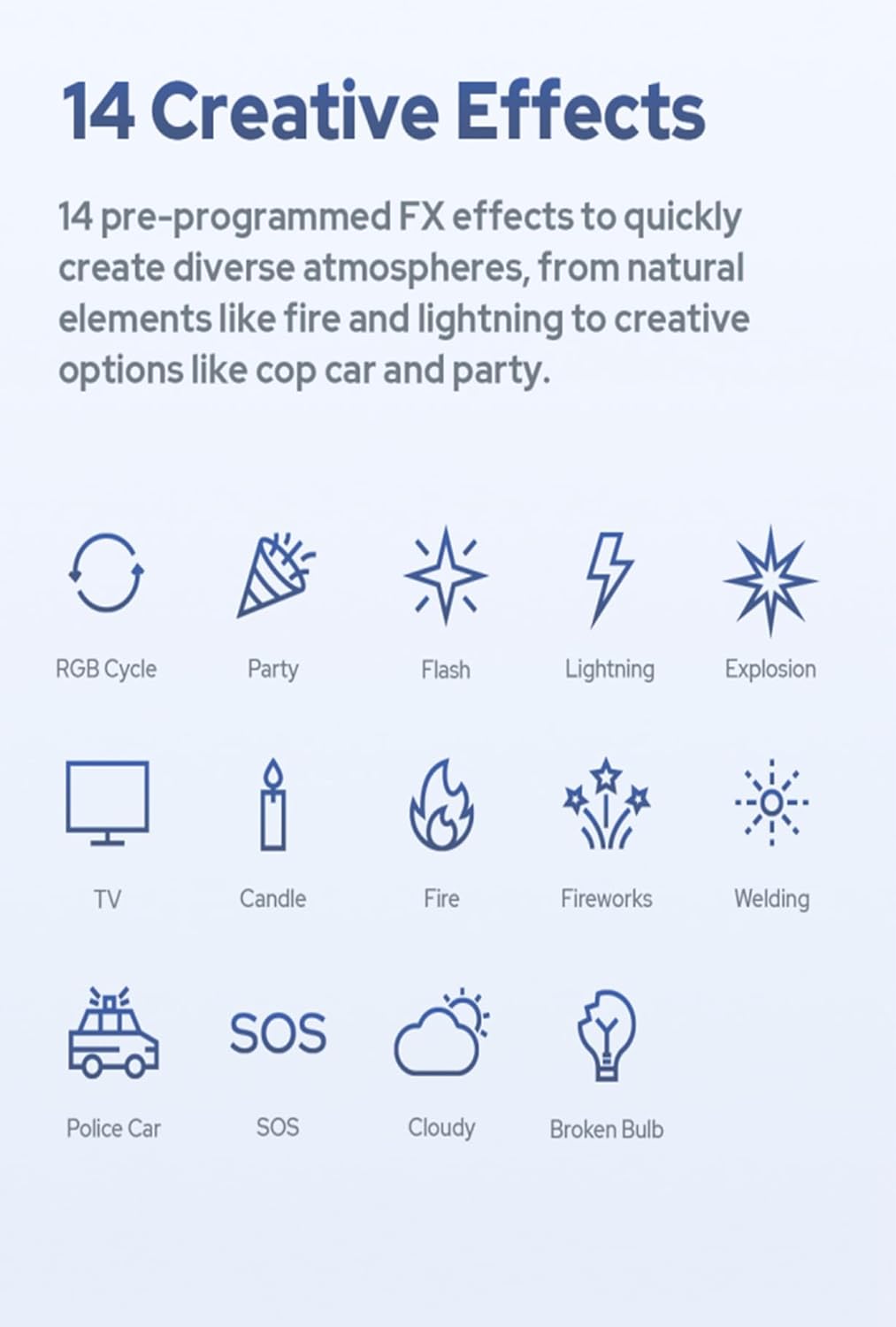
Image 6.3: Visual representation of the 14 creative effects, offering diverse lighting atmospheres.
6.5 App Control (Godox Light App)
The ML100R can be controlled remotely via Bluetooth using the Godox Light app. This app allows for seamless adjustment of HSI, CCT, RGB, and FX settings, and can control multiple lights simultaneously.
- Download: Scan the QR code on the product packaging or visit Godox Light App Download Page to download the app.
- Pairing: Enable Bluetooth on your mobile device and open the Godox Light app. Follow the in-app instructions to pair with your ML100R.
- Control: Once paired, you can adjust all light parameters from your device.

Image 6.4: The Godox Light app interface on a smartphone, demonstrating remote control capabilities for the ML100R.
7. Accessories
The Godox ML100R is part of an expanding ecosystem of compact modifiers and attachments, designed to enhance its versatility and creative potential.
Godox Mount Ecosystem:
The ML100R is compatible with a range of Godox Mount accessories, including lens reflectors, softboxes, and projection attachments. Key accessories include:
- Collapsible Fresnel Attachment ML-CFL5: Intensifies brightness and provides adjustable beam control.
- Mini Projection Attachment ML-SP: Allows for creative visual projections.
- Air Soft Tube ML-S1A: Transforms the ML100R into a soft light tube, ideal for portrait photography.
- Octagon Softbox ML-SF50 & Square Softbox ML-SF3030: For diffused and softer lighting.
- Diffusion Dome ML-CD15 & Soft Tent ML-CS1625: For broad, even light spread.

Image 7.1: The Godox Mount ecosystem, showing the ML100R and its range of compatible light modifiers.

Image 7.2: The ML100R with various accessories demonstrating their application in different lighting setups.
8. Maintenance
Proper maintenance ensures the longevity and optimal performance of your Godox ML100R.
- Cleaning: Use a soft, dry cloth to clean the light body. For the lens, use a lens cleaning cloth and solution. Avoid harsh chemicals or abrasive materials.
- Storage: When not in use, store the light in its included carrying bag in a cool, dry place, away from direct sunlight and moisture.
- Battery Care: If using external batteries, follow the manufacturer's guidelines for charging, discharging, and storage to maximize battery life.
- Inspection: Periodically check cables and connections for any signs of wear or damage. Replace damaged components immediately.
9. Troubleshooting
If you encounter issues with your Godox ML100R, refer to the following common problems and solutions.
| Problem | Possible Cause | Solution |
|---|---|---|
| Light does not power on. | No power supply; faulty cable/adapter; low battery. | Check power connection. Ensure AC adapter is properly connected or battery is charged. Try a different power source. |
| Light output is weak or inconsistent. | Low power setting; power supply issue; overheating. | Increase brightness setting. Ensure stable power supply. Allow light to cool down if it has been running for an extended period. |
| App control not working. | Bluetooth not enabled; light not paired; app issue. | Ensure Bluetooth is active on your device. Re-pair the light in the Godox Light app. Restart the app and the light. |
| Unusual noise from the unit. | Fan noise; internal component issue. | Some fan noise is normal during operation. If the noise is excessive or unusual, discontinue use and contact customer support. |
If the problem persists after attempting these solutions, please contact Godox customer support for further assistance.
10. Specifications
Detailed technical specifications for the Godox ML100R LED Video Light.
| Feature | Specification |
|---|---|
| Model | ML100R |
| Power Output | 110W |
| Color Temperature (CCT) | 1800K-10000K |
| Color Accuracy | CRI 95, TLCI 95 |
| Lighting Effects | 14 Cinematic FX Effects |
| Control Methods | Onboard, Godox Light App (Bluetooth) |
| Power Options | AC Power, V-mount/NP-F Batteries, Godox BG02 Battery Grip, USB-C Power Bank |
| Mounting | 1/4"-20 Thread |
| Item Weight | 465g (approx. 1.02 lbs) |
| Package Dimensions | 9.72 x 9.02 x 4.49 inches |
| UPC | 663992148282 |
11. Warranty and Support
Godox products are designed and manufactured to the highest quality standards. This product is covered by a limited warranty from the date of purchase. Please refer to the official Godox website or your local distributor for specific warranty terms and conditions.
For technical support, service, or warranty claims, please contact your authorized Godox dealer or visit the official Godox website for contact information.
Godox Official Website: www.godox.com