
MMS MS380T
MMS Mini Triangular Track Skid Steer Loader User Manual
Model: MS380T
Brand: MMS
Introduction
This manual provides essential information for the safe and efficient operation, maintenance, and troubleshooting of your MMS Mini Triangular Track Skid Steer Loader, Model MS380T. Please read this manual thoroughly before operating the machine to ensure proper usage and to prevent injury or damage.

Figure 1: MMS Mini Triangular Track Skid Steer Loader (Model MS380T) with 46-inch bucket.
Setup and Initial Inspection
1. Unpacking and Delivery Inspection
Upon delivery, carefully inspect the packaging for any signs of damage. The unit is typically shipped in a sturdy wooden case. It is recommended to use a forklift for safe unloading due to the machine's weight.

Figure 2: The skid steer loader is packed in wooden cases for secure transport. A forklift is recommended for unloading.
2. Pre-Operation Checks
- Fluid Levels: Verify engine oil, hydraulic fluid, and fuel levels are within recommended ranges.
- Battery Connection: Ensure battery terminals are clean and securely connected.
- Tire/Track Condition: Inspect tracks for any damage or excessive wear.
- Attachment Installation: If attachments like the bucket are not pre-installed, follow the specific instructions provided with the attachment for secure mounting. The machine supports quick replacement of various attachments.
Operating Instructions
1. Control Panel Overview
The control panel features intuitive joysticks for movement and bucket control, along with gauges for fuel and oil temperature, and switches for ignition and choke.

Figure 3: Detailed view of the operation console, showing controls for engine throttle, ignition, and various indicators.
2. Starting the Engine
Follow these steps to safely start the MMS Mini Triangular Track Skid Steer Loader:
- Turn on the Power Switch: Locate the main power switch, typically a red knob, and turn it to the ON position.
- Open Engine Throttle: Adjust the engine throttle lever to an open position.
- Pull out the Choke Switch: For cold starts, pull out the choke switch.
- Start the Engine: Insert the key into the ignition lock and turn it to start the engine.
- Return Choke: After the engine starts, immediately return the choke switch to its original position.
Video 1: Demonstrates the step-by-step process for starting the MS380T engine, including power switch, throttle, choke, and ignition.
3. Basic Operation
- Driving: Use the left and right joysticks to control forward, reverse, and turning movements. The independent control of left and right walking motors allows for zero-radius steering.
- Bucket Control: Use the dedicated joystick or levers to raise, lower, dump, and curl the bucket.
- Foldable Foot Pedal: The machine features a foldable foot pedal for improved space utilization and maneuverability. Ensure it is properly deployed or stowed as needed.
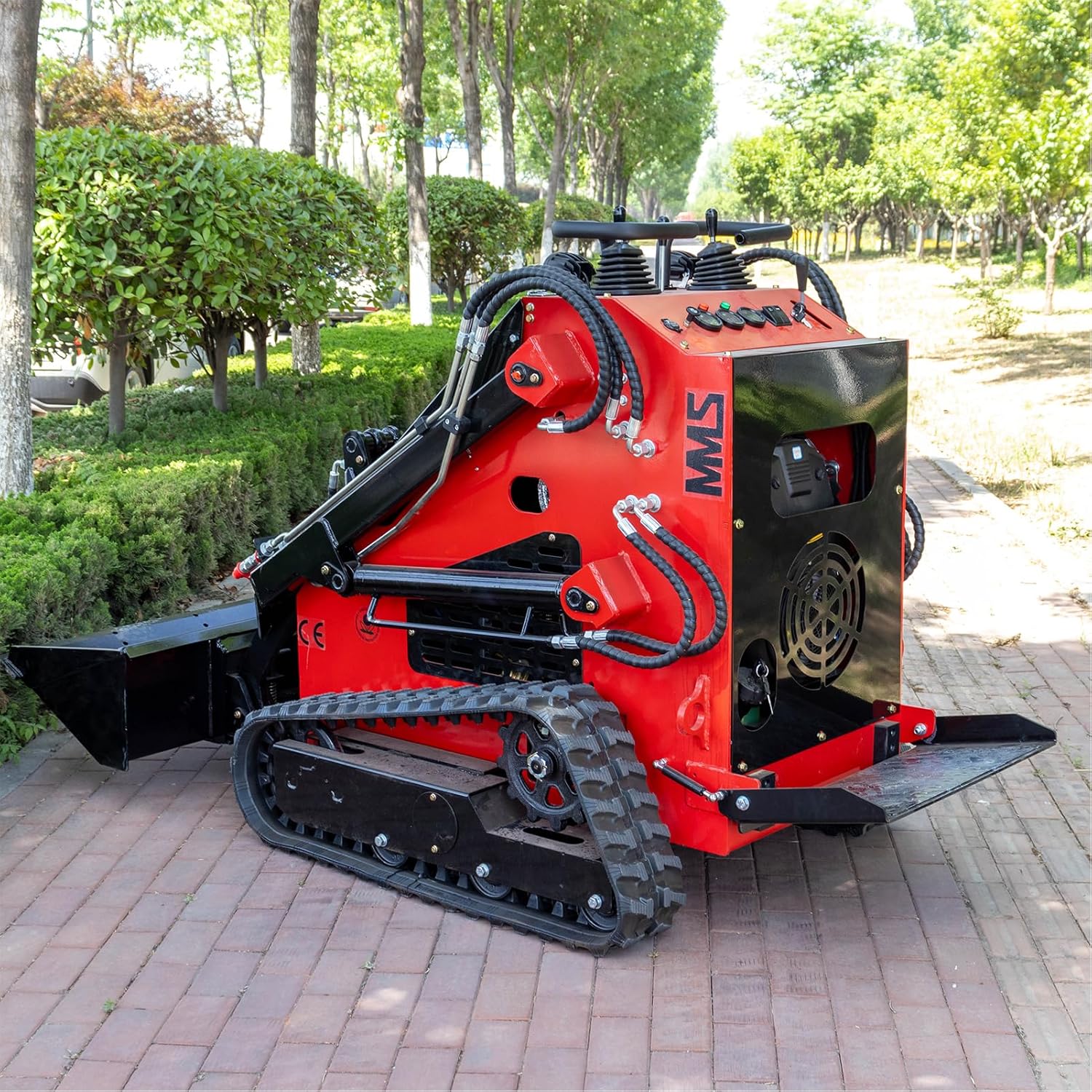
Figure 4: The foldable foot pedal provides convenience and improves maneuverability in tight spaces.
4. Safety Guidelines
- Always wear appropriate personal protective equipment (PPE).
- Ensure the work area is clear of obstacles and personnel.
- Never operate the machine on excessively steep slopes.
- Be aware of the machine's stability, especially when carrying loads.
- Perform daily pre-operation checks.
Maintenance
Regular maintenance is crucial for the longevity and optimal performance of your skid steer loader.
1. Routine Checks and Servicing
- Engine Maintenance: Regularly check and change engine oil and filters as per the engine manufacturer's recommendations.
- Hydraulic System: Monitor hydraulic fluid levels and inspect hoses and connections for leaks or damage.
- Track System: Inspect tracks for proper tension, wear, and debris accumulation. Clean tracks regularly to prevent excessive wear.
- Lubrication: Grease all pivot points and moving parts as indicated in the lubrication chart (refer to machine decals or a separate lubrication guide).
2. Access for Maintenance
The front hood of the skid steer loader opens easily, providing convenient access to the engine compartment for maintenance and refueling.

Figure 5: The front hood provides easy access for routine maintenance and refueling.
Troubleshooting
This section provides solutions to common operational issues. For problems not listed here, contact customer support.
| Problem | Possible Cause | Solution |
|---|---|---|
| Engine does not start | Low fuel, battery dead, choke not used/returned, power switch off. | Check fuel level, charge/replace battery, ensure choke is used correctly, turn on power switch. |
| Loss of hydraulic power | Low hydraulic fluid, clogged filter, hydraulic pump issue. | Check hydraulic fluid level, replace hydraulic filter, contact service for pump issues. |
| Machine not moving | Parking brake engaged, hydraulic issue, track obstruction. | Disengage parking brake, check hydraulic system, clear track obstructions. |
Specifications
Key technical specifications for the MMS Mini Triangular Track Skid Steer Loader (Model MS380T):

Figure 6: Detailed specifications for the MS380T Track Skid Steer Loader.
| Feature | Value |
|---|---|
| Brand | MMS |
| Model Number | MS380T |
| Material | Manganese Steel |
| Item Weight | 1700 Pounds |
| Load Capacity | 2000 Pounds |
| Power Source | Gasoline |
| Wattage | 16 KW |
| Package Dimensions | 88 x 55 x 50 inches |
| Included Components | Wide Bucket Toolbox |
Warranty and Support
MMS is committed to providing professional quality and excellent after-sales service. Our products have passed certifications such as CE, SGS, TUV, and ISO, ensuring professional quality.
Customer Support
For any inquiries, technical assistance, or warranty claims, please contact MMS customer support. Our professional sales and maintenance teams are ready to provide you with consultation and support.
You can visit the official MMS store for more information and contact details: MMS Official Store
Ask a question about this manual
Ask about setup, troubleshooting, compatibility, parts, safety, or missing instructions. Manuals+ will review the question and use this page’s manual context to help answer it.