
1. Product Overview
The PUTORSEN Under Desk PC Mount is designed to securely hold mid and mini-tower PC cases, freeing up valuable desk space and improving workspace organization. This mount supports both vertical and horizontal installation, accommodating various PC case sizes and configurations.
- Heavy-Duty Support: Constructed with reinforced steel brackets, this mount can securely hold PC cases weighing up to 77 lbs (35kg).
- Universal Compatibility: Designed for standard mid-tower and mini-tower cases, supporting ATX, Micro-ATX, and Mini-ITX motherboards.
- Flexible Mounting Options: Offers both vertical and horizontal installation modes to suit your specific setup requirements.
- Enhanced Airflow: The open-frame design promotes optimal ventilation, helping to prevent PC overheating.
- Space-Saving Solution: Elevates your PC off the floor or desk, creating more legroom and a cleaner aesthetic.

Image 1.1: The PUTORSEN Under Desk PC Mount configured for both vertical and horizontal PC case installations.

Image 1.2: A PC case mounted vertically under a desk, demonstrating improved airflow and space utilization.
2. What's in the Box
Please verify that all components listed below are present in your package before beginning installation.
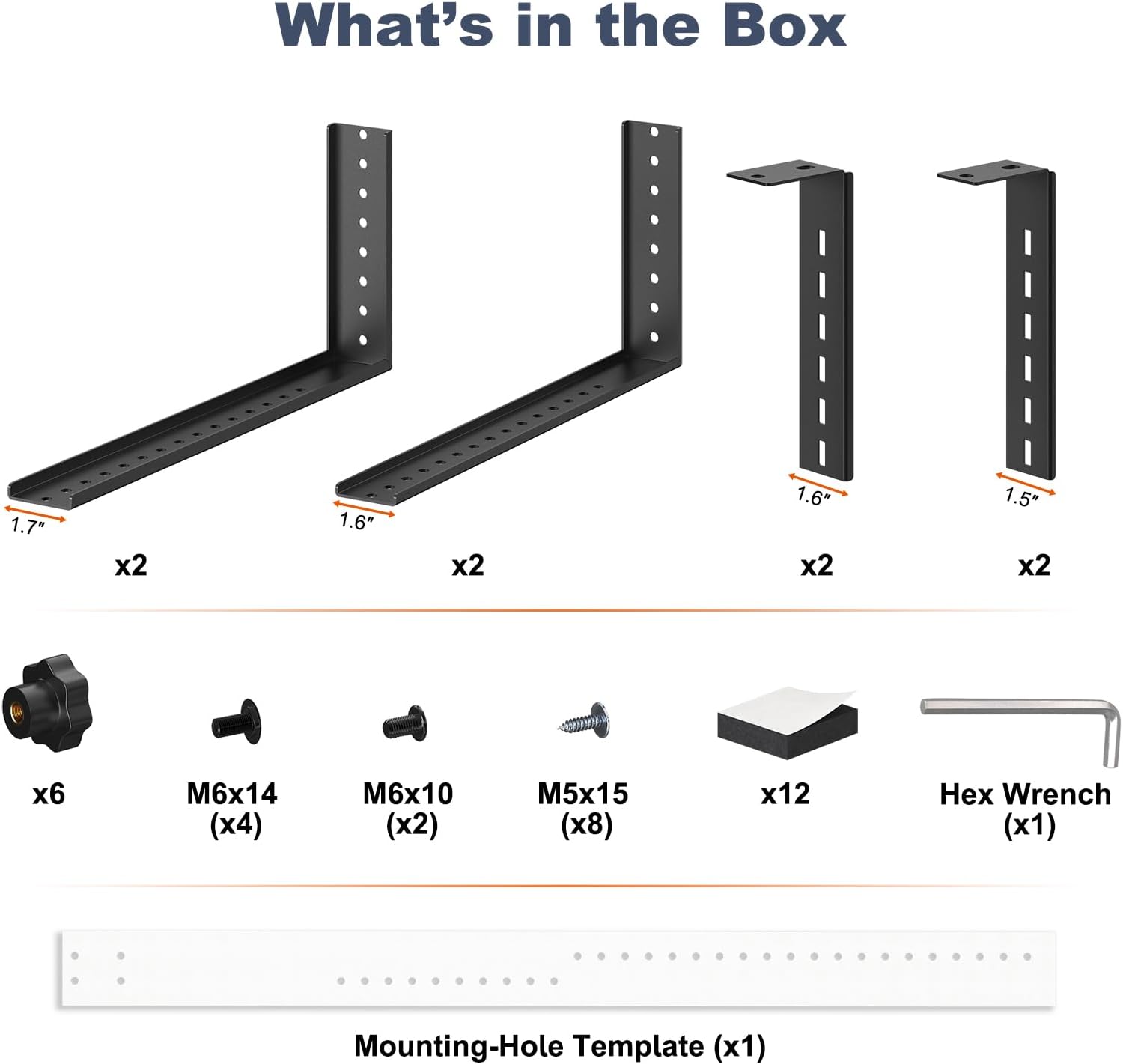
Image 2.1: All components included in the PUTORSEN Under Desk PC Mount package.
- Long Brackets (1.7") x2
- Medium Brackets (1.6") x2
- Short Brackets (1.6") x2
- Small Brackets (1.5") x2
- Knobs x6
- M6x14 Screws x4
- M6x10 Screws x2
- M5x15 Screws x8
- Adhesive Pads x12
- Hex Wrench x1
- Mounting-Hole Template x1
3. Specifications
| Feature | Detail |
|---|---|
| Brand | PUTORSEN |
| Model | Under Desk PC Mount |
| Material | Alloy Steel |
| Mounting Type | Under Desk |
| Compatible Devices | PC Tower (Mid-Tower, Mini-Tower, ATX, Micro-ATX, Mini-ITX) |
| Maximum Load Capacity | 77 lbs (35 kg) |
| Vertical Mode (Adjustable) | Width: 6 3/16" to 10 5/8" (15.7cm to 27cm) Height: Up to 19 1/4" (48.9cm) |
| Horizontal Mode (Adjustable) | Width: 13 1/2" to 25 11/16" (34.3cm to 65.2cm) Height: Up to 12 11/20" (32.3cm) |
| Item Weight | 5.06 pounds (2.3 kg) |
| Package Dimensions | 14.88 x 7.56 x 2.2 inches (37.8 x 19.2 x 5.6 cm) |

Image 3.1: Detailed dimensions for both vertical and horizontal mounting configurations, including maximum load capacity.
4. Setup and Installation
4.1 Pre-installation Check
Before installation, ensure your desk surface is sturdy enough to support the combined weight of the mount and your PC. Also, verify that there is sufficient clearance under your desk.
- Desk Compatibility: The under-desk mount requires your PC's width, plus an additional 2.8 inches (7.1 cm) clearance on EACH SIDE for proper installation and adjustment.

Image 4.1: Ensure adequate clearance (2.8 inches on each side) between your PC case and any obstructions under the desk.
4.2 Vertical Installation
- Assemble the brackets according to your PC's dimensions, securing them with the provided knobs.
- Use the mounting-hole template to mark the drilling points under your desk.
- Drill pilot holes and attach the assembled brackets to the underside of your desk using the M5x15 screws.
- Slide your PC case into the mounted brackets and secure it by tightening the knobs.
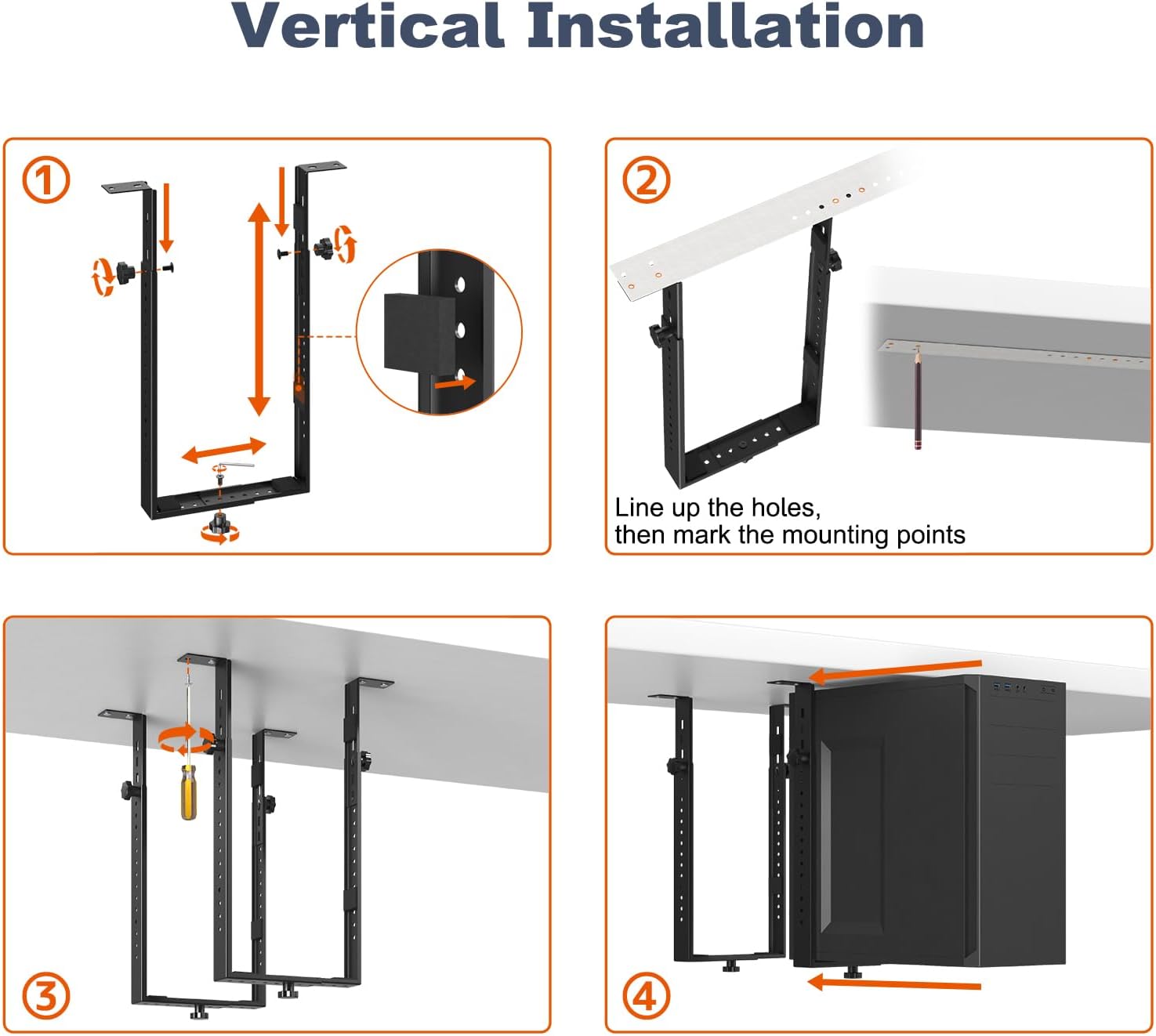
Image 4.2: Visual instructions for installing the PC mount in a vertical orientation.
4.3 Horizontal Installation
- Assemble the brackets to match your PC's dimensions for horizontal placement, securing with knobs.
- Position the mounting-hole template under your desk and mark the drilling locations.
- Drill pilot holes and fasten the assembled brackets to the desk using the M5x15 screws.
- Place your PC case onto the mounted brackets and tighten the knobs to secure it.

Image 4.3: Visual instructions for installing the PC mount in a horizontal orientation.
4.4 Post-Installation Considerations
After mounting, ensure there is adequate clearance for accessing top ports and managing cables.

Image 4.4: The mounted PC provides sufficient space for connecting cables to top ports.
5. Operating Instructions
Once installed, the PUTORSEN Under Desk PC Mount operates passively by holding your PC case in its designated position. No active operation is required from the mount itself.
- Access: The mount allows easy access to your PC's front and rear ports, depending on its orientation.
- Airflow: The open design ensures continuous airflow around your PC, contributing to optimal cooling.
- Cable Management: Utilize the space created by the mount to organize cables effectively, reducing clutter.
6. Maintenance
To ensure the longevity and safety of your PUTORSEN Under Desk PC Mount, follow these simple maintenance guidelines:
- Regular Inspection: Periodically check all screws and knobs to ensure they remain tight. Loose connections can compromise stability.
- Cleaning: Wipe the mount with a soft, dry cloth to remove dust. Avoid abrasive cleaners or solvents.
- Weight Limit: Do not exceed the maximum load capacity of 77 lbs (35 kg).
7. Troubleshooting
If you encounter any issues with your PUTORSEN Under Desk PC Mount, consider the following:
- Instability/Wobble: Ensure all mounting screws are securely fastened to the desk and all adjustment knobs are tightened around the PC case. Verify that the desk surface itself is stable.
- PC Does Not Fit: Double-check your PC case dimensions against the mount's adjustable ranges (refer to Section 3, Specifications). Ensure you have selected the correct bracket configuration (vertical or horizontal) for your case size.
- Compatibility Issues: This mount is designed for mid/mini-tower cases. It may not be compatible with all specialized PC stands or non-standard case designs.
- Difficulty with Installation: Re-read the installation steps (Section 4) carefully. Ensure you are using the correct screws for each step and that pilot holes are drilled appropriately.
8. Warranty and Support
For warranty information or technical support, please refer to the documentation included with your purchase or contact PUTORSEN customer service directly. Contact details can typically be found on the manufacturer's official website or through your retailer.
When contacting support, please have your product model name (PUTORSEN Under Desk PC Mount) and purchase date available.