
Introduction
Thank you for choosing the LEDIARY 20-inch Low Profile Ceiling Fan with Light. This manual provides essential information for the safe installation, operation, and maintenance of your new ceiling fan. Please read these instructions thoroughly before beginning installation and retain them for future reference.

Image 1: The LEDIARY 20-inch Low Profile Ceiling Fan with Light, remote control, and app interface.
Important Safety Information
- Always disconnect power at the main circuit breaker before installation or servicing.
- Ensure all electrical connections comply with local codes and ordinances. If you are unsure, consult a qualified electrician.
- Mounting must be done to a structurally sound ceiling capable of supporting the fan's weight.
- Do not bend the fan blades during installation or cleaning.
- Ensure all connections are tight and secure to prevent accidental disconnection.
Parts List
Before installation, verify that all components are present and undamaged. Refer to the 'Parts Inspection' section in the installation video for a visual guide.

Image 2: Exploded view of the LEDIARY ceiling fan components, illustrating its modular design for quick assembly.
- Main Body (3 sections)
- Ceiling Plate (1)
- Fan Blade (1)
- DC Motor (1)
- Remote Control
- Mounting Hardware (screws, wire nuts, etc.)
Setup and Installation
The LEDIARY ceiling fan is designed for easy assembly. For a detailed visual guide, please refer to the official installation video below. Ensure power is disconnected before proceeding.
Video 1: Official LEDIARY 20-inch Ceiling Fan Assembly & Installation Video. This video provides step-by-step instructions for setting up your fan.
1. Remove Mounting Plate
- Loosen the four screws on the canopy.
- Rotate counterclockwise to detach the mounting plate. (Tip: It does not need to be completely removed.)
2. Wire Fixing
- Thread the screw arm and the wire of the connected port through the fan motor host together.
- Secure the nut through the wire and the lamp pole. (Tip: Do not tighten to make it easier to adjust the bracket in the next step.)
3. Fixing the Light Arm
- Lightly pull the wires to the proper length and secure the two light bodies together with the screws.
- Use the supplied wrench to tighten all nuts clockwise.
4. Mounting Fan Blade
- Rotate the cap clockwise to remove it.
- Align the fan blade with the motor core, then screw in the fan blade cap counterclockwise to secure it.
5. Mounting Controller
- Tear off the adhesive backing on the controller and secure it inside the back cover.
- Connect each of the 3 wires to a port on the driver.
6. Mounting Fan to Ceiling
- Install the ceiling bracket and hang the fan.
- Connect ceiling wiring: black to black, white to white, and ground wires connected.
- Rotate the ceiling fan to align with the grooves, then tighten all 4 screws.
Operating Instructions
Your LEDIARY ceiling fan offers versatile control options and features for personalized comfort.
Light Functions
- Stepless Dimming: Adjust brightness from 10% to 100%.
- 3 Color Temperatures: Select between 3000K (Warm White), 4000K (Natural White), and 6000K (Cool White).
- Memory Function: The fan remembers your last light setting (brightness and color temperature) when turned off for at least 5 seconds.

Image 3: Illustration of the adjustable color temperature (3000K-6000K) and 10%-100% brightness adjustment features.
Fan Functions
- 6 Wind Speeds: Choose from 6 fan speeds for optimal airflow. Speeds 1-2 provide a soft wind, 3-4 a natural wind, and 5-6 a cool wind.
- Reversible Airflow: The fan features a reversible DC motor for year-round comfort. Use downward airflow for cooling in summer and upward airflow for warm air circulation in winter.
- Quiet Operation: The pure copper motor ensures ultra-quiet operation, typically below 30dB.
- 2-Hour Timer: Set the fan to automatically turn off after 2 hours.

Image 4: Visual representation of the fan's reversible function, showing downward airflow for summer and upward for winter.
Control Methods
- Remote Control: The included remote allows separate control of fan speeds (6 speeds), light dimming, color temperature, 2-hour timer, and reverse function.
- Bluetooth App Control: Download the 'Fanlamp Pro' app from Google Play or Apple Store for advanced control features. App control requires Bluetooth.
- Wall Switch Control: A conventional wall switch can turn the fan and light on or off. Note: It does not control dimming or speed adjustments.

Image 5: The LEDIARY ceiling fan with light, showcasing control via both the included remote and a smartphone application.
Video 2: LEDIARY Ceiling Fan with Light product overview, demonstrating various features including light and fan speed adjustments.
Maintenance
- Cleaning: To clean the fan, wipe with a soft, damp cloth. Do not use abrasive cleaners or solvents.
- Inspection: Periodically check all connections and mounting hardware for tightness.
- Light Source: The integrated LED light source is designed for long-term use and is non-removable.
Troubleshooting
- Fan does not operate: Check power supply, ensure wall switch is on, and remote control batteries are functional. Verify all wiring connections.
- Light does not turn on: Check power supply and wall switch. Ensure remote control batteries are functional.
- Remote control not working: Replace batteries. Ensure the remote is paired with the fan (refer to pairing instructions in the full manual, if provided).
- Fan makes unusual noise: Check that all screws are tightened. Ensure the fan blades are not obstructed.
- Light memory function not working: Ensure the light is turned off for at least 5 seconds before turning it back on.
Specifications
| Brand | LEDIARY |
| Model Number | d8c03eba-e5ed-473d-a01d-43f84edbcc54 |
| Color | Sandy Gray |
| Material | Acrylic, Metal, Plastic |
| Product Dimensions | 20"L x 20"W x 5.7"H |
| Power Source | DC Motor |
| Voltage | 120 Volts |
| Wattage | 32 watts |
| Brightness | 2500 Lumens |
| Light Color | Warm/Nature/Cool (3000K-6000K) |
| Control Method | App, Remote, Wall Switch |
| Special Features | 6 Wind Speed Adjustment, Adjustable 3CCT Color, Dimmable, Reverse Function, Timer |
| Item Weight | 6.49 pounds |
| Batteries | 2 AAA batteries required (included) |
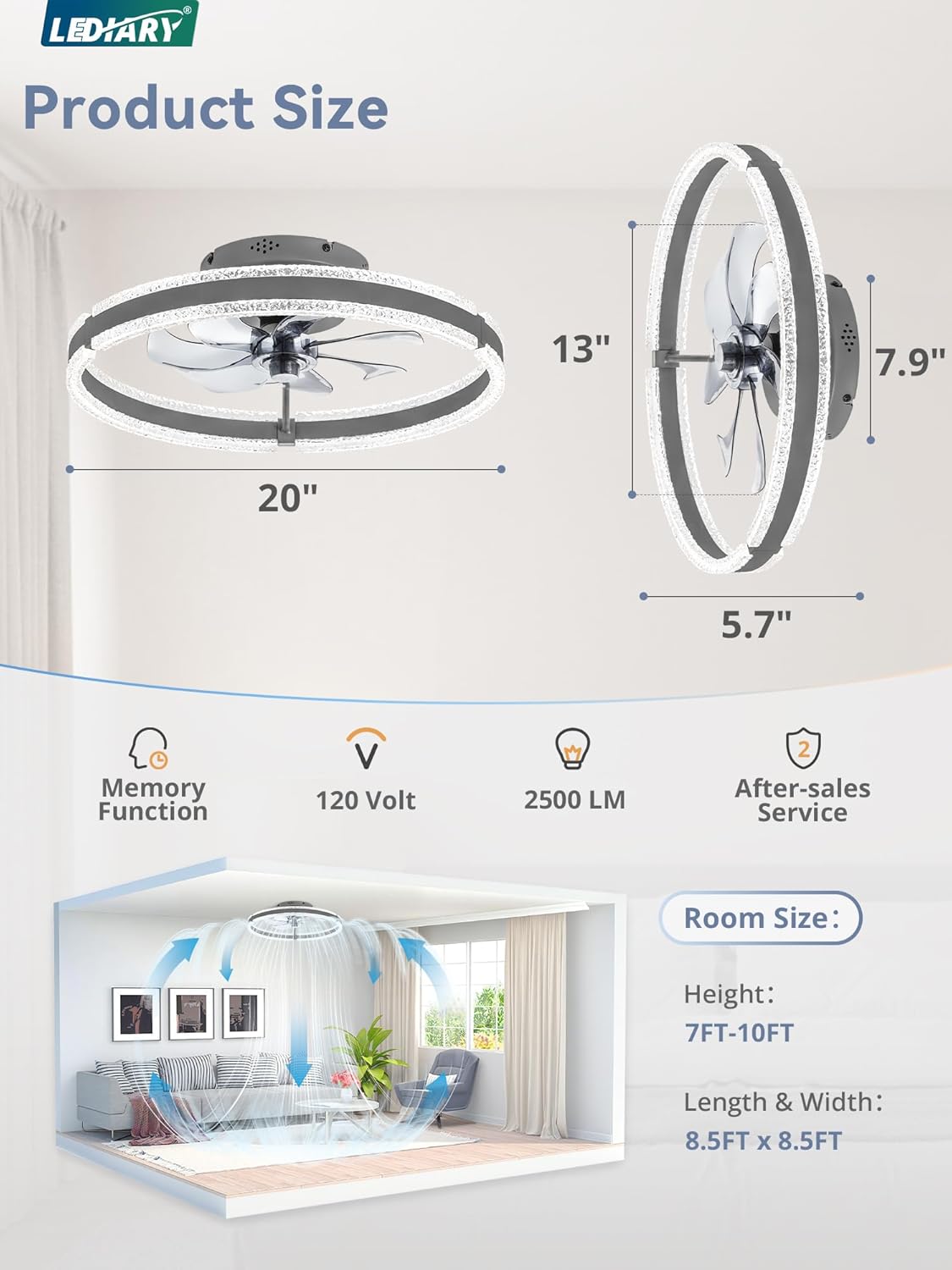
Image 6: Product dimensions (20" diameter, 5.7" height) and recommended room size (7-10ft height, 8.5x8.5ft length & width).
Warranty and Support
LEDIARY provides 2-year support for this ceiling fan. For any questions during installation or use, please contact LEDIARY customer service. We are committed to providing assistance and ensuring your satisfaction.
For further assistance, please visit the LEDIARY Store on Amazon.


