
Product Overview
The LEDIARY 20-inch Low Profile Ceiling Fan with Light is designed to provide efficient air circulation and versatile lighting for various indoor spaces. This modern fandelier combines the functionality of a ceiling fan with integrated dimmable LED lighting, offering adjustable color temperature and brightness. It features multiple control options, including a remote control and a Bluetooth-enabled app, ensuring convenient operation. The fan's quiet DC motor and reversible airflow function make it suitable for year-round comfort.
Key Features:
- Stepless Dimming & Memory Function: Seamless 10%-100% brightness adjustment and 3 color temperatures (3000K-6000K). The memory function retains your last light setting.
- Dual Control & Smart Features: Operates via remote control or Bluetooth app. Features 6 fan speeds, LED dimming, and a 2-hour timer setting.
- Easy Assembly: Designed for straightforward installation with detailed instructions.
- Quiet Operation: Pure copper DC motor ensures energy efficiency and ultra-quiet operation (below 30dB).
- Reversible Airflow: Provides downward airflow for summer cooling and upward airflow for winter warmth.
- Compact Design: 20-inch body with 13-inch blades, ideal for rooms with limited ceiling clearance.
Technical Specifications
| Specification | Detail |
|---|---|
| Brand | LEDIARY |
| Model Number | 04f4028d-7e2f-4b43-a58f-0e9e7efb1537 |
| Color | Black |
| Material | Acrylic, Metal, Plastic |
| Product Dimensions | 20"L x 20"W x 5.7"H |
| Item Weight | 6.76 pounds |
| Voltage | 120 Volts |
| Wattage | 32 watts |
| Brightness | 2500 Lumen |
| Light Color | Warm/Nature/Cool (3000K-6000K) |
| Control Method | App, Remote, Wall Switch |
| Special Feature | 6 Wind Speeds, Adjustable 3CCT, Brightness adjustable, Reversible DC Motor, Timer |
| Assembly Required | Yes |
| Included Components | LED Fan with Light, Remote Control |
Setup and Installation Guide
Before beginning installation, ensure the power supply to the installation area is turned off at the circuit breaker to prevent electrical shock. It is recommended to have a qualified electrician perform the installation if you are unsure about any steps.
1. Unboxing and Component Identification
Carefully remove all components from the packaging. Verify that all parts listed in the "What You Will Receive" section are present. The main components include the fan body, light fixture, remote control, and various mounting hardware.

Figure 1: All components included in the LEDIARY ceiling fan package, including the fan unit, remote, and various screws and connectors.
2. Fan Assembly
Assemble the fan unit by attaching the light fixture and fan blades to the main motor housing. Ensure all screws are tightened securely but do not overtighten to avoid damaging components. Pay attention to the direction of rotation for any threaded parts, as some may be counter-intuitive (e.g., clockwise to loosen, counter-clockwise to tighten).
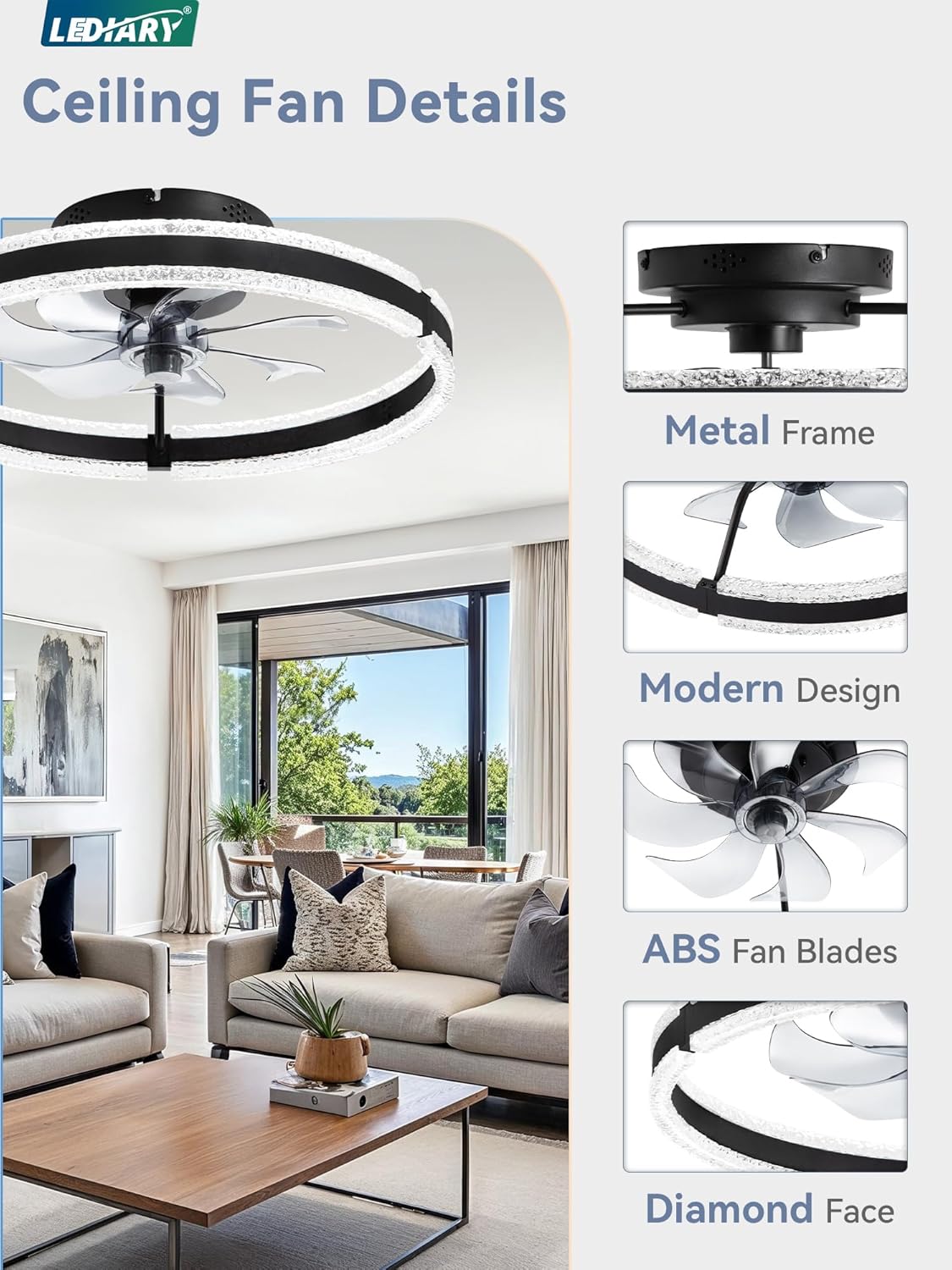
Figure 2: Detailed view of the fan's components, including the metal frame, modern design, durable ABS fan blades, and the decorative diamond face.
3. Mounting the Fan
Attach the mounting bracket to the ceiling junction box. Ensure the bracket is firmly secured to a structural support to safely bear the weight of the fan. Connect the electrical wires from the ceiling to the fan's wiring according to the provided wiring diagram (typically black to black, white to white, and ground to ground). Once wired, carefully lift the fan and secure it to the mounting bracket, ensuring it sits flush against the ceiling. Tighten all securing screws.

Figure 3: The LEDIARY ceiling fan installed, demonstrating its low-profile design and integrated lighting.
Operating Instructions
1. Remote Control Operation
The included remote control provides full functionality for the fan and light. Insert 2 AAA batteries (included) into the remote. Use the buttons to control fan speed (1-6), light brightness (10%-100% stepless dimming), color temperature (3000K-6000K), and the 2-hour timer. Separate buttons allow independent control of the fan and light.

Figure 4: The remote control allows comprehensive management of fan speeds, light brightness, and color temperature.
2. App Control (Bluetooth)
For enhanced control, download the "Fanlamp Pro" app from your device's app store (Google Play or Apple Store). Ensure Bluetooth is enabled on your device. Follow the in-app instructions to pair your fan. The app provides an intuitive interface for all fan and light functions, including advanced customization options.

Figure 5: Control your fan and light settings conveniently through the dedicated mobile application.
3. Wall Switch Control
The fan can also be controlled by a conventional wall switch (not included). The wall switch will primarily control the fan and light's on/off state. Note: Do not connect the fan to a transmission switch designed for light brightness or wind speed adjustment, as this may interfere with the fan's internal controls.

Figure 6: Basic on/off functionality is available via a standard wall switch.
4. Reversible Airflow Function
The fan features a reversible DC motor for year-round comfort. In Summer Mode, the fan blades rotate counter-clockwise, pushing air downward to create a cooling effect. In Winter Mode, the blades rotate clockwise, drawing air upward to circulate warm air trapped near the ceiling. This function can be activated via the remote control or app.
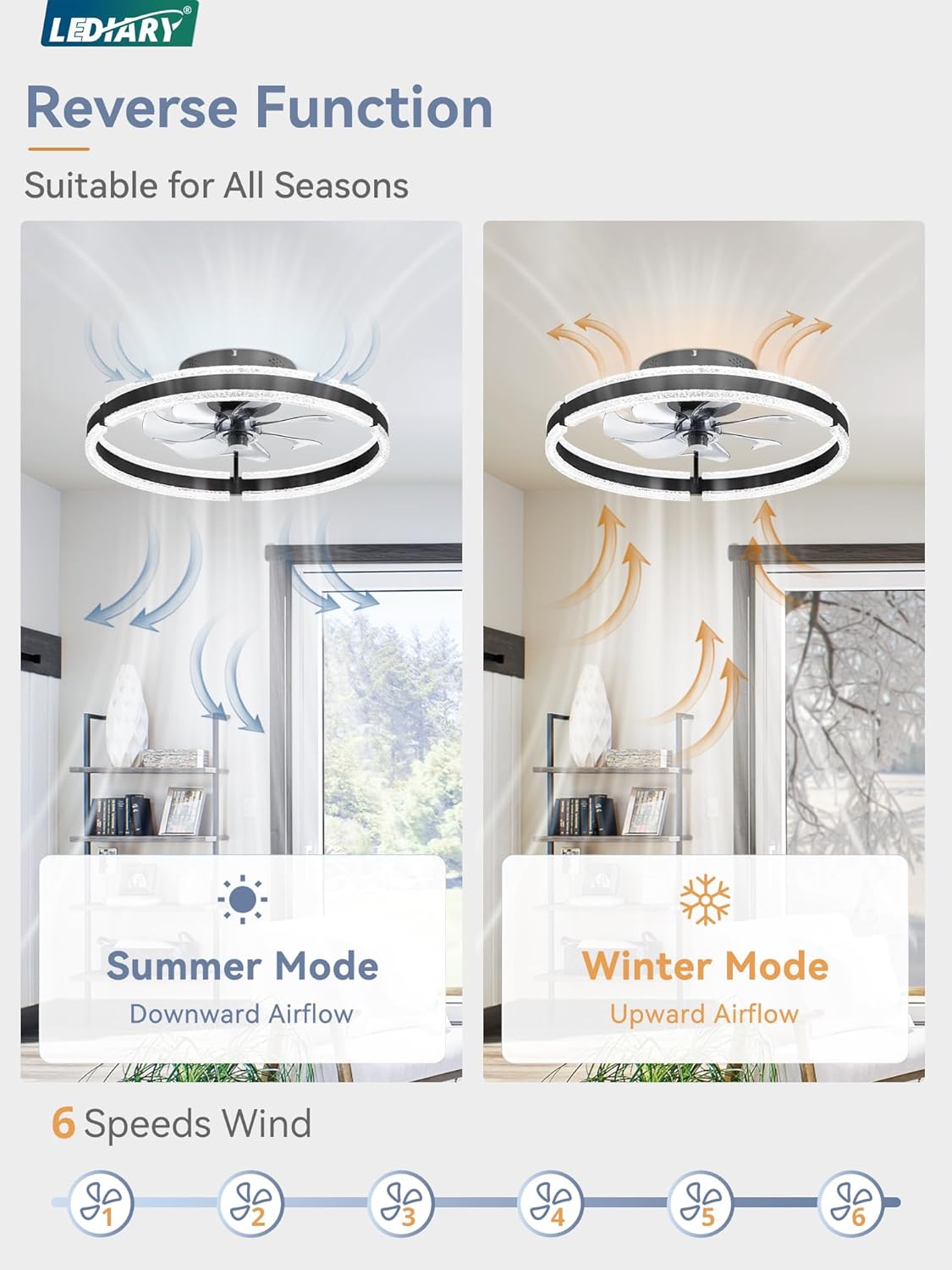
Figure 7: The reversible function optimizes air circulation for both warm and cool seasons.
5. Memory Function for Lighting
The fan's lighting system includes a memory function. To set your preferred light settings (brightness and color temperature), turn on the light and adjust it to your desired level. Keep the light on for at least 10 seconds. When you turn off the light and then turn it back on, it will recall the last used settings. Ensure the light is turned off for at least 5 seconds before turning it back on to ensure the memory function works correctly.

Figure 8: The light's memory function saves your preferred settings for convenience.
Maintenance
- Cleaning: Before cleaning, ensure the fan is turned off and the power supply is disconnected. Use a soft, damp cloth to wipe down the fan blades and light fixture. Avoid using harsh chemicals or abrasive cleaners, as they may damage the finish.
- Regular Checks: Periodically check all screws and connections to ensure they remain tight. Loose connections can cause noise or malfunction.
- Dust Removal: Regularly dust the fan and light to maintain optimal performance and light output.
Troubleshooting
| Problem | Possible Cause | Solution |
|---|---|---|
| Fan does not turn on. | No power supply; loose wiring; remote control not paired. | Check circuit breaker. Ensure all wires are securely connected. Re-pair the remote control with the fan according to the pairing instructions in the manual. |
| Light does not turn on/off or flickers. | Loose wiring; LED driver issue; remote control battery low. | Check electrical connections. Replace remote control batteries. If the issue persists, contact customer support. |
| Fan makes unusual noise. | Loose screws; unbalanced blades; motor issue. | Ensure all mounting and assembly screws are tight. Check if blades are securely attached and balanced. If noise continues, contact customer support. |
| Remote control not responding. | Low batteries; remote not paired; interference. | Replace batteries. Re-pair the remote. Ensure no obstructions between remote and fan. |
| Light does not completely turn off (dim glow). | Residual current; specific wiring configuration. | This can sometimes occur with certain electrical setups. If it's a concern, consult a qualified electrician. |
| "Breeze" function not working. | Internal receiver module malfunction. | Contact customer support for assistance or a replacement receiver module. |
Warranty and Support
The LEDIARY Ceiling Fan with Lights comes with a 2-year support warranty. If you encounter any questions or issues during installation or use, please do not hesitate to contact LEDIARY customer service. They are committed to providing prompt technical support and ensuring customer satisfaction.
For further assistance, please refer to the contact information provided in your product packaging or visit the official LEDIARY website.
Note: Keep your purchase receipt for warranty claims.