Introduction
This manual provides detailed instructions for the setup, operation, and maintenance of your DANFI AUDIO DF TE-2028 Vinyl Record Player. This 3-speed turntable offers a blend of vintage aesthetics and modern functionality, including wireless Bluetooth streaming and external speaker connectivity. Please read this manual thoroughly before using the product to ensure proper function and longevity.
What's in the Box
Carefully unpack all components and ensure the following items are present:
- Turntable unit with pre-installed stylus
- Two wired external speakers
- Power adapter (DC 12V / 2A)
- 45 RPM adapter
- Slipmat
- Dust cover
Setup
Follow these steps to set up your record player:
- Placement: Place the turntable unit and the two external speakers on a stable, level surface. Ensure there is enough space for the dust cover to open fully.
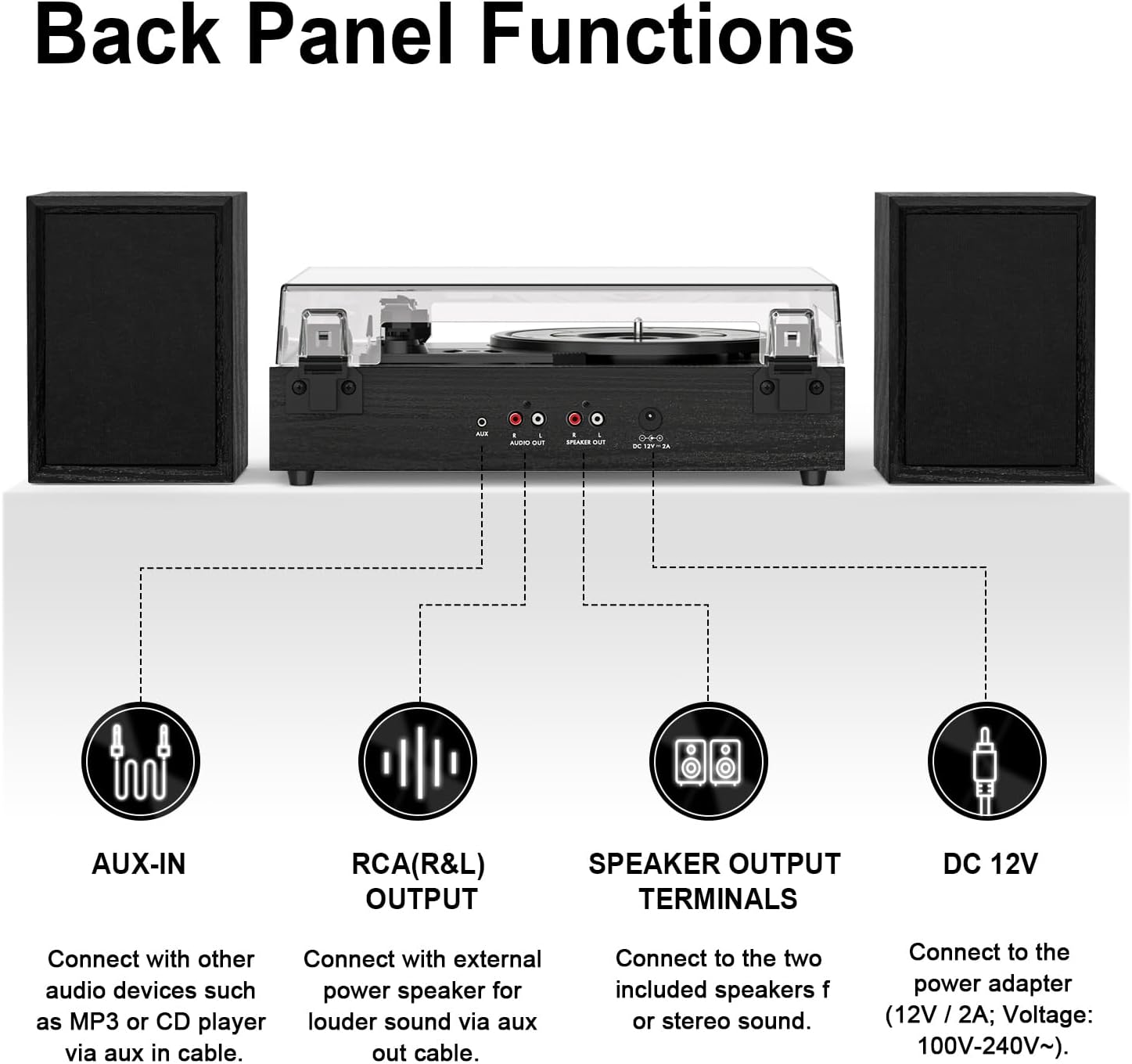
- Connect Speakers: Connect the two external speakers to the 'SPEAKER OUT' terminals on the back of the turntable. Match the red speaker wire to the red terminal and the black speaker wire to the black terminal for each speaker.
- Connect Power: Insert the DC 12V power adapter into the 'DC 12V' port on the back of the turntable, then plug the adapter into a wall outlet.
- Install Dust Cover: Carefully attach the dust cover to the hinges on the back of the turntable unit.
- Place Slipmat: Place the felt slipmat onto the turntable platter.
- 45 RPM Adapter: If playing 7-inch records with a large center hole, place the 45 RPM adapter on the center spindle.

Operating Instructions
1. Basic Playback
- Power On: Rotate the 'VOLUME' knob clockwise until it clicks to turn on the unit. The LED indicator will illuminate.
- Select Mode: Rotate the 'PHONO/BT/AUX' knob to select 'PHONO' mode for playing records.
- Place Record: Open the dust cover and place a vinyl record on the turntable platter.
- Select Speed: Adjust the speed switch (33 1/3, 45, or 78 RPM) to match the record you are playing. For 7-inch records, use the 45 RPM adapter if needed.
- Start Playback: Lift the tone arm using the cueing lever. Position the tone arm over the desired track on the record. Gently lower the cueing lever to allow the stylus to descend onto the record. The turntable will begin to spin automatically.
- Adjust Volume: Use the 'VOLUME' knob to adjust the sound level.
- Auto-Stop Feature: The turntable is equipped with an auto-stop function that will automatically stop the platter from spinning when the record reaches its end. To disable this, locate the auto-stop switch (if present, typically near the tone arm base) and set it to 'OFF'.
- End Playback: At the end of the record, or when you wish to stop, lift the tone arm using the cueing lever and return it to the tone arm rest.

2. Bluetooth Streaming
- Select Bluetooth Mode: Rotate the 'PHONO/BT/AUX' knob to 'BT' (Bluetooth) mode. The LED indicator will flash, indicating it is ready for pairing.
- Pair Device: On your smartphone, tablet, or other Bluetooth-enabled device, search for Bluetooth devices and select 'DANFI AUDIO DF' (or similar name) from the list.
- Play Audio: Once paired, the LED indicator will stop flashing. You can now play audio from your device through the record player's speakers.
3. AUX-in Connection
- Connect Device: Use a 3.5mm audio cable (not included) to connect your external audio device (e.g., MP3 player, CD player) to the 'AUX-IN' port on the back of the turntable.
- Select AUX Mode: Rotate the 'PHONO/BT/AUX' knob to 'AUX' mode.
- Play Audio: Play audio from your connected device. The sound will be output through the record player's speakers.
4. RCA Output
The RCA (R&L) OUTPUT jacks on the back of the turntable allow you to connect the record player to an external amplifier or powered speakers for a different audio experience. Use an RCA cable (not included) to connect the record player's RCA outputs to the corresponding inputs on your external audio system.
Maintenance
- Dust Cover: Keep the dust cover closed when not in use to protect the turntable and stylus from dust and debris.
- Cleaning: Use a soft, dry cloth to clean the surface of the record player and speakers. Do not use abrasive cleaners or solvents.
- Stylus Care: Handle the tone arm and stylus with care. Avoid touching the stylus with your fingers. A dirty or worn stylus can damage your records and affect sound quality. Replace the stylus when necessary.
- Record Care: Keep your vinyl records clean and stored properly to prevent dust accumulation and scratches, which can lead to skipping and poor sound quality.
Troubleshooting
| Problem | Possible Cause | Solution |
|---|---|---|
| No power | Power adapter not connected properly; outlet not working. | Ensure power adapter is securely plugged into the unit and a working wall outlet. |
| No sound from speakers | Speakers not connected; volume too low; incorrect mode selected. | Check speaker connections. Increase volume. Ensure correct mode (PHONO, BT, AUX) is selected. |
| Record skipping | Record is dirty or scratched; stylus is dirty or worn; turntable not level. | Clean the record. Clean or replace the stylus. Ensure the turntable is on a stable, level surface. |
| Bluetooth not pairing | Incorrect mode; device too far; Bluetooth on device is off. | Ensure 'BT' mode is selected. Move device closer to the turntable. Turn on Bluetooth on your device. |
| Sound distortion | Volume too high; dirty stylus; damaged record. | Reduce volume. Clean or replace stylus. Try a different record. |
Specifications
| Feature | Detail |
|---|---|
| Brand | DANFI AUDIO DF |
| Model Name | TE-2028 |
| Product Dimensions | 18 x 6 x 15 inches |
| Item Weight | 10.97 pounds |
| Maximum Rotational Speed | 78 RPM (Supports 33 1/3, 45, 78 RPM) |
| Included Components | Turntable with dual wired external speakers, Power adapter, 45rpm Adapter and slipmat, Dust cover |
| Special Features | Anti-Resonance, Anti-Skipping, Detachable Dust Cover, Detachable Speaker |
| Material | Acrylic, Metal, Plastic, Wood |
| Style | Vintage |
| Color | Black Wood |
| Compatible Devices | Smartphone, Tablets, PC, MP3 Player, External Speakers |
| Motor Type | AC Motor |
| On-mode power consumption | 30 watts |
Warranty and Support
For warranty information and technical support, please refer to the documentation included with your purchase or contact DANFI AUDIO DF customer service. Keep your purchase receipt as proof of purchase for any warranty claims.


