
Amicura F1 PRO-US
Amicura F1 PRO Automatic Pet Feeder User Manual
Model: F1 PRO-US
1. Introduction
Thank you for choosing the Amicura F1 PRO Automatic Pet Feeder. This smart feeder is designed to provide convenient and reliable feeding for your cats and dogs, featuring a 2K AI camera, dual-band WiFi connectivity, and smart app control. It ensures your pet is fed on schedule and allows you to monitor and interact with them remotely.
2. Safety Information
- Read all instructions carefully before use.
- Keep the feeder on a stable, level surface to prevent tipping.
- Do not immerse the main unit in water or any other liquid.
- Use only the provided power adapter.
- Ensure the power cable is not chewed by pets. Use the chew-proof cable provided.
- Keep out of reach of children.
- This device is intended for indoor use only.
- Only use dry pet food with a diameter of 5-15mm.
- Do not place foreign objects into the food storage or dispensing mechanism.
3. Package Contents
Please check that all items are present and in good condition:
- Amicura F1 PRO Automatic Cat Feeder x1
- Power Adapter x1
- Desiccant Bag x1
- User Manual x1

Image: The Amicura F1 PRO feeder shown alongside its included accessories: the power adapter, a desiccant bag, and the user manual.
4. Product Overview
The Amicura F1 PRO features a sleek design with key components for smart feeding and monitoring.

Image: A comprehensive view of the Amicura F1 PRO Automatic Cat Feeder, highlighting its main unit, food bowl, and integrated camera features, with various pet images demonstrating its use.
Key Features:
- 2K Ultra HD AI Camera: 160° wide-angle view with night vision, intelligent overhead shooting, and AI motion capture.
- Dual-Band WiFi (5G/2.4G): Compatible with iOS and Android for smart APP control.
- Real-Time Video Chat & Personalized Meal Call: Two-way audio and 10-second voice message recording.
- Worry-Free Feeding: Infrared sensor for low food/card food/power outage alerts, APP push notifications.
- 4.5 Liter Capacity: Suitable for 15-30 days of feeding for adult cats.
- Removable Food Spout & 304 Stainless Steel Bowl: Easy to clean and maintain hygiene.
- Advanced Anti-Clog System: Silicone auger prevents jams for 5-15mm food.
- Freshness Tech: Hidden dispensing port, airtight lid, silicone desiccant.
- Dual Power Supply: Plug-in operation with chew-proof cable and 3x D-cell battery backup (sold separately).
5. Setup Guide
5.1 Unpacking and Assembly
- Remove all components from the packaging.
- Place the feeder on a flat, stable surface.
- Ensure the stainless steel food bowl is properly seated in the base.
5.2 Powering the Feeder
The feeder supports dual power options:
- Primary Power: Connect the provided power adapter to the feeder and a wall outlet.
- Battery Backup: For uninterrupted feeding during power outages, insert three (3) D-cell alkaline batteries (not included) into the battery compartment at the bottom of the unit. This provides up to 180 days of operation without external power, though WiFi and camera functions are disabled in battery-only mode.

Image: The feeder demonstrating its dual power capabilities, showing both plug-in operation for full features and battery power for essential feeding during outages.
5.3 App Installation and WiFi Connection
- Download the "Amicura" app from the App Store (iOS) or Google Play Store (Android).
- Register for an account and log in.
- Follow the in-app instructions to add your Amicura F1 PRO feeder. The feeder supports dual-band WiFi (2.4GHz and 5GHz) for stable and fast connection.

Image: A user interacting with the Amicura app on a smartphone, demonstrating real-time video and voice communication features with their pet.
5.4 Filling the Food Container
- Open the lid of the food storage container.
- Pour dry pet food (5-15mm diameter) into the container. The 4.5L capacity can hold a significant amount of food.
- Place the desiccant bag into its designated slot under the lid to maintain food freshness.
- Close the lid securely to ensure an airtight seal.
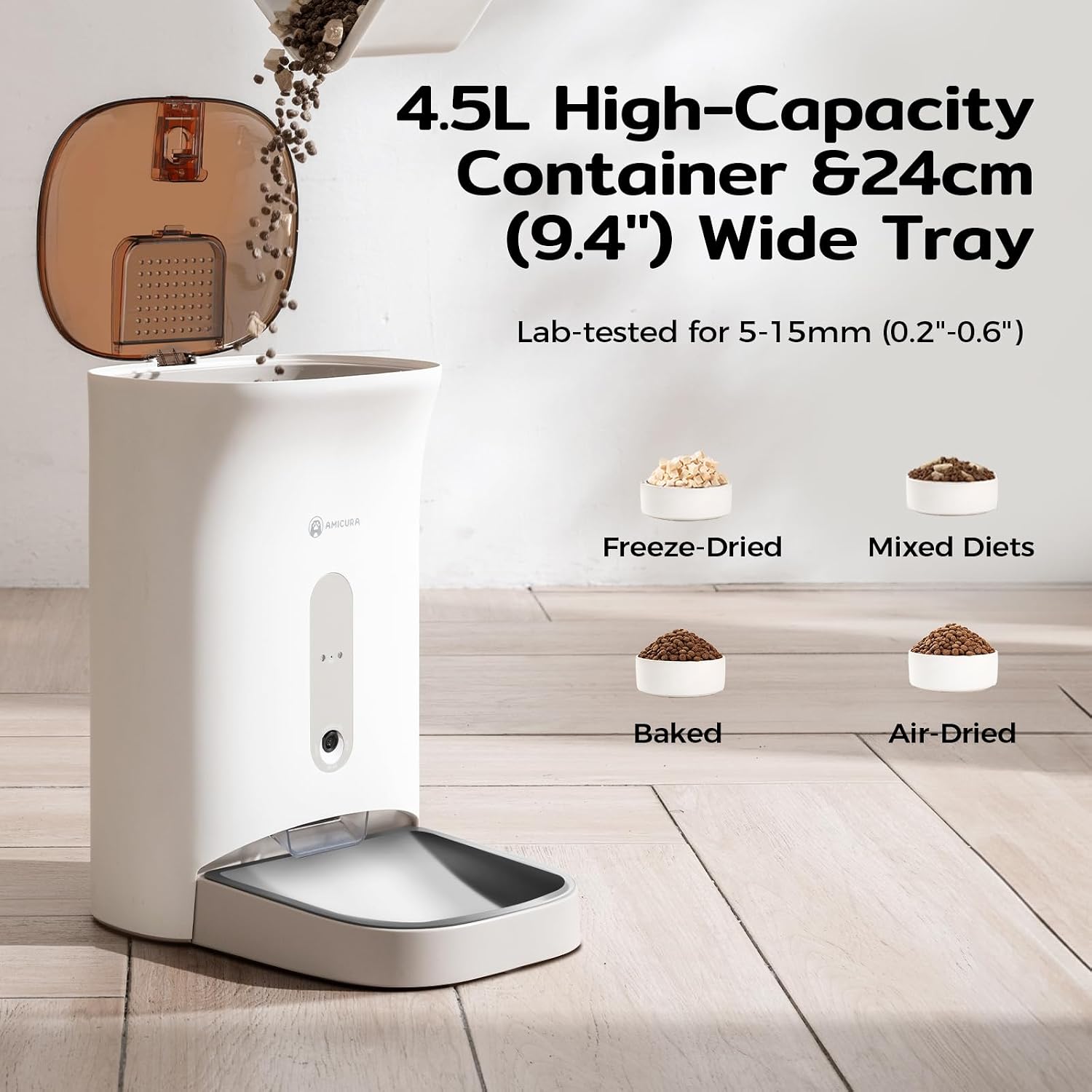
Image: The feeder with its lid open, illustrating the 4.5L food capacity and compatibility with various dry food types like freeze-dried, mixed diets, baked, and air-dried kibble.
5.5 Camera and Privacy Settings
The integrated 2K AI camera provides clear monitoring. For privacy, the camera is downward-focused to monitor food levels without invading your living space. You can also use the APP to close the lens at any time to protect family privacy.

Image: The feeder and a smartphone screen showing the camera's view of a cat eating, emphasizing the privacy protection system with a toggle to shut off monitoring.
6. Operating Instructions
6.1 Scheduling Meals via App
Use the Amicura app to set up customized feeding schedules for your pet. You can define meal times and portion sizes according to your pet's needs.
- Open the Amicura app and select your feeder.
- Navigate to the "Feeding Plan" or "Schedule" section.
- Add new feeding times and adjust the number of portions for each meal.
- Save your schedule. The feeder will automatically dispense food at the programmed times.
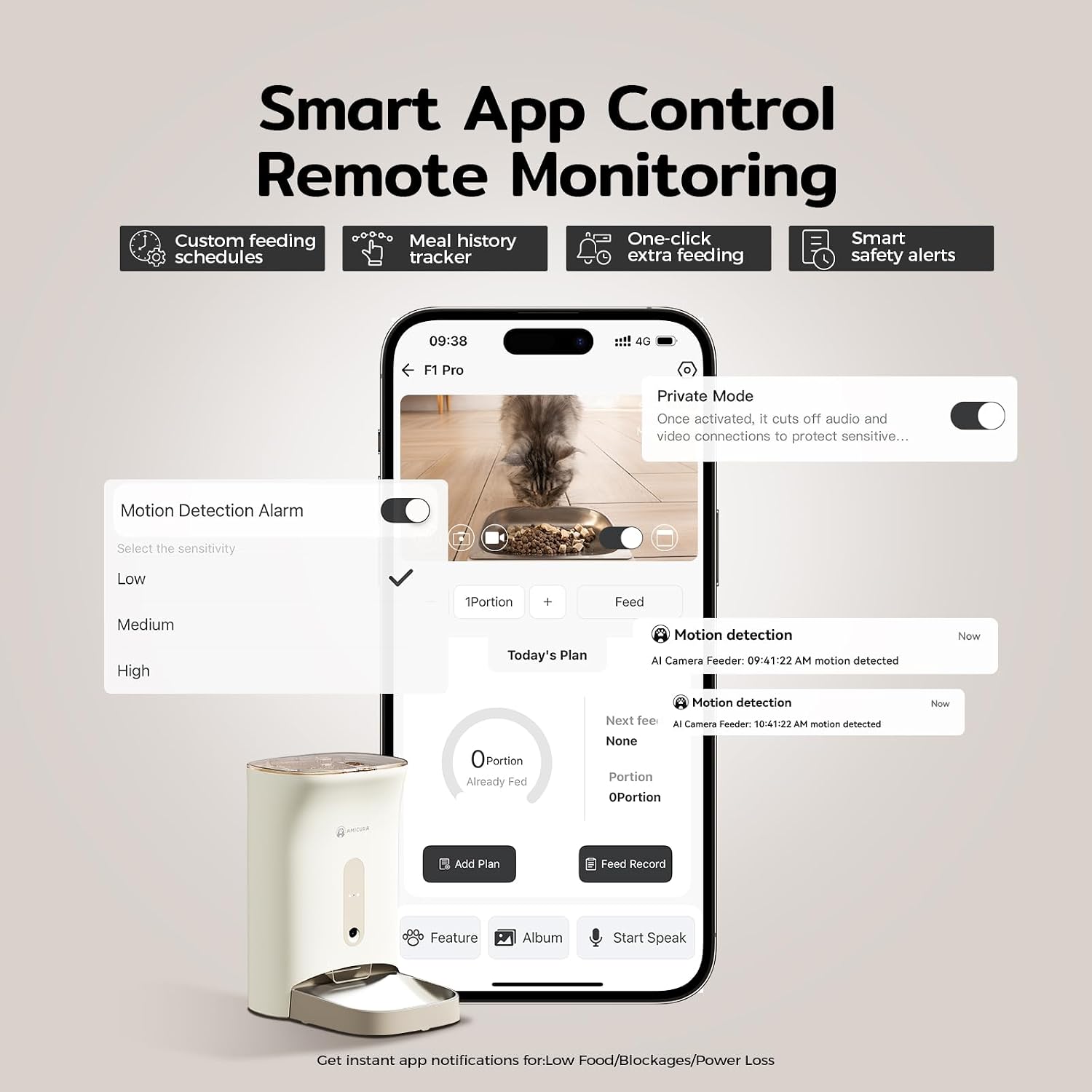
Image: The Amicura app interface on a smartphone, illustrating features like custom feeding schedules, meal history tracking, one-click feeding, and smart safety alerts.
6.2 Manual Feeding
You can dispense food manually at any time:
- Via App: In the Amicura app, tap the "Feed" button to dispense one portion immediately.
- On Device: Press the manual feed button on the feeder itself to dispense a single portion.
6.3 Real-Time Video Chat and Voice Call
Engage with your pet remotely using the two-way audio and video features:
- Open the app and access the live camera view.
- Use the microphone icon to speak to your pet.
- Use the speaker icon to hear your pet.
- Record a 10-second personalized voice message that plays at mealtimes to comfort your pet.
6.4 Monitoring and Alerts
The feeder provides intelligent monitoring and alerts:
- 2K HD Camera: Monitor your pet with clear 2K video, even in low light with night vision.
- AI Motion Capture: The camera automatically captures lovely moments when your pet passes by.
- Infrared Sensor: Detects low food levels, food card blockages, or power outages, triggering sound and light alarms, plus APP push notifications.
- Live Photo Push: The AI camera intelligently pushes live photos of your pet during meal times to your phone.

Image: The feeder in use, with a smartphone showing the 160° wide-angle night vision AI camera's 2K HD view, emphasizing 24/7 monitoring and smart motion detection.
7. Maintenance
7.1 Cleaning the Feeder
Regular cleaning ensures hygiene and proper operation:
- Removable Components: The food bucket, food bowl (304 stainless steel), and food spout are detachable for easy cleaning. Lift the food bucket straight up to remove it.
- Wash these components with mild soap and water. Rinse thoroughly and dry completely before reassembling.
- Main Unit: Wipe the exterior of the main unit with a damp cloth. Do not use abrasive cleaners or immerse the unit in water.

Image: The feeder demonstrating its "Hassle-Free Removable Bucket, Lift & Clean Design," highlighting the easy removal of the food bucket and the 304 stainless steel bowl for quick cleaning.
7.2 Desiccant Replacement
The desiccant bag helps keep food fresh and dry. Replace it periodically (e.g., every 1-2 months) to maintain effectiveness.
7.3 Anti-Clog System
The feeder features a silicone auger and a hidden dispensing port that auto-closes to prevent jams and maintain freshness. If a jam occurs, the infrared sensor will trigger an alert. Clear any obstructions manually if necessary.

Image: An exploded view of the feeder's internal components, detailing the removable desiccant box, airtight lid, and auto-sealing port, which together form the Triple-Lock Freshness Preservation System.
8. Troubleshooting
| Problem | Possible Cause | Solution |
|---|---|---|
| Feeder not dispensing food. | Food jam; low food level; power issue. | Check for obstructions in the dispensing port. Refill food container. Ensure power adapter is connected or batteries are installed. |
| App cannot connect to feeder. | Incorrect WiFi password; feeder too far from router; 5G/2.4G conflict. | Verify WiFi password. Move feeder closer to router. Ensure your router supports dual-band and try connecting to both 2.4GHz and 5GHz networks. Restart feeder and router. |
| Camera not working or poor quality. | Poor WiFi signal; privacy mode enabled; lens obstructed. | Check WiFi signal strength in the app. Disable privacy mode in the app. Clean the camera lens. |
| Voice messages not playing. | Message not recorded; volume too low. | Record a new voice message in the app. Check feeder volume settings. |
| Feeder alerts (low food, blockage) not received. | App notifications disabled; poor internet connection. | Enable notifications for the Amicura app in your phone settings. Ensure stable internet connection for both phone and feeder. |
9. Specifications
- Model: F1 PRO-US
- Capacity: 4.5 Liters
- Camera: 2K Ultra HD AI Camera, 160° Wide Angle, Night Vision
- Connectivity: Dual-Band WiFi (2.4GHz & 5GHz)
- Food Size Compatibility: 5-15mm dry pet food
- Power Supply: DC 5V/1A adapter (included), 3x D-cell batteries (not included)
- Dimensions: 12.48 x 9.45 x 14.57 inches (L x W x H)
- Weight: 5.72 pounds (2.6 Kilograms)
- Material: Food-grade ABS, 304 Stainless Steel bowl
10. Warranty and Support
Amicura provides a 2-Year Warranty for the F1 PRO Automatic Pet Feeder, covering manufacturing defects and malfunctions under normal use. For any questions, technical assistance, or warranty claims, please contact our customer support team.
- Customer Support: Available 24/7. Please refer to the contact information provided on the Amicura website or your purchase documentation.

Image: A graphic representing Amicura's customer satisfaction guarantee, featuring a cat wearing a headset, indicating 24/7 customer support and a 2-year warranty.
Related documentsF1 PRO-US

Ask a question about this manual
Ask about setup, troubleshooting, compatibility, parts, safety, or missing instructions. Manuals+ will review the question and use this page’s manual context to help answer it.