
1. Introduction
Welcome to the user manual for your ECOVACS DEEBOT T30C Robot Vacuum and Mop. This advanced cleaning device is designed to provide a comprehensive and hands-free cleaning experience for your home. Featuring an impressive 20,000Pa suction power, TruEdge Adaptive Edge Mopping, and ZeroTangle 2.0 Technology, the DEEBOT T30C efficiently handles various floor types and debris. Its innovative OMNI station offers hot water mop washing, self-emptying, and hot air drying, ensuring minimal maintenance. This manual provides essential information for setup, operation, maintenance, and troubleshooting to help you maximize the performance and longevity of your robot.

Image: The ECOVACS DEEBOT T30C robot vacuum and its accompanying OMNI station, showcasing the sleek black design of both units. The robot is positioned in front of the tall, rectangular OMNI station, which features clear reservoirs for water.
2. Safety Information
Before operating your DEEBOT T30C, please read and understand all safety instructions. Failure to follow these instructions may result in electric shock, fire, or serious injury.
- Ensure the power voltage matches the voltage marked on the charging dock.
- Do not use the robot in environments with open flames, flammable or explosive materials.
- Keep the robot and OMNI station away from water or wet surfaces.
- Supervise children and pets when the robot is operating.
- Remove loose cables, small objects, and fragile items from the cleaning path to prevent entanglement or damage.
- Do not sit on the robot or place heavy objects on it.
- Only use authorized accessories and replacement parts.
- Unplug the OMNI station before cleaning or performing maintenance.
3. Package Contents
Verify that all items are present in the package:
- ECOVACS DEEBOT T30C Robot Vacuum
- OMNI Station (Self-Emptying, Auto-Refill, Mop Washing, Hot Air Drying)
- Power Cord
- Side Brushes (2x)
- Mop Pads (2x)
- Cleaning Solution Bottle
- User Manual and Quick Start Guide
- Cleaning Tool
4. Product Overview
Familiarize yourself with the main components of your DEEBOT T30C and OMNI Station.
DEEBOT T30C Robot
- Top Panel: Features control buttons (Power, Spot Cleaning, Return to Station) and the LiDAR sensor for navigation.
- Front Bumper: Equipped with obstacle avoidance sensors.
- Bottom: Main brush, side brushes, driving wheels, cliff sensors, and mopping module with TruEdge Adaptive Edge Mopping.
- Dustbin: Located under the top cover for easy access and emptying.
OMNI Station
- Clean Water Tank: For fresh water used in mop washing and robot refilling.
- Dirty Water Tank: Collects wastewater from mop washing.
- Dust Bag Compartment: Houses the disposable dust bag for automatic dust collection from the robot.
- Mop Washing Tray: Where the robot's mop pads are cleaned with hot water and dried with hot air.
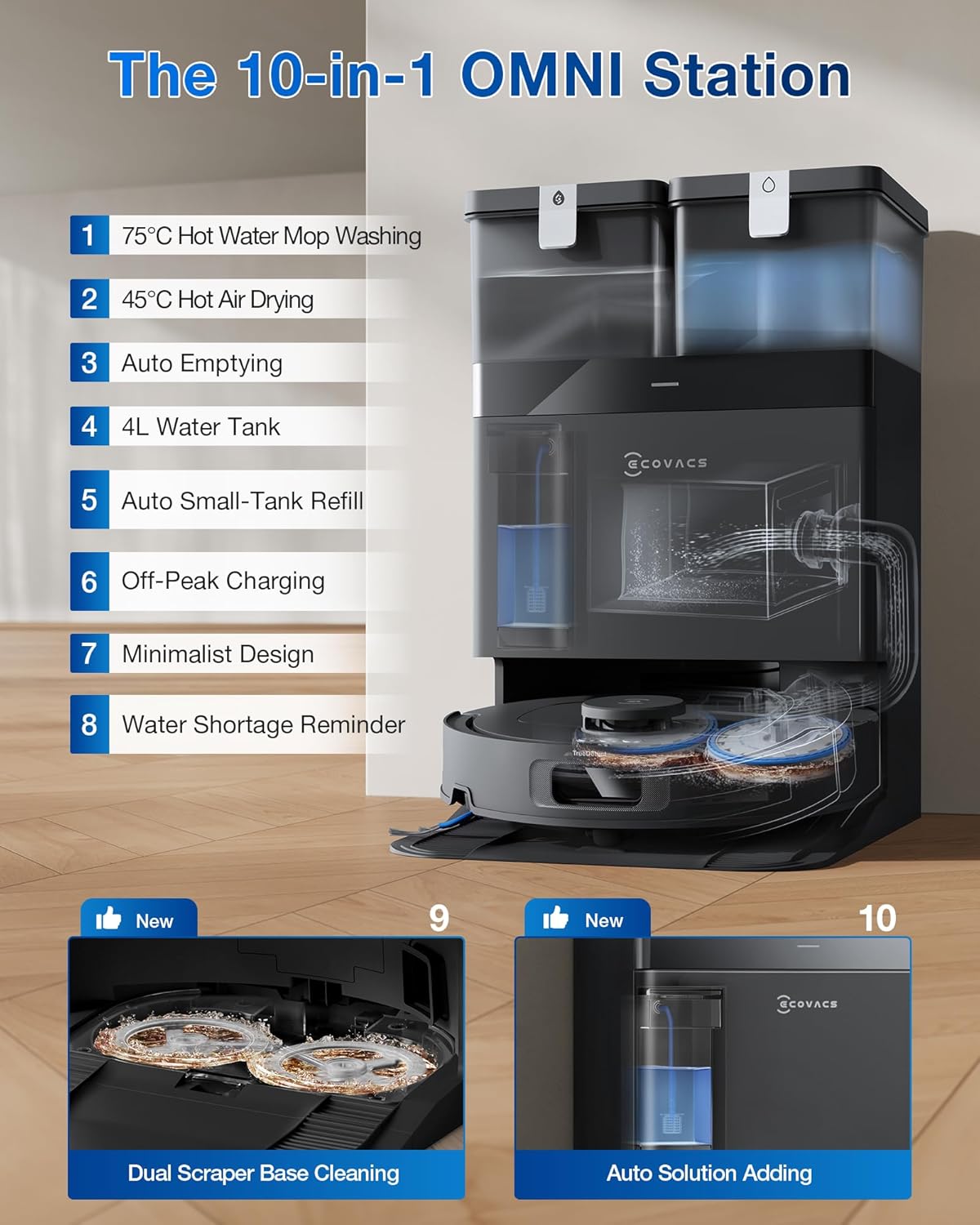
Image: A detailed view of the ECOVACS OMNI Station, highlighting its various functions such as hot water mop washing, hot air drying, auto emptying, water tanks, and auto solution adding.
5. Setup
Follow these steps for initial setup of your DEEBOT T30C.
- Unpack: Carefully remove all components from the packaging. Remove any protective films or packing materials from the robot and OMNI Station.
- Position the OMNI Station: Place the OMNI Station on a hard, level surface against a wall, ensuring there is at least 0.5 meters (1.6 ft) of clear space on both sides and 1.5 meters (4.9 ft) in front. Plug the power cord into a wall outlet.
- Prepare Water Tanks:
- Fill the Clean Water Tank with clean tap water. For optimal mopping, you may add the recommended ECOVACS cleaning solution.
- Ensure the Dirty Water Tank is empty and properly seated.
- Install Side Brushes: Attach the side brushes to the corresponding posts on the bottom of the robot until they click into place.
- Install Mop Pads: Attach the mop pads to the mopping plate on the bottom of the robot.
- Place Robot on Station: Place the DEEBOT T30C onto the OMNI Station, ensuring the charging contacts align. The robot will automatically power on and begin charging.
- Download ECOVACS HOME App: Scan the QR code in the Quick Start Guide or search for "ECOVACS HOME" in your app store. Follow the in-app instructions to connect your DEEBOT to your Wi-Fi network.
- Initial Mapping: Once connected, initiate a quick mapping run through the app. This allows the robot to create a map of your home for efficient cleaning.
6. Operating Instructions
Your DEEBOT T30C offers various cleaning modes and control options for a customized cleaning experience.
Starting a Cleaning Cycle
- From the Robot: Press the Power Button on the robot's top panel to start or pause a cleaning cycle.
- From the App: Open the ECOVACS HOME app, select your DEEBOT, and tap "Auto Clean" to start a full cleaning cycle.
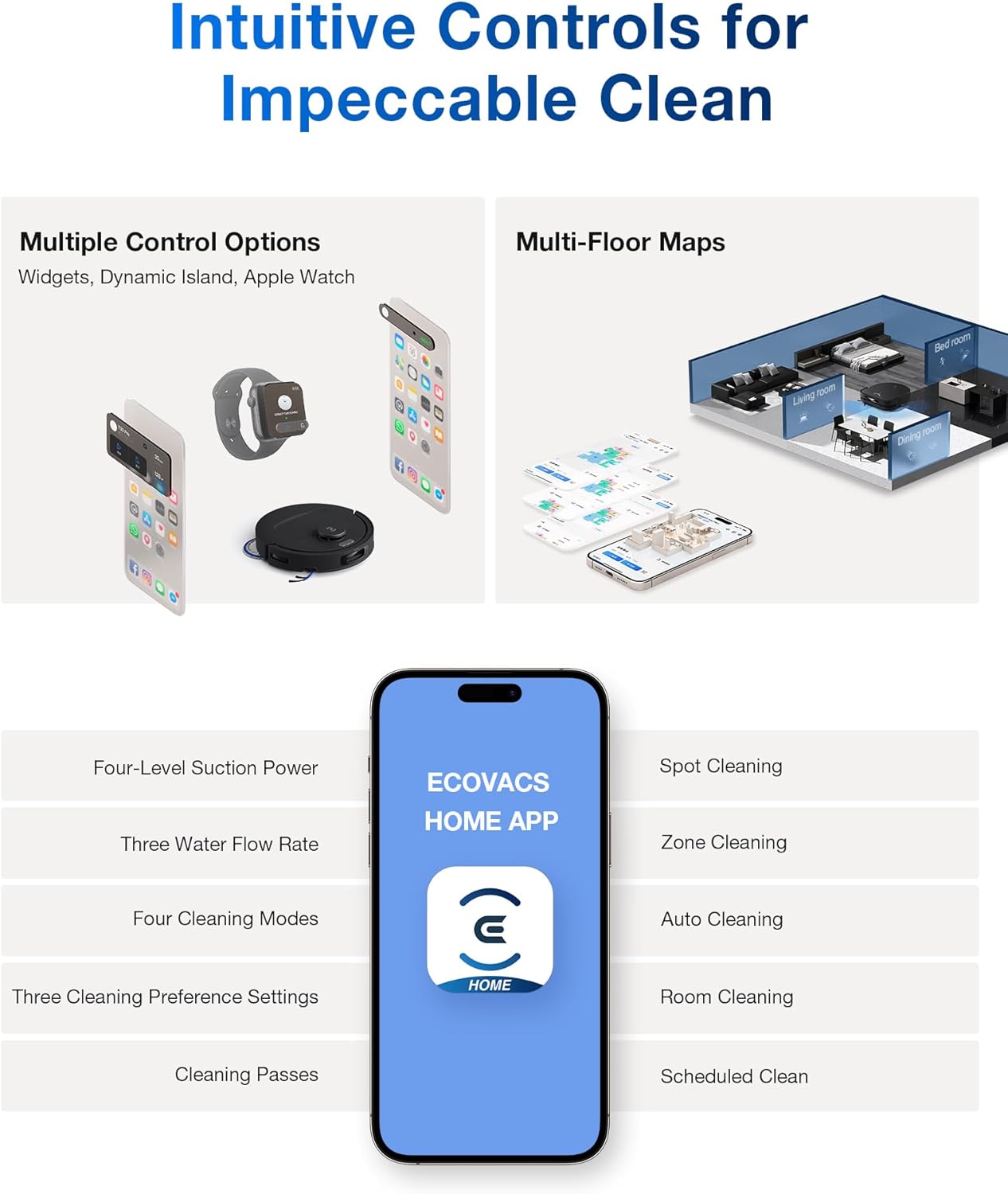
Image: Displays the ECOVACS HOME app interface on a smartphone, showing various control options like four-level suction, three water flow rates, and different cleaning modes. Also shows multi-floor mapping capabilities.
Cleaning Modes and Technologies
- Auto Clean: The robot automatically cleans the entire mapped area.
- Area Clean: Select specific rooms or areas on the map for cleaning.
- Custom Clean: Draw a custom area on the map for the robot to clean.
- Spot Clean: For concentrated cleaning of a small, dirty area. Press the Spot Clean button on the robot or select in the app.
- 20,000Pa Suction Power: Experience powerful vacuuming for deep cleaning carpets and hard floors.
- ZeroTangle 2.0 Technology: Designed to minimize hair entanglement on the main brush, reducing maintenance.

Image: Illustrates the powerful 20,000Pa suction of the DEEBOT T30C and its ZeroTangle 3.0 technology, showing how it prevents hair wraps on both side and main brushes.
- TruEdge Adaptive Edge Mopping: The robot dynamically extends its mop to clean closer to edges and corners, achieving enhanced coverage.

Image: Shows the DEEBOT T30C utilizing TruEdge 2.0 Technology to clean along edges and around furniture legs, demonstrating its ability to reach hard-to-access areas for 100% edge and corner coverage.
- OZMO Turbo 2.0 Mopping System: Features rotating mop pads with downward pressure for effective stain removal. Mop pads automatically lift when cleaning carpets to prevent wetting.

Image: Depicts the DEEBOT T30C's OZMO Turbo 2.0 Mopping System, showing its rotating mop pads and the auto-lifting feature for carpets, ensuring stains are removed and carpets remain dry.
Navigation and Obstacle Avoidance
- TrueMapping 2.0: Enables fast and accurate mapping of your home for efficient navigation and path planning.
- Intelligent Obstacle Avoidance: Advanced sensors help the robot recognize and avoid common household objects, preventing collisions and interruptions.
- Threshold Climbing: The robot can seamlessly climb thresholds up to 20mm, moving freely between rooms.
- Anti-Drop Sensors: Prevents the robot from falling down stairs or off elevated surfaces.

Image: Illustrates the DEEBOT T30C's TrueMapping 2.0 for fast mapping and intelligent path planning, as well as its precise obstacle avoidance capabilities, showing the robot navigating around objects.

Image: Shows the DEEBOT T30C's ability to climb 20mm thresholds and its anti-drop sensors, ensuring seamless cleaning across different floor levels and preventing falls.
Advanced Features via App
- Scheduling: Set specific times for the robot to clean automatically.
- No-Go Zones/Virtual Walls: Define areas the robot should avoid.
- Suction Power Adjustment: Adjust suction levels (Quiet, Standard, Max, Max+).
- Water Flow Rate: Control the amount of water used for mopping.
- Carpet Detection: The robot automatically boosts suction on carpets and lifts mop pads to prevent wetting.
- Multi-Floor Maps: Store maps for multiple levels of your home.
- Smart Home Integration: Compatible with voice assistants like Google Home and Amazon Alexa.
7. Maintenance
Regular maintenance ensures optimal performance and extends the lifespan of your DEEBOT T30C. Always power off the robot and unplug the OMNI Station before performing maintenance.
OMNI Station Maintenance
- Clean/Dirty Water Tanks: Empty the Dirty Water Tank after each mopping cycle. Rinse both tanks with clean water regularly.
- Dust Bag: Replace the disposable dust bag in the OMNI Station when the app indicates it is full (approximately every 30-60 days, depending on usage).
- Mop Washing Tray: Regularly clean the mop washing tray and the dual scraper baseplate to prevent residue buildup. The baseplate is fully detachable for easy cleaning.
DEEBOT Robot Maintenance
- Dustbin and Filter: Empty the robot's dustbin after each use. Clean the high-efficiency filter by tapping it against a trash can or using the cleaning tool. The filter system offers up to 150 days of maintenance-free operation.
- Main Brush: Remove the main brush and use the cleaning tool to cut and remove any tangled hair or debris.
- Side Brushes: Check side brushes for wear or entanglement. Replace if damaged.
- Mop Pads: Remove and wash mop pads after each mopping cycle. They can be hand-washed or machine-washed.
- Sensors: Wipe all sensors (cliff sensors, anti-collision sensors, charging contacts) with a clean, dry cloth.
8. Troubleshooting
If your DEEBOT T30C encounters an issue, refer to the following common problems and solutions. For more detailed troubleshooting, consult the ECOVACS HOME app or the official support website.
| Problem | Possible Cause | Solution |
|---|---|---|
| Robot does not charge. | Charging contacts are dirty or not aligned. OMNI Station is not powered. | Clean charging contacts on both robot and station. Ensure OMNI Station is plugged in and powered on. |
| Robot gets stuck frequently. | Loose cables, small objects, or uneven surfaces. | Clear the cleaning area of obstacles. Use No-Go Zones in the app for problematic areas. |
| Poor cleaning performance. | Dustbin full, brushes tangled, filter clogged, or mop pads dirty. | Empty dustbin, clean/replace brushes, clean filter, wash mop pads. |
| No water dispensed during mopping. | Clean Water Tank empty, water nozzle clogged, or mop pads not installed correctly. | Refill Clean Water Tank. Check for clogs in water nozzles. Reinstall mop pads. |
| Robot cannot connect to Wi-Fi. | Incorrect Wi-Fi password, router issues, or robot too far from router. | Verify Wi-Fi password. Restart router. Move robot closer to router. Ensure 2.4GHz Wi-Fi is used. |
9. Specifications
| Feature | Detail |
|---|---|
| Brand | ECOVACS |
| Model Name | DEEBOT T30C |
| Special Feature | OZMO ROLLER Instant Self-Washing Mopping |
| Color | Black |
| Product Dimensions | 13.78"L x 20.98"W x 15.94"H |
| Included Components | DEEBOT T30C ROBOT VACUUM |
| Filter Type | WASHABLE |
| Battery Life | 200 minutes |
| Voltage | 220 Volts |
| Capacity (Water Tanks) | 3 Liters |
| UPC | 850066858639 |
| Item Weight | 35.2 pounds |
| Batteries Required | 1 AAA batteries required (included) |
10. Warranty and Support
For detailed warranty information, please refer to the warranty card included with your product or visit the official ECOVACS website.
If you require technical assistance, have questions about your DEEBOT T30C, or need to purchase replacement parts, please contact ECOVACS Customer Support through the following channels:
- ECOVACS HOME App: Access support directly through the app for FAQs, troubleshooting guides, and live chat options.
- Official Website: Visit www.ecovacs.com for comprehensive support resources, product registration, and contact information.
- Customer Service Hotline: Refer to the contact details provided in your Quick Start Guide or on the ECOVACS website for phone support.