
1. Introduction
The Amicura Cura 3 Self-Cleaning Cat Litter Box is an innovative solution for pet owners seeking convenience and hygiene. This advanced system automates the cleaning process, manages waste, and controls odors, providing a fresh environment for your cat and home. It is designed for multi-cat households and offers smart control via a dedicated mobile application.

Image: The Amicura Cura 3 litter box, showcasing its sleek design and integrated app control.
2. Safety Information
Your safety and the safety of your pet are paramount. The Amicura Cura 3 is equipped with multiple safety features to ensure secure operation.
- TÜV-Certified Safety: The device is TÜV-approved, incorporating anti-pinch technology.
- 7 Safety Sensors: Equipped with 7 sensors, including IR sensors, proximity sensors, and weight sensors. These sensors detect your cat's presence and instantly stop operation if a cat approaches within 30 cm, resuming only when the cat has safely left the area.
- Accident-Free Use: Designed to prevent accidents and ensure 100% safe usage for your pets.

Image: Illustration of the 7 safety sensors and TÜV certification for the Cura 3.
3. Package Contents
Please verify that all items listed below are included in your package:
- Amicura Box (Main Unit) x1
- Litter Mat x1
- Pailing Panel x1
- Auto-Packing Trash Bag Box x1
- Instruction Manual x1
- Deodorant Box x1
- Deodorant Bar x3
- Power Supply x1
- Universal Power Adapter x4

Image: Visual representation of the complete packing list for the Amicura Cura 3.
4. Setup
Follow these general steps to set up your Amicura Cura 3. Refer to the included Instruction Manual for detailed, step-by-step guidance.
- Unpack: Carefully remove all components from the packaging.
- Placement: Place the litter box on a flat, stable surface in a suitable location, away from direct sunlight or heat sources.
- Install Pailing Panel: Attach the pailing panel to the entrance of the litter box.
- Insert Trash Bag Box: Place the auto-packing trash bag box into its designated compartment.
- Add Deodorant Bar: Insert a deodorant bar into the deodorant box.
- Fill with Litter: Add clumping cat litter to the litter compartment. Ensure the litter level is within the recommended range.
- Connect Power: Connect the power supply to the unit and plug it into an electrical outlet.
- App Pairing: Download the Amicura app and follow the in-app instructions to pair your device. Ensure your Wi-Fi is 2.4 GHz.
5. Operating Instructions
The Amicura Cura 3 offers automated cleaning and waste management for a clean and odor-free environment.
Automatic Self-Cleaning and Waste Management
The system automatically detects when your cat uses the litter box and initiates a cleaning cycle after a set delay. Waste is sealed in bags, and new bags are refilled automatically, preventing direct contact with waste and minimizing odors and bacteria.
- Auto-Cleaning: The internal mechanism sifts the litter, separating clumps from clean litter.
- Auto-Sealing Trash: Waste is automatically sealed into a bag within the trash compartment.
- Auto Refill Trash Bag: The system automatically refills a new trash bag after the previous one is sealed and removed.
- One-Tap Litter Empty: Through the app, you can initiate a full litter emptying cycle, making it easy to change all the litter.

Image: The automatic waste management process: auto-cleaning, auto-sealing, and auto-refilling.
Odor Control and Leak-Proof Design
The Cura 3 incorporates features to maintain a fresh environment and prevent leaks.
- MSDS-Certified Deodorizer: A deodorizing bar made from natural ingredients provides long-lasting freshness for up to 30 days.
- 360° Leak-Proof Design: A patented anti-leakage structure and cat-friendly design prevent urine leakage, even when cats spray against the wall. This design has been tested over 5,000 times to ensure effectiveness.

Image: The deodorizing system and MSDS certification for effective odor control.
Quiet Operation
The Amicura Cura 3 operates quietly to avoid disturbing your household or sensitive pets.
- Near-Silent Operation: The device operates at approximately 30dB during normal standby.
- Low Noise During Cycles: Brief periods of auto-emptying (≤46dB), auto-cleaning (≤40dB), and auto-packing (≤37dB) are designed to be minimally disruptive.

Image: Noise level chart for the Amicura Cura 3 during various operational stages.
6. App Control & Monitoring
The Amicura app provides comprehensive control and monitoring capabilities for your Cura 3 litter box.
- Remote Control: Manage cleaning cycles, empty litter, and auto-pack waste remotely.
- Health Monitor: Track your cat's behavior, weight, and usage patterns to gain insights into their health.
- Multi-Pet Profiles: Create individual profiles for multiple cats, allowing the system to distinguish them by weight.
- Personalized Settings: Customize cleaning schedules and other preferences.
- Device Status Reminders: Receive notifications regarding device status and maintenance needs.
- Wi-Fi Compatibility: Supports 2.4 GHz Wi-Fi networks.
- Family Sharing: The Cura 3 can be controlled by multiple family members through the app.

Image: The Amicura app interface showing remote control and monitoring features.
Multi-Cat Recognition
The app utilizes weight sensors to recognize and distinguish between different cats, providing personalized data for each pet.
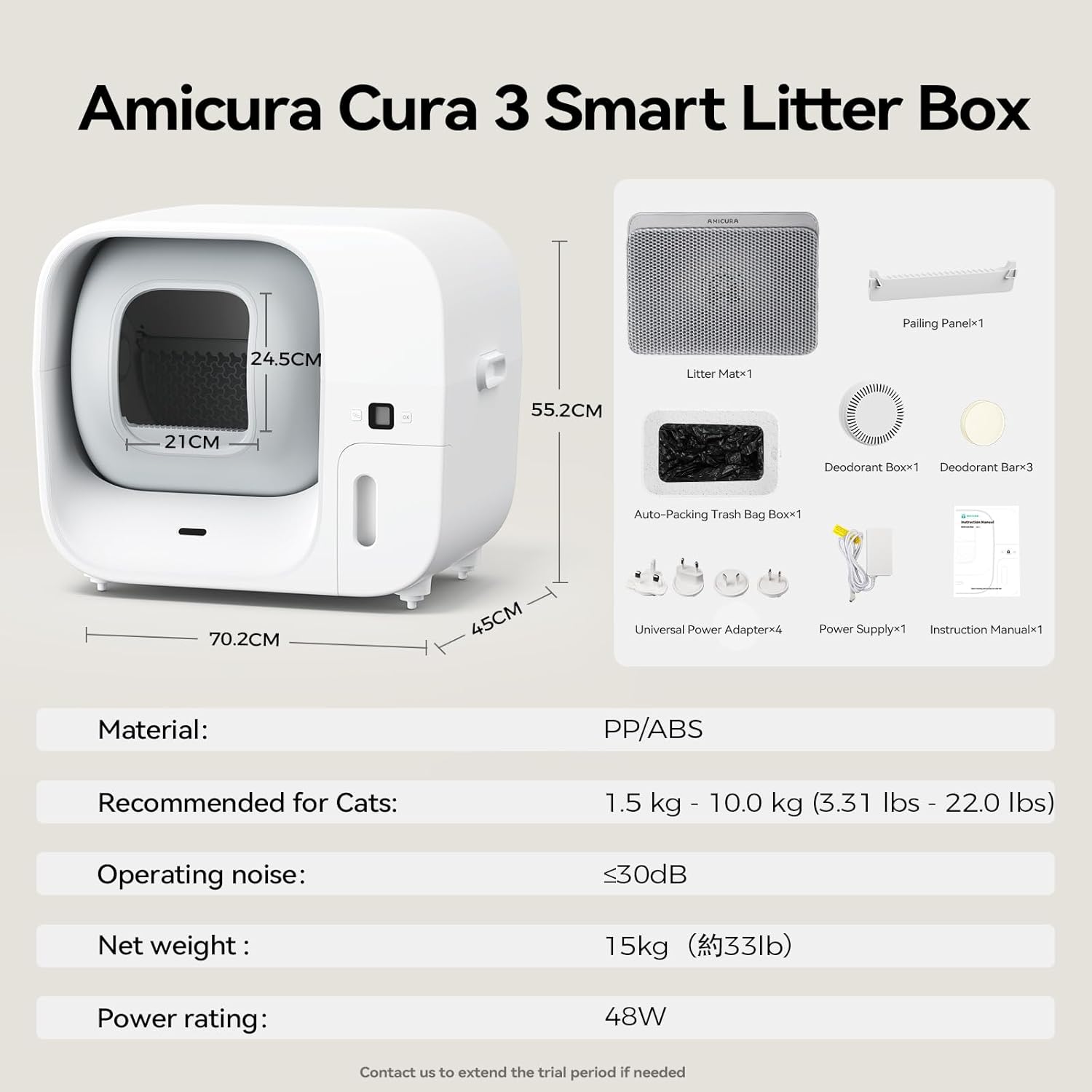
Image: Multi-cat recognition feature, showing how the app distinguishes cats by weight.
7. Maintenance & Cleaning
Regular maintenance ensures optimal performance and hygiene of your Amicura Cura 3.
- Easy Disassembly: All components except the base are designed for easy disassembly and washing.
- Thorough Cleaning: Periodically disassemble the washable parts for a deep clean. Ensure all parts are completely dry before reassembly.
- Litter Mat and Pailing Panel: The included litter mat and pailing panel help trap stray litter, keeping the surrounding area clean. Clean these regularly.
- Deodorant Bar Replacement: Replace the deodorant bar approximately every 30 days for continuous odor control.

Image: Illustration of the easy-to-clean, detachable components of the Cura 3.

Image: The pailing panel and litter mat working together to trap stray litter.
8. Troubleshooting
If you encounter issues with your Amicura Cura 3, please refer to the following general advice. For specific error codes or persistent problems, consult the full instruction manual or contact customer support.
- Device Not Responding: Check power connection and ensure the device is properly plugged in. Verify Wi-Fi connection in the app.
- Cleaning Cycle Not Initiating: Ensure no cat is currently inside or near the litter box. Check litter level and consistency.
- Odor Persistence: Replace the deodorant bar. Ensure the trash bag is properly sealed and disposed of. Clean the unit thoroughly.
- Litter Leakage: Verify that the litter box components are correctly assembled and that the litter level is not overfilled.
- App Connectivity Issues: Ensure your smartphone is connected to a 2.4 GHz Wi-Fi network. Restart the app and the litter box.
If problems persist, please contact Amicura customer support for assistance.
9. Specifications
| Feature | Specification |
|---|---|
| Model Number | Cura 3 Pro |
| Product Dimensions | 73.5 x 64.5 x 52 cm |
| Item Weight | 19 kg |
| Material | PP/ABS |
| Color | White |
| Recommended for Cats | 1.5 kg - 10.0 kg (3.31 lbs - 22.0 lbs) |
| Operating Noise | ≤30dB (normal operation) |
| Power Rating | 48W |
| Country of Origin | China |
10. Warranty & Support
Amicura is committed to providing quality products and customer satisfaction.
- Warranty: The Amicura Cura 3 comes with a 1-year manufacturer warranty.
- Return Policy: A 30-day free return policy is available.
- Customer Support: For any questions, concerns, or assistance with your Cura 3 self-cleaning litter box, please contact Amicura customer support.
Contact: service@amicurapet.com


