
VILTROX Vintage Z1
VILTROX Vintage Z1 Retro Camera Flash Instruction Manual
Model: Vintage Z1 | Brand: VILTROX
1. Introduction
The VILTROX Vintage Z1 is a compact and lightweight hot shoe speedlite designed for use with a wide range of DSLR and mirrorless cameras. Combining a classic retro aesthetic with modern functionality, this flash unit provides adjustable lighting for various photography scenarios. Its built-in rechargeable battery and optical triggering modes offer convenience and versatility for both on-camera and off-camera flash setups.

Figure 1: VILTROX Vintage Z1 Retro Camera Flash
Video 1: Overview of the VILTROX Vintage Z1 Retro Camera Flash, showcasing its design and features.
2. What's in the Box
The VILTROX Vintage Z1 Retro Camera Flash package includes the following items:
- Flash Unit (VILTROX Vintage Z1 flash)
- Flash Diffuser
- Packaging Box
- Instruction Manual (this document)

Figure 2: Included components of the VILTROX Vintage Z1 package.
3. Product Overview
The VILTROX Vintage Z1 features a robust design with intuitive controls for ease of use. Key components include:
- Power Knob: Used to adjust flash output levels.
- Pre-flash Button (Recycle Indicator): Indicates flash readiness (green) or charging (red/pink).
- Thumbwheel (Power off/M manual flash key): Main power switch and manual flash trigger.
- Light Emitting Area: Where the flash light is emitted.
- Photosensitive Induction Light: Sensor for optical triggering.
- Charging Indicator: Shows charging status.
- Type-C Interface: For charging the built-in battery.
- Photosensitive Induction Button (S1/S2): Selects optical slave mode.
- Lock Ring: Secures the flash to the camera's hot shoe.
- Hot Shoe: Connects the flash to the camera.

Figure 3: Detailed view of the VILTROX Vintage Z1 components.
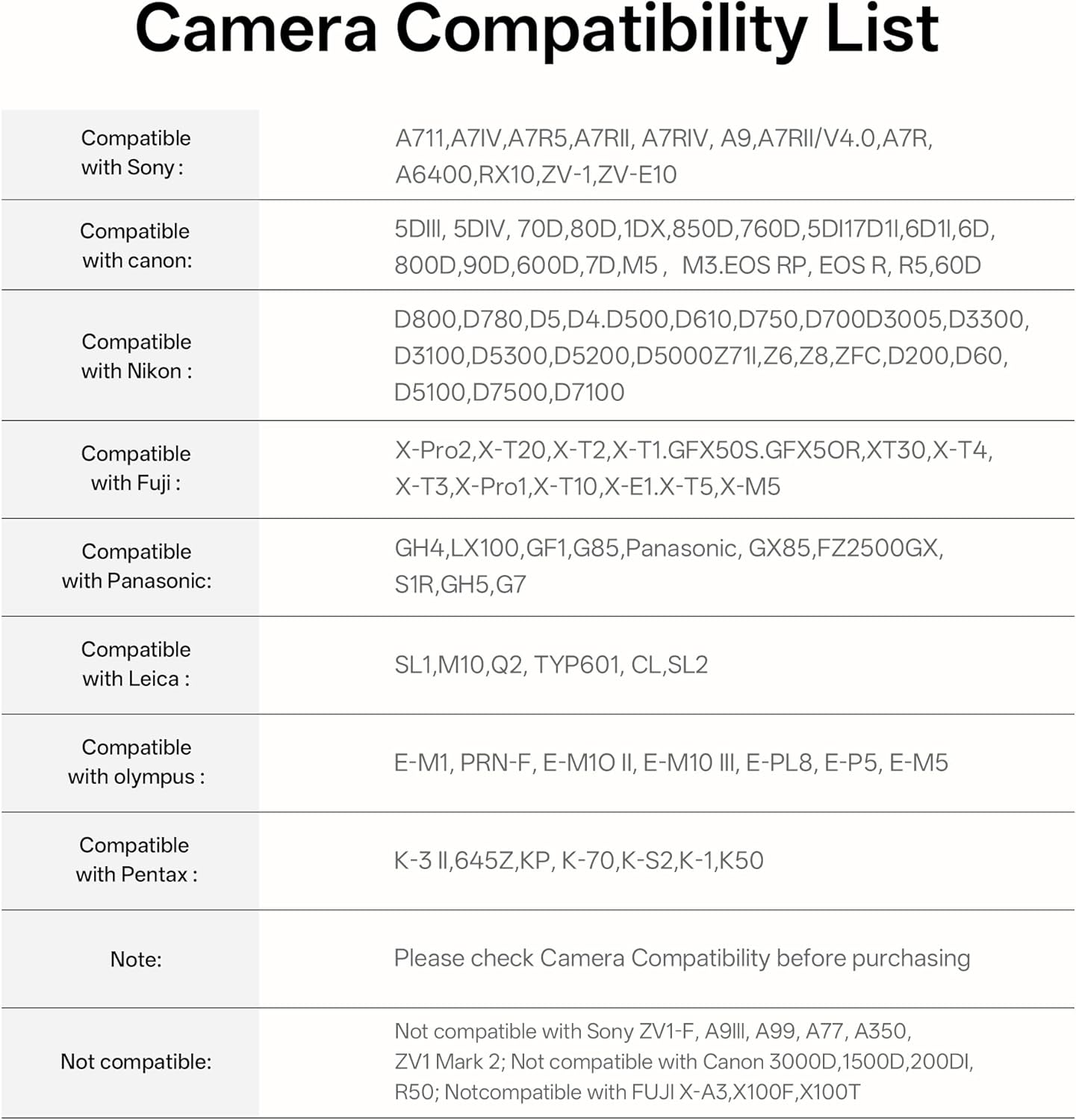
Figure 4: The compact and lightweight design of the Vintage Z1.
4. Setup
4.1 Attaching to Camera
The Vintage Z1 is designed for seamless compatibility with most cameras featuring a standard hot shoe mount. To attach the flash:
- Slide the flash unit onto your camera's hot shoe.
- Tighten the lock ring securely to ensure the flash is firmly attached.

Figure 5: Universal hot shoe compatibility with various camera models.
4.2 Initial Charging
Before first use, fully charge the flash unit. The Vintage Z1 features a built-in 1100mAh lithium battery and supports Type-C fast charging.
- Connect a Type-C USB cable (not included) to the flash unit's Type-C interface.
- Connect the other end to a 5V/2A power source.
- A full charge takes approximately 50 minutes. The charging indicator will show progress.

Figure 6: Type-C fast charging capabilities.
5. Operating Instructions
5.1 Power Adjustment
The flash output can be manually adjusted using the power knob. There are 7 levels of power adjustment, ranging from 1/1 (full power) down to 1/64 power.
- Rotate the power knob to select the desired flash output.
- Recycle time varies from 0.25 to 3.5 seconds depending on the power setting.
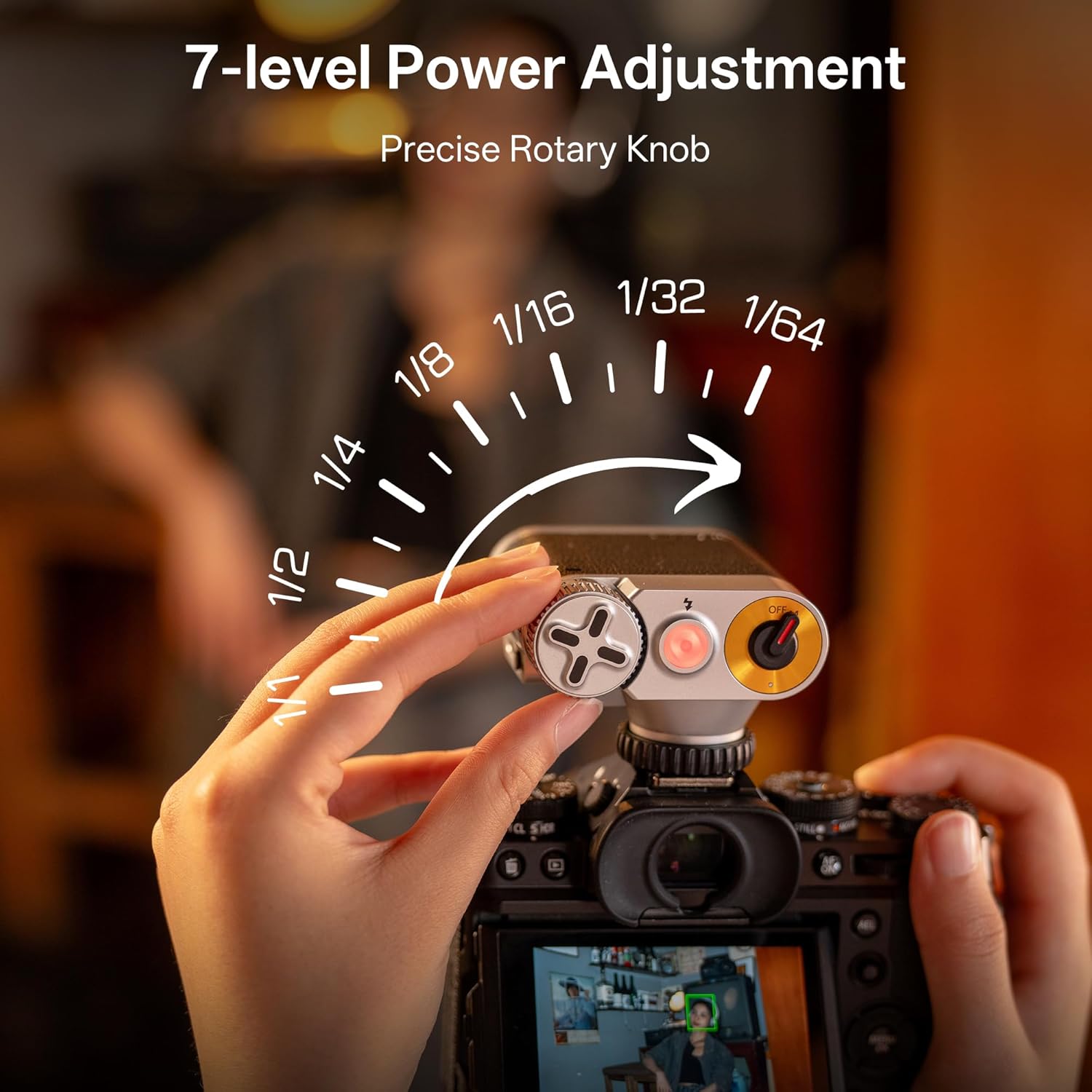
Figure 7: Precise rotary knob for power adjustment.
5.2 Optical Triggering (S1 & S2 Modes)
The Vintage Z1 supports optical slave triggering for multi-flash setups, allowing it to fire in sync with another flash unit.
- S1 Mode (Standard Optical Triggering): The flash fires when it detects another flash. This mode is suitable when the master flash does not emit a pre-flash (e.g., manual flash).
- S2 Mode (Anti-Preflash Triggering): The flash ignores the first pre-flash from the master unit and fires on the second, main flash. This is ideal for cameras with TTL (Through-The-Lens) metering systems that emit a pre-flash.
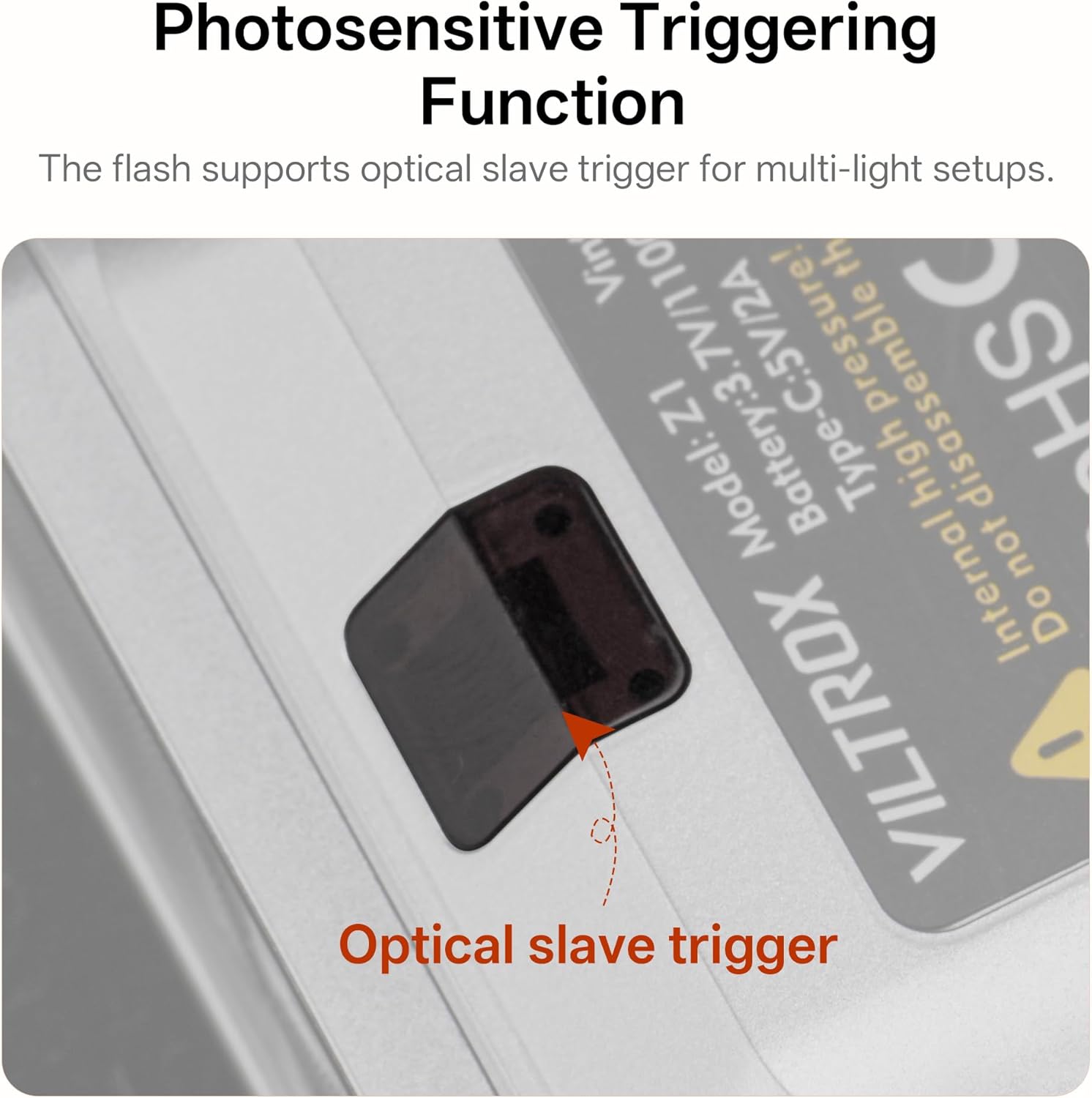
Figure 8: Photosensitive triggering function for slave modes.
5.3 Using the Diffuser
The included detachable softbox (diffuser) helps to soften the harsh light from the flash, providing a more natural and pleasing illumination, especially for portraits and close-up photography.
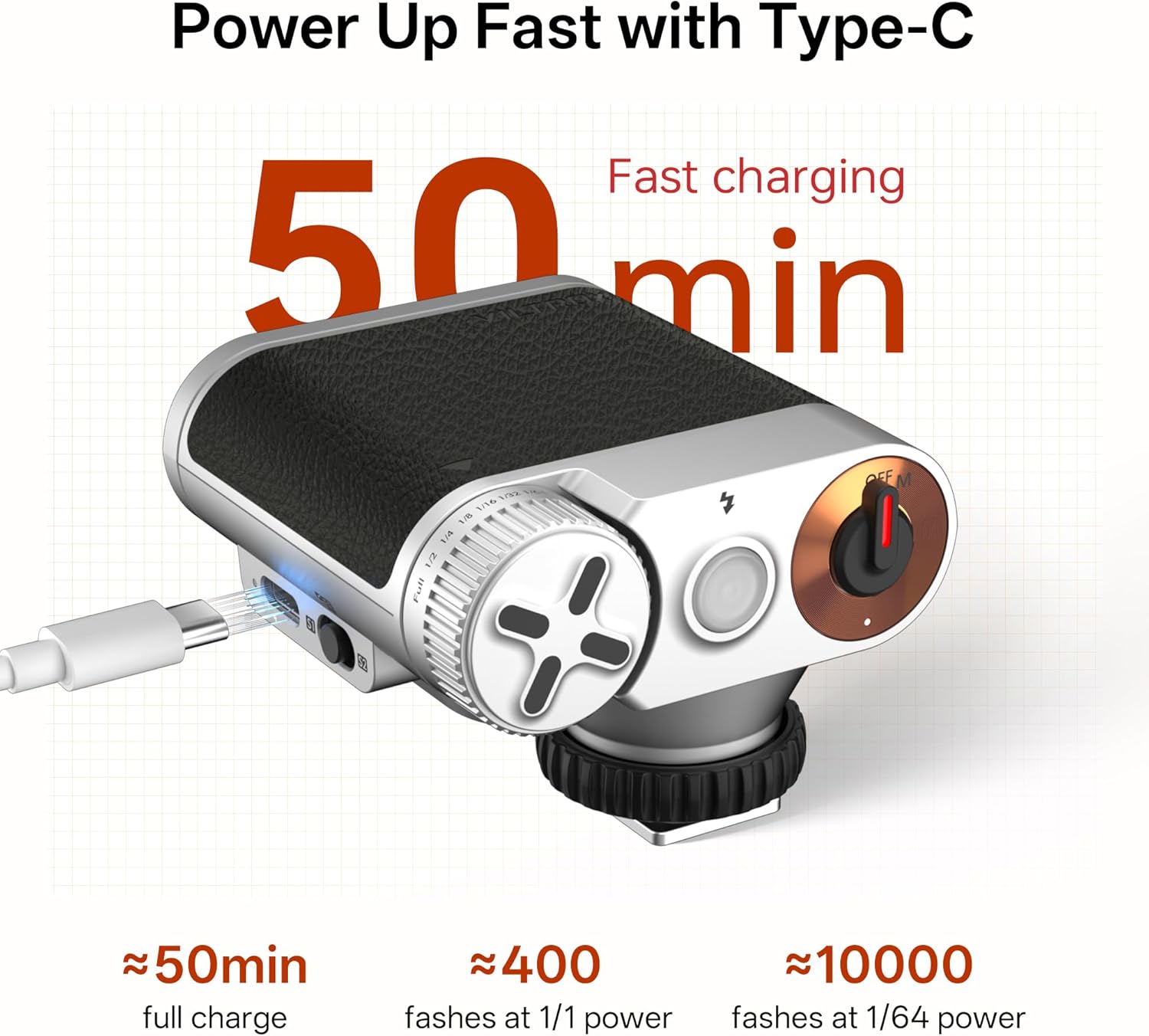
Figure 9: Attaching the diffuser to soften flash output.
5.4 Shutter Speed Considerations
The VILTROX Vintage Z1 has a flash sync speed of 1/200s. When using the flash, it is crucial to set your camera's shutter speed at or below its maximum flash sync speed (typically 1/200s or 1/250s, depending on your camera model). Shooting at a faster shutter speed than the sync speed can result in partial illumination of the frame, often appearing as a dark band across the image.
Video 2: Demonstrates the effect of flash on photos and highlights the importance of proper shutter speed settings.
6. Maintenance
6.1 Battery Care
- To prolong battery life, avoid completely draining the battery before recharging.
- Store the flash unit with a partial charge if not used for extended periods.
- The flash unit will enter sleep mode after 15 minutes of inactivity to conserve power. Power on again to resume operation.
6.2 Cleaning
- Use a soft, dry cloth to clean the exterior of the flash unit.
- For the light-emitting area, use a lens cleaning cloth and solution if necessary, ensuring no residue is left.
- Do not use harsh chemicals or abrasive materials.
7. Troubleshooting
- Flash Not Firing:
- Ensure the flash is powered on (switch set to 'M').
- Check the recycle indicator; if red/pink, the flash is still charging. Wait for it to turn green.
- Verify the flash is securely mounted on the camera's hot shoe.
- If using optical slave mode (S1/S2), ensure the master flash is firing correctly and the sensor on the Z1 is unobstructed.
- Shadows in Photos:
- If using a large lens, the lens barrel may cast a shadow. Try using a shorter focal length lens or stepping back from your subject.
- Ensure your camera's shutter speed is at or below the flash sync speed (e.g., 1/200s). Faster speeds can cause partial illumination.
- Overexposed/Underexposed Images:
- Adjust the flash power output using the power knob. Increase for underexposure, decrease for overexposure.
- Consider adjusting your camera's ISO or aperture settings to fine-tune exposure.
8. Specifications
| Feature | Specification |
|---|---|
| Model | Vintage Z1 |
| Guide No. (1/1 output) | GN12 (ISO 100, in meters) |
| Power (1/1 output) | 23W/s |
| Flash Output Levels | 7 levels: 1/1 - 1/64 |
| Recycle Time | 0.25 - 3.5s |
| Flash Coverage | 28mm |
| Flash Duration T0.5 | 1/5000s - 1/50000s |
| Color Temperature | 6500K ± 200K |
| Flash Mode | M (Manual mode) |
| Flash Triggering Mode | S1 (Synchronous flash triggering mode) / S2 (Anti-preflash triggering mode) |
| Battery Capacity | 3.7V, 1100mAh (Built-in Lithium Battery) |
| Flashes Count (per charge) | 400 - 10,000 times (depending on power output) |
| Charging Period | Type-C 5V/2A (Approx. 50 min) |
| Dimensions | 68.5 x 50.2 x 74mm |
| Weight | Approx. 116g |
| Compatible Mountings | Hot Shoe Mount |
| Sleep Mode | Device enters sleep mode after 15 minutes of inactivity. Power on again to resume operation. |
9. Warranty and Support
For warranty information, technical support, or any inquiries regarding your VILTROX Vintage Z1 Retro Camera Flash, please refer to the warranty card included in your package or contact VILTROX customer service directly through their official website or authorized retailers. Keep your purchase receipt as proof of purchase for warranty claims.
Related documentsVintage Z1


Ask a question about this manual
Ask about setup, troubleshooting, compatibility, parts, safety, or missing instructions. Manuals+ will review the question and use this page’s manual context to help answer it.