
Introduction
Thank you for choosing the Medcursor Cordless Heated Knee Massager. This device is designed to provide targeted massage and heat therapy to your knees, shoulders, and elbows, promoting comfort and relaxation. Please read this manual thoroughly before use to ensure safe and effective operation.

Image: The Medcursor Cordless Heated Knee Massager, illustrating its design and areas of heat and vibration application.
Safety Information
To reduce the risk of electric shock, burns, fire, or injury, please observe the following precautions:
- Do not use this device if you have a pacemaker, heart condition, or any other medical implant.
- Consult a physician before use if you are pregnant, have diabetes, phlebitis, thrombosis, or are at increased risk of developing blood clots.
- Do not use on swollen, inflamed, or injured skin areas.
- Avoid using the massager for more than 20 minutes at a time.
- Keep out of reach of children.
- Do not disassemble or attempt to repair the device yourself.
- Use only the provided charging cable.
Package Contents
- Medcursor Cordless Heated Knee Massager
- USB-C Charging Cable
- Extension Strap (19 inches)
- User Manual
Product Diagram
Familiarize yourself with the components of your Medcursor Knee Massager:
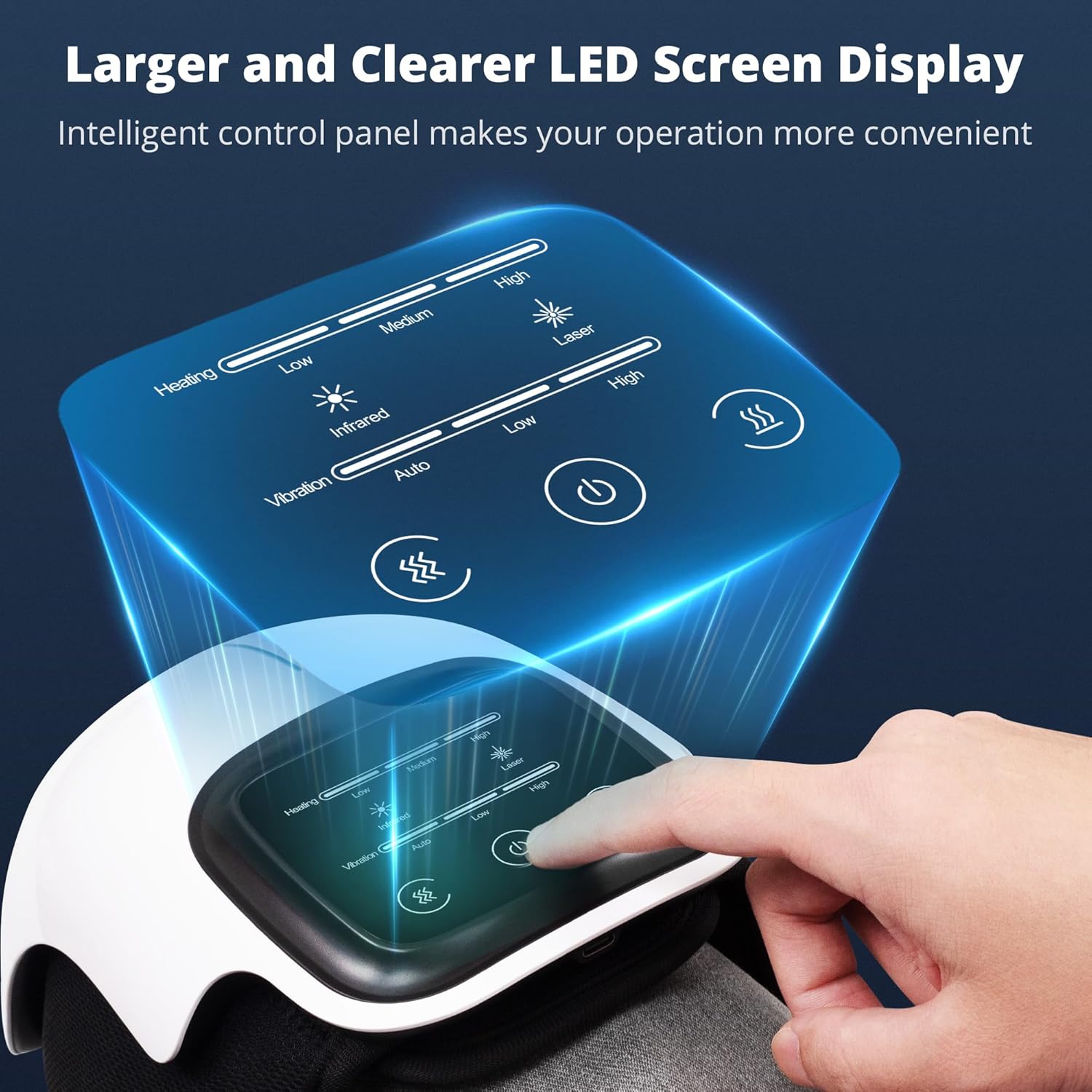
Image: Close-up of the Medcursor Knee Massager's LED screen, highlighting the control panel for various functions.
- Power Button: Turns the device on/off.
- Heating Button: Cycles through heating levels (Low, Medium, High).
- Vibration Button: Cycles through vibration modes (Auto, Low, High).
- LED Display: Shows current settings and battery level.
- Adjustable Straps: Secure the massager to your body.
- USB-C Charging Port: For recharging the internal battery.
Setup
Charging the Device
Before first use, fully charge the massager. A full charge takes approximately 2-3 hours.
- Connect the USB-C charging cable to the charging port on the device.
- Connect the other end of the cable to a compatible USB power adapter (not included) or a computer USB port.
- The LED display will indicate charging status. The battery icon will show full when charging is complete.

Image: The Medcursor Knee Massager displaying battery capacity, working time, charging port type, and timer information.
Wearing the Massager
The massager is designed to fit most knee sizes. Use the included extension strap if needed.
- Place the massager on your knee, shoulder, or elbow, ensuring the massage nodes are positioned over the desired area.
- Wrap the adjustable hook-and-loop straps securely around your limb. Ensure a snug but comfortable fit.
- If the standard straps are too short, attach the 19-inch extension strap to achieve a proper fit.

Image: A diagram illustrating the maximum dimensions of the Medcursor Knee Massager and the length of the adjustable strap, indicating its suitability for various body sizes.
Operating Instructions
Once the massager is securely in place and charged, you can begin your massage session.

Image: A user comfortably using the Medcursor Knee Massager while relaxing on a sofa, with an overlay detailing the available heating and vibration modes.
Power On/Off
- Press and hold the Power Button for 2 seconds to turn the device on. The LED screen will illuminate.
- Press and hold the Power Button again for 2 seconds to turn the device off.
Adjusting Heating Levels
The massager offers three heating levels:
- Press the Heating Button to cycle through the heat settings:
- Low: Approximately 104-113°F (40-45°C)
- Medium: Approximately 115-122°F (46-50°C)
- High: Approximately 124-136°F (51-58°C)
- The selected heat level will be displayed on the LED screen.
Adjusting Vibration Modes
The massager features three vibration modes:
- Press the Vibration Button to cycle through the vibration modes:
- Auto: Alternating vibration patterns.
- Low: Gentle, continuous vibration.
- High: Stronger, continuous vibration.
- The selected vibration mode will be displayed on the LED screen.
Automatic Timer
The device is equipped with an automatic 10-minute timer. After 10 minutes of continuous operation, the massager will automatically shut off to prevent overuse and conserve battery life. You can restart the device for another session if desired.
Maintenance and Care
- Cleaning: Disconnect the device from power before cleaning. Wipe the surface with a soft, damp cloth. Do not use abrasive cleaners or immerse the device in water.
- Storage: Store the massager in a cool, dry place, away from direct sunlight and extreme temperatures.
- Battery Care: To prolong battery life, charge the device regularly, even if not in frequent use. Avoid fully discharging the battery for extended periods.
Troubleshooting
| Problem | Possible Cause | Solution |
|---|---|---|
| Device does not turn on. | Battery is low or depleted. | Charge the device fully using the provided USB-C cable. |
| No heat or vibration. | Function not activated or set to lowest setting. | Press the Heating/Vibration button to cycle through modes. Ensure the device is powered on. |
| Device turns off unexpectedly. | Automatic 10-minute timer activated. | This is normal operation. Restart the device if you wish to continue the session. |
| Straps do not fit. | Standard straps are too short. | Use the included 19-inch extension strap for a more comfortable fit. |
Specifications
| Model | B0DZX5SR1C |
| Brand | Medcursor |
| Power Source | Battery Powered (3000 mAh) |
| Material | Acrylonitrile Butadiene Styrene |
| Heating Levels | 3 (104-136°F / 40-58°C) |
| Vibration Modes | 3 (Auto, Low, High) |
| Automatic Timer | 10 minutes |
| Item Weight | 1.83 Pounds |
| Applicable Areas | Knee, Shoulder, Elbow |

Image: The Medcursor Cordless Knee Massager demonstrating its versatility for use on the knee, shoulder, and elbow, addressing muscle stiffness, joint swelling, and aiding in injury recovery.
Warranty and Support
Medcursor products come with a standard manufacturer's warranty. For detailed warranty information, product support, or to register your product, please visit the official Medcursor website or contact customer service.
Medcursor Official Website: Visit Medcursor Store on Amazon
Please retain your proof of purchase for warranty claims.

