Introduction
This manual provides essential information for the proper setup, operation, and maintenance of your UGREEN Qi2 25W Magflow Foldable 2-in-1 Wireless Charger (Model W756). Please read this manual thoroughly before using the product to ensure optimal performance and safety.
Package Contents
Verify that all items listed below are included in your package:
- 1 x UGREEN Qi2 25W Magflow Foldable 2-in-1 Wireless Charger
- 1 x USB-C Charging Cable (3ft)
- 1 x User Manual

Image: Contents of the UGREEN Qi2 25W Magflow Foldable 2-in-1 Wireless Charger package, including the charger, a USB-C cable, and the user manual.
Product Overview
The UGREEN Qi2 25W Magflow Foldable 2-in-1 Wireless Charger is designed for efficient and safe charging of compatible Apple devices. It features Qi2 certification for enhanced performance and magnetic alignment.

Image: The UGREEN Qi2 25W Magflow Foldable 2-in-1 Wireless Charger shown in its compact, folded state.
Setup Instructions
- Power Connection: Connect the included USB-C charging cable to the USB-C port on the back of the wireless charger.
- Power Adapter: Connect the other end of the USB-C cable to a power adapter. For optimal 25W charging performance, a 45W or higher power adapter is required (not included). Ensure any alternative USB-C cable used supports 60W or higher.
- Placement: Place the charger on a stable, flat surface.

Image: The UGREEN Qi2 25W Magflow charger set up on a nightstand, connected to a wall power adapter, with an iPhone charging on the magnetic pad and AirPods charging on the base.
Operating Instructions
Charging an iPhone
- Unfold the Charger: Gently unfold the magnetic charging pad to the desired angle. The stand is fully adjustable from 0 to 70 degrees tilt.
- Magnetic Attachment: Place your compatible iPhone onto the magnetic charging pad. The strong magnets will automatically align your device for optimal charging.
- Charging Indicator: The LED indicator on the charger will illuminate to confirm charging has begun.
- StandBy Mode: The charger supports iPhone StandBy mode, allowing your iPhone to display useful information while charging in landscape orientation.

Image: Diagram illustrating the 70-degree adjustable tilt of the charging stand and the 360-degree rotation capability for the device on the magnetic pad.

Image: An exploded view diagram highlighting the 16 powerful magnets within the charging pad, designed to provide a secure 7N gripping force for attached devices.
Charging AirPods
- Placement: Place your compatible AirPods charging case onto the designated 5W charging area on the base of the wireless charger.
- Charging Indicator: The AirPods case's indicator light will show its charging status.

Image: The UGREEN Qi2 25W Magflow charger in use, showing an iPhone magnetically attached and charging at up to 25W, and AirPods placed on the base charging at 5W.
Compatibility
The UGREEN Qi2 25W Magflow Foldable 2-in-1 Wireless Charger is compatible with the following devices:
- iPhone (up to 25W): iPhone 17 series (iPhone 17/17 Air/17 Pro/17 Pro Max), iPhone 16 series (iPhone 16/16 Plus/16 Pro/16 Pro Max). Note: For full 25W charging, iPhone 16 with iOS 26 or later is required.
- iPhone (up to 15W): iPhone 15 series (iPhone 15/15 Plus/15 Pro/15 Pro Max), iPhone 14 series (iPhone 14/14 Plus/14 Pro/14 Pro Max), iPhone 13 series (iPhone 13/13 Mini/13 Pro/13 Pro Max), iPhone 12 series (iPhone 12/12 Mini/12 Pro/12 Pro Max).
- AirPods (up to 5W): AirPods 2, AirPods 3rd Gen, AirPods Pro 2nd Gen, AirPods Pro. Note: Not compatible with AirPods model A1602 (2017) and model A2897 (2022).
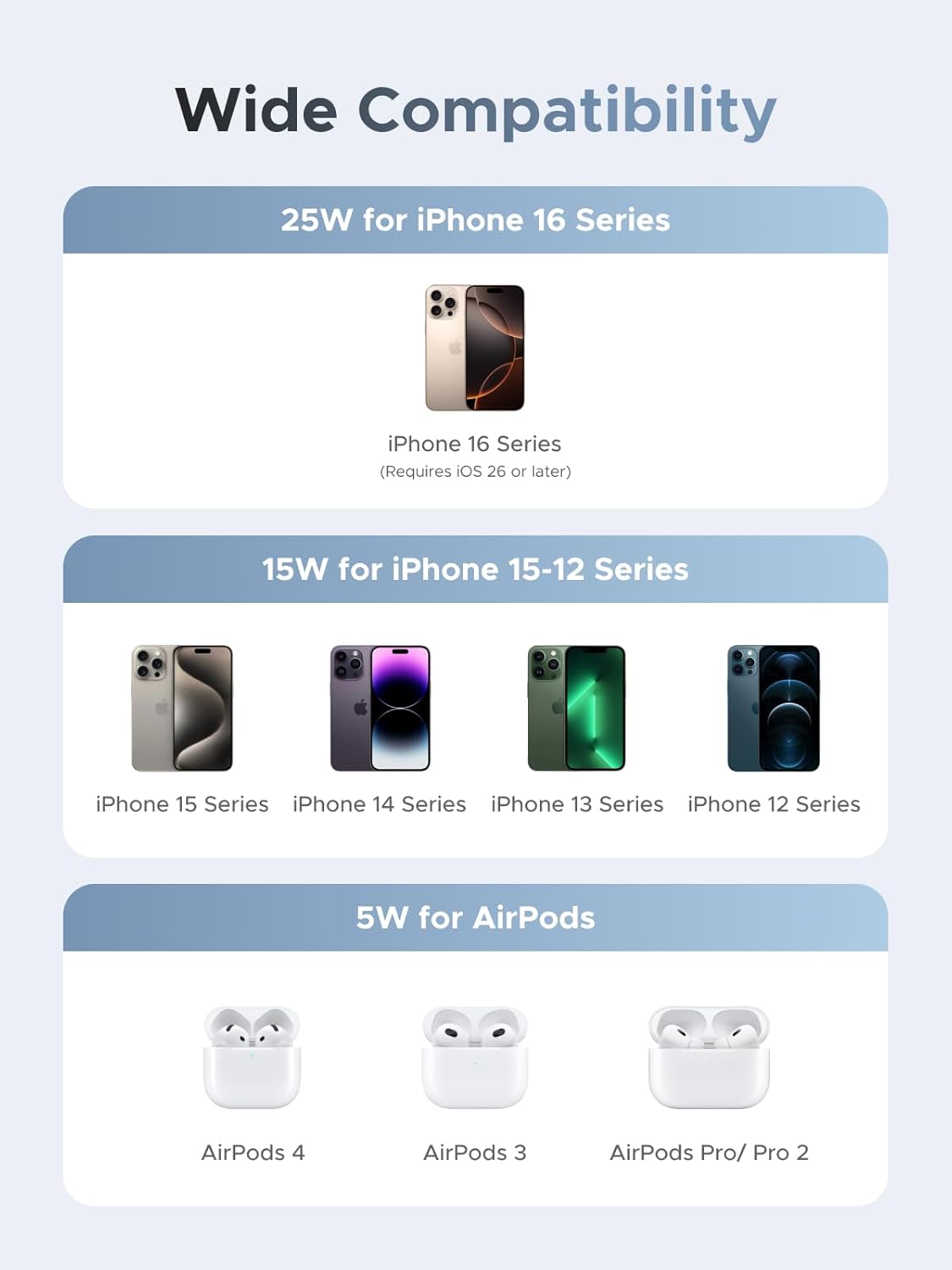
Image: A visual chart detailing the charging compatibility and speeds for various iPhone models (16, 15-12 series) and AirPods models with the UGREEN Qi2 25W Magflow charger.
Safety Information
The UGREEN Qi2 25W Magflow Foldable 2-in-1 Wireless Charger incorporates advanced safety features to protect your devices and ensure safe operation:
- ThermalGuard Temperature Control: Monitors temperature 200 times per second to prevent overheating.
- 8-Layer Protection System:
- Overcharge Protection
- Input Overvoltage Protection
- High Temperature Protection
- Short Circuit Protection
- Overcurrent Protection
- Static Electricity Protection
- Overpower Protection
- Foreign Object Detection (FOD)

Image: An internal view diagram illustrating the ThermalGuard technology within the UGREEN Qi2 charger, which continuously monitors temperature for safety.

Image: A graphic depicting the 8 layers of safety protection integrated into the UGREEN Qi2 charger, including overcharge, overvoltage, and temperature protection.
Troubleshooting
- Device not charging or charging slowly:
- Ensure you are using a 45W or higher power adapter (not included) and a USB-C cable that supports 60W or higher. Lower wattage adapters or cables may result in slower charging or no charging.
- Verify that your iPhone is running iOS 26 or later for full 25W charging with iPhone 16 series devices.
- Check for proper magnetic alignment of your iPhone on the charging pad. Remove any thick cases that might interfere with magnetic connection or wireless charging.
- Ensure no foreign objects are between your device and the charging surface, as this can trigger Foreign Object Detection (FOD) and prevent charging.
- Charger overheating:
- The charger has built-in temperature control. If it feels excessively hot, disconnect it from power and allow it to cool down. Ensure it is placed in a well-ventilated area.
- LED indicator not lighting up:
- Confirm the charger is properly connected to a working power source.
- Ensure your device is correctly placed on the charging area.
Specifications
| Feature | Detail |
|---|---|
| Model Number | W756 |
| Product Dimensions | 2.36 x 0.78 x 4.66 inches |
| Item Weight | 9.9 ounces |
| Connector Type | USB Type C |
| Input Voltage | 12 Volts (AC) |
| Amperage | 3 Amps |
| Wattage | 25 watts (Max) |
| Special Feature | 2-in-1 Wireless Charger, Foldable, Magnetic |
| Color | Gray |
Warranty and Support
UGREEN products typically come with a standard warranty. For specific warranty details, please refer to the warranty card included in your package or visit the official UGREEN website. If you encounter any issues or require technical assistance, please contact UGREEN customer support.
UGREEN Official Website: www.ugreen.com


