
1. Introduction
This manual provides essential information for the safe and efficient operation of your FrSara X18 Portable Misting Fan. Please read this manual thoroughly before using the product and retain it for future reference.
The FrSara X18 is a versatile, rechargeable misting fan designed for both indoor and outdoor use. It features a 6-liter water tank, multiple fan speeds, misting functions, oscillation, and an integrated LED light, all controllable via a remote.
2. Product Overview
2.1 Components
- Main Fan Unit
- 6L Water Bucket
- Remote Control
- USB-C Charging Cable
- User Manual (This document)
2.2 Key Features
- Rechargeable Battery: Integrated 20000mAh battery for cordless operation.
- Misting Function: Three nozzles provide a fine mist for enhanced cooling.
- Oscillation: 90-degree oscillation for wide area coverage.
- Adjustable Fan Speeds: Multiple speed settings for customized airflow.
- LED Light: Integrated light with multiple brightness levels.
- Remote Control: Convenient operation from a distance.
- Portable Design: Detachable fan unit and 6L water bucket for easy transport.

Figure 1: Overview of the FrSara X18 Portable Misting Fan, showing the main fan unit, 6L water bucket, remote control, and hanging configuration.
3. Setup
3.1 Charging the Fan
- Locate the USB-C charging port on the fan unit.
- Connect the provided USB-C cable to the fan and a compatible USB power adapter (not included).
- The charging indicator lights will illuminate, showing the battery level. Charge until all indicators are solid.

Figure 2: Illustration of the fan's internal battery, indicating its 20000mAh capacity for extended runtime.
3.2 Filling the Water Bucket
- Ensure the fan unit is detached from the water bucket.
- Open the water inlet on the 6L bucket.
- Fill the bucket with clean, cool water. Do not exceed the maximum fill line.
- Securely close the water inlet.
- Carefully place the fan unit back onto the filled water bucket, ensuring a stable connection.

Figure 3: The fan unit positioned on the 6L water tank, illustrating the water capacity and the 90-degree oscillation capability.
4. Operation
4.1 Control Panel and Remote Control
The fan can be operated using the control buttons on the unit or the included remote control.

Figure 4: Detailed view of the fan's control panel, showing buttons for light/oscillation, fan speed, and misting functions, along with battery and speed indicators.
4.2 Power On/Off and Fan Speed
- Press the Power button on the fan unit or remote to turn the fan on.
- Press the Speed button repeatedly to cycle through the available fan speeds (e.g., Low, Medium, High, VFD mode).
- Press the Power button again to turn the fan off.
4.3 Misting Function
- Ensure the water bucket is filled and the fan unit is properly seated.
- Press the Misting button on the fan unit or remote to activate the misting function.
- Press the Misting button again to turn it off.
4.4 Oscillation
- Press the Oscillation button on the fan unit or remote to start the 90-degree oscillation.
- Press the Oscillation button again to stop the oscillation at the desired position.
4.5 LED Light
- Press the Light button on the fan unit or remote to turn on the LED light.
- Press the Light button repeatedly to cycle through the three brightness levels.
- Press the Light button again after the highest brightness level to turn the light off.
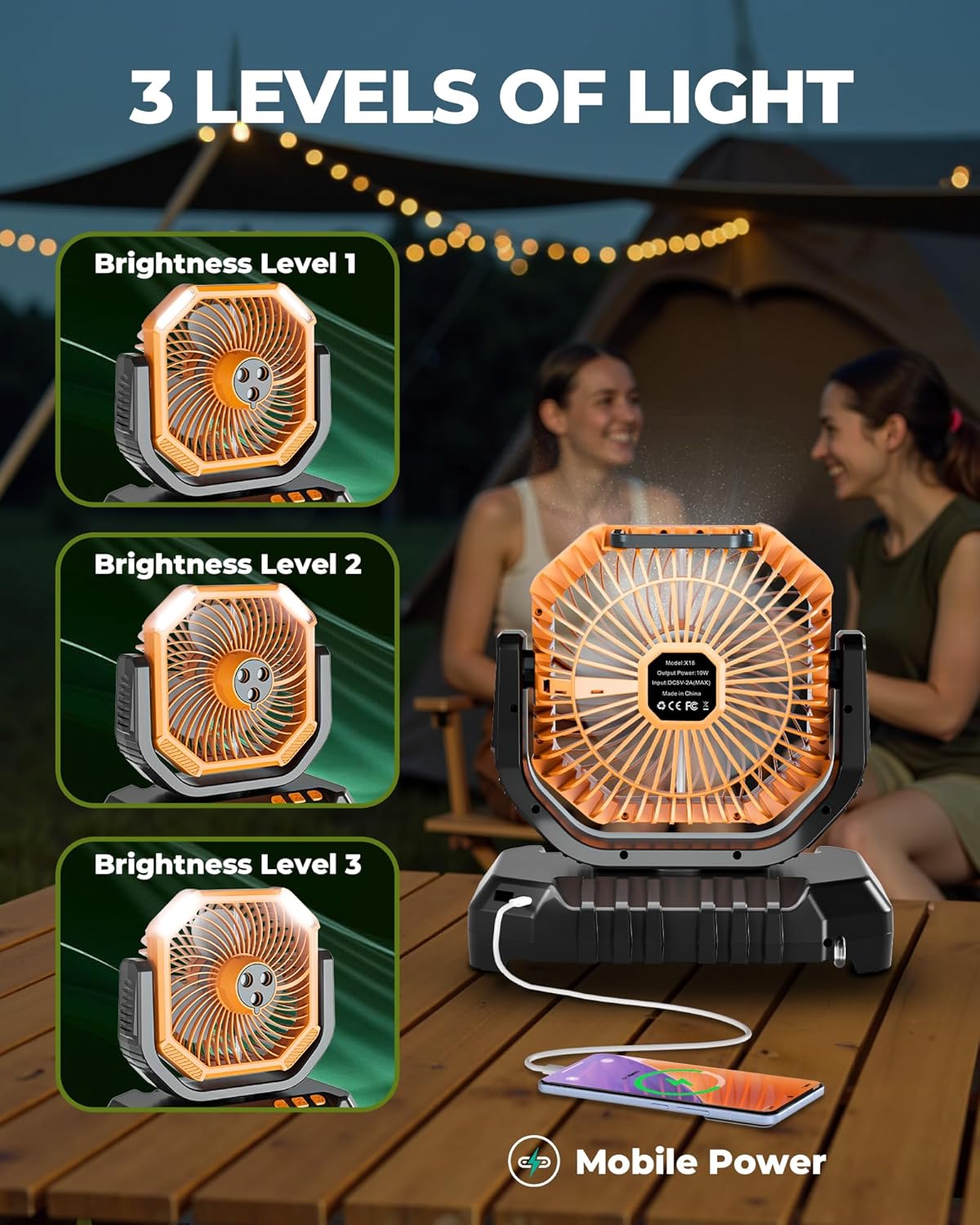
Figure 5: The fan demonstrating its three levels of LED light brightness, also showing its capability as a mobile power source.
5. Maintenance
5.1 Cleaning
- Always ensure the fan is turned off and unplugged before cleaning.
- Wipe the exterior of the fan unit with a soft, damp cloth. Do not use abrasive cleaners or solvents.
- For the water bucket, empty any remaining water and rinse thoroughly. Allow it to air dry completely before refilling or storing.
- Periodically clean the misting nozzles to prevent mineral buildup. Use a soft brush or cotton swab if necessary.
5.2 Storage
When not in use for extended periods, ensure the fan is clean, dry, and fully charged. Store it in a cool, dry place away from direct sunlight and extreme temperatures.
6. Troubleshooting
| Problem | Possible Cause | Solution |
|---|---|---|
| Fan does not turn on. | Battery is depleted. | Charge the fan using the USB-C cable. |
| Misting function not working. | Water bucket is empty or improperly seated. | Refill the water bucket and ensure it is correctly attached. |
| Misting nozzles are clogged. | Clean the misting nozzles as described in the Maintenance section. | |
| Remote control not responding. | Remote battery is low or depleted. | Replace the remote control battery. Ensure line of sight to the fan's receiver. |
| Fan oscillation is erratic or not working. | Obstruction or internal issue. | Ensure no physical obstructions. If the problem persists, contact customer support. |
7. Specifications
| Feature | Detail |
|---|---|
| Model Name | X18 |
| Brand | FrSara |
| Power Source | Battery Powered |
| Battery Capacity | 20000mAh (included) |
| Water Tank Capacity | 6 Liters |
| Product Dimensions | 9"D x 6"W x 14"H |
| Item Weight | 4.03 pounds |
| Oscillation Angle | 90 degrees |
| Number of Fan Speeds | Multiple (including VFD mode) |
| Misting Nozzles | 3 |
| LED Light Levels | 3 |
| Noise Level | 48 dB |
| Control Method | Push Button, Remote |
| Main Power Connector | USB-C |
| Indoor/Outdoor Usage | Yes |
8. Warranty and Support
For warranty information and customer support, please refer to the official FrSara website or contact your retailer. Keep your purchase receipt as proof of purchase.
For further assistance, please visit the FrSara Store on Amazon.