
Introduction
This manual provides essential information for setting up, operating, maintaining, and troubleshooting your Nothing Phone (3a) Pro 5G. Please read this guide thoroughly to ensure optimal performance and longevity of your device.
Device Overview
The Nothing Phone (3a) Pro 5G features a 6.77-inch Full HD+ Flexible AMOLED Display, powered by a Snapdragon 7s Gen 3 Processor. It includes a versatile camera system with a 50MP main, 50MP 3X Periscope, and 8MP ultra-wide rear cameras, alongside a 50MP front camera. The device is equipped with a 5000 mAh battery for extended use.
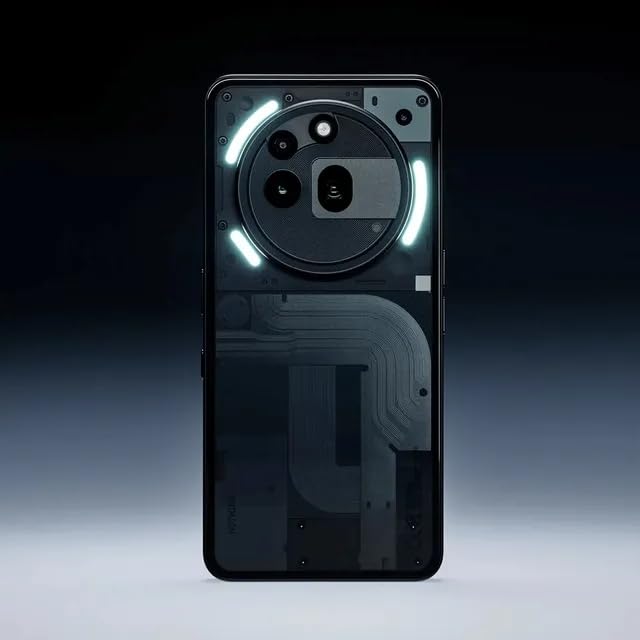
Image: Front view of the Nothing Phone (3a) Pro 5G, showcasing its display and sleek design.
Setup
1. Inserting the SIM Card
- Locate the SIM card tray on the side of your phone.
- Insert the SIM ejector tool into the small hole next to the tray and push gently until the tray pops out.
- Place your Nano SIM card(s) into the tray with the gold contacts facing down. Ensure proper orientation.
- Carefully push the tray back into the phone until it clicks into place.
2. Initial Power On and Configuration
- Press and hold the Power button until the Nothing logo appears.
- Follow the on-screen prompts to select your language, connect to a Wi-Fi network, and set up your Google account.
- Configure biometric security features such as fingerprint recognition for enhanced security.
3. Charging the Battery
Before first use, fully charge your device. Connect the USB cable to the phone's charging port and the other end to a compatible power adapter. The phone supports fast charging.
Operating Your Device
1. Basic Navigation
- Touch Gestures: Tap to select, swipe to scroll, pinch to zoom.
- Home Screen: Access apps, widgets, and notifications.
- Notifications: Swipe down from the top of the screen to view notifications and quick settings.
2. Camera Usage
The Nothing Phone (3a) Pro 5G features a triple rear camera system (50MP Main, 50MP 3X Periscope, 8MP Ultra-Wide) and a 50MP front camera. Open the Camera app to access various modes like Photo, Video, Portrait, and Night mode.

Image: Details on the camera system, highlighting the 50 MP front camera, TrueLens Engine 3, and up to 60x ultra zoom with a 70mm periscope zoom lens.
- Rear Camera: Utilize the 50MP main sensor for high-resolution photos, the 50MP 3X periscope lens for optical zoom, and the 8MP ultra-wide lens for expansive shots.
- Front Camera: The 50MP front camera supports ultra-clear 4K video recording for high-quality selfies and video calls.
- TrueLens Engine 3: Advanced camera software powered by AI enhances image processing for superior results.
3. Essential Key Functionality
The Essential Key allows for quick access to functions such as grabbing photos, recording your screen, and capturing your voice. Customize its actions in the phone's settings.
4. Connectivity
- 5G Network: The device supports 5G cellular technology for high-speed internet access.
- Wi-Fi & Bluetooth: Connect to wireless networks and Bluetooth devices via settings.
- USB: Use the USB-C port for charging and data transfer.
Maintenance
1. Battery Care
- Avoid extreme temperatures to prolong battery life.
- Use only approved chargers and cables.
- For optimal battery health, avoid frequently draining the battery completely or keeping it at 100% for extended periods.
2. Cleaning Your Device
Use a soft, lint-free cloth to clean the screen and body of your phone. Avoid harsh chemicals or abrasive materials. The device has a Water Resistant rating, but it is not waterproof; avoid submerging it in liquids.
3. Software Updates
Regularly check for and install software updates to ensure your device has the latest features, security patches, and performance improvements. Navigate to Settings > System > System updates.
Troubleshooting
Common Issues and Solutions
- Device not powering on: Ensure the battery is charged. Connect to a charger and wait a few minutes before attempting to power on again.
- Apps crashing or freezing: Close the problematic app and reopen it. If the issue persists, restart your phone. Check for app updates in the Google Play Store.
- Poor network connectivity: Check if Airplane Mode is off. Restart your phone. Verify your SIM card is correctly inserted. Contact your service provider if issues persist.
- Fingerprint sensor not working: Ensure your finger is clean and dry. Re-register your fingerprint in settings if necessary.
- Battery draining quickly: Reduce screen brightness, disable unnecessary background apps, and limit location services. Check battery usage in settings to identify power-hungry apps.
Specifications
Detailed technical specifications for the Nothing Phone (3a) Pro 5G:

Image: Information about the Snapdragon 7s Gen 3 5G processor, highlighting its 8-core CPU up to 2.5 GHz, Qualcomm AI Engine, and up to 20GB RAM Booster.
| Feature | Detail |
|---|---|
| Brand | Nothing |
| Model | Phone (3a) Pro 5G |
| Operating System | Android 15 |
| RAM Memory Installed Size | 8 GB |
| Memory Storage Capacity | 128 GB |
| CPU Model | Snapdragon 7s Gen 3 Processor |
| CPU Speed | 2.5 GHz |
| Display Type | AMOLED |
| Screen Size | 6.77 Inches |
| Resolution | 1080 × 2392 |
| Rear Camera Photo Sensor Resolution | 50 MP (Main) + 50MP (3X Periscope) + 8MP (Ultra-Wide) |
| Front Photo Sensor Resolution | 50 MP |
| Video Capture Resolution | 4k |
| Battery Capacity | 5000 Milliamp Hours |
| Battery Average Life (Talk Time) | 38 Hours |
| Cellular Technology | 5G |
| Water Resistance Level | Water Resistant (IP64) |
| Biometric Security Feature | Fingerprint Recognition |
| SIM Card Slot Count | Dual SIM (Nano) |
| Headphones Jack | No headphone jack |
| Item Dimensions | 16.4 x 7.7 x 0.8 Centimeters |
Warranty Information
The Nothing Phone (3a) Pro 5G typically comes with a standard manufacturer's warranty. Please refer to the warranty card included in your product packaging for specific terms, conditions, and duration. For warranty claims or service, retain your proof of purchase.
Additional protection plans may be available for purchase, such as extended warranty, screen protection, or accidental and liquid damage coverage. Check with your retailer for details.
Support
For further assistance, technical support, or to access frequently asked questions, please visit the official Nothing support website or contact their customer service. You can find contact information on the manufacturer's website or in your product documentation.
Official Brand Store: Nothing Store on Amazon.in
Important Safety Information
- Do not attempt to disassemble or repair the device yourself.
- Keep the device away from extreme heat, direct sunlight, and liquids.
- Dispose of the device and its battery responsibly according to local regulations.
- Use only accessories approved by Nothing.


