1. Introduction
This manual provides essential information for the safe and efficient operation, maintenance, and troubleshooting of your Samsung Bespoke AI Jet Lite Cordless Stick Vacuum. Please read this manual thoroughly before using the appliance and retain it for future reference.
The Samsung Bespoke AI Jet Lite is a powerful cordless stick vacuum designed for comprehensive home cleaning. It features advanced AI cleaning modes, an innovative All-in-One Clean Station, and specialized tools for various cleaning needs.
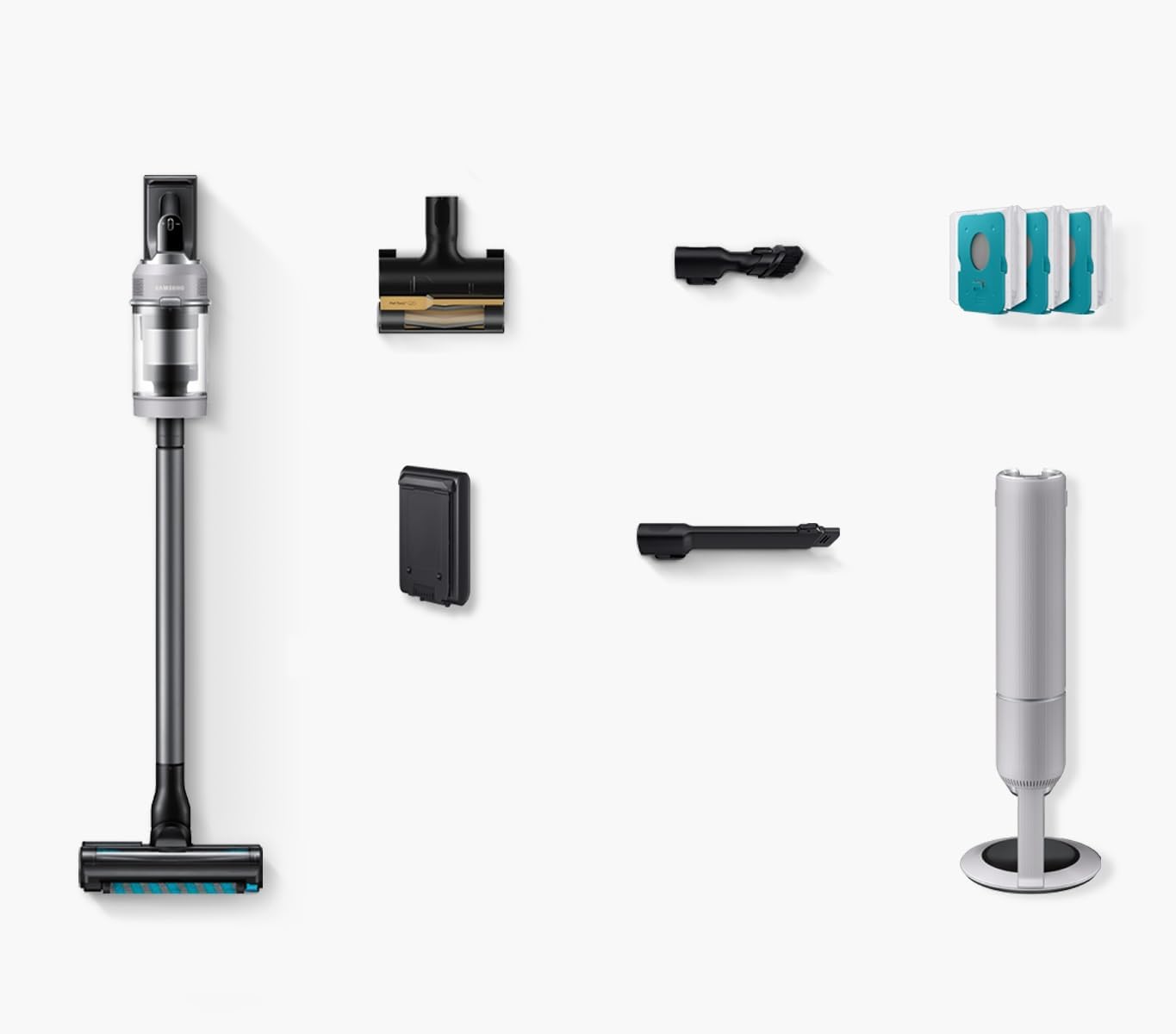
Figure 1: Samsung Bespoke AI Jet Lite Cordless Stick Vacuum with All-in-One Clean Station.
2. What's in the Box
Verify that all components are present in the packaging before assembly.

Figure 2: All components included in the product packaging.
- Samsung Bespoke AI Jet Lite Cordless Stick Vacuum
- All-in-One Clean Station
- Active Dual Brush
- Anti-Tangle Pet Tool+
- Combination Tool
- Extension Crevice Tool
- 3 Clean Station Bags
- Battery (60-minute capacity)
3. Setup
3.1 Assembly
- Unpack all components from the box.
- Attach the main body of the vacuum to the extension pipe. Ensure it clicks securely into place.
- Attach the desired cleaning brush (e.g., Active Dual Brush) to the end of the extension pipe.
- Insert the battery into the designated slot on the main body of the vacuum.
3.2 Initial Charging
Before first use, fully charge the battery. Place the vacuum onto the All-in-One Clean Station. The station will automatically begin charging the battery. A full charge typically takes approximately 3.5 hours.

Figure 3: Front view of the assembled vacuum.
4. Operating Instructions
4.1 Powering On/Off and Suction Modes
The power button and suction mode controls are conveniently located on the top of the main unit.

Figure 4: Power and mode selection buttons.
- Press the power button (⏻) to turn the vacuum on or off.
- Use the plus (+) and minus (−) buttons to cycle through suction modes:
- AI Cleaning Mode 2.0: Automatically senses floor and carpet types to optimize suction and runtime for efficient cleaning.
- Mid: Standard suction for everyday cleaning.
- Max: Increased suction for tougher dirt.
- Jet: Maximum suction power for deep cleaning.
4.2 Using Attachments
The vacuum comes with various attachments for specialized cleaning tasks:

Figure 5: Included attachments for diverse cleaning needs.
- Active Dual Brush: Ideal for all floor types, from hard floors to carpets.
- Anti-Tangle Pet Tool+: Specifically designed to remove pet hair from upholstery and carpets without tangling.
- Combination Tool: A versatile tool for dusting and cleaning various surfaces.
- Extension Crevice Tool: Extends to reach tight spaces, corners, and crevices.
4.3 Lightweight Design and Battery Life
The lightweight design and telescopic pipe allow for easy maneuverability and reaching high or low areas.

Figure 6: Lightweight design with telescopic pipe for enhanced reach.
The high-capacity battery provides up to 60 minutes of runtime on a single charge (results may vary depending on usage and power level).

Figure 7: Battery life and charging information.
5. Maintenance
5.1 All-in-One Clean Station
The Clean Station automatically empties the dustbin and recharges the vacuum. It traps 99.999% of fine dust particles, releasing cleaner air.

Figure 8: All-in-One Clean Station in operation.
To empty the vacuum, simply place it on the Clean Station and press the 'Start/Stop' button on the station. The station will automatically extract debris from the vacuum's dustbin into a disposable bag.
5.2 HEPA Filtration System
The vacuum is equipped with a HEPA filtration system to ensure cleaner air is released.

Figure 9: HEPA Filtration System.
Regularly check and clean the HEPA filter according to the instructions provided in the full user manual to maintain optimal performance.
5.3 Anti-Tangle Jet Dual Brush
The Anti-Tangle Jet Dual Brush is designed to minimize hair tangling around the brush roll. Periodically inspect the brush roll and remove any accumulated hair or debris to ensure effective cleaning.

Figure 10: Anti-Tangle Jet Dual Brush mechanism.
6. Troubleshooting
6.1 Smart Self-Diagnosis and Alerts
The vacuum features smart self-diagnosis, providing alerts and notifications on its LCD display to help you maintain performance.

Figure 11: LCD display with alerts and notifications.
- The display will indicate charging status, remaining battery life, and selected suction mode.
- Alerts will notify you about potential issues such as an object stuck in the brush roll or when to clean the microfilter.
6.2 Common Issues
- Reduced Suction: Check if the dustbin is full, the filter is clogged, or the brush roll is tangled. Clean or empty as necessary.
- Short Battery Life: Ensure the battery is fully charged. If the issue persists, the battery may need replacement.
- Clean Station Not Emptying: Verify the vacuum is correctly seated on the station and the dustbag inside the station is not full or improperly installed.
7. Specifications
| Feature | Specification |
|---|---|
| Brand | Samsung |
| Model Name | Bespoke AI Jet Lite Cordless Stick Vacuum with All-in-One Clean Station |
| Item Model Number | VS80F28DMP/AA |
| Color | Pebble Gray |
| Form Factor | Stick |
| Special Feature | Cordless |
| Maximum Suction | 280 AW |
| Battery Life | Up to 60 minutes |
| Filter Type | HEPA Filter |
| Capacity | 0.5 Liters |
| Product Dimensions | 13.7"L x 11.8"W x 46.9"H |
| Item Weight | 25 pounds |
| Power Source | Battery Powered |
| Surface Recommendation | All floors |
8. Warranty and Support
8.1 Warranty Information
The product battery comes with a 2-year warranty. For detailed warranty terms and conditions for the entire product, please refer to the warranty card included in your packaging or visit the official Samsung website.
8.2 Customer Support
For further assistance, technical support, or to purchase replacement parts, please contact Samsung Customer Service. Contact details can be found on the official Samsung website or in your product documentation.


