
Technisat 0001/3253
Contents
TECHNISYSTEM 5/24 NT Multiswitch User Manual
Model: 0001/3253 | Brand: Technisat
Product Overview
The Technisat TECHNISYSTEM 5/24 NT is a multiswitch designed for distributing satellite TV and terrestrial signals to multiple subscribers. It is suitable for small to medium-sized residential units or complexes, ensuring independent signal reception for each participant.
This multiswitch distributes signals from one orbital position to up to 24 participants. It supports a maximum distribution length/cable length of 100 meters from the switch to the socket. Only a Quattro LNB can be connected to the satellite inputs of this switch.
The integrated power supply of the multiswitch powers a connected LNB and its own terrestrial amplifier. It operates within a satellite reception range of 950 - 2400 MHz and a terrestrial range of 47 - 862 MHz. The housing meets shielding requirements according to EN50083-2, class A, and is intended for indoor use only.
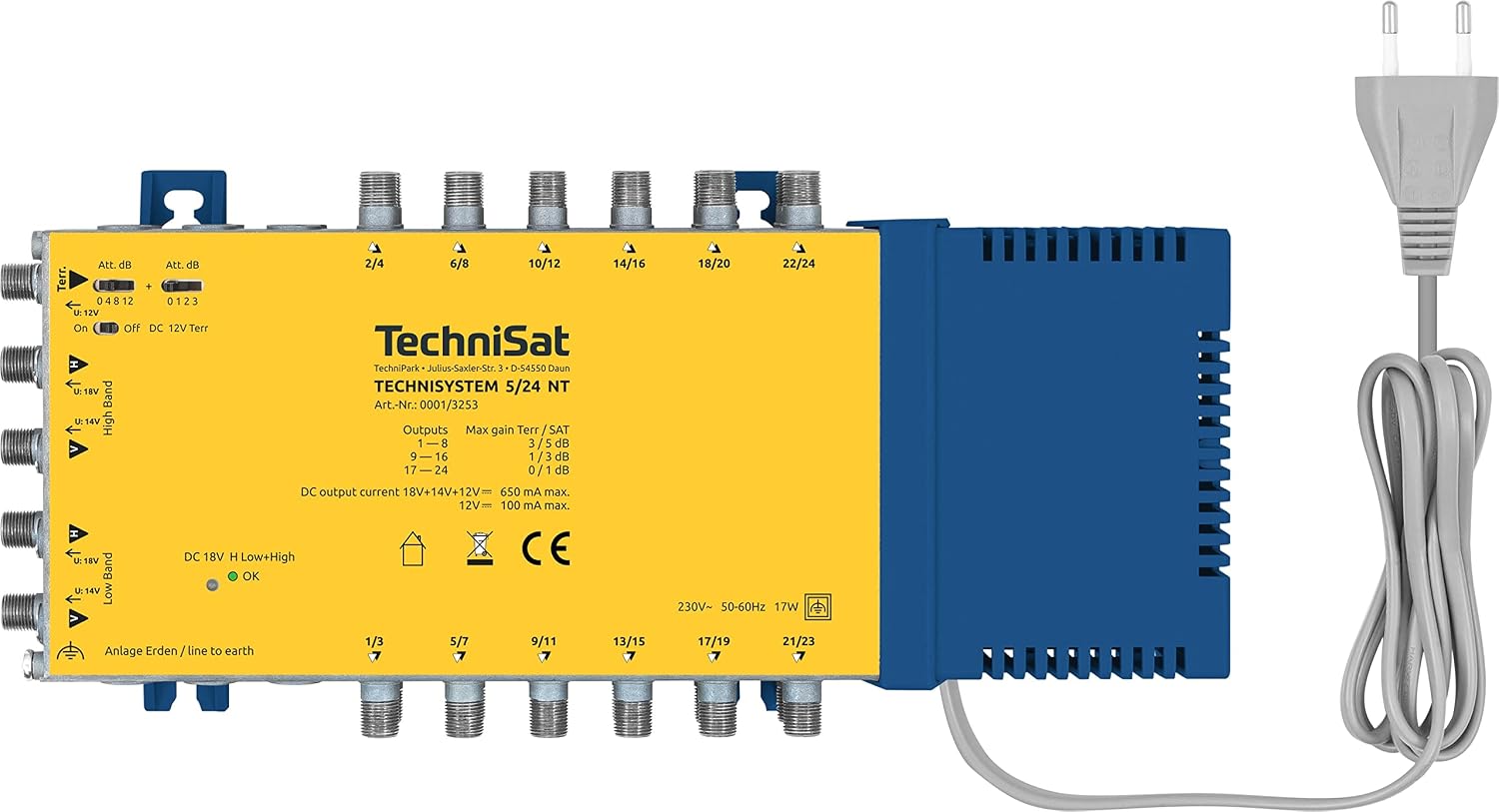
Figure 1: Front view of the Technisat TECHNISYSTEM 5/24 NT Multiswitch, showing input and output ports, and the attached power cable.
What's in the Box
Upon unboxing, please verify that all components are present and undamaged:
- TECHNISYSTEM 5/24 NT Multiswitch (with integrated power supply)
- Installation instructions (English)
Setup
Follow these steps for proper installation and connection of your multiswitch:
- Placement: Position the multiswitch indoors in a dry, well-ventilated area, away from direct sunlight, heat sources, and moisture. Ensure the housing is not obstructed to allow for proper ventilation.
- Satellite Input Connection: Connect the outputs from a Quattro LNB to the satellite inputs (High Band and Low Band) on the multiswitch. Ensure correct polarity (Vertical/Horizontal) is matched. The multiswitch requires a Quattro LNB for satellite signal input.
- Terrestrial Input Connection: If integrating terrestrial signals (e.g., DVB-T/T2, FM radio), connect your terrestrial antenna to the "Terr." input port on the multiswitch.
- Subscriber Output Connections: Connect coaxial cables from the multiswitch's output ports (labeled 1/3, 2/4, etc., up to 21/23 or 22/24 depending on model variant) to the satellite/TV outlets in each subscriber's location. Each output port supports two subscribers.
- Power Connection: Plug the integrated power supply cable into a standard electrical outlet. The multiswitch will power the connected LNB and its internal terrestrial amplifier.
- Grounding: Ensure the multiswitch is properly grounded according to local electrical codes. Use the designated grounding terminal if available.


Figure 2: Conceptual diagrams illustrating the multiswitch's capability to distribute signals from a single orbit position to many participants.
Operating
The Technisat TECHNISYSTEM 5/24 NT operates automatically once properly installed and powered. It continuously distributes the received satellite and terrestrial signals to all connected subscriber outlets.
- Signal Distribution: The multiswitch takes the four satellite signals (Vertical High, Vertical Low, Horizontal High, Horizontal Low) from the Quattro LNB and combines them with the terrestrial signal.
- Independent Reception: Each connected receiver or television can independently select and receive any available satellite or terrestrial channel without interfering with other connected devices.
- Power Indicator: Check the power indicator light (if present) on the unit to confirm it is receiving power and operating correctly.
Maintenance
The TECHNISYSTEM 5/24 NT multiswitch requires minimal maintenance. Adhere to the following guidelines to ensure optimal performance and longevity:
- Indoor Use Only: This device is designed for indoor use. Do not expose it to outdoor elements, extreme temperatures, or high humidity.
- Cleaning: Disconnect the power before cleaning. Use a soft, dry cloth to wipe the exterior of the unit. Do not use liquid cleaners, aerosols, or abrasive materials.
- Ventilation: Ensure that the ventilation openings on the multiswitch are not blocked. Adequate airflow is crucial to prevent overheating.
- Cable Connections: Periodically check all cable connections to ensure they are secure and free from corrosion. Loose connections can lead to signal degradation.
Troubleshooting
If you encounter issues with your multiswitch, refer to the following common problems and solutions:
| Problem | Possible Cause | Solution |
|---|---|---|
| No signal or poor signal quality on all channels. |
|
|
| No terrestrial signal. |
|
|
| Signal issues on only one or a few outputs. |
|
|
If the problem persists after attempting these solutions, please contact Technisat customer support for further assistance.
Specifications
| Feature | Detail |
|---|---|
| Brand | Technisat |
| Model Number | 0001/3253 |
| Operation Mode | ON-OFF |
| Contact Type | Normally Open |
| Connector Type | Lnb-spannungsversorgung |
| Terminal | F (Satellit), Coaxial (Niederfrequenz) |
| Item Dimensions (L x W x H) | 2.05 x 11.54 x 5.31 inches (5.2 x 29.3 x 13.5 cm) |
| International Protection Rating | IP20 |
| Specification Met | Multi-switch Meets the Shielding Requirements According to EN50083-2, Class A. |
| Color | blue/yellow |
| Number of Items | 1 |
| Item Weight | 3.59 pounds (1.63 kg) |
| Satellite Reception Range | 950 - 2400 MHz |
| Terrestrial Reception Range | 47 - 862 MHz |
| Max Distribution Length | 100 m (from switch to socket) |
Warranty and Support
For information regarding warranty coverage, technical support, or service, please refer to the documentation included with your product or visit the official Technisat website. Keep your purchase receipt as proof of purchase for warranty claims.
For direct assistance, you may contact Technisat customer support through their official channels.
Ask a question about this manual
Ask about setup, troubleshooting, compatibility, parts, safety, or missing instructions. Manuals+ will review the question and use this page’s manual context to help answer it.