
Loakdsa YAP1FF YAP1F
YAP1FF YAP1F Remote Control User Manual
Model: YAP1FF YAP1F | Brand: Loakdsa
1. Introduction
This manual provides detailed instructions for the proper use and maintenance of your Loakdsa YAP1FF YAP1F Remote Control. This remote is designed as a direct replacement for various TGM, GWHART, and GWART series AC Air Conditioners, including models such as GWHART12SA, GWHART09SA, GWART12SA, GWART09S, GWART12S, GWART18S, GWHART09S, GWHART12S, GWHART18S, GWHART24S, GWART24S, GWART36S2, and GWHART36S2. It operates via infrared technology and requires no programming for immediate use.

Image 1.1: Front and back view of the YAP1FF YAP1F remote control, showcasing its design and battery compartment.
2. Setup
2.1 Battery Installation
The remote control requires AAA batteries for operation. Please follow these steps to install the batteries:
- Locate the battery compartment cover on the back of the remote control.
- Slide the cover downwards or press the latch (if present) to open the compartment.
- Insert two new AAA batteries, ensuring the positive (+) and negative (-) terminals align correctly with the markings inside the compartment.
- Slide the battery compartment cover back into place until it clicks securely.
Important Note:
- Always use brand new batteries for optimal performance.
- Remove batteries if the remote control will not be used for an extended period to prevent leakage and damage.
- This remote control does not require any programming or setup; it is ready for use immediately after battery installation.
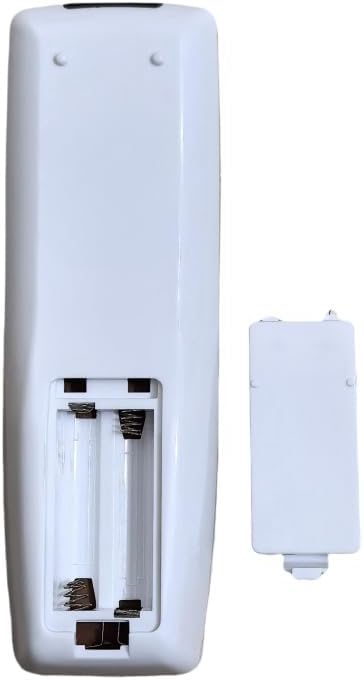
Image 2.1: Back view of the remote control with the battery cover removed, illustrating the battery compartment for AAA batteries.
3. Operating Instructions
To operate your air conditioner, point the remote control directly towards the air conditioner's signal receiving window. Ensure there are no obstructions between the remote and the unit.

Image 3.1: Front view of the remote control, highlighting the display and button layout.
3.1 Button Functions
| Button | Function |
|---|---|
| ON/OFF | Powers the air conditioner on or off. |
| MODE | Cycles through operating modes (e.g., Cool, Heat, Fan, Dry, Auto). |
| FAN | Adjusts the fan speed (e.g., Low, Medium, High, Auto). |
| ▲ / ▼ (Temperature Arrows) | Increases or decreases the desired temperature setting. |
| TURBO | Activates rapid cooling or heating for quick temperature changes. |
| I FEEL | Enables the 'I Feel' function, which measures the temperature at the remote's location for more precise comfort. |
| T-ON / T-OFF | Sets the timer for the air conditioner to turn on (T-ON) or turn off (T-OFF) automatically. |
| LIGHT | Controls the display light on the air conditioner unit. |
| X-FAN | Activates the X-Fan (anti-mildew) function, which keeps the fan running for a short period after shutdown to dry the evaporator. |
| SLEEP | Activates Sleep mode, which adjusts temperature and fan speed for comfortable sleep and energy saving. |
| CLOCK | Used to set the current time on the remote's display. |
4. Maintenance
Proper maintenance ensures the longevity and optimal performance of your remote control.
- Battery Replacement: Replace batteries when the remote's display dims or the air conditioner does not respond consistently. Always replace both batteries at the same time with new ones.
- Storage: If the remote control will not be used for an extended period (e.g., during off-season), remove the batteries to prevent potential leakage and corrosion. Store the remote in a cool, dry place away from direct sunlight.
- Cleaning: Wipe the remote control with a soft, dry cloth. Do not use liquid cleaners, abrasive cleaners, or chemical solvents, as these may damage the surface or internal components.
5. Troubleshooting
If you experience issues with your remote control, please refer to the following common troubleshooting steps:
- Remote Not Responding:
- Check if the batteries are installed correctly with the correct polarity (+/-).
- Replace old batteries with new ones.
- Ensure there are no obstructions between the remote control and the air conditioner's infrared receiver.
- Make sure you are within the effective operating range of the air conditioner.
- Display Issues:
- If the display is dim or flickering, replace the batteries.
- Accidental Keypad Lock:
- Some remote models may have a keypad lock function. If the remote is unresponsive, try pressing the 'Temp Up' and 'Temp Down' buttons simultaneously for a few seconds to unlock the keypad.
If the problem persists after trying these steps, please contact customer support.
6. Specifications
| Feature | Detail |
|---|---|
| Model Number | YAP1FF YAP1F |
| Compatible Devices | AC Air Conditioner (TGM, GWHART, GWART series) |
| Connectivity Technology | Infrared (IR) |
| Batteries Required | AAA batteries (2) |
| Special Feature | No Programming Required |
| Max Number of Supported Devices | 1 (Air Conditioner) |
| Manufacturer | Loakdsa |
| Country of Origin | China |
7. Support & Warranty
Your satisfaction is important to us. This remote control is designed for reliable performance and ease of use.
7.1 Customer Support
If you have any questions, concerns, or require assistance with your Loakdsa YAP1FF YAP1F Remote Control, please do not hesitate to contact our customer support team. We strive to respond to all inquiries within 24 hours.
7.2 Warranty Information
Specific warranty details for this product may vary. Please refer to your purchase documentation or contact the seller directly for information regarding warranty coverage and return policies.
Related Documents - YAP1FF YAP1F
 |
TGM Split Air Conditioner Owner's Manual - INVERTER Models GWART09S, GWART12S, GWART18S, GWART24S This owner's manual provides comprehensive instructions for the safe operation, maintenance, and installation of TGM Split Air Conditioners, including INVERTER models GWART09S, GWART12S, GWART18S, and GWART24S. It covers precautions, remote control functions, cleaning, and troubleshooting to ensure optimal performance and longevity of the air conditioning unit. |
 |
Turbo Air Glass Door Merchandiser Refrigerators: Installation and Operation Manual This manual provides comprehensive installation, operation, safety, and maintenance guidelines for Turbo Air Glass Door Merchandiser Refrigerators, including model specifications and warranty information. |
 |
TGM FREEMATCH INVERTER SERIES_R32 Service Manual Official service manual for the TGM FREEMATCH INVERTER SERIES_R32 air conditioning system. This guide provides detailed instructions for installation, maintenance, troubleshooting, electrical diagrams, and technical specifications for various indoor and outdoor unit models. Essential resource for HVAC technicians. |
 |
TGM Air Conditioner Service Manual: GWFRT/GRFRT Series This comprehensive service manual provides detailed technical specifications, installation guides, maintenance procedures, troubleshooting steps, and parts lists for TGM GWFRT and GRFRT series split air conditioning units. |
 |
Refricenter TGM Air Handler Limited Warranty Terms Official limited warranty terms and conditions for Refricenter TGM 14, 15, & 18 SEER Air Handlers, effective February 1st, 2026. Details coverage, exclusions, and registration requirements. |
 |
TGM 14, 15, & 18 SEER HVAC Limited Warranty Terms - Refricenter Official limited warranty terms and conditions from Refricenter of Miami, Inc. for TGM 14, 15, & 18 SEER HVAC condensing units and air handlers, effective February 1st, 2026. Covers residential and commercial applications. |
Ask a question about this manual
Ask about setup, troubleshooting, compatibility, parts, safety, or missing instructions. Manuals+ will review the question and use this page’s manual context to help answer it.