
Introduction
This manual provides instructions for the proper setup, operation, and maintenance of your Azwok AKB74955602 replacement remote control for LG Air Conditioners. This remote is designed to function as a direct replacement for the original AKB74955602 remote, offering essential controls for your air conditioning unit.
Setup
1. Battery Installation
The remote control requires two AAA or AA batteries (not included). Follow these steps to install them:
- Locate the battery compartment cover on the back of the remote control.
- Press down on the tab and slide the cover off.
- Insert two AAA or AA batteries, ensuring the positive (+) and negative (-) terminals align correctly with the markings inside the compartment.
- Slide the battery compartment cover back into place until it clicks securely.
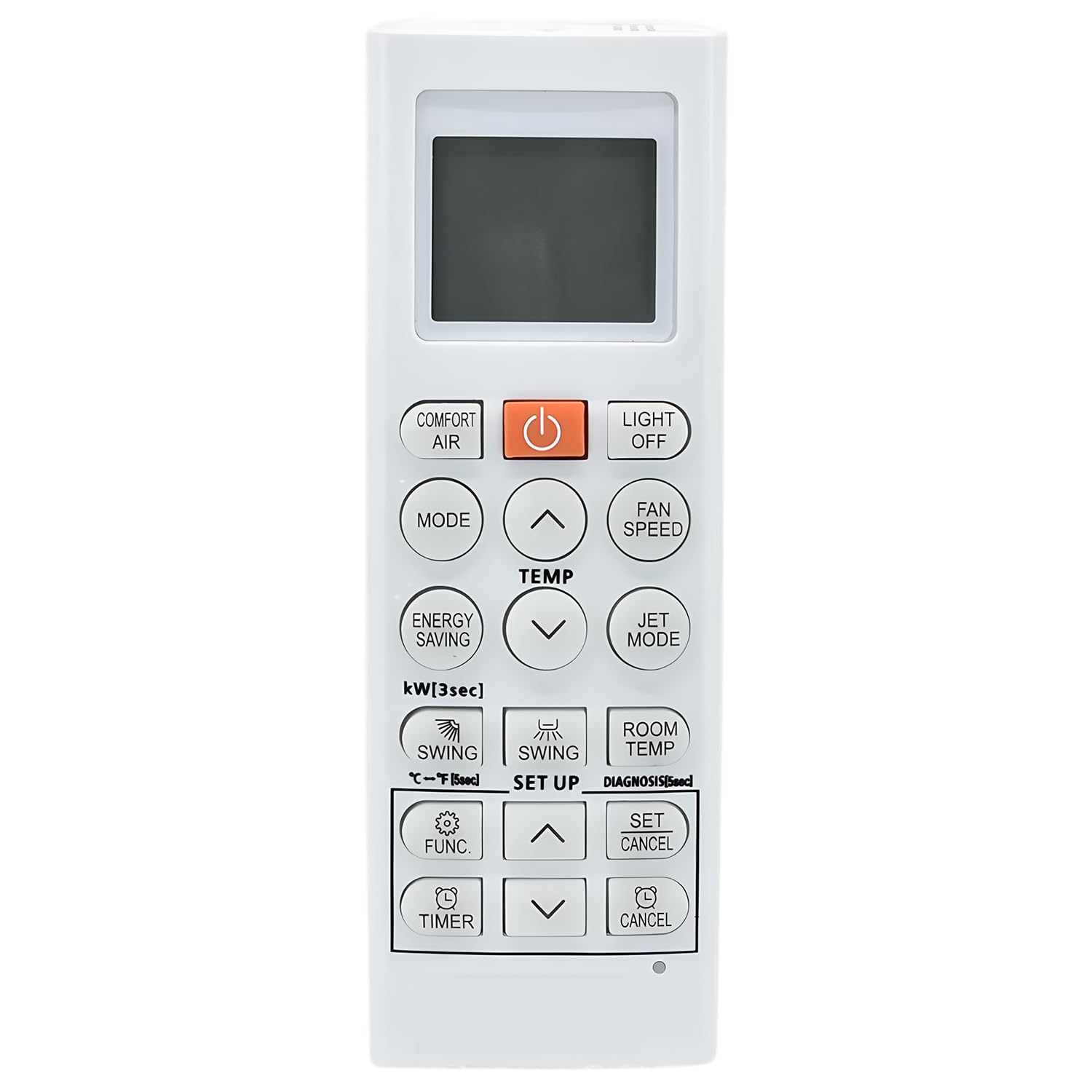
Image: Rear view of the Azwok AKB74955602 remote control, showing the battery compartment.
2. Initial Use
This replacement remote control is ready to use immediately after battery installation. No programming or pairing is required. Point the remote directly at your LG Air Conditioner unit and press the desired function button.
Operating Instructions
The Azwok AKB74955602 remote control provides essential functions for your LG Air Conditioner. Below is a general overview of common buttons and their functions:
Image: Front view of the Azwok AKB74955602 remote control, displaying various function buttons.
- POWER: Turns the air conditioner unit on or off.
- MODE: Cycles through operating modes such as Cool, Heat, Fan, Dry, and Auto.
- TEMP ▲/▼: Adjusts the temperature setting up or down.
- FAN SPEED: Changes the fan speed (e.g., Low, Medium, High, Auto).
- SWING: Activates or deactivates the louver swing function.
- TIMER: Sets the timer for automatic on/off operations.
- SLEEP: Activates the sleep mode for comfortable night operation.
Compatible Models
This remote control is compatible with a wide range of LG Air Conditioner models, including but not limited to:
- AKB75215402, AKB74955615, AKB74955604, AKB75215401, AKB74955602, AKB74955603
- LSN363HLV, LS243HLV, LS303HLV, LS363HLV, LSU363HLV, LSU303HLV, LSN243HLV, LSN303HLV
- LA090HSV5, LA240HSV3, LA180HSV5, LS120HEV2, LS090HEV2, LS240HEV2, LS090HXV, LS120HXV, LSU120HEV2
- HSN24ISY, HSN12ISY, HSN18IPA, HSN12IPC, HSN12IPA, HSN09IPA
- WH21SLN-18, WH24SLN-18, WH18SLN-18, WH30SRN-18, WH18SLN-19, HSN09ISW, HSN12ISW, WH34SRN-18
- TC18GQ, TC12GQ, TC09GQR, TC07GQR, TC24GQ
- LGHP12S, LGHP09S, LSU090HEV2, LSN240HEV2, LSU240HEV2, LSN090HEV2
- LS090HSV5, LS120HSV5, LS180HSV5, LS180HEV, LSU180HEV, LSN180HEV, LSN120HXV2, Ls090HXV2, LSU120HXV2, LS120HXV2
- Art cool LA120HSV5, LSU090HSV5, LAN120HSV5, LSU120HSV5, LAN180HSV5, LSU180HSV5, LAU240HSV3, LAN240HSV3, LAN090HSV5
- HSN30IPC, HSN24ISW, HSN24IPA, HSN18ISY
Maintenance
Cleaning the Remote Control
To maintain optimal performance and appearance, clean the remote control regularly:
- Wipe the surface with a soft, dry cloth.
- For stubborn dirt, lightly dampen the cloth with water and a mild detergent, then wipe dry immediately.
- Do not use abrasive cleaners, alcohol, or chemical solvents, as these can damage the remote's surface or internal components.
Battery Replacement
Replace batteries when the remote's response becomes sluggish or the air conditioner does not respond to commands. Always replace both batteries at the same time with new ones of the same type (AAA or AA). Remove batteries if the remote will not be used for an extended period to prevent leakage.
Troubleshooting
If your remote control is not functioning as expected, consider the following common issues and solutions:
- Remote not responding:
- Check if the batteries are inserted correctly with the correct polarity (+/-).
- Replace old batteries with new ones.
- Ensure there are no obstructions between the remote control and the air conditioner's receiver.
- Confirm you are within the effective operating range of the air conditioner.
- Air conditioner not turning on/off:
- Verify the air conditioner unit is plugged in and receiving power.
- Ensure the remote is pointed directly at the air conditioner's infrared receiver.
- Specific functions not working:
- Some advanced functions may vary slightly depending on your specific LG Air Conditioner model. Refer to your air conditioner's original manual for detailed function descriptions.
Specifications
| Feature | Detail |
|---|---|
| Brand | Azwok |
| Model Name | AKB74955602 |
| Model Number | RM-AKB74955602-LG149 |
| Connectivity Technology | Infrared (IR) |
| Compatible Devices | LG Air Conditioners (various models) |
| Battery Type | 2 x AAA or AA batteries (not included) |
| Special Feature | No Programming Required |
Warranty and Support
Warranty Information
This Azwok remote control comes with a 12-month warranty from the date of purchase. This warranty covers manufacturing defects and ensures the remote functions as described. For warranty claims or issues, please retain your proof of purchase.
Customer Support
If you encounter any issues not covered in this manual, or if you are unsure about the compatibility of this remote with your specific LG Air Conditioner model, please contact our customer support. We are available to assist you in finding the correct solution or confirming suitability.
Note: If your model number is not listed in the compatible models section or your original remote differs significantly, please reach out to us for assistance.