Overview
The Honeywell Smart Cordless Vacuum Cleaner VC14 is designed to provide an efficient and convenient cleaning experience. This model features intelligent automatic suction adjustment, a versatile 10-in-1 multi-functional design, and a long-lasting 70-minute battery runtime. Its high-efficiency Dual Pro filtration system ensures a cleaner home environment by capturing allergens and fine dust.
Key features include an intelligent dust sensing system that automatically adjusts suction power for various surfaces, a comprehensive set of brush heads for diverse cleaning needs, and a powerful 8*3000mAh battery supporting up to 70 minutes of continuous operation in ECO mode. The advanced filtration system captures 99.9% of dust and allergens, making it ideal for households with children, pets, or allergy sufferers.
Setup Guide
Unboxing and Component Identification

Figure 1: All components included in the Honeywell VC14 package.
Before assembly, ensure all components are present:
- Handheld Body
- Lithium-Ion Battery Pack
- Aluminum Extension Tube
- Soft Roller (Motorized Multi Surface Soft Roller)
- Deluxe 2-in-1 Crevice Tool
- Deluxe 2-in-1 Sofa Brush
- Deluxe Pet Hair Removal Brush
- Deluxe Soft Hairbrush
- Flexible / Stretch Hose
- Bendable Connector
- Long Cleaning Brush with Bristles
- Premium Charger
- Wall Mount Docking Station
- Accessory Storage Bag
- Instruction Manual
Assembly

Figure 2: Attaching the battery pack to the main unit.
- Ensure the Lithium-Ion Battery Pack is fully charged.
- Align the battery pack with the slot on the Handheld Body and slide it in until it clicks securely into place.
- Attach the Aluminum Extension Tube to the Handheld Body.
- Connect the desired cleaning head (e.g., Soft Roller) to the end of the Extension Tube.
- For handheld use, attach accessories directly to the Handheld Body.
Video 1: Demonstration of the Honeywell VC14 cordless vacuum cleaner unboxing and assembly process.
Operating Your Vacuum
Power On/Off and Mode Selection

Figure 3: Digital display showing battery level and suction modes (ECO, MID, MAX).
- To power on the vacuum, press the power button located on the handheld body. The digital display will illuminate, showing the current battery percentage.
- To change the suction mode (ECO, MID, MAX), press the 'Mode' button on the digital display. The vacuum will automatically adjust suction based on the detected dust concentration.
- To power off the vacuum, press the power button again.
Using Attachments

Figure 4: Using the bendable connector to reach high and low areas.

Figure 5: Various brush heads for different surfaces and cleaning tasks.
The VC14 comes with a variety of specialized attachments for different cleaning tasks:
- Soft Roller: Ideal for hard floors and delicate surfaces.
- Deluxe 2-in-1 Crevice Tool: Perfect for narrow gaps and edges.
- Deluxe 2-in-1 Sofa Brush: Designed for upholstery and fabric surfaces.
- Deluxe Pet Hair Removal Brush: Effectively removes pet hair from carpets and furniture.
- Flexible / Stretch Hose & Bendable Connector: For reaching awkward angles and high-up areas.
Video 2: Demonstration of the Honeywell VC14 cordless vacuum cleaner in various cleaning scenarios, highlighting its versatility.
Maintenance and Care
Emptying the Dustbin

Figure 6: Clear dustbin showing collected debris.
To maintain optimal suction and performance, empty the dustbin regularly. Simply press the release button on the dustbin to open the bottom flap and dispose of collected debris into a waste bin.
Filter Cleaning
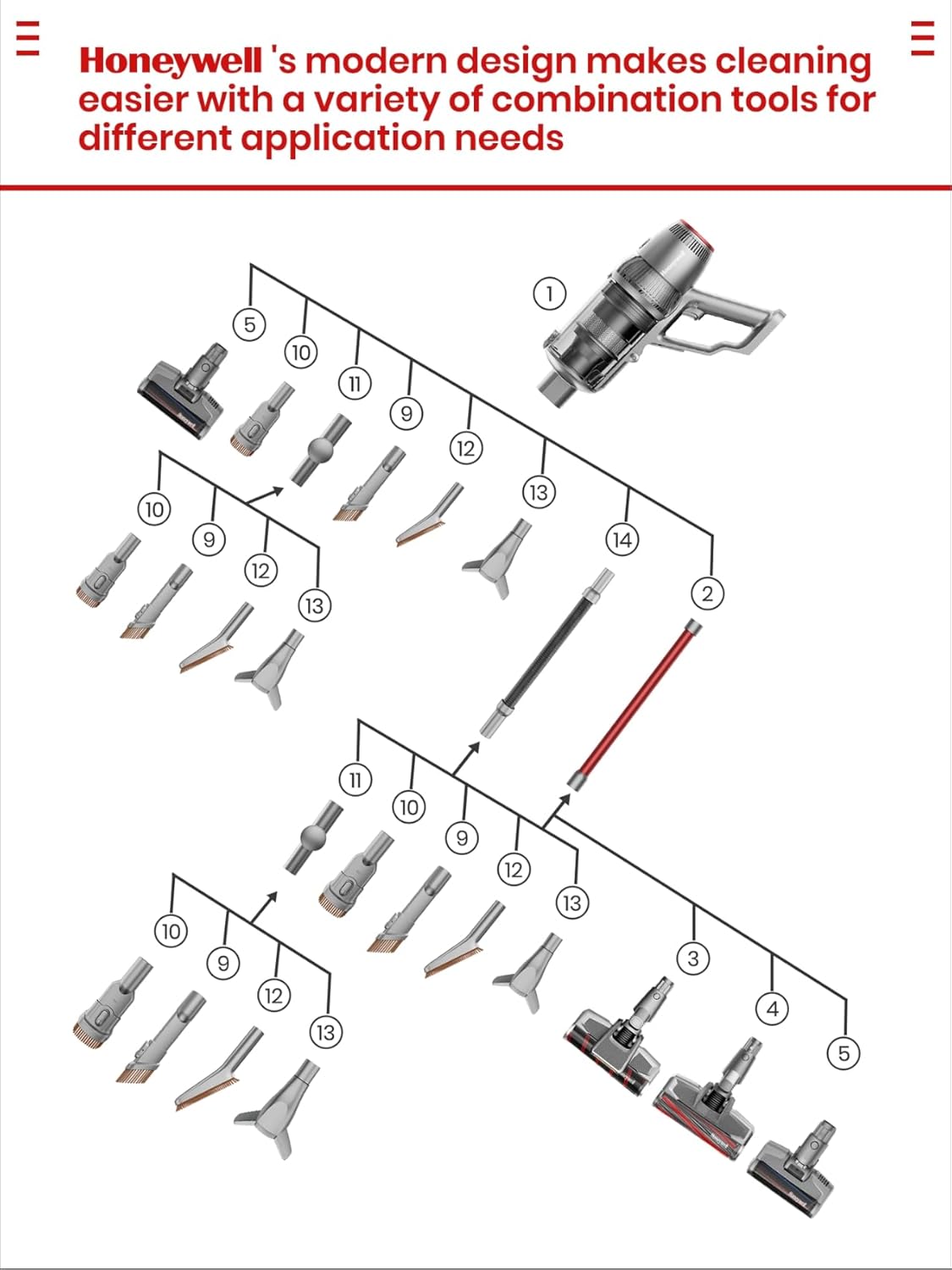
Figure 7: HEPA filter being removed for cleaning.
The Dual Pro high-efficiency filtration system includes a washable imported filter and a rear maintenance-free high-efficiency filter. The washable filter should be cleaned periodically by rinsing under cold water and allowing it to air dry completely before reinserting. The rear filter is designed to be maintenance-free.
Troubleshooting
If your Honeywell VC14 vacuum is not performing as expected, please check the following:
- No Power: Ensure the battery pack is fully charged and correctly inserted into the handheld body.
- Reduced Suction: Check if the dustbin is full and empty it if necessary. Inspect the washable filter for blockages and clean it. Ensure there are no obstructions in the extension tube or brush heads.
- Brush Head Not Spinning: Verify that the brush head is properly attached and free from tangled hair or debris.
For more detailed troubleshooting steps, please refer to the comprehensive instruction manual included with your product.
Product Specifications
| Feature | Specification |
|---|---|
| Brand | Honeywell |
| Model Name | VC14 AEROMAX ELITE |
| Wattage | 630 watts |
| Battery Life | 70 minutes (ECO mode) |
| Charging Time | 3.5 Hours |
| Capacity | 600 Milliliters |
| Filter Type | HEPA Filter |
| Special Feature | 630W High Power, 70 Mins Running time, Cordless, HEPA, Lightweight, Rechargeable, Three brush heads, Wall Mount Charging |
| Product Dimensions | 11"L x 10"W x 46.9"H |
| Item Weight | 11.2 pounds |
| Surface Recommendation | All floors |
Warranty and Customer Support
Each Honeywell cordless vacuum cleaner comes with a 24-month official warranty. Honeywell is committed to providing high-quality after-sales service, focusing on user experience and health, to protect the basic legal rights of users. If you have any questions or encounter problems during use, you can contact customer service by leaving a message or email at any time of the day or night, and we will solve it for you as soon as possible to ensure your shopping experience.


