
Introduction
The Jopix Marine 616P is a high-visibility, floating, and IP67 waterproof VHF marine walkie talkie designed for reliable communication in marine environments. This manual provides essential information for the proper setup, operation, and maintenance of your device, ensuring safe and effective use.
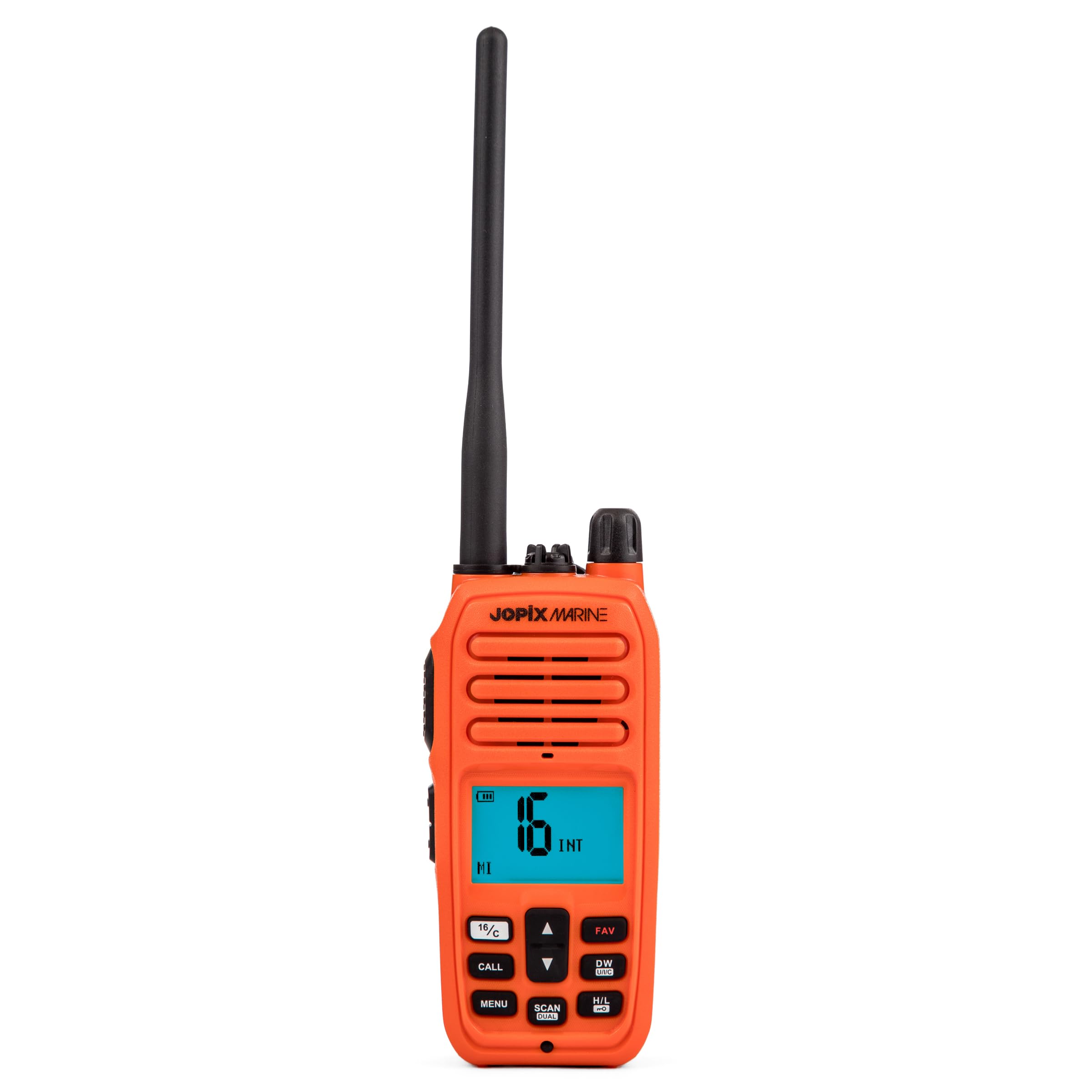
Image: Front view of the Jopix Marine 616P VHF Marine Walkie Talkie in orange.
Product Features
- High Visibility and Floating IP67 Design: Features a striking orange color for quick visual location if dropped overboard. Certified IP67 waterproof (fully submersible) and designed to float, automatically activating a light indicator upon contact with water.
- Comprehensive Marine Communication: Offers 88 VHF channels across International, USA, and Canada groups, with direct access to emergency Channel 16. This device is fully approved in Spain by the Directorate General of the Merchant Marine (DGMM), essential for maritime safety.
- Maximum Clarity and Noise Reduction (NCR): Transmits with 5W power and incorporates advanced Noise Reduction (NCR) technology for clear audio output (1W) even in windy conditions or with engine noise. Includes a Dual Watch function for monitoring two channels simultaneously.
- Multi-color LCD Screen and Weather Alerts: Equipped with a large, backlit screen customizable in 7 colors, displaying channel, battery level, and signal strength. Includes 10 weather channels with real-time alerts to keep you informed of weather changes during navigation.
- Long-lasting Battery and Complete Kit: Comes with a powerful 7.4V 1800 mAh removable Li-Ion battery for extended operation. The complete kit includes an antenna, desktop charger, AC/DC adapter, belt clip, and user manual.
What's in the Box
Upon unpacking your Jopix Marine 616P, please ensure all the following components are present:
- Jopix Marine 616P Walkie Talkie Unit
- Antenna
- Rechargeable Li-Ion Battery (7.4V, 1800 mAh)
- Desktop Charger Cradle
- AC/DC Power Adapter
- Belt Clip
- User Manual (this document)

Image: All components included with the Jopix Marine 616P.
Setup
1. Battery Installation
- Align the battery pack with the battery compartment on the back of the walkie talkie.
- Gently push the battery into place until it clicks securely.
- Ensure the battery cover (if separate) is properly closed and latched to maintain the IP67 waterproof rating.
2. Antenna Attachment
- Screw the antenna clockwise onto the antenna connector at the top of the walkie talkie until it is finger-tight. Do not overtighten.
- Ensure a secure connection for optimal signal transmission and reception.
3. Charging the Battery
- Connect the AC/DC power adapter to a suitable power outlet.
- Plug the adapter's output into the desktop charger cradle.
- Place the walkie talkie (with battery installed) into the charging cradle.
- The charging indicator light on the cradle or walkie talkie will illuminate, typically red for charging and green for fully charged.
- Allow sufficient time for a full charge before first use (refer to the full manual for specific charging times).

Image: Jopix Marine 616P with antenna and belt clip.
Operating Instructions
1. Power On/Off
To power on the device, rotate the power/volume knob clockwise until you hear a click and the screen illuminates. To power off, rotate the knob counter-clockwise until it clicks off.
2. Volume Adjustment
Adjust the volume by rotating the power/volume knob clockwise to increase and counter-clockwise to decrease.
3. Channel Selection
- Use the UP and DOWN arrow buttons to navigate through the available channels (International, USA, Canada).
- Press the INT/USA/CAN button (if available, or via menu) to switch between channel groups.
- Emergency Channel 16: Press the dedicated 16/C button for immediate access to Channel 16. Press it again to return to the last working channel.
4. Transmitting and Receiving
- To transmit, press and hold the PTT (Push-To-Talk) button on the side of the device. Speak clearly into the microphone.
- Release the PTT button to listen for a response.
- Ensure the antenna is properly attached for optimal range.
5. Dual Watch Function
Activate the DUAL Watch function (often labeled DW) to monitor Channel 16 and another selected channel simultaneously. The radio will automatically switch to Channel 16 if a signal is detected there.
6. Noise Reduction (NCR)
The integrated NCR technology automatically reduces background noise for clearer communication. No user action is typically required for this feature to function.
7. Weather Alerts
Access the 10 dedicated weather channels to receive real-time meteorological information and alerts. Consult the full manual for specific instructions on accessing and setting up weather alerts.
8. LCD Display Customization
The large LCD screen can be customized with 7 different backlight colors. Refer to the menu options in the full user manual to change the display color and adjust brightness.

Image: Example of the multi-color LCD display on the Jopix Marine 616P.
Maintenance
1. Cleaning
- Wipe the device with a soft, damp cloth. Do not use harsh chemicals or abrasive cleaners.
- Ensure all ports and covers are clean and free of debris to maintain the waterproof seal.
2. Battery Care
- Charge the battery fully before long periods of storage.
- Store the device and battery in a cool, dry place.
- Avoid exposing the battery to extreme temperatures.
3. Water Resistance
- Always ensure the battery cover and any port covers are securely closed before exposing the device to water to maintain its IP67 rating.
- If the device has been submerged in saltwater, rinse it with fresh water and dry thoroughly.

Image: The Jopix Marine 616P floating in water, highlighting its IP67 waterproof and floating design.
Troubleshooting
| Problem | Possible Cause / Solution |
|---|---|
| No Power |
|
| Poor Reception/Transmission |
|
| Audio Unclear / Static |
|
| Device does not float or light up in water |
|
Specifications
| Feature | Detail |
|---|---|
| Model Number | 616P |
| Brand | Jopix |
| Color | Orange |
| Number of Channels | 88 (International, USA, Canada) |
| Special Function | Emergency Alarm, Dual Watch, Weather Alerts |
| Frequency Range (Tx) | 156.025 MHz – 157.425 MHz |
| Frequency Range (Rx) | 156.050 MHz – 163.275 MHz |
| Maximum Talk Range | 1 Kilometer (Note: Actual range varies with conditions) |
| Water Resistance Level | IP67 (Fully submersible) |
| Battery | 7.4V 1800 mAh Li-Ion (Removable) |
| Output Power | 5W |
| Audio Output | 1W (with NCR) |
| Display | 1.8" LCD with 7-color backlight |
| Dimensions (Package) | 28.4 x 13.1 x 11.8 cm |
| Weight (Package) | 630 g |
Warranty
This Jopix Marine 616P walkie talkie comes with a 3-year warranty from the date of purchase. This warranty covers manufacturing defects under normal use. Please retain your proof of purchase for warranty claims. The warranty does not cover damage caused by misuse, accidents, unauthorized modifications, or normal wear and tear.
Support
For technical assistance, troubleshooting beyond this manual, or warranty inquiries, please contact Jopix customer support. Refer to the official Jopix website or your purchase documentation for the most current contact information.
Manufacturer: Pihernz Comunicaciones s.a.
Important Safety Information
- Do not operate the radio in explosive atmospheres (e.g., near flammable gases, dust, or powders).
- Always use original or approved accessories (battery, antenna, charger) to ensure optimal performance and safety.
- Do not attempt to disassemble or modify the radio. Servicing should only be performed by qualified personnel.
- Keep the radio and its accessories out of reach of children.
- Observe all local regulations and laws regarding radio communication, especially in marine environments.
- Avoid prolonged exposure to direct sunlight or extreme temperatures.

