
Introduction
Thank you for choosing the Ekrist 26800 mAh Wireless Power Bank. This device is designed to provide versatile and efficient charging for your electronic devices. It features a high-capacity battery, multiple output options including wireless charging and built-in cables, and advanced fast-charging technology.
Please read this manual carefully before using the product to ensure safe and optimal performance. Keep this manual for future reference.

Image: The Ekrist 26800 mAh Wireless Power Bank, showcasing its sleek black design, integrated LCD screen displaying '100% IN OUT', and built-in charging cables neatly tucked into the side. A wireless charging pad is visible on the front surface.
Product Features
- 7-in-1 Charging Capability: Equipped with 1 wireless charging pad, 2 USB-A outputs, 1 USB-C output (25W), and 3 integrated cables (Micro-USB, USB-C, Lightning) for simultaneous charging of up to 7 devices.
- Fast Charging Technology: Supports QC4.0 and PD3.0 USB-C input and output for efficient and rapid power delivery, reducing charging time and heat generation.
- 15W Max Wireless Charging: Provides 5W, 7.5W, and 15W MAX wireless charging, compatible with most wireless-enabled smartphones, even with protective cases. Note: Not suitable for wireless charging of Bluetooth headsets.
- High Capacity 26800mAh Battery: Features a high-density Li-polymer battery, capable of fully charging typical smartphones 5 to 6 times.
- Advanced Safety Protections: Integrated smart chip with multiple protection mechanisms against overcurrent, overdischarge, overcharge, short-circuit, and overheating.
- LCD Display: Clear LED indicator shows remaining power percentage and charging status.
- Durable Design: Constructed with a robust plastic shell for enhanced longevity.

Image: The Ekrist power bank actively charging seven different electronic devices, including smartphones, a tablet, and a smartwatch, demonstrating its multi-device charging capability using both wired connections and the wireless charging pad.
Package Contents
- Ekrist 26800 mAh Wireless Power Bank
- User Manual
- USB-C Charging Cable (for recharging the power bank)
Setup and Initial Use
1. Recharging the Power Bank
Before first use, fully charge your Ekrist Power Bank. There are two primary methods to recharge the power bank:
- Using the Built-in USB-C Cable: Connect the built-in USB-C cable from the power bank to a compatible USB wall adapter (not included).
- Using the USB-C Input Port: Connect an external USB-C cable (provided) to the power bank's USB-C input port and then to a compatible USB wall adapter.
For optimal fast charging of the power bank itself, use a wall adapter with a power output greater than 18W and a charging cable rated for more than 3A. The LCD display will show the charging progress.
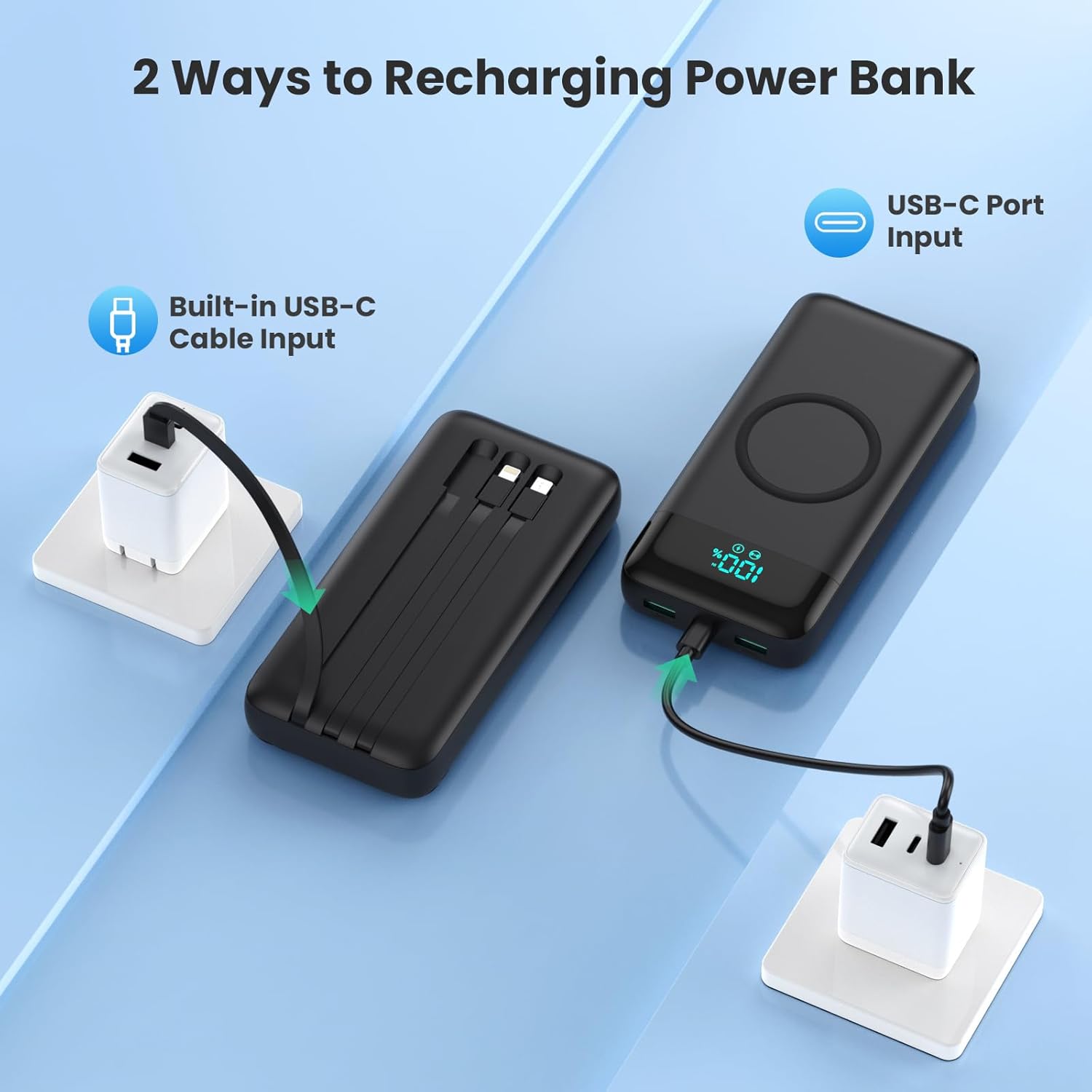
Image: Illustration showing two methods to recharge the Ekrist power bank: one using its integrated USB-C cable connected to a wall adapter, and another using an external USB-C cable plugged into the power bank's dedicated USB-C input port, also connected to a wall adapter.
Operating Instructions
1. Charging Devices via Built-in Cables
- Identify the appropriate built-in cable for your device: Micro-USB, USB-C, or Lightning.
- Gently pull out the desired cable from its storage slot.
- Connect the cable to your device's charging port. The power bank will automatically begin charging.
2. Charging Devices via USB Ports
- Connect your device's charging cable to one of the available USB-A output ports or the USB-C input/output port on the power bank.
- Connect the other end of the cable to your device. The power bank will automatically begin charging.
- The USB-C port supports 25W fast charging for compatible devices.

Image: A smartphone connected to the Ekrist power bank via a USB-C cable, with an overlay indicating "25W FAST CHARGING" and a graphic showing "3X Faster" and "30min Charge your iPhone More than 50%+". This highlights the rapid charging capability of the power bank.
3. Wireless Charging
- Place your wireless charging-compatible device (e.g., smartphone) directly onto the wireless charging pad located on the power bank's surface.
- Ensure the device is centered on the pad for optimal charging.
- The power bank will automatically detect and begin wireless charging. The LCD display may indicate wireless charging activity.
- Note: Wireless charging supports 5W, 7.5W, and 15W MAX. It is not designed for Bluetooth headsets.

Image: A smartphone placed on the wireless charging pad of the Ekrist power bank, with an animated graphic indicating active wireless charging. Text labels show supported wireless charging speeds: 5W, 7.5W, 10W, 15W.
4. Checking Battery Level
Press the power button once to activate the LCD display, which will show the remaining battery percentage of the power bank.
Maintenance
- Keep the power bank away from extreme temperatures, direct sunlight, and moisture.
- Do not drop, disassemble, or attempt to repair the device yourself.
- Clean the power bank with a soft, dry cloth. Avoid using harsh chemicals or abrasive materials.
- For long-term storage, charge the power bank to approximately 50-75% every three months to preserve battery health.
Troubleshooting
| Problem | Possible Cause | Solution |
|---|---|---|
| Power bank not charging devices. | Low power bank battery; incorrect cable connection; device not compatible with wireless charging; power bank in standby mode. | Recharge the power bank; ensure cables are securely connected; verify device compatibility; press the power button to activate. |
| Slow charging speed. | Device does not support fast charging; cable/adapter not rated for fast charging; multiple devices charging simultaneously. | Ensure your device, cable, and wall adapter (for recharging power bank) support fast charging standards (PD3.0/QC4.0); charge fewer devices at once. |
| Wireless charging not working. | Device not centered on pad; device not wireless charging compatible; thick phone case; power bank battery low. | Reposition device; confirm device supports wireless charging; remove thick cases; recharge power bank. |
| LCD display not turning on. | Power bank battery is completely depleted; power button not pressed. | Recharge the power bank; press the power button firmly. |
Specifications
| Brand | Ekrist |
| Model | B0DZNBF965 |
| Battery Capacity | 26800 mAh |
| Battery Composition | Lithium-Polymer |
| Color | Black |
| Dimensions (L x W x H) | 15.9 cm x 7.6 cm x 3 cm (Approx. 6.1" x 2.9" x 0.86") |
| Number of Ports | 6 (2x USB-A, 1x USB-C, 3x Built-in Cables) |
| Wireless Charging Output | 5W, 7.5W, 15W MAX |
| Fast Charging Support | PD3.0, QC4.0 (25W output) |
| Built-in Cables | Micro-USB, USB-C, Lightning |
| Special Features | LCD display, automatic shutdown, adaptive current, scratch-resistant, short-circuit protection, overcharge protection. |
| Compatible Devices | Smartphones (iPhone 16/15/14 series, Samsung Galaxy S series, Huawei, OPPO, Xiaomi, OnePlus, Motorola), Tablets (iPad), Gaming Consoles (Nintendo Switch, Steam Deck, Rog Ally), Smartwatches, Bluetooth Headsets (wired charging only), AirPods, and other USB-powered devices. |
| UPC | 640712661054 |

Image: A close-up view of the Ekrist power bank, highlighting its various output and input options. Labels point to the Micro USB cable output, built-in USB-C cable input/output, built-in Lightning cable input, wireless charging pad, 100% LCD display, USB-A2 output, USB-C input/output, and QC USB-A1 output. The weight (480.4g) and dimensions (6.1"x2.9"x0.86") are also indicated.

Image: A visual representation of the Ekrist power bank's broad compatibility, showing various devices it can charge, including iPads/Tablets, iPhones (all series), Samsung Galaxy/Android phones, Google Pixel phones, Kindles, Smart Watches, Bluetooth Headsets, AirPods, and other USB devices.
Warranty and Support
Ekrist products are manufactured with high-quality standards. For warranty information or technical support, please refer to the contact details provided with your purchase documentation or visit the official Ekrist website. Please retain your proof of purchase for warranty claims.
If you encounter any issues not covered in the troubleshooting section, please contact our customer support team for assistance.


