
HOgardenME Cleaning Attachments Kit for Ultenic T10 Lite Robot Vacuum Cleaner
User Manual
Introduction
This manual provides instructions for the installation, use, and maintenance of the HOgardenME Cleaning Attachments Kit, designed for the Ultenic T10 Lite Robot Vacuum Cleaner. This kit includes replacement mop cloths and dust bags to ensure optimal performance of your robot vacuum.
Safety Information
- Always turn off and unplug the robot vacuum cleaner before installing or replacing any accessories.
- Keep replacement parts out of reach of children.
- Use only genuine or compatible replacement parts to avoid damage to your appliance.
- Dispose of used dust bags and mop cloths according to local regulations.
Package Contents
Verify that all items are present in the package:
- 4 x Mop Cloths
- 4 x Dust Bags
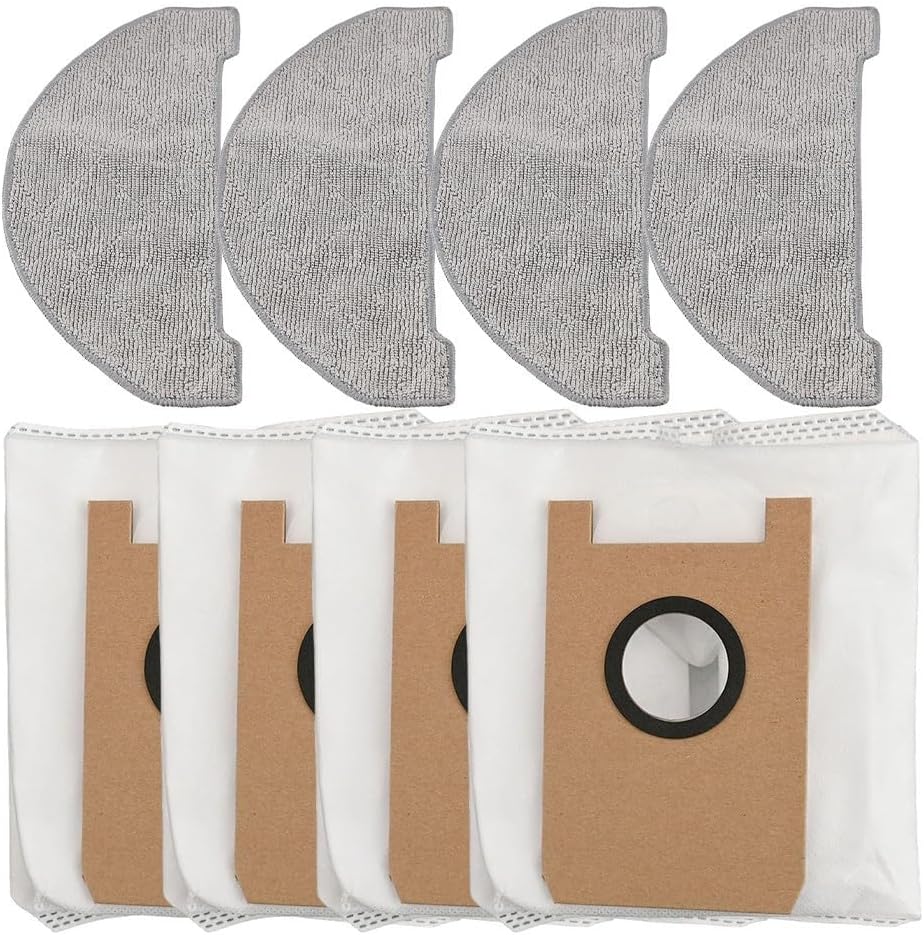
Figure 1: Complete HOgardenME Cleaning Attachments Kit contents.
Installation
Installing Dust Bags
- Locate the dustbin compartment on your Ultenic T10 Lite Robot Vacuum Cleaner. Refer to your vacuum's user manual for specific instructions on accessing the dustbin.
- Open the dustbin compartment and remove the old dust bag, if present.
- Carefully insert a new dust bag into the compartment, ensuring it is properly seated and aligned with the opening. The cardboard collar of the dust bag should fit snugly into the designated slot.
- Close the dustbin compartment securely.

Figure 2: A single dust bag for the Ultenic T10 Lite.

Figure 3: Side view of a dust bag, illustrating its construction and collar.
Installing Mop Cloths
- Locate the mopping module on your Ultenic T10 Lite Robot Vacuum Cleaner.
- Remove the used mop cloth, if any, from the mopping module.
- Attach a clean mop cloth to the mopping module. Ensure the cloth is securely fastened, typically using Velcro or a similar attachment mechanism, covering the entire mopping surface.
- Ensure the mop cloth is evenly spread and not bunched up to prevent uneven cleaning.

Figure 4: A single mop cloth for the Ultenic T10 Lite.

Figure 5: Underside texture of a mop cloth, designed for effective cleaning.
Operating Instructions
Once the dust bag and mop cloth are correctly installed, your Ultenic T10 Lite Robot Vacuum Cleaner is ready for operation. Refer to your vacuum's main user manual for detailed instructions on starting cleaning cycles, setting schedules, and selecting cleaning modes.
- Dust Bags: The dust bags are designed for dry vacuuming. They efficiently capture dust, dirt, and debris, preventing them from re-entering the air.
- Mop Cloths: The mop cloths are used for wet mopping. Ensure the water tank of your robot vacuum is filled before initiating a mopping cycle. The cloths are effective for tackling spills and stains on hard floor surfaces.
Maintenance
Replacing Dust Bags
Dust bags should be replaced when full or when you notice a decrease in suction power. The frequency of replacement depends on usage and the amount of debris collected.
- Turn off the robot vacuum cleaner.
- Open the dustbin compartment.
- Carefully remove the full dust bag. Most bags have a self-sealing mechanism to prevent dust leakage during removal.
- Dispose of the used dust bag in a waste bin.
- Install a new dust bag as described in the "Installing Dust Bags" section.
Cleaning Mop Cloths
Mop cloths should be cleaned after each mopping cycle to maintain hygiene and cleaning effectiveness.
- Remove the mop cloth from the mopping module.
- Rinse the mop cloth thoroughly under running water until clean. For heavily soiled cloths, a mild detergent can be used.
- Wring out excess water and allow the mop cloth to air dry completely before reattaching or storing.
- Regularly inspect mop cloths for wear and tear. Replace them when they become worn or lose their cleaning effectiveness.
Troubleshooting
| Problem | Possible Cause | Solution |
|---|---|---|
| Reduced suction power | Dust bag is full. | Replace the dust bag with a new one. |
| Poor mopping performance | Mop cloth is dirty or worn. | Clean or replace the mop cloth. Ensure the water tank is filled. |
| Dust leakage from dustbin | Dust bag not installed correctly. | Reinstall the dust bag, ensuring it is properly seated and sealed. |
For further troubleshooting related to the Ultenic T10 Lite Robot Vacuum Cleaner itself, please consult its dedicated user manual or contact Ultenic customer support.
Specifications
| Feature | Detail |
|---|---|
| Product Name | HOgardenME Cleaning Attachments Kit |
| Compatibility | Ultenic T10 Lite Robot Vacuum Cleaner |
| Materials (Mop Cloths) | Microfiber |
| Materials (Dust Bags) | Non-woven Fabrics |
| Kit Contents | 4 Mop Cloths, 4 Dust Bags |
| Item Weight | 7.4 ounces (approx. 210 grams) |
| Product Dimensions (Packaging) | 7.87 x 3.94 x 3.94 inches (approx. 20 x 10 x 10 cm) |
| Model Number (Internal SKU) | 8L4J2855G09JRFB1W8E9E4IL0OM |
Warranty and Support
For warranty information regarding this HOgardenME Cleaning Attachments Kit, please refer to the purchase documentation or contact the seller directly. As these are replacement parts, their warranty may differ from the main robot vacuum cleaner unit.
For support related to the Ultenic T10 Lite Robot Vacuum Cleaner itself, please contact Ultenic customer service or refer to their official website.