
1. Introduction
Thank you for choosing the eSynic ESYESY234 Digital Walkie Talkies. This manual provides essential information for the safe and efficient operation of your device. Please read it thoroughly before use and retain it for future reference.
Front view of the eSynic digital walkie talkie, highlighting its compact design and antenna.
2. Package Contents
Please check the package for the following items:
- 5 × Walkie Talkies
- 5 × Earpieces
- 5 × Li-ion Battery Packs
- 5 × Type-C Charge Cables
- 5 × USB Desktop Chargers
- 5 × Belt Clips
- 5 × Slings
- 1 × User's Manual
3. Product Features
The eSynic ESYESY234 Digital Walkie Talkies offer advanced communication capabilities:
- Crystal Clear Long Range: Up to 5KM (3 Miles) communication range.
- Advanced Noise Reduction: Built-in chip filters out background noise for clear communication.
- VOX Hands-Free Function: Voice-activated transmission with 3 sensitivity levels for convenient operation.
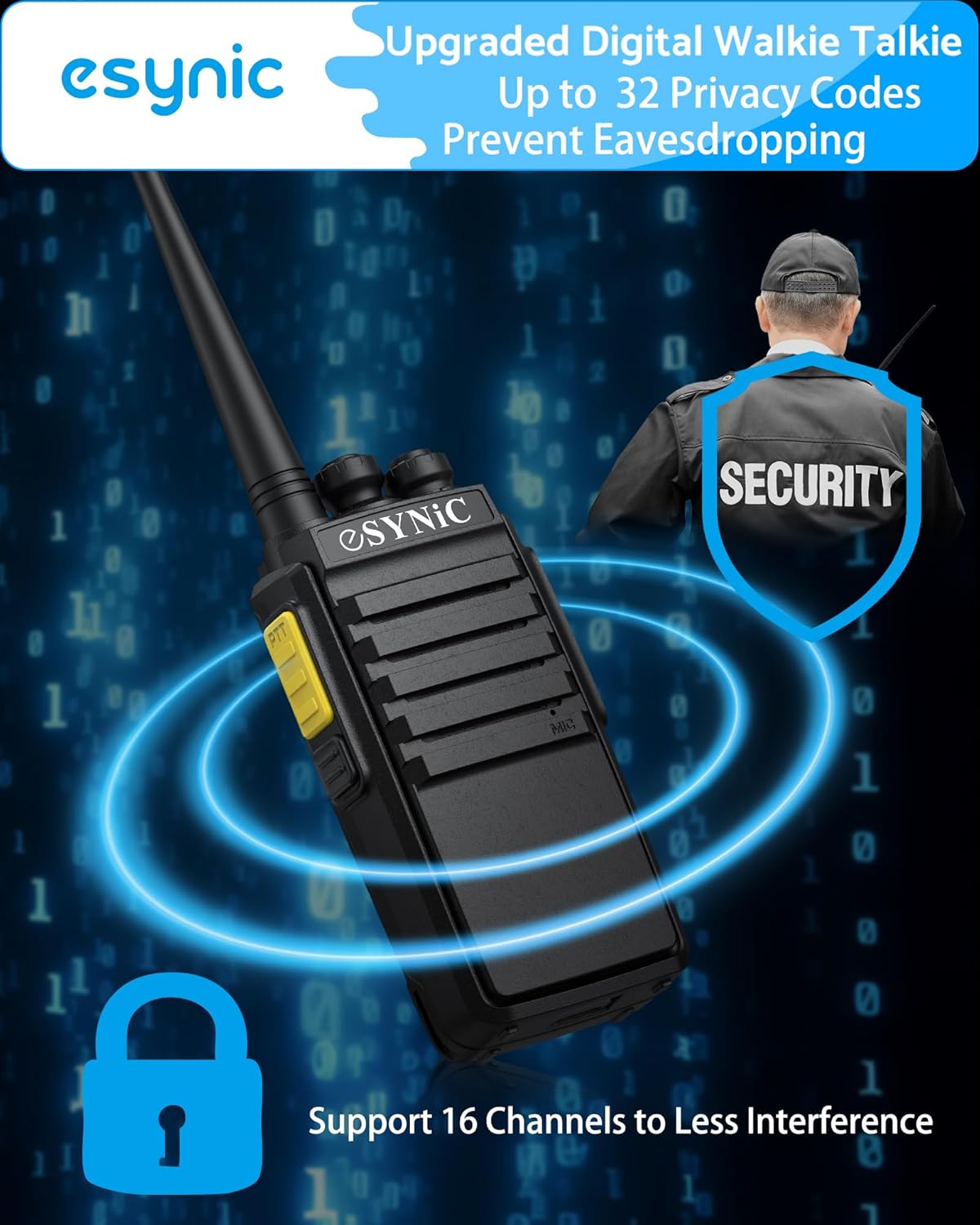
- 16 Programmable Channels: Allows for dedicated frequency management for different groups or purposes.
- 32 Privacy Codes: Digital encryption prevents eavesdropping and enhances communication security.
- Durable Design: IP54 weather resistance and robust construction for challenging environments.
- USB-C Rechargeable: 1500mAh Li-ion battery with versatile Type-C charging options.
- Compact and Lightweight: Easy to carry and attach with the included belt clip.

An illustration of the eSynic digital walkie talkie highlighting its digital encryption for privacy and support for 16 channels to minimize interference.

An overview image summarizing the key features of the eSynic digital walkie talkie, including long range, stable signal, 1500mAh battery, noise reduction, VOX, and digital encryption.
4. Setup
4.1 Battery Installation
- Ensure the walkie talkie is powered off.
- Locate the battery compartment cover on the back of the unit.
- Slide the cover down or unclip it to open.
- Insert the Li-ion battery pack, ensuring the contacts align correctly.
- Replace the battery compartment cover and secure it.
4.2 Charging the Battery
The walkie talkie can be charged using the provided Type-C cable and USB desktop charger. It supports various USB power sources.
- Connect the Type-C cable to the charging port on the side of the walkie talkie.
- Connect the other end of the Type-C cable to the USB desktop charger, or directly to a compatible USB power source (e.g., phone adapter, power bank, car cigarette lighter, PC).
- The charging indicator light will illuminate (typically red) during charging and change color (typically green) when fully charged.
- A full charge typically takes 3-4 hours.
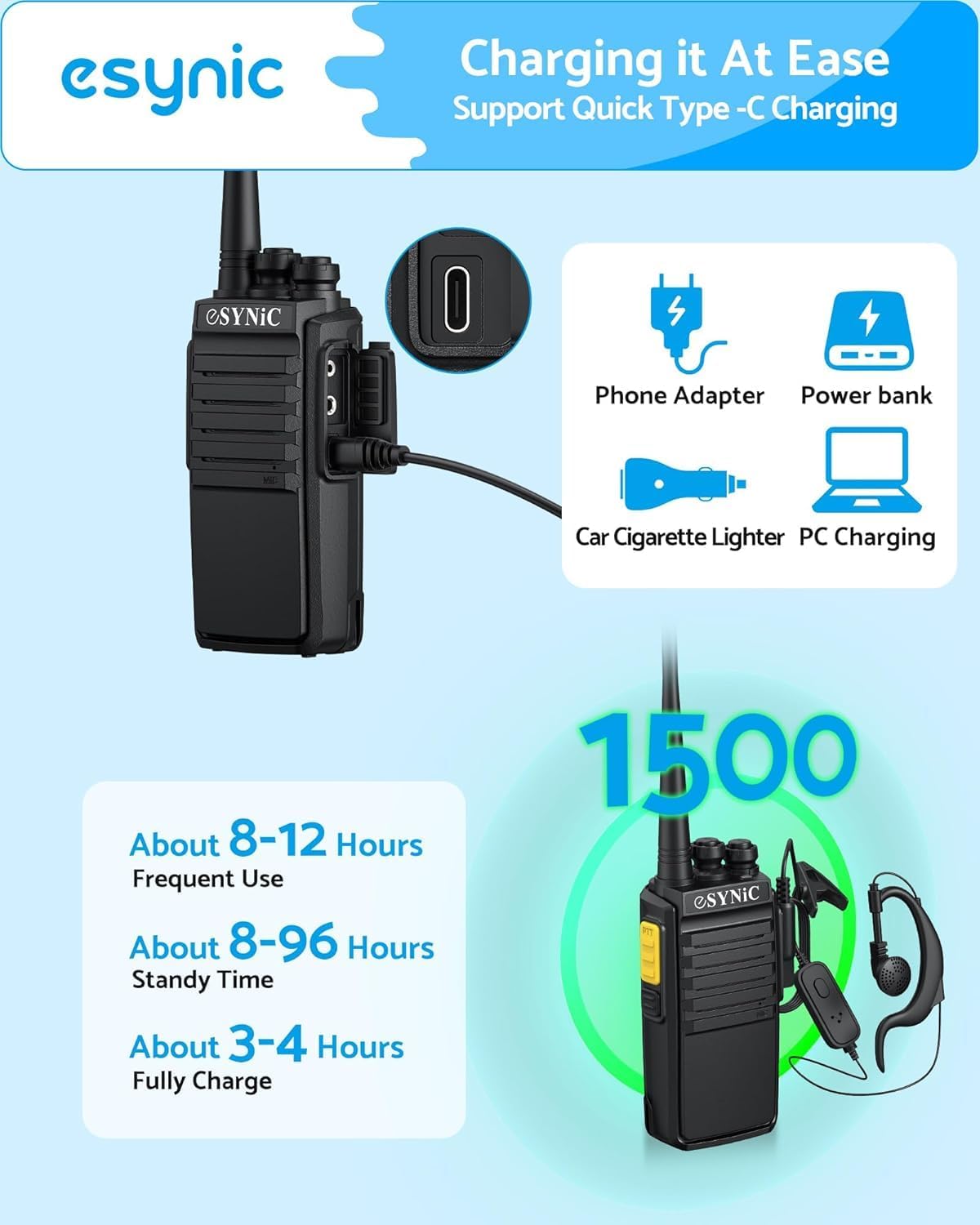
Image detailing the USB-C charging port on the walkie talkie and various charging methods including phone adapter, power bank, car charger, and PC.
4.3 Attaching Accessories
- Earpiece: Plug the earpiece connector into the audio jack on the side of the walkie talkie.
- Belt Clip: Align the belt clip with the designated slots on the back of the walkie talkie and slide it into place until it clicks securely.
- Sling: Attach the sling to the designated loop on the walkie talkie for convenient carrying.

A user wearing the walkie talkie with a belt clip, showcasing its compact size and portability, along with detailed dimensions.
5. Operating Instructions
5.1 Power On/Off
- To power on, rotate the Power/Volume knob clockwise until you hear a click and a tone.
- To power off, rotate the Power/Volume knob counter-clockwise until you hear a click.
5.2 Adjusting Volume
Rotate the Power/Volume knob clockwise to increase volume and counter-clockwise to decrease volume.
5.3 Channel Selection
The walkie talkie has 16 channels. To select a channel:
- Rotate the Channel Selector knob (usually located near the antenna) to your desired channel number.
- Ensure all walkie talkies you wish to communicate with are set to the same channel.
5.4 Transmitting and Receiving
- To Transmit: Press and hold the Push-To-Talk (PTT) button on the side of the walkie talkie. Speak clearly into the microphone, holding the unit approximately 2-5 cm from your mouth. Release the PTT button when finished speaking.
- To Receive: Ensure the PTT button is not pressed. The walkie talkie will automatically receive transmissions on the selected channel.
5.5 VOX Function (Hands-Free)
The Voice-Operated Exchange (VOX) function allows for hands-free transmission. When activated, the walkie talkie will automatically transmit when it detects your voice.
- Refer to the specific programming instructions (if applicable) or the quick guide for activating and adjusting VOX sensitivity levels (1-3).
- When VOX is active, you do not need to press the PTT button to transmit.

Image showing a user operating the walkie talkie hands-free with VOX function and another user benefiting from 5-level noise cancellation with an earpiece.
5.6 Privacy Codes (CTCSS/DCS)
The walkie talkies support 32 privacy codes (CTCSS/DCS) to minimize interference from other users on the same channel. When a privacy code is set, you will only hear transmissions from users who are also using the same channel and privacy code.
- These codes are typically programmed using software. Consult the advanced user guide or manufacturer's website for details on programming privacy codes.
- All walkie talkies in your group must use the same channel and privacy code for communication.

Details on the secure communication features of the eSynic walkie talkie, including 32 customizable encryption keys, non-standard CTCSS, frequency hopping, and one-key frequency matching.
5.7 Communication Range
The maximum communication range is up to 5 kilometers (3 miles) under optimal conditions. Actual range may vary significantly based on terrain, weather, electromagnetic interference, and obstructions.

Diagram illustrating the 3-5 kilometer long-range communication capability of the walkie talkies in various environments.

Close-up of the walkie talkie speaker, demonstrating clear audio output even in loud settings, with examples of users in construction and warehouse environments.
6. Maintenance
6.1 Cleaning
- Wipe the walkie talkie with a soft, damp cloth. Do not use harsh chemicals or abrasive cleaners.
- Ensure the charging port and audio jack are free from dust and debris.
6.2 Battery Care
- To prolong battery life, avoid fully discharging the battery frequently.
- Charge the battery regularly, even if the walkie talkie is not in use for extended periods.
- Store the walkie talkie and battery in a cool, dry place away from direct sunlight and extreme temperatures.
6.3 Durability
The eSynic ESYESY234 walkie talkie features an IP54 weather-resistant and durable body, designed to withstand:
- Rain and dust exposure.
- Drops from up to 6 feet onto concrete surfaces.
- Extreme temperatures ranging from -20°C to 60°C.

Highlights the robust construction, 1500mAh Li-ion battery performance (working time, standby, charge time), and the convenient belt clip for portability.
7. Troubleshooting
If you encounter issues with your eSynic walkie talkie, please refer to the following common problems and solutions:
| Problem | Possible Cause | Solution |
|---|---|---|
| No power | Battery discharged or improperly installed. | Charge the battery. Ensure the battery is correctly installed and the power knob is turned on. |
| Cannot communicate with other units | Different channels or privacy codes. Units too far apart or obstructions. | Verify all units are on the same channel and privacy code. Move closer to the other unit or to an open area. |
| Poor audio quality / Static | Weak signal, interference, or low battery. | Move to an area with better signal. Ensure battery is charged. Check for sources of interference. |
| VOX not working | VOX disabled or sensitivity too low. | Activate VOX function and adjust sensitivity to a higher level. |
If the problem persists, please contact eSynic customer support for assistance.
8. Specifications
| Feature | Specification |
|---|---|
| Model Number | ESYESY234 |
| Item Weight | 3.8 pounds (for 5-pack) |
| Package Dimensions | 13.3 x 12.09 x 4.41 inches |
| Number of Channels | 16 |
| Talking Range Maximum | 5 Kilometer (3 Miles) |
| Battery Capacity | 1500mAh Li-ion |
| Charging Time | Approx. 3-4 hours (full charge) |
| Working Time | Approx. 8-12 hours (frequent use) |
| Standby Time | Approx. 8-96 hours |
| Water Resistance Level | IP54 (Water Resistant) |
| Special Features | Noise Reduction, 32 Privacy Codes, VOX Hands-Free |
| Color | Black |
9. Warranty
This eSynic product comes with a 12-month warranty from the date of purchase. Please retain your proof of purchase for warranty claims. The warranty covers manufacturing defects but does not cover damage caused by misuse, accidents, unauthorized modifications, or normal wear and tear.
10. Support
For technical support, troubleshooting assistance, or warranty inquiries, please contact eSynic customer service through the retailer where you purchased the product or visit the official eSynic website for contact information.

Examples of the walkie talkie's use in various settings, including driving, elderly care, hiking, and hospitality.