
Introduction
This instruction manual provides detailed guidance for the installation, operation, and maintenance of your LINEWAY Battery Operated Motion Sensor Ceiling Light, Model LWHT22LD2. This product is designed to provide convenient, motion-activated illumination in various indoor environments.
Safety Information
- Read all instructions thoroughly before installing and operating the device.
- This product is designed for indoor use only. It is not water resistant and should not be exposed to moisture or direct water contact.
- Use only the specified battery type (4 x AA batteries). Do not mix old and new batteries, or different types of batteries.
- Ensure batteries are inserted with correct polarity (+/-).
- Remove batteries if the device will not be used for an extended period.
- Keep the device and batteries out of reach of children.
- Do not attempt to disassemble or modify the light fixture. This will void the warranty.
Package Contents
Verify that all components are present in the package:
- LINEWAY Battery Operated Motion Sensor Ceiling Light (2 units)
- Instruction Manual
- Mounting Hardware (screws and wall anchors)
- 3M Double-Sided Adhesive Strips
Product Features
- Motion Activated & Light Sensor: Automatically turns on when motion is detected within 2-5 meters (9-16 feet) in dark conditions. Automatically turns off after 20 seconds of no motion.
- Battery Powered: Operates on 4 x AA batteries (not included), providing approximately 6 months of light with 8-10 activations per day.
- Constant Light Mode: Features a switch to enable continuous illumination, bypassing the motion sensor.
- Wireless & Easy Installation: No wiring required, allowing for flexible placement without an electrician.
- Bright Illumination: Equipped with 48 LEDs, providing 180 lumens of 6000K cool white light.
- Wide Application: Suitable for closets, stairways, hallways, basements, pantries, cabinets, and other indoor areas.
Setup
1. Battery Installation
- Locate the battery compartment cover on the back of the light fixture.
- Slide or unclip the cover to open the compartment.
- Insert 4 new AA batteries, ensuring correct polarity (+/-) as indicated inside the compartment.
- Replace the battery compartment cover securely.
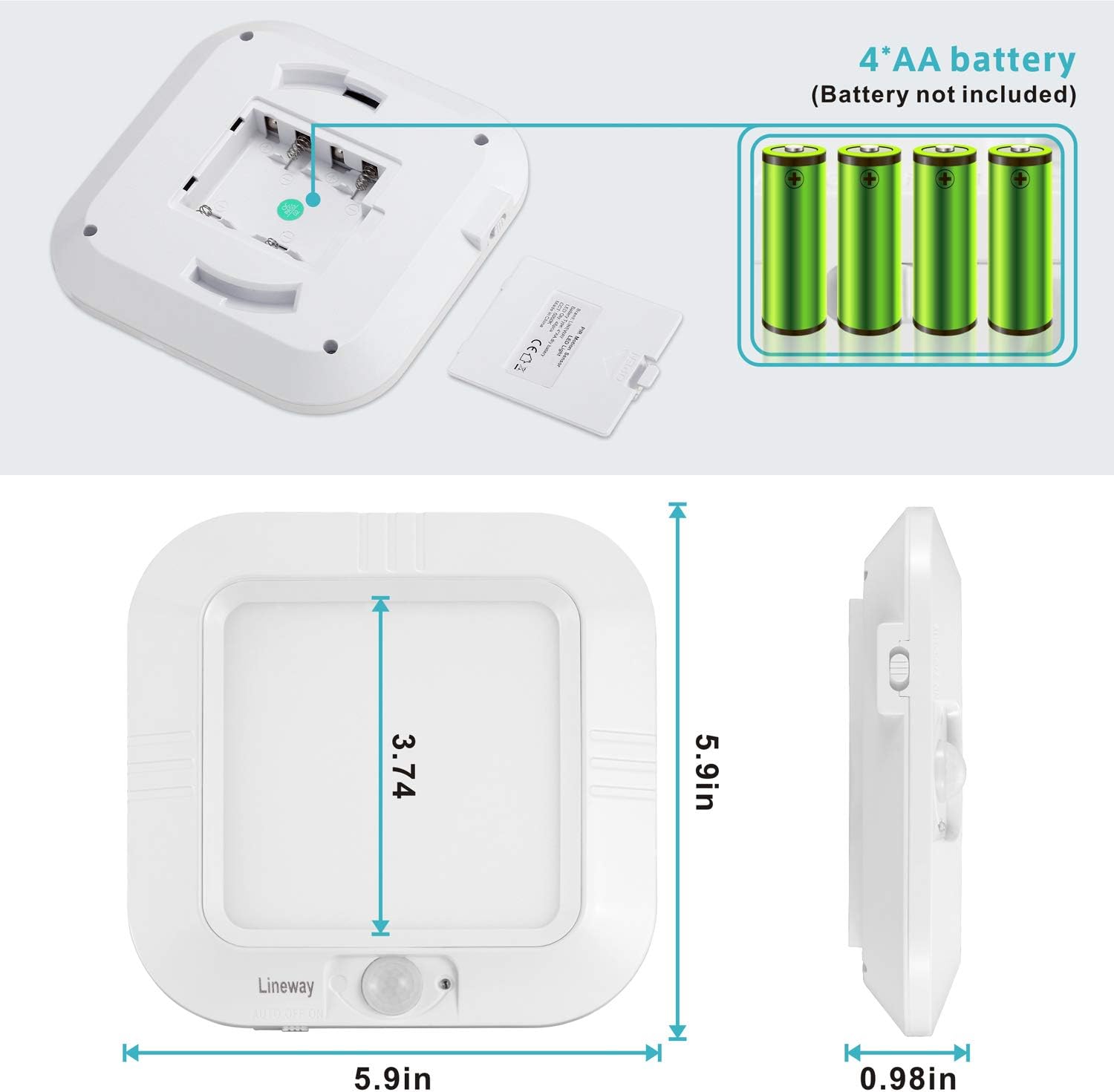
Figure 1: Battery installation. Requires 4 AA batteries (not included).
2. Mounting the Light
The light can be installed using two methods:
Method A: Adhesive Strips (for smooth, clean surfaces)
- Clean the desired mounting surface thoroughly to ensure it is free of dust and grease.
- Peel the protective backing from the 3M adhesive strips.
- Attach the adhesive strips to the mounting bracket.
- Press the mounting bracket firmly onto the desired surface for at least 30 seconds.
- Align the light fixture with the mounted bracket and slide it into place until it clicks securely.
Method B: Screws (for more permanent installation)
- Hold the mounting bracket against the desired surface and mark the screw hole positions.
- Drill pilot holes if necessary, and insert wall anchors if mounting into drywall.
- Secure the mounting bracket to the surface using the provided screws.
- Align the light fixture with the mounted bracket and slide it into place until it clicks securely.

Figure 2: Two installation methods for the ceiling light.
Operating Instructions
The LINEWAY ceiling light features a toggle switch with three positions:
- ON: In this position, the light will remain continuously on, regardless of motion or ambient light conditions.
- OFF: In this position, the light is completely off.
- AUTO (Motion Sensor Mode): In this position, the light will activate only when motion is detected in a dark environment. It will automatically turn off after approximately 20 seconds of no motion. The built-in light sensor prevents activation during daylight or in brightly lit areas to conserve battery life.

Figure 3: Operating modes: Motion Sensor and Always On.
Maintenance
- Battery Replacement: When the light output dims significantly or the light stops functioning, replace all four AA batteries with new ones. Refer to the 'Battery Installation' section for instructions.
- Cleaning: To clean the light fixture, gently wipe the surface with a soft, dry cloth. Do not use abrasive cleaners, solvents, or immerse the unit in water.
Troubleshooting
| Problem | Possible Cause | Solution |
|---|---|---|
| Light does not turn on in AUTO mode. | 1. Insufficient darkness. 2. Batteries are dead or incorrectly installed. 3. No motion detected. | 1. Ensure the environment is sufficiently dark for the light sensor to activate. 2. Check battery polarity and replace with new AA batteries. 3. Ensure motion occurs within the detection range (2-5 meters). |
| Light remains on continuously in AUTO mode. | 1. Switch is in 'ON' position. 2. Continuous motion within detection range. | 1. Ensure the switch is set to 'AUTO' for motion sensor functionality. 2. Relocate the light or ensure there is no constant movement in its detection zone. |
| Light is dim. | Low battery power. | Replace all 4 AA batteries. For brighter output, consider using high-quality lithium AA batteries. |
| Light falls off mounting surface. | Adhesive not strong enough or surface not clean. | Ensure surface is clean and dry before applying adhesive. For a more secure mount, use the screw installation method. |
Specifications
| Brand | LINEWAY |
| Model Number | LWHT22LD2 |
| Power Source | 4 x AA Batteries (not included) |
| Light Source | LED (48 LEDs) |
| Brightness | 180 Lumens |
| Color Temperature | 6000K (Cool White) |
| Wattage | 2 Watts |
| Voltage | 6 Volts (DC) |
| Motion Sensor Range | 2-5 meters (9-16 feet) |
| Auto-Off Time | Approximately 20 seconds (after no motion) |
| Material | Acrylonitrile Butadiene Styrene (ABS) |
| Dimensions (L x W x H) | 5.9" x 5.9" x 0.98" |
| Installation Type | Flush Mount |
| Water Resistance Level | Not Water Resistant |
Warranty
This LINEWAY product is covered by a 1-year manufacturer's warranty from the date of purchase. This warranty covers defects in materials and workmanship under normal use. It does not cover damage caused by misuse, accident, unauthorized modification, or improper installation.
Support
For further assistance, technical support, or warranty claims, please contact LINEWAY customer service through the retailer where the product was purchased. Please have your model number (LWHT22LD2) and proof of purchase ready.