1. Introduction and Overview
The XYGStudy Raspberry Pi 5-16GB is a high-performance single board computer, representing the latest generation in the Raspberry Pi series. It features a powerful BCM2712 processor, 16GB of RAM, and an RP1 I/O controller designed by Raspberry Pi. This manual provides essential information for setting up, operating, and maintaining your device.

Image 1.1: Top-down view of the Raspberry Pi 5-16GB board, showing its various components and ports. This image highlights the compact design and layout of the single board computer.

Image 1.2: An angled view of the Raspberry Pi 5, illustrating its core capabilities including flexible RAM options, a powerful quad-core CPU, high performance, and integrated WiFi connectivity.
2. Product Features and Specifications
The Raspberry Pi 5-16GB offers significant enhancements over previous generations, providing a robust platform for various computing tasks.
2.1 Key Features
- Processor: BCM2712, 2.4GHz quad-core 64-bit Arm Cortex-A76 CPU with 512KB per-core L2 caches and a 2MB shared L3 cache.
- Memory: 16GB LPDDR4X-4267 SDRAM.
- I/O Controller: RP1, designed by Raspberry Pi, providing dual USB 3.0, dual USB 2.0, Gigabit Ethernet, and dual four-lane MIPI transceivers.
- Video Output: Dual 4Kp60 HDMI display output.
- Connectivity: Dual-band 802.11ac Wi-Fi and Bluetooth 5.0 / Bluetooth Low Energy (BLE).
- PCI Express: Four-lane PCI Express 2.0 interface for high-speed peripherals.
- Power Management: DA9091 PMIC, integrating eight switch-mode power supplies.
- Real-time Clock (RTC): Onboard RTC, powered by an external battery (not included).
- Power Button: Onboard power button for convenient power control.
2.2 Detailed Specifications
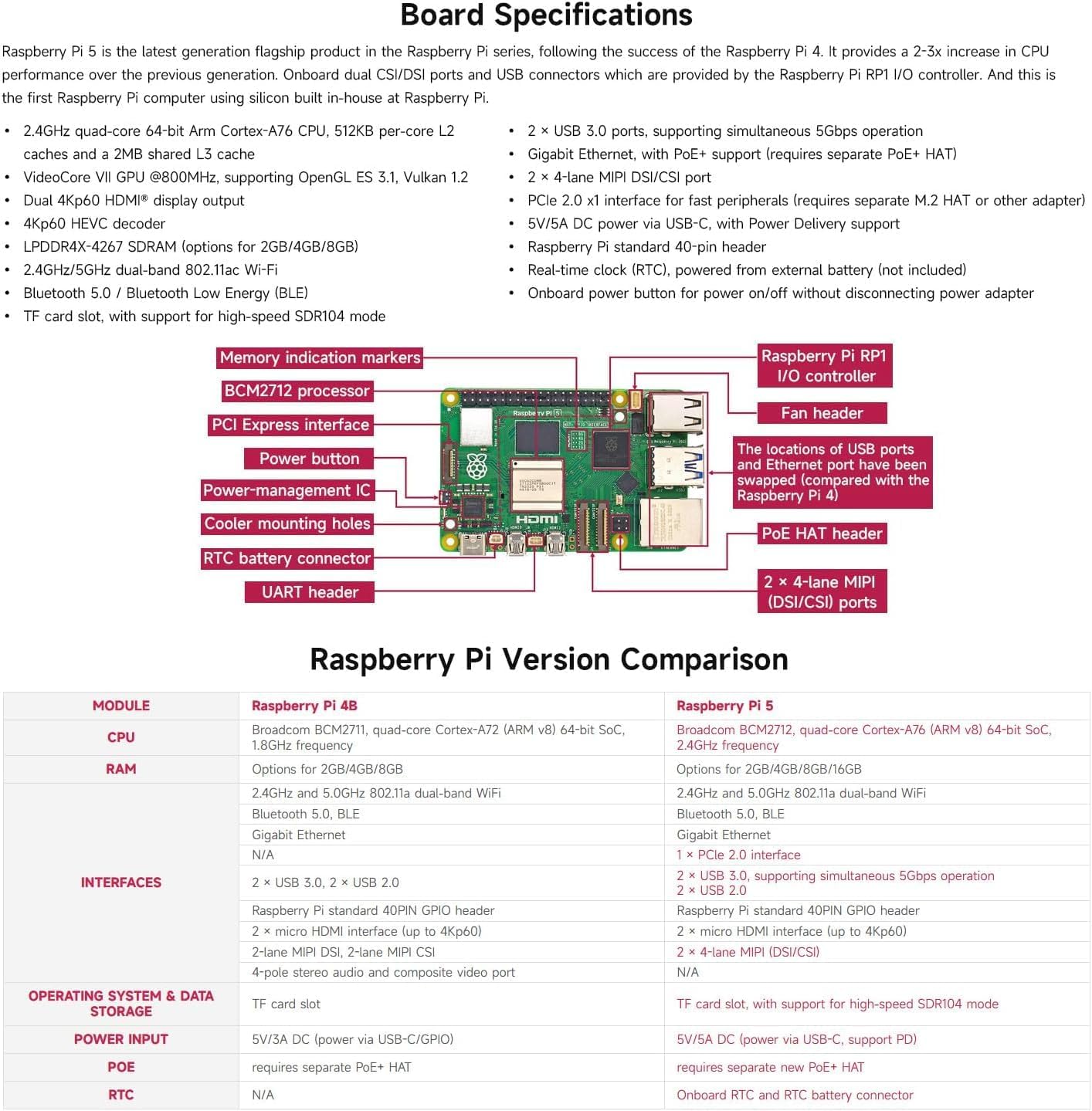
Image 2.1: A visual representation of the Raspberry Pi 5 board layout, highlighting key components such as the BCM2712 processor, RP1 I/O controller, power button, and various ports. This image also includes a comparison table between Raspberry Pi 4 and Raspberry Pi 5 specifications.
| Component | Specification |
|---|---|
| Processor | Broadcom BCM2712, 2.4GHz Quad-core 64-bit Arm Cortex-A76 |
| RAM | 16GB LPDDR4X-4267 SDRAM |
| GPU | VideoCore VII GPU, OpenGL ES 3.1, Vulkan 1.2 |
| Video Output | Dual 4Kp60 HDMI, 4Kp60 HEVC decoder |
| Wireless | Dual-band 802.11ac Wi-Fi, Bluetooth 5.0 / BLE |
| Ethernet | Gigabit Ethernet |
| USB Ports | 2 x USB 3.0, 2 x USB 2.0 |
| CSI/DSI Ports | 2 x 4-lane MIPI transceivers (for camera and display) |
| PCIe | PCI Express 2.0 x4 interface (requires separate HAT) |
| GPIO | 40-pin Raspberry Pi standard header |
| Power Input | 5V DC via USB-C (requires 5V/5A Power Delivery) |
| RTC | Onboard Real-Time Clock (RTC) with external battery connector |
2.3 New Chipset and Updated Layout

Image 2.2: Detailed views of the new BCM2712 processor, RP1 I/O controller, and DA9091 power management IC. This image also illustrates updated layout features such as the dual MIPI CSI/DSI ports, PCIe interface, onboard power button, and the RTC battery connector, highlighting the advanced design of the Raspberry Pi 5.
3. Setup Guide
Follow these steps to set up your Raspberry Pi 5-16GB for the first time.
3.1 Required Components (Not Included)
- Power Supply: 5V/5A USB-C Power Delivery (PD) compatible power supply.
- MicroSD Card: High-quality microSD card (minimum 8GB, 32GB or more recommended) for the operating system.
- Monitor: HDMI-compatible display.
- HDMI Cable: Micro HDMI to HDMI cable (or two for dual display).
- Keyboard and Mouse: USB keyboard and mouse.
- Optional: Active cooler, case, RTC battery, M.2 HAT, camera/display FPC cables.

Image 3.1: An overview of various accessories compatible with the Raspberry Pi 5, such as a protective case, active cooling solutions, a recommended USB-C power supply, an RTC battery, and expansion modules like PoE+ and M.2 HATs, along with flexible flat cables for camera and display connections.
3.2 Initial Setup Steps
- Prepare MicroSD Card: Download the Raspberry Pi Imager software from the official Raspberry Pi website. Use it to flash your preferred operating system (e.g., Raspberry Pi OS) onto the microSD card.
- Insert MicroSD Card: Carefully insert the prepared microSD card into the card slot on the Raspberry Pi 5.
- Connect Peripherals:
- Connect your monitor(s) to the HDMI ports using Micro HDMI to HDMI cables.
- Connect your USB keyboard and mouse to the USB 2.0 or USB 3.0 ports.
- (Optional) Connect an Ethernet cable for wired network access.
- (Optional) Install an active cooler if prolonged high-load operation is anticipated.
- Connect Power: Plug the 5V/5A USB-C Power Delivery power supply into the USB-C power port on the Raspberry Pi 5. The device will automatically power on.
- First Boot: The Raspberry Pi OS will boot up. Follow the on-screen instructions to complete the initial setup, including setting your locale, password, and connecting to Wi-Fi.
4. Operating Instructions
Once your Raspberry Pi 5 is set up, you can begin using it for various applications.
4.1 Basic Operation
- Power On/Off: The Raspberry Pi 5 powers on automatically when connected to power. To shut down, use the operating system's shutdown option. You can also use the onboard power button for a controlled shutdown or power cycle.
- Desktop Environment: Navigate the desktop using your connected keyboard and mouse.
- Software Installation: Use the package manager (e.g.,
aptin Raspberry Pi OS) or the "Recommended Software" tool to install applications. - Network Connectivity: Connect to Wi-Fi via the desktop interface or configure wired Ethernet.
4.2 Advanced Usage
- GPIO: Utilize the 40-pin GPIO header for interfacing with electronic components and sensors. Refer to official Raspberry Pi documentation for pinout details.
- PCIe Expansion: For advanced users, the PCIe 2.0 x4 interface allows connection of high-speed peripherals via a compatible HAT.
- Dual Displays: Connect two 4Kp60 monitors for an extended desktop experience.
- Camera/Display Modules: Connect official Raspberry Pi camera modules or DSI displays to the MIPI ports.
5. Maintenance
Proper maintenance ensures the longevity and optimal performance of your Raspberry Pi 5.
- Software Updates: Regularly update your operating system and installed software to ensure security and access to the latest features. Use commands like
sudo apt updateandsudo apt full-upgrade. - Cooling: The Raspberry Pi 5 can generate significant heat under heavy load. An active cooler is highly recommended to prevent thermal throttling and ensure stable performance. Ensure proper airflow if using a case.
- Cleaning: Keep the board free from dust and debris. Use compressed air or a soft brush. Avoid liquids.
- Power Supply: Always use a stable and sufficient power supply (5V/5A USB-C PD recommended) to prevent power-related issues.
- Environment: Operate the device in a dry, well-ventilated area, away from extreme temperatures and direct sunlight.
6. Troubleshooting
Here are solutions to common issues you might encounter.
- No Power/No Boot:
- Ensure the power supply is 5V/5A USB-C PD compatible and properly connected.
- Verify the microSD card is correctly inserted and has a valid operating system image.
- Check the power LED on the board. If it's not lit, there might be a power issue.
- No Display Output:
- Confirm HDMI cables are securely connected to both the Raspberry Pi and the monitor.
- Ensure the monitor is set to the correct input source.
- Try a different HDMI cable or monitor.
- Overheating:
- If the system becomes unstable or slows down under load, it may be overheating.
- Install an active cooler.
- Ensure the case (if used) allows for adequate ventilation.
- USB Devices Not Working:
- Try connecting the device to a different USB port.
- Ensure the device does not require more power than the USB port can provide. Use a powered USB hub for high-power devices.
7. Package Contents
The XYGStudy Raspberry Pi 5-16GB package includes:
- 1 x Raspberry Pi 5-16GB Single Board Computer
Note: Additional accessories such as power supply, microSD card, cables, and cooling solutions are sold separately.
8. Outline Dimensions
The physical dimensions of the Raspberry Pi 5-16GB board are provided below (measurements in millimeters).
Image 8.1: Diagram illustrating the precise outline dimensions of the Raspberry Pi 5 board, with a length of 85.00mm and a width of 56.00mm, crucial for case design and integration.
- Length: 85.00 mm
- Width: 56.00 mm
9. Warranty and Support
This product is sold by XYGStudy. For specific warranty information, please refer to the seller's policies on the purchase platform. General return policies typically allow for returns within 30 days of purchase.
Optional protection plans are available for purchase separately:
- 2-Year Protection Plan
- 3-Year Protection Plan
For technical support or further inquiries, please contact XYGStudy directly through the Amazon message system.


