
1. Product Overview
The LIVALL PikaBoost 2 is an innovative E-Bike Rear Wheel Conversion Kit designed to transform your traditional bicycle into an electric bike. This powerful edition features a robust 220Wh battery, integrated LED lighting for enhanced visibility, and smart app control for a customized riding experience. It offers a practical and efficient solution for cyclists seeking electric assistance without purchasing an entirely new e-bike.

Image: The LIVALL PikaBoost 2 unit, showcasing its compact design and integrated rear wheel.
2. Safety Information
Please read and understand all safety instructions before operating the PikaBoost 2. Failure to do so may result in injury or damage to the product.
- Pre-Ride Checks: Always ensure the PikaBoost 2 is securely mounted and all connections are firm before each ride. Check tire pressure and brake functionality.
- Automatic Shut-off: The motor is designed to shut off automatically if the built-in gyroscope detects a tilt over 30 degrees, enhancing safety on uneven terrain or during sharp turns.
- SOS Alert: If the unit detects a tilt exceeding 60 degrees, an SOS alert function is triggered, which can be configured via the app.
- Road Safety: Always wear a helmet and appropriate safety gear. Obey all local traffic laws and regulations. Be aware of your surroundings.
- Battery Safety: Use only the provided charging equipment. Do not expose the battery to extreme temperatures, direct sunlight, or moisture. Do not puncture or disassemble the battery.
3. Package Contents
Verify that all components are present in your package:
- LIVALL PikaBoost 2 E-bike Conversion Kit Unit
- 220Wh Battery (integrated or separate, depending on model)
- LED Control Unit
- Mounting Hardware (brackets, straps, etc.)
- Charging Cable
- Quick Guide / User Manual

Image: All components included in the LIVALL PikaBoost 2 package, including the main unit, battery, control unit, and cables.
4. Compatibility Guide
The PikaBoost 2 is designed for broad compatibility with various bicycle types. Please refer to the table below to ensure your bike is suitable:
| Category | Requirement |
|---|---|
| Bike Models | Most common hardtail bikes (mountain bikes, road bikes, hybrid bikes, folding bikes) |
| Wheel Size | 35.6–73.7 cm / 14–29 inches |
| Seat Tube Type | Round tube |
| Seat Tube Length | Over 50 mm / 1.97 inches |
| Seat Tube Diameter | 25–35 mm / 0.98–1.38 inches |
| Tire Width (V-shaped) | 25–65 mm / 1.0–2.6 inches |
| Tire Width (Road) | 23–32 mm / 0.9–1.3 inches |
| Tire Width (Mountain) | 45–65 mm / 1.8–2.6 inches |
Note: Not suitable for tricycles, wheelchairs, D-shaped seat tubes, carbon fiber seat posts, or rear-suspension bikes.
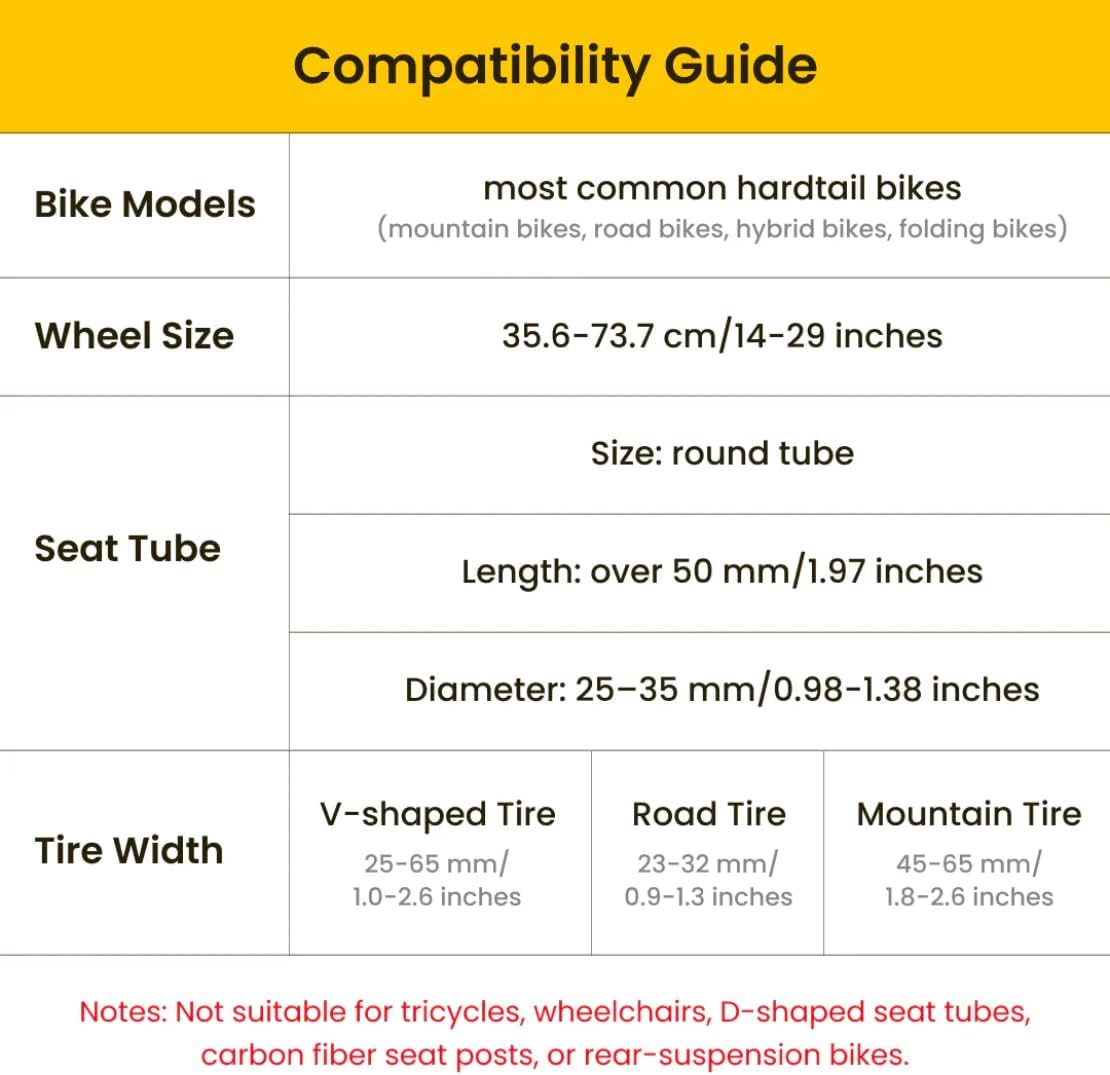
Image: Detailed compatibility guide for various bike models, wheel sizes, seat tube dimensions, and tire widths.
5. Setup and Installation
The LIVALL PikaBoost 2 is designed for quick and secure installation on your bike's rear wheel without the need for complex wiring. Follow these general steps:
- Prepare Your Bike: Ensure your bike is stable, preferably on a stand. Clean the area around the rear wheel and seat tube where the PikaBoost 2 will be mounted.
- Attach Mounting Bracket: Secure the provided mounting bracket to your bike's seat tube according to the instructions in the quick guide. Ensure it is firmly tightened.
- Mount PikaBoost 2 Unit: Slide the PikaBoost 2 unit onto the mounting bracket until it clicks securely into place. The unit's wheel should rest against your bike's rear tire.
- Adjust Position: Adjust the unit's position to ensure optimal contact between the PikaBoost 2 wheel and your bike's tire. There should be sufficient friction for power transfer.
- Initial Calibration (App): Connect the PikaBoost 2 to the LIVALL app on your smartphone for automatic installation and calibration. This ensures proper functionality and alignment.

Image: The LIVALL PikaBoost 2 unit securely installed on the rear wheel of a road bike, ready for use.

Image: A close-up view of the PikaBoost 2 unit attached to a bicycle, highlighting its integration.
6. Battery Information and Charging
The PikaBoost 2 features a durable and long-lasting battery with advanced management systems for safety and performance.
- Battery Capacity: The Powerful Edition comes with a 220Wh battery, offering an impressive range of up to 70km (43 miles) under ideal conditions.
- Charging Options: You can charge the PikaBoost 2 directly via the tail port or remove the battery for separate charging. It supports dual-way fast charging.
- Power Bank Functionality: The battery can also function as a power bank, allowing you to charge your other devices on the go.
- Battery Management System (BMS): A multi-layered BMS ensures safety, including dual protection, charging protection, and discharge protection.
- Charge Level Indicator: An external indicator on the unit shows the current charge level.

Image: The PikaBoost 2 battery unit, highlighting its dual, charging, and discharge protection features.
7. Operating Instructions
The PikaBoost 2 offers smart connectivity and app control to customize your riding experience.
- Power On/Off: Refer to the quick guide for specific power button location and operation.
- App Connection: Download the official LIVALL app from your device's app store. Enable Bluetooth on your smartphone and follow the in-app instructions to connect to your PikaBoost 2.
- Riding Modes: The app allows you to switch between 4 distinct riding modes to cater to diverse riding styles:
- Standby Status: Unit is on but not providing assistance.
- Assist Mode: Provides electric assistance based on your pedaling effort.
- Cruise Mode: Maintains a set speed without continuous pedaling.
- Workout Mode: Designed for fitness, potentially offering resistance or specific power profiles.
- Monitoring: Use the app to monitor speed, battery life, distance, and other vital statistics.
- Group Features: The app may allow you to create groups with friends for shared rides and tracking.

Image: The PikaBoost 2 installed on a bike, illustrating the different riding modes available via the app.
8. Maintenance
Regular maintenance ensures the longevity and optimal performance of your PikaBoost 2.
- Tire Durability: The V-shape tire on the PikaBoost 2 unit is durable and designed to last between 3,000 to 5,000 km under normal use. Inspect it regularly for wear and tear.
- Cleaning: Wipe the unit clean with a damp cloth after rides, especially if exposed to dirt or mud. Avoid using harsh chemicals or abrasive materials.
- Battery Care: Store the battery in a cool, dry place when not in use. If storing for extended periods, ensure it has a partial charge (around 50-60%) and recharge it every few months to prevent deep discharge.
- Mounting Check: Periodically check that the mounting hardware is secure and free from corrosion.
- Software Updates: Keep the LIVALL app and PikaBoost 2 firmware updated to ensure the best performance and access to new features.

Image: Features of the PikaBoost 2 including durable tire, replaceable battery, bright LED rear light, and SOS alert.
9. Troubleshooting
If you encounter issues with your PikaBoost 2, try the following common troubleshooting steps. For more complex problems, the app offers remote troubleshooting functions.
| Problem | Possible Cause / Solution |
|---|---|
| Unit not powering on | Battery is low or depleted. Charge the battery. Ensure the power button is pressed correctly. |
| No electric assistance | Check battery level. Ensure the unit is securely mounted and making proper contact with the bike tire. Verify riding mode in the app (e.g., not in Standby). |
| App not connecting | Ensure Bluetooth is enabled on your phone. Restart the PikaBoost 2 unit and the app. Make sure the app is updated to the latest version. |
| Unusual noises or vibrations | Check for debris caught in the unit's wheel or between the unit and bike tire. Ensure all mounting hardware is tight. If persists, contact support. |
| LED lights not working | Check app settings for light control. Ensure unit is powered on and battery has sufficient charge. |
10. Specifications
| Feature | Detail |
|---|---|
| Model Number | Powerful Edition |
| Brand | LIVALL |
| Parcel Dimensions | 44 x 32.4 x 13.4 cm |
| Item Weight | 3.5 kg |
| Battery Type | Lithium Ion (1 required) |
| Wattage | 220 watts |
| Bike Type Compatibility | Road Bike, Electric Bike (conversion) |
| Brake Type | Drum |
| Colour | Dark Gray |
| Frame Material | Aluminum |
| Material | Aluminum, Plastic |
| Number of Speeds | 3 (modes) |
| Power Source | Battery Powered |
| Special Features | Rear Wheel Conversion, App Control, Portable, Quick Installation, Rechargeable, Battery Powered |
| Usage | Road Cycling, Mountain Biking, Commuting |
| Suspension | Rear |
| Included Components | E-bike Conversion Kit, 220wh Battery, Led Control Unit, Mounting Hardware |
| Date First Available | March 23 2025 |
| Manufacturer | Livall |
11. Warranty and Support
For specific warranty terms and conditions, please refer to the documentation included with your purchase or visit the official LIVALL website. LIVALL provides customer support for product inquiries, technical assistance, and warranty claims.
Manufacturer: Livall
Place of Business: Livall Customer Support
It is recommended to register your product upon purchase to facilitate any future support or warranty claims.